


Agile web development helps teams ship useful website features sooner. It also helps them improve the product as real users react to it. That matters because web projects rarely stay fixed for long. Content changes. Business goals shift. User behavior changes. New tools appear. Because of that, agile web development gives teams a practical way to plan, build, test, launch, and improve without waiting for one big release.
This guide explains what agile web development means, why it works well for changing web projects, and how teams can use it step by step. You will also see where it creates real value, where it can fail, and which frameworks and tools usually fit best.
What Is Agile Web Development?
1. What Agile Methodology Means In Web Development
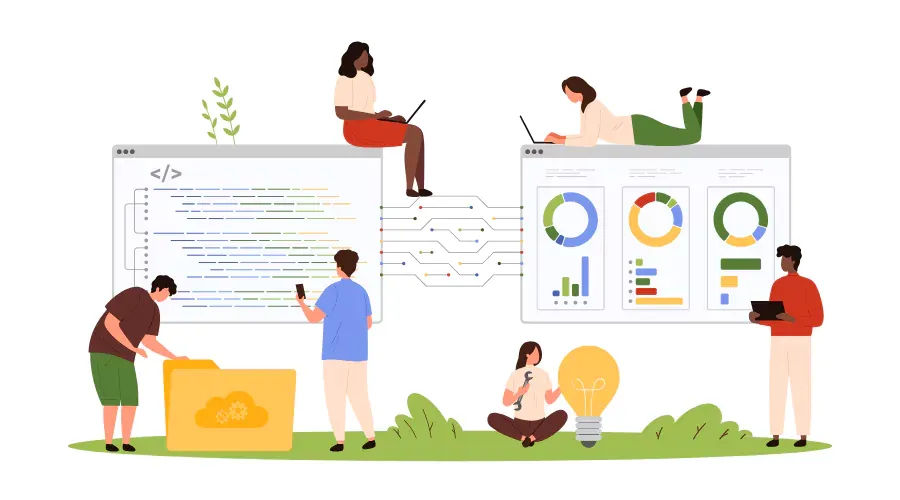
Agile web development is a way to build websites and web apps in small, useful increments. A team does not try to define every detail at the start. Instead, it sets a clear goal, breaks the work into smaller parts, and releases working features in cycles.
That approach comes from the Agile Manifesto, which says teams value working software over comprehensive documentation. In web work, that means a team should not spend months writing long specs while the product stands still. It should deliver something users can open, click, test, and judge.
Agile also values collaboration and adaptability. The official principles emphasize early and continuous delivery of valuable software. For web teams, that usually means short sprints, shared priorities, regular demos, and frequent feedback from clients, users, or internal stakeholders.
A simple example makes this clear. A team building a SaaS marketing site does not need to finish every page, workflow, and integration before release. It can launch the homepage, contact form, analytics setup, and CMS first. Then it can add landing pages, A/B tests, lead scoring, and chatbot support in later cycles.
2. Why Agile Works Better For Evolving Web Projects
Agile works well for web projects because web products change fast. A company may start with a brochure site and then add a careers section, content hub, gated resources, localization, and CRM integration. An online store may start with a basic catalog and then add subscription orders, loyalty features, and new payment options. A rigid plan often breaks under that kind of change.
Agile gives teams a way to absorb change without losing control. They can review real progress at the end of each sprint. Then they can update the backlog, move features up or down, and keep the most valuable work in focus.
That is one reason the model remains common. Digital.ai reported that 71% of organizations use Agile in the software development lifecycle. Web projects fit that pattern because they often involve uncertain requirements, frequent content updates, and direct user feedback.
Agile also reduces waste. Teams stop building large batches of low-value features based only on assumptions. Instead, they test one meaningful slice at a time. If users ignore a feature, the team can change direction before it spends too much time or budget.
Key Principles Of Agile Web Development
1. Iterative Delivery In Short Sprints
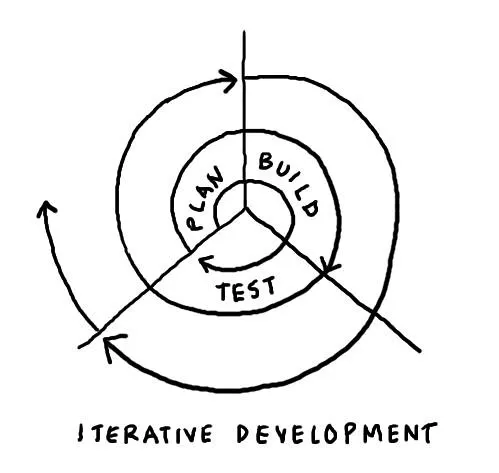
Agile web development moves in short cycles. Most teams use sprints that last one or two weeks, though some use continuous flow. Each cycle ends with a working output. That output may be small, but it should be usable.
For example, a sprint may deliver a responsive navigation bar, blog templates, and page speed fixes. The next sprint may add search, form validation, and analytics events. This rhythm helps teams learn faster because each release shows what works and what still needs improvement.
Short cycles also improve focus. A team does not carry a huge plan in its head for months. It concentrates on the next group of tasks, completes them, and then reviews what to do next.
2. Continuous Collaboration With Stakeholders
Agile depends on steady communication. Product owners, designers, developers, QA engineers, marketers, and business stakeholders need to stay aligned. If they do not, the team may build the wrong thing very efficiently.
This matters even more now because information gets scattered across many tools. Atlassian’s research found that 12,000 knowledge workers and 200 executives found that leaders and teams waste 25% of their time just searching for answers. In a web project, that lost time often shows up as delayed approvals, unclear priorities, and duplicated work.
Agile reduces that waste with sprint planning, daily check-ins, backlog grooming, demos, and retrospectives. Everyone sees the current priorities. Everyone sees what has changed. As a result, fewer surprises appear late in the project.
3. Flexibility And Change Management
Agile does not treat change as failure. It treats change as expected. That does not mean teams accept random requests without limits. It means they use a controlled system to assess each request, estimate its impact, and decide whether it belongs in the next sprint, a later sprint, or not at all.
This principle matters in web work because business needs move quickly. A leadership team may want a new campaign page after a product launch date changes. A compliance team may require new cookie consent behavior. A growth team may ask for improved checkout tracking. Agile makes room for these shifts without forcing a total reset.
Good change management still needs discipline. Teams should tie each new request to a business goal, user need, or measurable outcome. Otherwise, flexibility turns into confusion.
4. Working Website Features Over Heavy Documentation
Agile does not reject documentation. It rejects excessive documentation that slows delivery without helping decisions. A web team still needs acceptance criteria, design notes, architecture context, and release records. However, it should not create long documents just to feel safe.
What matters most is a working feature that people can review. A live prototype often answers more questions than a long specification. A tested staging build often resolves disagreement faster than a meeting.
This principle is especially useful for user interface work. Instead of debating every detail of a dashboard in documents, a team can build a clickable version, collect feedback, and refine it based on real reactions.
Key Benefits Of Agile Web Development

1. Faster Time To Market With MVP Delivery
Agile web development speeds up delivery by focusing on the smallest version that creates value. That version is often the MVP. Instead of waiting for a “perfect” website, the team launches the essential flow first.
For a startup, that may mean releasing only the homepage, sign-up flow, account dashboard, and billing basics. For an enterprise site, it may mean launching a new content hub first and moving complex personalization to later iterations.
This approach helps businesses learn sooner. They can test demand, collect user behavior data, and improve the product while it already creates value.
2. Better Quality Through Continuous Testing
Quality improves when testing happens all the time. In agile web development, QA is not a final gate at the end. It runs throughout the process. Developers test features during the sprint. QA checks acceptance criteria before review. Stakeholders give feedback during demos. Teams then fix issues while the context is still fresh.
That rhythm supports stronger delivery outcomes. Google Cloud noted that DORA’s four key metrics, introduced in 2013, have become the industry standard for measuring software delivery performance. Those metrics matter for web teams because they keep attention on release speed, stability, and recovery instead of only output volume.
Continuous testing also catches issues before they spread. A broken checkout flow, tracking script error, or mobile layout bug costs less to fix when the team finds it in the same sprint.
3. Higher Customer Satisfaction Through Ongoing Feedback
Customers become more satisfied when they can shape the product during development, not only after launch. Agile creates that loop. Stakeholders see demos. Users join usability tests. Teams study analytics and support tickets. Then they change the backlog based on what they learn.
That process improves both the product and the relationship. The same Digital.ai study found that almost 60% said collaboration has improved, while 57% saw better alignment to business needs and a quarter saw better quality software delivered. Those are strong reasons to keep customers close to the process instead of treating feedback as an afterthought.
In web projects, this benefit shows up clearly. A team can test navigation labels, form layouts, content structure, or pricing page copy after each sprint. That leads to a site that feels clearer and more useful.
4. Lower Project Risk Through Incremental Releases
Large launches create large risk. If the product fails, everything fails at once. Agile lowers that risk by shipping smaller changes over time. Each release becomes easier to test, review, and roll back if needed.
This matters for web apps and content-heavy websites alike. A team can launch a new checkout in stages. It can release a new dashboard to a limited group first. It can move sections of a large site to a new CMS gradually instead of all at once.
Incremental delivery also protects budgets. When a feature does not prove its value, the team can stop early and shift effort to something more useful.
The Agile Web Development Process
1. Step 1: Define Goals And Requirements
The first step is to define what success looks like. Teams should start with business goals, user goals, and technical constraints. They should answer direct questions. What problem will this website or web app solve? Who will use it? What action should users take? What must launch first?
Requirements should stay clear but light. Teams do not need to predict every future feature. They do need enough clarity to avoid building the wrong foundation.
A helpful output at this stage includes user stories, success metrics, technical assumptions, and known dependencies. For example, a B2B site may need multilingual content, CRM forms, analytics events, and strong page performance from day one.
2. Step 2: Ideate And Prioritize Features
Next, the team turns goals into a backlog. This is the master list of features, fixes, and ideas. Then it prioritizes the list by business value, user value, risk, and effort.
This step matters because not every good idea belongs in the first release. A team may want blog search, gated content, personalization, A/B testing, and chat support. Still, it should ask which features matter most right now.
Strong prioritization keeps the MVP lean. It also helps teams avoid spending weeks on edge cases before the core journey works well.
3. Step 3: Plan The Sprint
Once the backlog is ready, the team selects the work for the next sprint. It defines what “done” means for each item. Then it estimates effort and confirms capacity.
Sprint planning should stay realistic. Teams should not fill the sprint with every urgent request. Instead, they should commit only to work they can complete well.
A good sprint goal might sound like this: “Enable first-time visitors to understand the product, request a demo, and receive a follow-up email.” That goal gives the team a clear outcome, not just a task list.
4. Step 4: Design And Develop
Now the team builds. Designers create wireframes, UI states, or prototypes. Developers turn them into working features. Content teams may prepare copy or media at the same time. Because the work happens in one cycle, handoffs stay shorter and feedback moves faster.
This phase works best when design and development stay closely connected. A designer should not disappear for weeks and return with a huge batch of screens. A developer should not code without clear acceptance criteria. Daily communication keeps both sides aligned.
For instance, if a signup flow needs better mobile behavior, the team can fix layout issues, validation messages, and loading states inside the same sprint instead of treating them as separate projects.
5. Step 5: Test, Review, And Iterate
After the feature works, the team tests it. It checks functionality, responsiveness, accessibility, performance, and cross-browser behavior. Then it reviews the output with stakeholders and gathers feedback.
This stage closes the learning loop. If users struggle with navigation, the team sees it early. If stakeholders request a change, the team can evaluate it before the next sprint begins.
Iteration is the key point here. The team does not treat the first version as final. It treats it as a real version that can improve quickly.
6. Step 6: Launch And Improve
Launch is not the end of agile web development. It is the start of the next learning cycle. Once the feature goes live, the team watches analytics, errors, support tickets, search performance, and user behavior.
Then it uses that data to decide what to improve. Maybe users drop off at the form. Maybe the page loads too slowly on mobile. And maybe a content section gets strong traffic and deserves expansion. Agile turns those signals into backlog items for future sprints.
This is why agile works so well for websites and web apps. A launch becomes a checkpoint, not a finish line.
Common Challenges And Limitations Of Agile Web Development
1. Managing Changing Requirements
Change helps agile, but unmanaged change hurts it. Teams often struggle when stakeholders submit new ideas in the middle of a sprint without understanding the tradeoff. That interrupts flow and weakens focus.
The fix is not to reject change. The fix is to route change through a clear system. Product owners should review the request, estimate its impact, and decide when it belongs in the backlog. That keeps the team flexible without making it chaotic.
2. Aligning Designers, Developers, And Stakeholders
Alignment is one of the hardest parts of agile web development. Designers may push for polish. Developers may push for technical simplicity. Stakeholders may push for speed. All three needs matter, but they do not always match.
Clear sprint goals help solve this problem. So do shared definitions of done, visible priorities, and regular demos. The team should talk about outcomes, not only preferences. That keeps decisions tied to value.
Tool sprawl can make alignment worse. Atlassian reported that half of the developers surveyed lose more than 10 hours a week searching for information. When project details live in too many places, coordination breaks down fast.
3. Avoiding Scope Creep And Rework
Scope creep happens when the project expands without a clear decision. A simple website becomes a portal. A content site becomes a product platform. A redesign becomes a full system rewrite. When that happens, deadlines slip and rework grows.
Teams can reduce this risk by keeping each sprint tied to a clear goal. They should also separate “must have,” “should have,” and “nice to have” work. That makes tradeoffs visible before they become painful.
Rework also drops when teams validate assumptions early. A low-fidelity prototype, user test, or staged release often prevents bigger mistakes later.
4. When Agile May Not Be The Best Fit
Agile is useful in many web projects, but it is not perfect for every case. Some projects need fixed scope, fixed deadlines, and formal sign-off at each phase. Highly regulated environments may require heavier documentation and stricter approval flows. Very small one-page websites may not need full agile rituals at all.
Agile also struggles when the client cannot join feedback loops. If no one reviews demos, answers questions, or sets priorities, the process loses one of its main strengths.
In those cases, a hybrid model may work better. Some teams use a structured discovery phase first and then shift into agile delivery. Others use a hybrid method because Scrumban is a hybrid Agile methodology that combines Scrum’s structure with Kanban’s visual workflow and WIP limits.
Getting Started With Agile Web Development

1. Choose The Right Agile Framework
The best framework depends on the shape of the work. Scrum fits well when a team wants clear roles, sprint cadence, and planned review points. Atlassian defines Scrum as an Agile project management framework that helps teams organize and oversee their work through values, principles, and practices.
Kanban fits well when work arrives continuously and the team needs flexible flow instead of fixed sprints. Atlassian describes Kanban as an Agile framework that visualizes work, limits work-in-progress, and promotes continuous improvement through transparent workflows.
Many web teams start with Scrum for new builds and move toward Kanban or Scrumban as maintenance, optimization, and content requests increase. The key is to choose a model that matches the team’s workload, not one that only sounds popular.
2. Build A Cross-Functional Team
Agile web development works best when the team can complete real work without waiting on too many outside groups. That usually means a product owner, designer, developer, QA support, and content or SEO input when needed.
Cross-functional teams move faster because they solve issues together. A developer can ask a designer about a component state right away. A QA specialist can raise an issue before the sprint ends. A content lead can flag missing copy before launch gets blocked.
This setup also improves accountability. The team owns the result together, not only its isolated tasks.
3. Start With A Small, Testable Scope
Teams often fail by starting too big. They try to redesign every page, rebuild the backend, migrate the CMS, and add personalization at the same time. That makes learning slow and risk high.
A better path is to start with one user journey. For example, build the product page, lead form, and thank-you flow first. Or launch account creation and one core dashboard view before adding advanced settings. Small scope creates faster feedback and cleaner decisions.
Once the team proves the process, it can expand with more confidence.
4. Use The Right Tools For Collaboration And Delivery
Tools should support the workflow, not control it. Most agile web development teams need a backlog tool, design tool, code repository, communication channel, documentation space, testing setup, and deployment pipeline.
Common choices include Jira or Trello for planning, Figma for design, GitHub or GitLab for source control, Slack for communication, and CI tools for automated testing and delivery. The exact stack can vary. What matters is visibility, traceability, and fast feedback.
That is important because modern development work includes much more than coding. GitLab reported that developers spend less than a quarter of their time writing new code, while teams report improved productivity (51%), faster deployments (44%), and increased accuracy and security (40%). Good tools help teams manage everything around the code as well.
FAQs About Agile Web Development
1. How Does Agile Web Development Work?
Agile web development works by breaking a web project into small pieces, prioritizing them in a backlog, and delivering them in short cycles. The team plans a sprint, designs and builds the selected work, tests it, reviews it with stakeholders, and then improves the backlog for the next cycle.
This creates a repeating loop of delivery and learning. As a result, the team can respond to new needs without losing sight of the main goal.
2. What Is An Example Of Agile Development?
A clear example is an eCommerce team improving checkout. In the first sprint, it streamlines the cart page and fixes mobile spacing. Meanwhile, in the second sprint, it adds better validation and guest checkout. And finally, in the third sprint, it improves payment messaging and tracks drop-off events. Each sprint delivers a useful improvement, and the team learns from real user behavior after every release.
The same logic applies to a content site, SaaS dashboard, booking portal, or customer support center.
3. Is Agile Web Development With Rails 7 Or Rails 8 Worth It For Experienced Developers?
Yes, often it is. Rails still suits agile web development because it helps experienced teams move from idea to working feature quickly. That speed comes from convention, mature patterns, and a strong full-stack approach.
The framework also remains current. The official Rails guides show Version 8.1 – October 2025, Version 8.0 – November 2024, and Version 7.2 – August 2024. Rails 8 also adds Kamal 2, Thruster, Solid Cable, Solid Cache, Solid Queue, Propshaft, and an authentication generator, which support faster delivery and cleaner operations for modern web apps.
That said, Rails is not the right choice for every team. If a company already has deep expertise in another stack, or if the product needs a very different architecture, that existing strength may matter more. Still, for experienced developers who want fast iteration, strong conventions, and full-product delivery, Rails remains a practical option.
4. Which Agile Framework Is Best For Web Development?
There is no single best framework for every web team. Scrum is often the best starting point for new website or web app builds because it adds clear planning and review points. Kanban often fits better for support-heavy teams that handle ongoing updates, fixes, and optimization requests. Scrumban works well when a team needs both structure and flexibility.
The best choice depends on the work pattern, team size, and stakeholder availability. A new product build may do well with Scrum. A mature marketing site with constant change requests may do better with Kanban.
5. What Tools Are Used In Agile Web Development?
Teams usually use planning tools, design tools, development tools, testing tools, and deployment tools together. A typical setup includes Jira or Trello for backlog management, Figma for design collaboration, GitHub or GitLab for source control, Slack for communication, and automated testing plus CI/CD for release quality.
The tool list matters less than the workflow it supports. If the team can see priorities, review work clearly, and ship safely, the setup is doing its job.
Agile web development gives web teams a practical way to handle change without losing speed or quality. It works because it turns big web projects into smaller decisions, smaller releases, and faster feedback. That makes it easier to launch earlier, learn sooner, and improve with less risk.
For most modern websites and web apps, that is a strong advantage. Start with a small scope, choose a framework that fits your workflow, and build one useful release at a time. That is how agile web development creates momentum that lasts beyond launch.
Conclusion
Agile web development creates the most value when a team can move from idea to release in small, clear steps. That is how we work at Designveloper. As a company formed in 2013, we have spent years helping businesses turn product ideas into real web solutions with faster feedback, tighter collaboration, and steady improvement.
We bring that mindset to more than one service line. Today, we provide AI-Powered Business Software, Custom Software Development, Web App Development, Mobile App Development, and VOIP App Development for startups, growing companies, and enterprise teams that need both speed and reliability. Our delivery experience also comes from real products and platforms, including Lumin, Swell & Switchboard, Walrus Education, Joyn’it, Bonux, and ODC, where iterative delivery and strong product thinking make a real difference.
For us, agile web development is not just a framework. It is a practical way to reduce waste, adapt to change, and keep improving after launch. That is why businesses choose us as a long-term technology partner in Vietnam. We do not just build websites or web apps. We help shape better digital products, stronger user experiences, and smarter growth paths from MVP to scale.


