


Software teams today are expected to build things, fix issues, and deploy fast. That’s why many adopt DevOps to accelerate their feature testing and deployment, combined with Agile approaches to make the entire development faster. So, what is DevOps, exactly? How can DevOps help teams deploy fast while maintaining quality?
In this guide, we’ll provide you with the essentials of DevOps, including:
- What DevOps really means
- Why DevOps matters in modern software development
- The cultural philosophy behind DevOps
- How DevOps actually works in practice
- Core practices, tools, and benefits
- How to adopt DevOps effectively in your organization
Let’s get started!
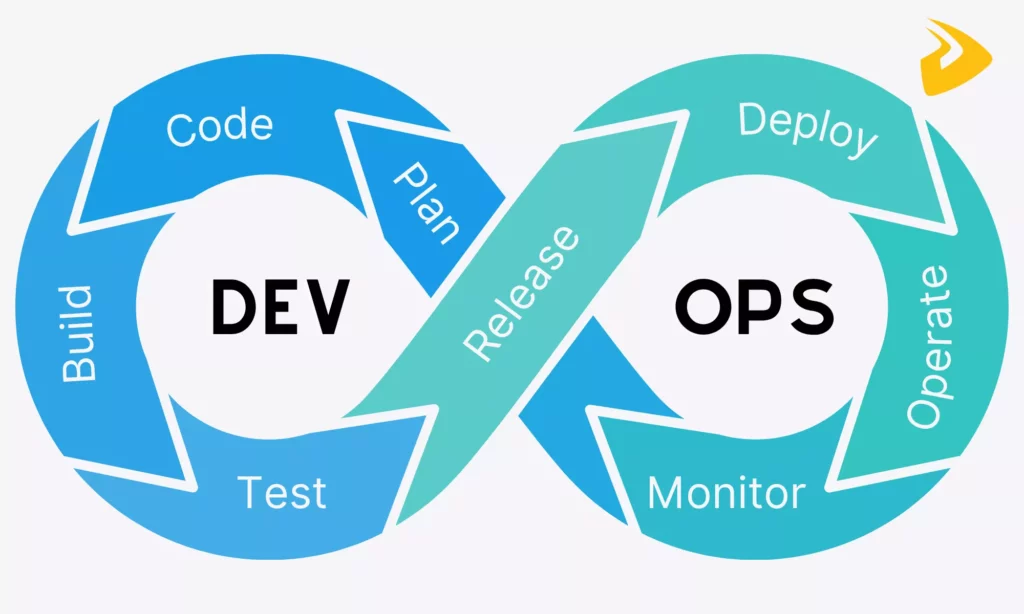
What Is DevOps?
DevOps is a way of building and delivering software where development and operations teams don’t work in isolation anymore but continuously work together. The operations team here often includes those responsible for running, deploying, and maintaining the software after it’s developed, like system administrators (SysAdmins) or site reliability engineers (SREs).
In traditional approaches, development teams would write code and pass it to operations. But if problems arose late, the operations team has to rework with developers to fix issues. The result? This makes feedback loops longer, takes time for issue fixes, and of course, slows down releases.
DevOps addresses those issues by allowing development and operations teams to work alongside throughout the entire lifecycle, from planning to monitoring. It encourages continuous integration, frequent releases, and real-time feedback. So teams can catch issues early and deliver better software faster.
Why DevOps Matters

The DevOps market has grown at a surprisingly high speed. It’s accordingly expected to reach $18.77 billion by 2026, with a projected CAGR of 25.8% through 2030. That growth reflects how more companies are leaning into DevOps to meet the constant pressure of delivering software quickly without compromising security, stability, or user experience.
So, why is DevOps so popular and important in the first place? Here are some reasons:
Faster Software Delivery And Time To Market
Traditional release cycles can take weeks or even months, partly because everything happens in separate phases.
DevOps handles that by encouraging both development and operations teams to work together to deliver smaller, more frequent releases. Besides, the DevOps process relies on practices like continuous integration and continuous delivery (CI/CD) to test and integrate code changes are tested and integrated almost right after they’re written. That allows teams to spot issues sooner, gather feedback for fixes faster, and hence deploy faster.
Better Reliability, Quality, And Stability
DevOps ensures faster software delivery but doesn’t sacrifice quality. It allows teams to automate testing, monitor systems in real time, and gather feedback early, which helps identify issues before they grow into bigger problems.
Further, instead of discovering bugs at the very end, DevOps encourages continuous testing and monitoring throughout the development process. For this reason, teams can immediately notice when something goes off track, and then respond quickly.
Stronger Collaboration Across Teams
DevOps changes the way people work together. Traditionally, development and operations teams had different priorities. Developers focused on coding features, while operations staff were responsible for ensuring software stability. And both worked in separate phases.
DevOps encourages shared responsibility and open communication between those teams to work toward the same goals instead of working in different directions. Accordingly, developers can be more aware of how their code performs in production, while operations teams get involved earlier in the development process.
Greater Agility In Modern Software Development
With all what we said, you may notice that DevOps boosts the ability to adapt quickly without completely losing structure. It makes processes more flexible and responsive to changes by allowing teams to release smaller and more frequent parts of software. This trait helps teams test new ideas, gather feedback, and refine features without affecting the entire system.
And if you already know Agile, you may notice that DevOps naturally supports this methodology. Together, both offer flexibility for teams to work effectively in use cases where requirements change often.
DevOps Cultural Philosophy
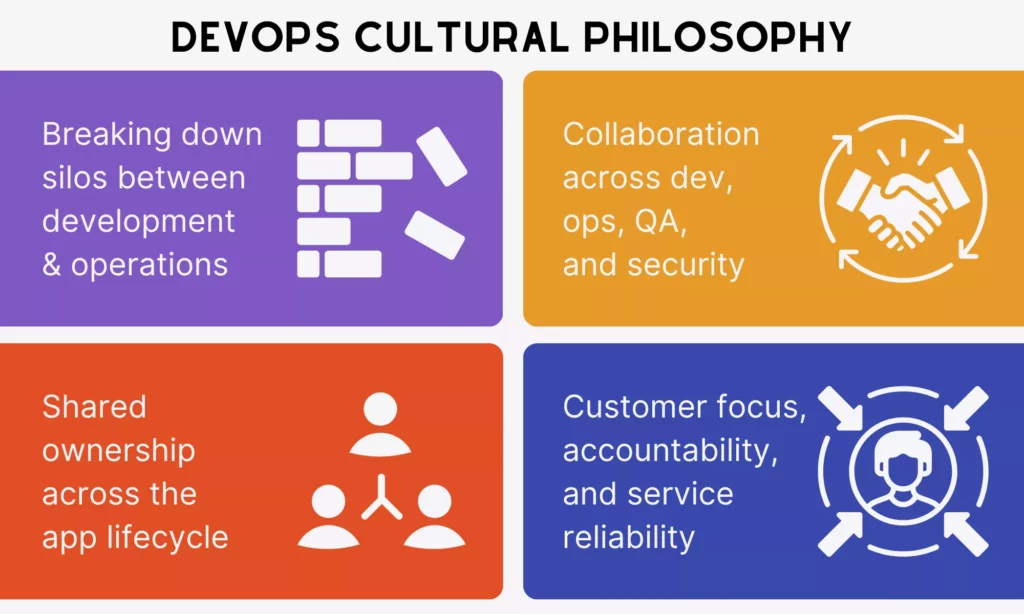
DevOps isn’t just about pipelines, methods, and tools. It’s also about how people think, communicate, and work together over time. So, before diving deeper into workflows, let’s discover the cultural side behind DevOps that shapes its process and practices:
Breaking Down Silos Between Development And Operations
Traditionally, development and operations teams worked in separate phases. Developers wrote code, and operations deployed and maintained it. This resulted in miscommunication, delays, and other problems.
So, to address this, DevOps focuses on breaking down those silos by:
- Encouraging cross-functional teams to perform continuous interaction throughout the process, instead of isolated teams handing work off to each other.
- Creating shared KPIs for both teams (e.g., change failure rate or deployment frequency) to promote teamwork.
- Encouraging shared responsibility through daily standups, shared collaboration tools (Jira, Slack, etc.), and transparent common documentation.
- Using unified tools to keep workflows from coding to deployment consistent.
- Adopting CI/CD pipelines to automate the “handoff” process.
Shared Ownership Across The Application Lifecycle
Another key idea in DevOps is shared ownership. In traditional setups, responsibility was often segmented. Accordingly, developers owned the code, while operations owned the infrastructure. And when something broke, people can blame others.
But DevOps builds a collaborative environment and moves teams from siloed objectives towards a common goal of delivering better quality faster. Accordingly, both developers and operators share responsibility for:
- Creating user stories in alignment with operational and security requirements
- Implementing automated testing and continuous integration (CI)
- Deploying software
- Monitoring the software’s performance and responding to incidents promptly.
Collaboration Across Development, Operations, QA, And Security
DevOps isn’t limited to just developers and operations, but expands to QA and security teams as well. Modern software delivery is too complex for any single function to operate in isolation. So, leaving any of those roles out would make a shared goal fail.
In a DevOps process, QA gets involved early and continuously throughout the cycle. Similarly, security practices are integrated from the beginning, instead of being treated as an afterthought, so a cross-functional team can identify and address vulnerabilities early. This concept is often referred to as DevSecOps.
This creates a more cohesive workflow. Accordingly, teams communicate more frequently, share insights, and align on priorities.
Customer Focus, Accountability, And Service Reliability
DevOps doesn’t just encourage different roles to work together on a shared goal, but also drives them to deliver value to users continuously. That’s why its cultural philosophy centers around customer values. Every change, update, or fix is ultimately measured by how it impacts the end user experience.
This focus ties into accountability. When teams share ownership and collaborate closely, they’ll ensure that features deployed need to work reliably in real-world conditions.
Furthermore, DevOps makes development services more reliable by encouraging continuous monitoring, quick incident response, and ongoing improvement to keep systems stable over time.
How DevOps Works
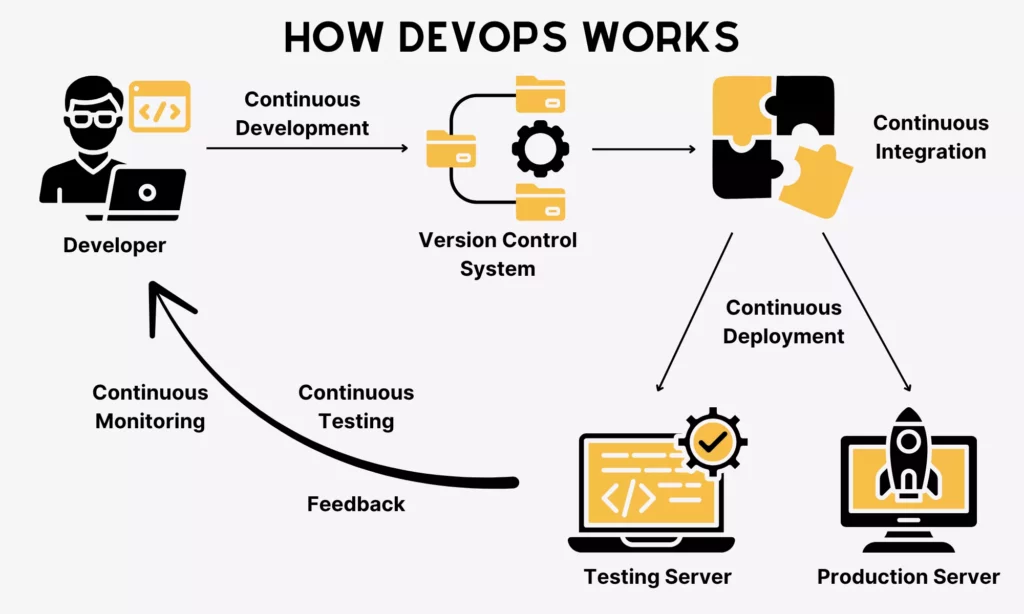
So, how does DevOps truly work in practice? This is a common question among beginners who are learning about the DevOps concept, but still don’t understand how everything connects. Let’s break the Pipeline process down to learn how it truly works:
The DevOps Lifecycle Explained
The DevOps lifecycle is a loop that keeps repeating to improve software products over time. Below are several key stages any DevOps team should consider:
- Plan: In this first step, product managers, developers, and even operations teams collaboratively define requirements, prioritize features, and map out what needs to be built.
- Build: Developers write code and integrate it into shared repositories using version control systems.
- Test: QA engineers and automated tools step in to validate functionality, performance, and security. This phase is crucial as it helps teams spot issues early.
- Release: Teams prepare the software for production, ensuring everything is stable and ready to go.
- Deploy: Operations or DevOps engineers handle deployment to production environments, often using automation tools.
- Operate: Once live, the operations team and even developers manage the system, ensuring uptime and performance.
- Monitor: The operations team also uses monitoring tools to track system behavior, user activity, and potential issues. Then, they feed insights back to the development team to enhance features or add new ones to meet customer expectations.
How The DevOps Pipeline Connects These Stages
To connect these stages, a DevOps team creates a sequential pipeline that automatically moves code from development to deployment and monitoring. Let’s take a look:
When specific conditions are met (e.g., a developer commits code or opens a pull request), the DevOps pipeline will automatically trigger the Build stage. In other words, it pulls the latest code and compiles it into something usable without the need for manually handing it off. Tools like Azure Pipelines support teams to trigger stage by stage.
Once the build is complete, it produces artifacts (like compiled binaries or Docker images) that are stored in a repository (like Docker Hub or Nexus) and retrieved for the next stages. These aren’t just outputs of the Build stage, but also the input for testing. Instead of rebuilding everything again, the exact same artifact moves forward from Build to Test, keeping things consistent.
The Test phase acts as a quality gate to filter out broken code and allow only verified code to move to production. Accordingly, automated tests, from unit and integration to security checks, run in sequence. If something fails, the pipeline stops right there and alerts developers. Beyond automation, the pipeline also integrates human judgment to manually approve whether the software truly passes validations before coming to production.
After deployment, teams continue to use monitoring tools to collect real-time data (e.g., performance metrics, error rates, or user behavior). This feedback loops back to the team to help them understand what’s actually happening in production. Further, the DevOps pipeline sends automated notifications (e.g., through email or Slack) to tell teams about the status of each stage.
Continuous Feedback And Automation Across The Process
One of the core strengths of DevOps is that it blends continuous feedback with automation to reinforce the development process.
Automation handles repetitive tasks, like testing, integration, and deployment, so that teams can focus on higher-value work. This also speeds up feedback that comes from automated test results, monitoring tools, user analytics, or even direct user input.
Here’s how:
- Continuous Integration/Continuous Delivery (CI/CD): Automated pipelines allow teams to integrate, test, and deploy code continuously.
- Continuous Testing: DevOps also emphasizes automated tests that are integrated throughout the development process to spot issues early and provide immediate feedback to developers.
- Continuous Monitoring and Feedback: Through real-time monitoring, the DevOps pipeline can provide information on software performance and user experience. That information then flows back to the development process to inform future improvements.
Core DevOps Practices

Different DevOps teams may approach the above process in different ways, tweaking it to fit their use cases. However, your workflow still needs to center around the core practices as follows:
Frequent Small Releases
As mentioned throughout the article, DevOps encourages small, frequent releases. More particularly, teams don’t bundle everything into large updates, but break changes down into smaller, manageable pieces and release them frequently.
In real projects, DevOps teams can deliver releases daily, weekly, or even multiple times a day instead of quarterly or monthly. Each release only focuses on small changes that are easy to test, review, and fix.
Those small, frequent releases help teams identify the root cause faster if something goes wrong. This translates to faster fixes and improvements.
Continuous Integration And Continuous Delivery
Continuous Integration and Continuous Delivery (CI/CD) are the heart of modern DevOps. By definition, CI allows developers to regularly merge their code into a shared repository, while CD ensures that code is always in a deployable state.
So, how does CI/CD work in real projects? Let’s see: every time a developer commits code, the automated CI/CD pipeline automatically integrates the code, runs tests to check for issues, and deploy verified code. If something breaks, the team knows immediately.
This approach reduces integration problems significantly. Instead of merging large chunks of code at the end, teams integrate continuously in small increments. This makes codebase more ready for release.
Infrastructure As Code And Configuration Management
DevOps works around the idea of Infrastructure as Code (IaC) and configuration management.
Instead of manually setting up servers and managing those configurations, teams can use scripts or templates to define infrastructure. Then, tools (re)use those definitions to automatically create and configure environments for development, testing, and deployment. This way, teams can ensure consistency across those environments.
In other words, when environments are defined as code, they can be replicated exactly. This reduces errors and makes scaling easier.
Monitoring, Logging, And Observability
Software monitoring is another target of DevOps. Once the software is live, teams need to understand how it behaves in real-world conditions through monitoring activities:
- Tracking system performance through metrics like response time, error rates, and uptime.
- Recording what’s happening inside the system in details.
- Analyzing all that data to understand why something is happening.
In real projects, teams often use dashboards, alerts, and analytics tools to keep an eye on their systems. If something goes wrong, these tools can send alerts to the team immediately. They even integrate logging and observability to help trace the issue and derive deeper insights into root causes. For this reason, teams can identify and fix issues faster.
DevSecOps And Security Integration
The final core practice of DevOps is security integration, or called DevSecOps. This practice embeds security directly into the development and delivery process, hence enabling continuous security checks throughout the pipeline.
For example, in practice, teams can run automated tools and perform different tests (e.g., dependency checks, static code analysis, or compliance validations) on code to spot bugs when doing development tasks. This way, teams can discover issues early. It also creates a shared responsibility for security, rather than leaving it to a single team at the end.
Benefits Of DevOps
So with what we said throughout the article, you seemingly notice how beneficial DevOps is. Below are several benefits teams may receive when adopting DevOps:
- Speed: DevOps helps teams release software faster by automating builds, tests, and deployments. Instead of waiting weeks or months for updates, teams can push changes frequently and respond quickly to user needs or market shifts.
- Reliability: With continuous testing, monitoring, and automated checks in DevOps, teams can detect issues earlier and deploy fixes faster. This makes systems become more stable and reliable.
- Scalability: DevOps practices like Infrastructure as Code make it easier to scale systems up or down depending on demand. Teams can replicate environments, deploy updates across various systems, and manage infrastructure more efficiently without rebuilding everything from scratch.
- Collaboration: In DevOps, developers, operations, QA, and security teams work more closely together. They share responsibility and communicate more openly to deliver better software faster.
- Efficiency: DevOps focuses on automation to reduce repetitive manual tasks. This frees teams to focus on more valuable work like improving features or solving complex problems. For this reason, teams can work more productively while ensuring the process works on the right track.

To build, test, deploy, and run software more efficiently, teams need to set up their own DevOps infrastructure that combines platforms and technologies. Toolkits vary across teams, but often center around the following core categories:
Version Control Tools
Version control (VC) tools are quite popular in software development. They allow teams to track changes in code, collaborate without overwriting each other’s work, and maintain a clear history of what changed and when.
In DevOps, developers use these tools to create branches, merge updates, and review code through pull requests. This makes collaboration smoother and safer. If something breaks, teams can revert to a previous version without rebuilding everything.
Git is the open-source, most common VC system. Teams can use web-based platforms like GitHub, GitLab, and Bitbucket to work with Git. These platforms help store code, integrate with CI/CD pipelines, include collaboration features, and enable issue tracking to facilitate the DevOps process.
CI/CD And Automation Tools
CI/CD and automation tools are the backbone of the DevOps infrastructure. They handle repetitive tasks like building code, running tests, and deploying applications automatically.
Some common tools include Jenkins, GitLab CI/CD, CircleCI, and Azure DevOps Pipelines. They all help teams turn manual processes into automated, stable workflows. When a developer commits code, these tools will trigger an automated pipeline to execute predefined steps.
Infrastructure As Code Tools
Infrastructure as Code (IaC) tools help teams manage and provision infrastructure using code instead of manual setup. In other words, they allow teams to define servers, networks, and environments in configuration files that they can reuse to auto-establish identical environments for development, testing, and production.
Some common IaC tools include Terraform, AWS CloudFormation, and Pulumi for provisioning infrastructure, along with configuration management tools like Ansible, Chef, and Puppet.
Containerization And Orchestration Tools
Containerization tools package software and its dependencies into lightweight, portable units called containers. This ensures that software can run consistently across different environments, whether it’s a developer’s laptop or a production server.
Some common tools to containerize software include Docker, Kubernetes, Docker Swarm, and OpenShift. They simplify the process of creating and running containers at scale.
Monitoring And Observability Tools
Once teams deploy software, they need monitoring and observability tools to see how it performs in real time. These tools collect metrics, logs, and traces from the software, and then present analytics in visual dashboards to help teams track performance. With these tools, teams can even set up alerts to identify unusual behavior and analyze logs to troubleshoot issues.
Some popular tools in this category include Prometheus, Grafana, Elastic Stack, Datadog, and New Relic. Each offers different capabilities, but they all help teams understand what’s happening inside their systems and why.
How To Adopt A DevOps Model

69% of developers admit that they waste time and even feel burned out because of slow or unreliable CI/CD pipelines. That raises a big concern about how to design an effective DevOps process. Unfortunately, there’s no common formula to build such a model, but you can follow some practical ways as follows. They’re good starting points for those beginning to adopt a DevOps process.
Start With A Cultural Shift
Don’t just treat DevOps as a process, but as part of your organizational culture. Without a shift in how your teams think and collaborate, even the best tools won’t fix underlying issues and help them adopt a DevOps model better.
Teams can follow every step, from setting up pipelines to automating deployments. But if they still work in silos or avoid shared responsibility, adopting DevOps still fails.
You can adopt these ways to encourage this cultural shift:
- Form a cross-functional team and educate them on what DevOps means and how it truly works
- Promote shared responsibility between development and operations
- Encourage open communication and regular cross-team meetings
- Involve operations early in development discussions
- Support a blameless culture when incidents occur
- Invest in continuous learning and upskilling
Remove Barriers Between Teams
Closely related to culture is the idea of removing barriers between teams. In traditional setups, development, QA, and operations often work separately, with limited visibility into each other’s work. This separation can slow things down and create misunderstandings.
When teams adopt DevOps, they have to eliminate those boundaries. This improves collaboration and ensures work moves smoothly across teams.
Below are several practical ways to remove those barriers:
- Create cross-functional teams with shared goals
- Use shared tools and dashboards for visibility
- Align KPIs across teams instead of optimizing for individual roles
- Encourage pair work or joint problem-solving sessions
- Reduce approval bottlenecks where possible
Automate Repetitive And High-Risk Work
Instead of manually doing everything, you should adopt automated pipelines (CI/CD) and automation tools to implement repetitive and high-risk tasks (e.g., deployments or configuration changes). This helps speed up workflows and reduces human error.
Don’t try to automate everything at once, as this can create complexity and make your team overwhelmed if they’re not familiar with automation. Therefore, you should start small, validate the results, and expand later. Besides, it’s better to design a DevOps pipeline that facilitates human evaluation to ensure the software meets all requirements.
Standardize Infrastructure And Delivery Processes
You need to standardize the DevOps process to avoid chaos. It’s because different environments, inconsistent deployment methods, and ad hoc configurations can lead to unexpected results.
With standardization, your team can create consistent setups that help replicate environments without rebuilding everything, address issues once, and scale systems easily. In other words, it ensures that what works in staging will work in production.
So how can you standardize infrastructure and delivery processes? Take a glance at these practices:
- Use Infrastructure as Code to define environments
- Create reusable deployment templates and pipelines
- Maintain consistent configurations across environments
- Document processes clearly and keep them updated
- Use version control for both code and infrastructure
Measure Improvement Over Time
Measuring improvements is a key part of DevOps. Without it, your team struggles to know whether things are actually improving or just changing.
To measure the software’s performance and improvement effectively over time, you should:
- Track key metrics (e.g., deployment frequency, lead time for changes, change failure rate, and mean time to recovery) using tools like Jira, GitLab, or Azure DevOps
- Monitor system performance with tools like Prometheus, Grafana, or Datadog
- Use logging tools (e.g., Elastic Stack) to analyze issues
- Set up dashboards for real-time visibility
- Regularly review metrics and adjust processes accordingly
Don’t just collect data. Focus more on learning what it wants to tell your team about the software. The insight helps you refine your workflows and build a more effective DevOps model.
FAQs About DevOps
What Does DevOps Stand For?
DevOps stands for Development and Operations. At a basic level, it refers to bringing these two traditionally separate teams together into a more unified workflow.
What Is DevOps In Simple Terms?
In simple terms, DevOps means building software faster and running it more reliably by letting both development and operations teams work together instead of separately. Instead of developers building software and then handing it off to operations, both collaborate throughout the entire process.
Is DevOps Easy To Learn?
It depends. Experts from Quora and Reddit have different views about whether DevOps is easy to learn for beginners. But they share the same idea: DevOps is too wide and involves so many technologies.
Basically, learners need to understand what DevOps means, its principles and values, plus the basics of coding, operating systems, databases, servers, networking, DevOps tools, and others. Grasping all these things takes time, depending on a learner’s capability. Not to mention that applying these concepts in real-world environments is another challenge.
What Is The Difference Between DevOps And Agile?
The core difference between Agile and DevOps lies in their different focuses. Agile aims for how teams plan and develop software, particularly for iterative development, quick feedback, and adapting to change. Meanwhile, DevOps focuses on automating and improving software delivery pipelines.
Conclusion
DevOps is a crucial concept for software development teams, as it helps teams to deploy, run, and maintain software faster and more securely. When done right, especially in combination with Agile approaches, DevOps keeps the development process smoother and more responsive to business needs.
Now, if you’re thinking about adopting DevOps and looking for expert help, it makes sense to work with a team that’s already been through it. As a leading software and app development company in Vietnam, Designveloper has years of hands-on experience in combining Agile approaches with DevOps practices to help businesses build high-quality software, websites, and mobile apps faster and more efficiently.
Clients gave compliments for not only our technical expertise but also our open communication, flexible collaboration, and scalable teams that grow with their projects. From solutions like Lumin and ODC to AI projects like Song Nhi, we’ve consistently delivered products that solve real-world problems (e.g., increasing organic traffic or streamlining workflows).
So, why don’t you contact us? Together, Designveloper will help you bring your ideas reliably to life!


