


To implement a DevOps pipeline effectively, understanding its fundamentals, including core practices and lifecycle, isn’t enough. Your team has to pick the right DevOps tools as well to keep every DevOps stage running smoothly and to deliver the desired results. So, what are the best tools to include in your DevOps tech stacks? Keep reading the article, and you’ll find the answers.
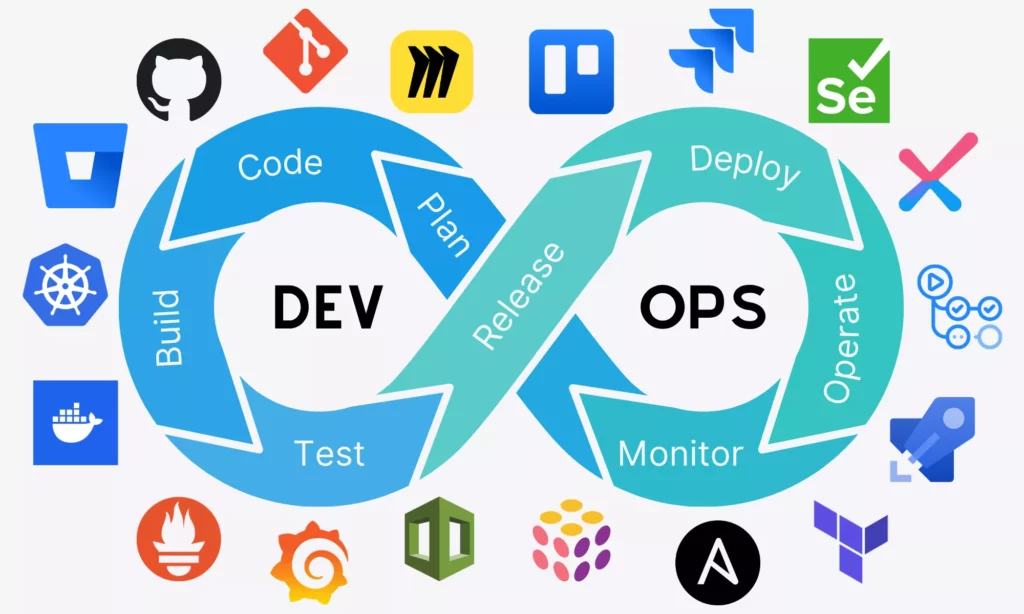
DevOps tools include all the technologies that help teams build, test, release, and run software faster. To many teams, that definition also extends to communication and project management tools that connect development and operations together. In other words, DevOps tools help teams not only move code from development to production smoothly but also collaborate well under the same goal.
Therefore, when diving into DevOps toolchains, you’ll discover a wide range of tools covering different functions. For example, some focus on version control, helping teams track code changes and collaborate without stepping on each other’s toes. Meanwhile, many cover continuous integration and delivery (CI/CD) to automatically build and test code whenever something new is pushed.
The global market for DevOps tools is expected to reach around $19.57 billion by 2026, dominated by the IT industry. A big part of that growth comes from companies trying to shorten development lifecycles. They’re increasingly adopting CI/CD automation tools, often paired with Agile practices, to push out smaller updates more frequently without compromising quality in the process.
And this shift isn’t just hype. These tools actually deliver many tangible benefits:
- Faster time to market: DevOps tools support modern software teams to automate their pipelines, hence cutting down manual steps from development to production. That makes new features or updates released much faster, even multiple times a day.
- Improved collaboration: DevOps tools create shared workflows and visibility between development and operations teams. This reduces misunderstandings and makes teams collaborate more effectively towards the shared goal.
- Higher software quality: DevOps tools support continuous testing and integration, thereby catching issues earlier and maintaining software quality.
- Greater scalability and flexibility: Tools like containerization and infrastructure as code make it easier to scale systems up or down depending on demand, without starting from scratch.
- More reliable releases: Tools help teams to create automated pipelines and consistent environments to make deployments more predictable.
- Better monitoring and faster recovery: Many tools include real-time tracking and alerting. So teams can detect and fix problems before they grow into serious problems.
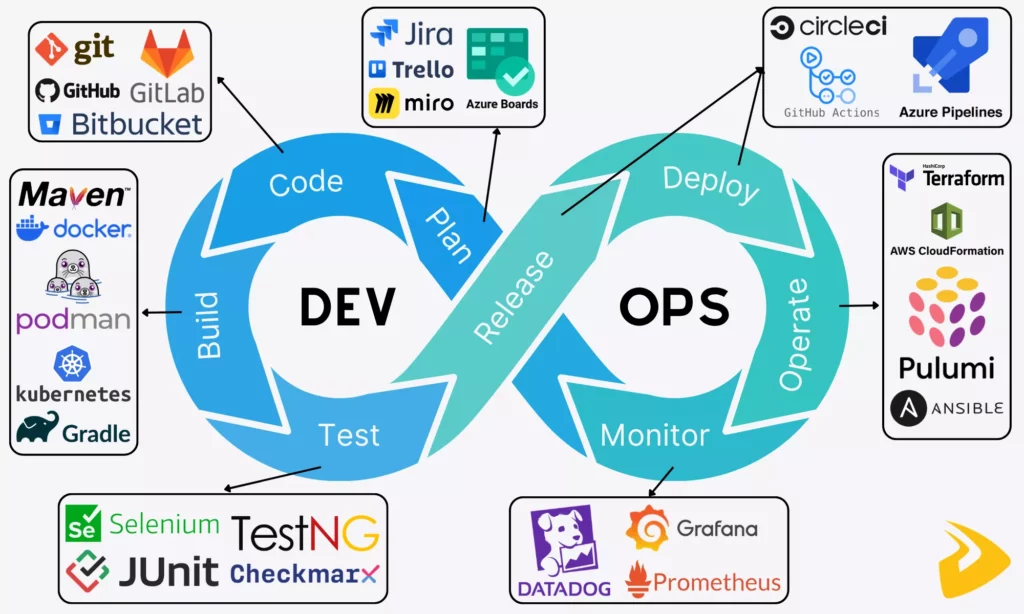
Now that you know what DevOps tools mean and how they benefit teams, you might be curious about where they actually fit in the DevOps lifecycle. Let’s start at the very beginning of the DevOps process and discover how different tools support different activities.
Step 1: Plan (Continuous Development)
In this phase, teams figure out what to build and how to approach it. More particularly, product managers, developers, QA engineers, and even stakeholders sit together to define requirements, prioritize tasks, and map out timelines. There’s usually a lot of discussion, so teams require appropriate tools to plan and communicate effectively.
- Planning and project management tools: Jira, Trello, Azure Boards, Asana, Miro
These tools often help DevOps teams organize and track planning work in a structured way. They help teams break down big ideas into manageable tasks, assign responsibilities, and monitor progress over time. Each offers a slightly different approach, but they all aim to keep everyone aligned and moving in the same direction.
- Communication tools: Slack, Microsoft Teams, Confluence, Lark
These tools support the ongoing conversations that make collaboration possible in the first place. They allow teams, even those in distributed environments, to share updates, ask questions, document decisions, and avoid long, messy email threads. Of course, these aren’t just beneficial in this stage but throughout the DevOps lifecycle because teams need to work together to ensure seamless workflows and achieve the desired outcomes.
Step 2: Code (Continuous Development)
Once the plan is in place, developers start writing application code (e.g., core features, business logic, or APIs) in code editors like VS Code. They also use version control tools to review and manage code quality collaboratively across the team.
When it comes to source control management, people often think of Git, an open-source, distributed version control system. Developers can install Git locally on their personal computers and use it for free to save code commits of their projects, track changes, and revert to previous versions if needed.
Besides, teams can use other cloud-based platforms like GitHub, GitLab, and Bitbucket to manage code versions, track changes, and collaborate across projects. These comprehensive platforms provide a space for developers to review code, comment, suggest improvements, and get approvals for code changes to maintain code quality as a team.
Step 3: Build (Continuous Integration – CI)
This phase involves the following activities and corresponding tools:
After code is written, teams need to turn it into something usable, like an application, a package, or a container image. Normally, they use build automation tools like Maven and Gradle to automate the process of building app features or changes consistently from source code (“CI”).
DevOps engineers write automation scripts using languages like Python, Bash, or Go. Such scripts help automate repetitive tasks, support CI/CD pipelines (in later steps), and manage infrastructure or integrations.
- Containerize and Orchestrate
When applications become more complex, running them consistently across environments becomes a challenge. That’s why teams need containerization tools (like Docker, Podman, and Buildah) to containerize applications with everything they need to run and make deployments more consistent.
They also use orchestration tools, typically Kubernetes (K8s), to manage containers at scale. These tools handle tasks like deployment, scaling, networking, and load balancing across clusters of machines.
Apart from these tools, teams can use managed orchestration services built on Kubernetes from major cloud providers. Some common services are Google Kubernetes Engine (GKE), AWS Elastic Kubernetes Service (EKS), and Azure Kubernetes Service (AKS). They support teams in managing the underlying infrastructure to reduce operational costs.
Step 4: Test (Continuous Testing)
Before any software reaches users, it needs to be tested carefully. But manual testing alone can’t keep up with fast-paced DevOps cycles, so automation becomes essential here. This phase ensures that new features work as expected and don’t break existing functionality.
DevOps teams often use different tools for unit testing, integration testing, functional testing, and even performance or security checks. Some common tools include Selenium, JUnit, TestNG, Cypress, Checkmarx, Snyk, and Aqua Security.
These tools automate different types of tests to help teams validate code quickly and continuously as part of the pipeline. Further, they support teams in analyzing code quality, performance, and security vulnerabilities to provide insights for maintaining standards over time.
Step 5: Release & Deploy (Continuous Delivery/Deployment – CD)
Once the code passes testing, it’s ready to be released. This phase focuses on pushing updates to staging or production environments in a reliable and repeatable way.
Normally, teams use unified CI/CD platforms or specialized CD tools to automate continuous deployments, reducing manual steps and minimizing errors.
- Unified CI/CD platforms: GitHub Actions, GitLab, Azure Pipelines (part of Azure DevOps), CircleCI, Bitbucket Pipelines, Harness
- Specialized CD tools: Octopus Deploy, Argo CD (for Kubernetes), Spinnaker
These tools support activities like infrastructure provisioning, configuration management, and advanced deployment strategies (like blue/green releases).
Step 6: Operate (Continuous Operations)
After deployment, the application needs to run smoothly in production. Therefore, this phase focuses on managing infrastructure and configurations (often with Infrastructure as Code) to keep applications running consistently and stably across environments.
Accordingly, teams use Infrastructure as Code (IaC) and provisioning tools (like Terraform, AWS CloudFormation, and Pulumi) to define and provision infrastructure through code. Moreover, they use configuration management tools (like Ansible, Chef, and Puppet) to automate the setup and maintenance of systems within the infrastructure provisioned by IaC tools.
Step 7: Monitor & Feedback (Continuous Monitoring)
Once applications are live, teams need to track their performance to check whether they run smoothly as intended and to respond promptly when something goes wrong.
For that reason, many software teams like Designveloper use observability and monitoring tools like Datadog, Prometheus, and Grafana to define SLIs (Service-Level Indicators), SLOs (Service-Level Objectives), dashboards, and alerts.
These tools help collect and visualize data on system performance, application health, and user activity. They help teams detect anomalies and understand what’s happening in real time. Additionally, they support alerting, logging, and troubleshooting when problems occur. This allows teams to respond faster and minimize downtime.
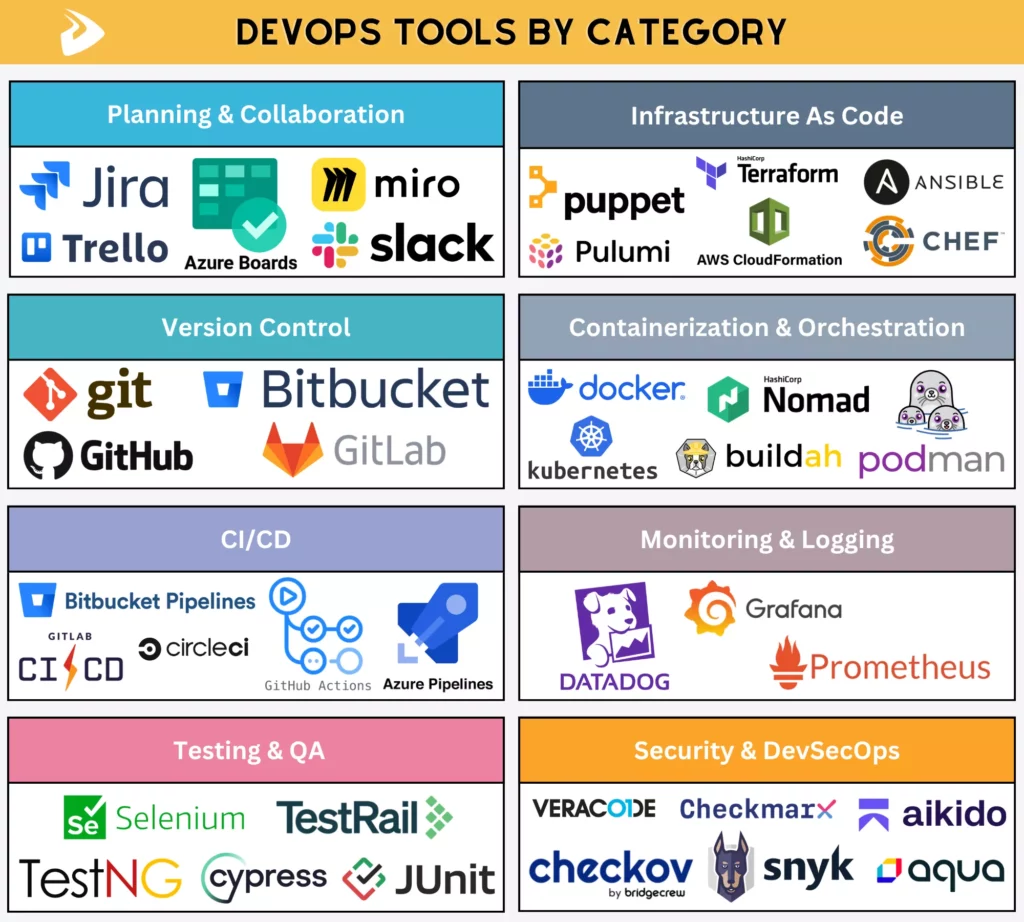
We’ve walked through the DevOps lifecycle and learn which key tools are adopted in each stage. Now, let’s dive deep into the best DevOps tools by category:
Planning And Collaboration Tools
DevOps teams often use planning and collaboration tools to organize work, align teams, and keep communication flowing throughout the development process. They help break down complex projects into manageable tasks, track progress, and keep everyone (including both developers and stakeholders) on the same page.
Some common tools in this category include:
- Jira: Widely used for Agile project management, especially in software teams. It allows teams to create user stories, plan sprints, and track issues.
- Trello: Mainly supports the Kanban framework. It allows smaller teams to use boards, lists, and cards to visually track work progress. The tool is more ideal for less complex projects.
- Azure Boards: Part of the Microsoft Azure DevOps suite, supporting Agile planning, tracking, and reporting. It integrates smoothly with other Microsoft tools, which is a big plus for teams already in that ecosystem.
- Miro: A collaborative whiteboard that allows teams to brainstorm, map workflows, and visualize ideas during early planning stages. It’s especially useful for remote teams who need a shared space to think things through together.
- Slack: A real-time messaging platform that supports team communication across channels. It helps teams share updates, ask questions, and integrate notifications from other DevOps tools.
Version Control Tools
Teams often use version control or source code management tools to track code changes, manage different versions, and support collaboration across development teams. They help different developers work on the same codebase without overwriting each other’s work. Additionally, they support branching, merging, and code reviews.
Below are some common version control systems:
- Git: An open-source, distributed version control system. It allows developers to track changes locally, create branches, and merge code efficiently.
- GitHub: A web-based tool built on Git. It offers repository hosting, a collaborative code review process through pull requests, and rich integrations. The tool supports robust CI/CD automation through GitHub Actions.
- GitLab: A complete, all-in-one DevOps platform. It supports Git-based source code management, CI/CD pipelines, security scanning, and project management.
- Bitbucket: A cloud-based and self-hosted platform that uses Git to manage repositories and integrates well with the Atlassian ecosystem (e.g., Jira for issue tracking and Confluence for documentation). It’s often used in enterprise settings and supports DevOps through Bitbucket Pipelines.
CI/CD Tools
Once code is written, it needs to be built, tested, and prepared for release. Traditionally, integrating code changes was time-consuming and error-prone. But DevOps handles that by encouraging frequent integration and automated delivery pipelines.
There are various tools supporting the Continuous Integration and Delivery/Deployment process. They’re used to automatically build, test, and deploy code whenever changes are committed (or saved in the repo). This speeds up software delivery while maintaining quality.
Some widely used CI/CD platforms include:
- GitHub Actions: Built within GitHub repositories to help developers automate workflows directly. It’s highly flexible and integrates seamlessly with GitHub projects. But configuring complex workflows with GitHub Actions can take some trial and error.
- GitLab CI/CD: Built into GitLab to help teams define pipelines using simple configuration files. It works well for teams already using GitLab for version control.
- Azure Pipelines: Part of Azure DevOps that supports building and deploying applications across many platforms. It integrates deeply with Microsoft services, making it a natural fit for enterprise environments.
- CircleCI: Known for its speed and ease of setup. It offers powerful automation features and supports parallel testing to speed up pipelines.
- Bitbucket Pipelines: Provides built-in CI/CD capabilities within Bitbucket and supports defining workflow stages in Docker containers.
Testing And QA Tools
Testing and QA tools help teams test whether applications work as expected before they reach users. These tools accordingly automate different types of tests (e.g., functional, integration, and performance), so teams can spot issues early.
Several common tools in this category include:
- Selenium: Widely used for automating web application testing. It supports multiple browsers and programming languages.
- JUnit: A popular framework for unit testing in Java applications. It helps developers validate individual components quickly. It’s considered simple and reliable, though mainly limited to Java ecosystems.
- TestNG: Builds on JUnit with more advanced features like parallel test execution and flexible configurations. Teams often use this tool for more complex testing scenarios.
- Cypress: Focuses on end-to-end testing for modern web applications. It offers a fast, developer-friendly experience with real-time reloading. However, it’s primarily designed for JavaScript-based environments.
- TestRail: Used for managing test cases, test plans, and reporting. It doesn’t execute tests itself but helps organize and track QA efforts across teams.
Infrastructure As Code Tools
These tools help teams define, provision, and manage infrastructure using code rather than do these activities manually. This approach makes environments more consistent, repeatable, and easier to scale.
Here are several common IaC tools that DevOps teams often use:
- Terraform: Allows teams to define infrastructure across various cloud providers using a single configuration language. People love it for its flexibility, but also complain that managing state files can sometimes be tricky.
- AWS CloudFormation: Designed specifically for AWS environments, hence integrating deeply with AWS services.
- Pulumi: Lets developers use familiar programming languages to define infrastructure.
Besides these IaC tools, teams can use configuration management platforms. These tools accordingly automate the setup and maintenance of software packages and operating system settings within the infrastructure provisioned by IaC tools.
Some widely used tools for managing configurations include:
- Ansible: Known for its simplicity and agentless architecture. It uses YAML-based playbooks, which are quite easy to understand. Besides, it’s a popular choice for automating server configurations.
- Chef: Uses code-based configurations to manage infrastructure. It’s powerful and flexible, but can be complex for beginners.
- Puppet: Focuses on maintaining system consistency over time. This tool is often used in large enterprise environments.
Containerization And Orchestration Tools
These tools are crucial in keeping apps and their dependencies running seamlessly across different environments. More particularly, containerization tools bundle software applications into portable containers and deploy them across environments. Orchestration tools then manage these containers at scale by automatically handling deployment, scaling, and networking.
Some common containerization tools include:
- Docker: The most widely used container platform. This tool simplifies packaging and running applications consistently. Besides, it comes with features like Docker Compose and Docker Desktop to manage multi-container apps locally.
- Podman: A daemonless alternative to Docker. The tool is compatible with Docker images and CLIs. Besides, it offers better security in some cases by supporting rootless containers.
- Buildah: Often used alongside Podman to build container images without requiring a full container runtime.
Besides, teams also use several common orchestration tools as follows:
- Kubernetes (K8s): A dominant open-source orchestration platform that manages containers at scale. The tool comes with powerful features like auto-scaling and load balancing to support complex, large-scale systems.
- Docker Swarm: A feature built directly into Docker that offers a simpler orchestration option than Kubernetes. It fits small teams or less complex projects.
- HashiCorp Nomad: Helps schedule and manage containers and other workloads (e.g., service discovery or secrets management by integrating with other HashiCorp tools). The tool can support both containerized and non-containerized apps.
- Red Hat OpenShift: Built on Kubernetes with additional enterprise features and tools.
- Rancher: Supports managing multiple Kubernetes clusters. The tool is widely adopted for running large-scale container environments.
Monitoring And Logging Tools
These tools provide teams with deeper insights into how systems actually perform. These insights help teams discover issues early and understand what’s happening in production environments.
Below are several common monitoring and observability tools in DevOps:
- Datadog: Offers comprehensive monitoring, logging, and analytics over infrastructure and application performance in a unified platform.
- Prometheus: An open-source tool used for metrics collection and alerting. It’s widely used in cloud-native environments, especially with Kubernetes.
- Grafana: An open-source tool to visualize metrics and create dashboards. It integrates with many data sources, making it highly flexible.
Security And DevSecOps Tools
In DevOps, security isn’t a final checkpoint, but it’s integrated throughout the entire DevOps lifecycle. So, teams often integrate different security tools to protect applications, infrastructure, and data during that process. They accordingly scan code, dependencies, and infrastructure to identify vulnerabilities and enforce compliance policies.
There are different security tools used to serve different DevSecOps functions. Some typical tools include:
- Aikido Security: An all-in-one platform that combines various security capabilities (e.g., SAST, DAST, SCA, and cloud infrastructure scanning) into a single interface. It helps simplify security management from code to cloud, helping developers detect, prioritize, and even auto-fix vulnerabilities.
- Checkmarx: Supports SAST (Static Application Security Testing) to identify vulnerabilities in source code early in development. It’s widely used in enterprise environments.
- Snyk: Focuses on SCA (Software Composition Analysis), scanning dependencies for known vulnerabilities. Also, it integrates well with developer workflows, making it easier to fix issues early.
- Aqua Security: Secures containers and cloud-native applications. It accordingly provides runtime protection and vulnerability scanning for containerized environments.
- Veracode: Offers different security testing tools, including SAST and DAST (Dynamic Application Security Testing).
- Checkov by Bridgecrew: Helps scan Infrastructure as Code to identify misconfigurations and security risks. It accordingly helps teams catch issues before infrastructure is deployed.
There’s no perfect DevOps tool. What works for beginners may fall apart in a large enterprise setup, and vice versa. So instead of chasing one perfect stack, it makes more sense to look at tools based on specific needs and contexts.
Best DevOps Tools For Beginners
If you’re just getting started with DevOps, the goal isn’t to use everything, but to use the right few tools that are easy to learn and don’t overwhelm you right away. This means that you need to focus more on understanding how different pieces in DevOps work together.
Here are some simple tips, plus what tools you need to learn alongside, when newly learning about DevOps:
- Start with Git. We advise you to learn Git via GitHub, as these tools are beginner-friendly for version control and workflow automation platforms like GitHub). Skipping them, and you’ll feel confused later.
- Focus on one tool at a time. As you can see, DevOps involves so many phases and corresponding tools, but you don’t need to learn all of them at very early stages. So, just focus on one truly important tool at a time, such as beginning with Docker for containerization and then exploring CI/CD through GitHub Actions or Jenkins.
- Explore Infrastructure as Code (IaC). Once you’re comfortable, try tools like Terraform to understand how infrastructure can be automated and versioned.
Best DevOps Tools For Startups And Small Teams
Startups and small teams usually care about speed, flexibility, and cost. So, they need tools that are quick to set up, easy to maintain, and don’t require a dedicated DevOps team because they often don’t have one. For that reason, they should:
- Prioritize SaaS and managed services to save time and costs. With tools like GitHub Actions or CircleCI, teams can reduce operational overhead for their own CI/CD infrastructure.
- Use free tiers and simple setups. Platforms like GitHub and GitLab offer generous free plans for those with tight budgets. Besides, teams can combine these tools with Docker for lightweight deployments.
- Choose integrated platforms. Instead of using different tools covering different DevOps functions, teams should choose unified platforms like GitLab or GitHub that provide version control, CI/CD, and monitoring in one place.
Best DevOps Tools For Enterprise Environments
Enterprises often operate at a different scale, for example, with more teams, more systems, and highly complex projects. Therefore, beyond common tools like Git, enterprises should rely on tools that offer superior security, scalability, compliance, and integration with their existing systems.
So, some of the best DevOps tools for enterprise settings include:
- Advanced CI/CD platforms: Tools like Azure Pipelines and GitLab CI/CD support complex pipelines, approvals, and enterprise-grade integrations.
- Container orchestration at scale: Teams can use Kubernetes and OpenShift to manage large-scale, distributed applications for enterprise needs.
- Security and compliance tools: Solutions like Veracode and Checkmarx help enforce policies and identify vulnerabilities across large codebases.
- Infrastructure automation and governance: Tools like Terraform and policy frameworks like OPA (Open Policy Agent) help teams maintain consistency and compliance across environments.
Best DevOps Tools For Cloud-Native Applications
Cloud-native applications often run in dynamic, distributed environments. So the tools for these apps should meet requirements about scalability, automation, and resilience.
To support this, teams can use the following tools:
- Containerization and orchestration: Use Docker for packaging applications and Kubernetes for managing them at scale.
- Dynamic infrastructure: Tools like Terraform and Pulumi help provision and manage cloud resources programmatically.
- Monitoring and observability: Use Prometheus and Grafana to get insights into system performance.
- Service mesh and advanced networking (optional but common): Tools like Istio help teams manage communication between services in complex architectures.
DevOps tools don’t work in isolation, but together to create a continuous, automated workflow. Below is how these tools actually connect to move code seamlessly from build to deployments.
- Connect planning, coding, CI/CD, and deployment
Work usually starts in planning tools, where teams define project goals and tasks. Those tasks link to code repositories (like GitHub or GitLab), where developers write and manage code. From there, CI/CD pipelines take over, building and deploying changes automatically.
- Use CI/CD as the automation backbone
CI/CD tools, such as GitHub Actions or Jenkins, act as the central engine of the toolchain. They accordingly trigger builds, run tests, and push code through environments.
- Link infrastructure provisioning with runtime operations
Tools like Terraform provision infrastructure automatically, while platforms like Kubernetes manage applications at runtime. When these tools are connected, deployments become more consistent and easier to scale.
- Feed monitoring data back into delivery improvements
Monitoring tools such as Prometheus or Datadog collect performance data and identify issues. That feedback sends insights back into planning and development, helping teams refine future releases.
- Prioritize seamless integration across the toolchain
Tools need to “talk” to each other (through APIs, plugins, or native integrations) so that data can flow smoothly. Without that, even the best tools can be disconnected from the DevOps process, and the whole system starts to lose its edge.
You’ve understood the importance of integrating different tools into the DevOps process. So now, it’s time to choose the right tools to shape how your entire team works, collaborates, and delivers software effectively. Without the right choice, tools can slow workflows down and create unnecessary complexity.
Below are several ways to pick what is truly important for your project:
- Identify workflow bottlenecks first
Don’t chase after popular tools, but look at where your current process breaks down first. Is deployment too slow, or are tests inconsistent? Remember that the right tools have to solve the real problems that your team is encountering.
- Align tools with team maturity
A beginner team might struggle with complex platforms like Kubernetes, while more experienced teams may need that level of control. Therefore, select tools that fit your team’s technical capacity and demands.
- Evaluate integration capabilities
Tools rarely work in isolation. So, make sure they integrate well with other DevOps tools or systems you already use. Poor integration can delay workflows and turn automation into another trouble.
- Consider scalability, governance, and cost
Some tools work great early on but struggle when your system grows. So, you should consider long-term scalability, compliance requirements, and pricing models when choosing DevOps tools.
- Avoid overlapping tools that solve the same problem
It’s not a good idea to adopt various tools with similar features, especially when you’re just experimenting with DevOps workflows. Too much overlap leads to confusion, duplicated effort, and a waste of money. In reality, one well-chosen tool is enough to solve a specific problem.
Besides our given tips, your team should avoid the following mistakes when choosing DevOps tools. Otherwise, you can easily run into issues because the tools are chosen for the wrong reasons. Here are a few common mistakes to consider:
- Choosing tools before defining workflows
Many teams often start with tools first before devising clear DevOps workflows. Remember that tools only serve as supporters to streamline and automate workflows more efficiently, and not all teams set up the same workflows. So without a clear workflow, even the best tools won’t fit properly, and they end up delivering bad results.
- Following trends instead of actual needs
Just because a tool is popular doesn’t mean it’s right for your team. For example, adopting something like Kubernetes too early can add unnecessary complexity if your system doesn’t really need it yet.
- Overcomplicating the toolchain
More tools don’t always mean better outcomes. In fact, adding too many layers can slow things down and make troubleshooting harder. So, instead of adding specialized tools to serve different DevOps functions (sometimes unnecessarily), your team should focus on a simpler setup that works reliably for your team and project.
- Ignoring usability and team adoption
A powerful tool isn’t very useful if your team struggles to use it. In other words, if a tool is too complex for the team, members tend to refuse to adopt it and fail to maximize its value for their work.
- Missing observability and feedback loops
Some teams focus heavily on building and deploying, but overlook monitoring and feedback. Without visibility into performance and issues, they struggle to improve or even understand what’s going wrong.
When choosing DevOps tools for automated workflows, many teams often ask the same question: “Can tools support us in delivering products at scale?” The answer depends on the tools they choose. But now, most modern DevOps tools are designed to support scalable product delivery. And here’s how:
- Faster iteration for web and mobile apps
DevOps tools enable teams to release smaller updates more frequently through automated CI/CD pipelines. Instead of bundling features into large, risky releases, teams can push incremental changes, test them, deploy them, learn from their possible failures, and iterate quickly. This is especially important for web and mobile apps, where user expectations shift fast.
- More consistent SaaS deployment pipelines
With standardized pipelines, deployments become repeatable and predictable. Besides, tools like GitHub Actions or GitLab CI/CD help ensure that every release follows the same process. This reduces errors caused by manual steps and makes deployments predictable and consistent over time.
- More scalable cloud infrastructure
Infrastructure as Code tools like Terraform allow teams to provision and scale infrastructure seamlessly. Combined with platforms like Kubernetes, applications can handle increasing workloads without requiring constant manual intervention.
- Better reliability and operational performance
Through monitoring and observability tools, teams can get real-time insights into system performance and health. By catching issues early and responding quickly, teams can maintain uptime and improve overall reliability, even when systems grow more complex.
Conclusion
This article has given you a complete picture of DevOps tools, including how teams use them throughout the process. These tools cover every stage of the DevOps lifecycle, from planning and coding to monitoring and feedback. The key, though, isn’t using as many tools as possible, but choosing the right combination that fits your workflow, your team, and your long-term goals.
If you’re looking to put all of this into practice without the usual trial-and-error, why don’t you partner with an experienced team like Designveloper? As a leading software and app development company in Vietnam, Designveloper combines DevOps tools like Bitbucket Pipelines, Docker, Kubernetes, and Terraform to build and maintain CI/CD pipelines to automate builds, tests, and releases.
We don’t just pick tools randomly, but blend them with the right technologies and processes to meet client requirements. For this reason, we help businesses create high-quality, scalable solutions within predefined timeframes and budgets. Our teams also put a strong emphasis on open communication and effective collaboration to reduce misunderstandings and keep clients consistently informed throughout the project lifecycle. This way, we’ve implemented various successful projects like Lumin, Song Nhi, Walrus Education, and Swell & Switchboard.
If you’re planning to build software solutions from scratch or modernize legacy systems, contact us now and discuss your ideas further!


