


To get reliable and desired outputs from AI models, you need prompt engineering best practices. These practices are like communication styles that you need to design and improve your instructions for better results. Whether you’re a developer, marketing executive, or regular user, these practices are all for you.
So, in this guide, you’ll learn how to write prompts that actually work, whether you’re using ChatGPT or any other AI model. We’ll explain practical techniques and real examples. By the end, you’ll know how to guide AI responses with precision and spend less time fixing outputs that miss the mark.
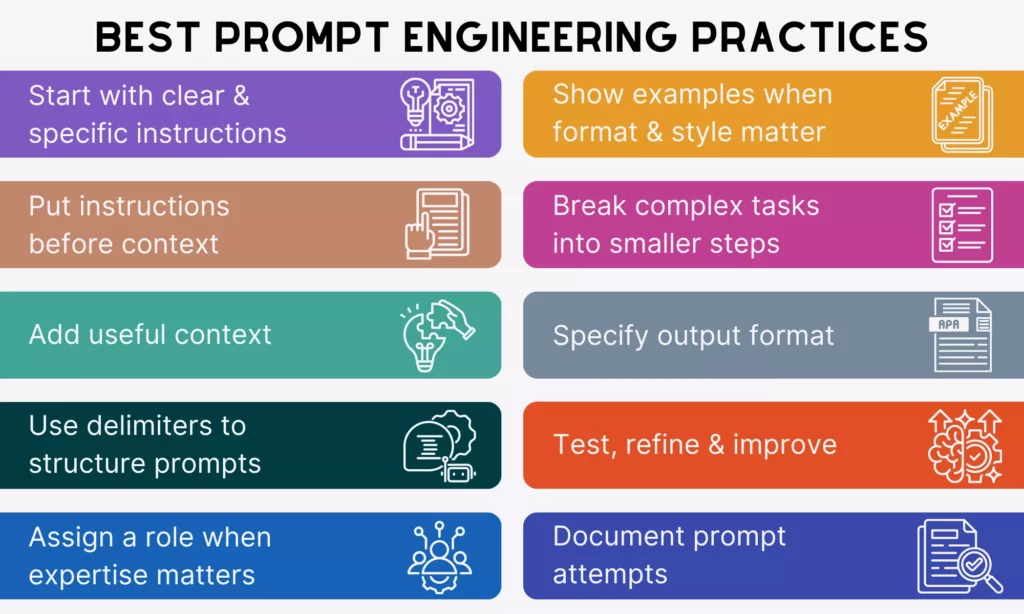
1. Start With Clear And Specific Instructions
Clear and specific instructions help you spend less time regenerating AI responses. Normally, AI models can’t read your mind, and they can only work with what you give. This means vague instructions produce vague results. So, without clear direction, AI assumes the output itself, which may miss your actual intent.
Take the following tips to specify your prompts:
Use Direct Action Verbs
To make your instructions clear and specific, one tip is to use direct action verbs. They include words like summarize, write, classify, extract, compare, and explain. Each word tells AI models a specific type of cognitive task that you want them to complete. For example, “extract” tells the model to retrieve specific data points while “classify” tells it to categorize.
Don’t use weak or passive phrases like “tell me about,” “can you explain,” or “I’m curious about.” Those phrases force the model to guess what kind of response format you actually want and take you more time to answer its follow-up prompts to redefine your instructions.
Example:
❌”Tell me about this report.”
✅”Summarize the key findings of this report in 5 bullet points.”
Define The Desired Outcome
Even with a clear action, the output can still miss the mark if you don’t define the end goal.
AI needs context about how your desired outcome should look. Without that, you may get answers that are technically correct but not useful, because an AI writing for a PhD audience will use different vocabulary and reasoning depth than one for a curious teenager. Therefore, be specific about:
- Audience (who the content is for)
- Goal or Scope (how detailed it should be)
- Tone (how it should sound)
Example:
❌“Write a product description.”
✅“Write a 100-word product description for a fitness tracker, targeting busy professionals, using a persuasive tone.”
2. Put Instructions Before Context

AI models often process your input from the very first token. So if you place the context before the core instruction, the models can focus on the wrong part and deliver off-topic responses. Reorganizing that sequence (instruction first, context second) tells the models exactly what to prioritize and hence create more relevant responses. Here’s how:
Lead With The Main Task
Starting with the core request or the main task helps an AI model immediately know what to focus on first. This helps the model lock onto the objective and avoid overly broad or irrelevant answers.
Example:
❌“We collected user feedback from surveys and interviews. What are the main issues?”
✅“Identify the top 3 user issues from the feedback below: (followed by the context)”
Keep Long Context Organized
For long context (with background information, examples, and constraints), the structure becomes important. Why?
A model reading a long, unstructured block of text has to do extra work to determine what’s relevant, what’s an instruction versus what’s data, and what the actual goal is. If it fails to identify what is what, the response can miss the key details and focus on unnecessary information.
So, when a prompt passes three or four sentences, breaking it into labeled sections: “Task,” “Background,” “Data,” “Constraints,” and even “Output Format.”
Example:
❌”Our return policy is 30 days, we don’t cover shipping costs for returns, the customer bought a blender that stopped working after two weeks, they’re really angry, they’ve contacted us twice already, write a professional reply that keeps them as a customer.”
✅”Task: Write a professional customer service email that retains the customer’s trust.
Customer situation: Purchased a blender that failed after two weeks. Has contacted support twice with no resolution. Tone in last message was frustrated.
Policy constraints: Return window is 30 days. Return shipping costs are not covered by the company.
Tone: Empathetic and solution-focused. Avoid corporate language.”
3. Add Useful Context

Adding useful context keeps AI responses more relevant and grounded. Why? Because AI doesn’t automatically know your business goals, audience expectations, or technical constraints. Instead of producing something based on facts, the AI accordingly assumes the responses.
So, remember the following tips to add truly useful context to your prompts:
Give The Model The Background It Needs
Providing the right context helps the model understand why the task matters and how to approach it, especially in business and professional work. Without it, outputs may be too generic or miss important nuances. So, tell the model about business, technical, or user information when relevant to adjust vocabulary, depth, and tone.
Example:
❌“Write a landing page headline.”
✅“Write a landing page headline for a SaaS tool that helps small businesses manage invoices.”
Include Constraints And Boundaries
Context isn’t only about what you want the model to include, but also about what you want it to avoid, how deep to go, and where to stop. Without defining constraints upfront, the model will automatically decide scope, length, and emphasis for their responses. This may translate to harmful content, especially when you want the AI to deal with complex or sensitive topics.
Constraints and boundaries here can take many forms:
- Format restrictions (“in under 150 words”)
- Exclusions (“don’t cover the history, but focus only on current implications”)
- Depth cues (“assume I’m already familiar with basic cryptography”)
- Output requirements (“use plain language, no jargon”)
Example:
❌“Tell me about medication dosages for elderly patients.”
✅ “Explain how age-related physiological changes affect medication dosing in elderly patients.
Audience: Junior nurses in a general ward setting.
Constraints: Focus on pharmacokinetic changes only (absorption, distribution, metabolism, excretion). Do not provide specific dosage numbers or prescribing recommendations. Flag where physician or pharmacist consultation is essential.
Depth: Conceptual understanding only, not a clinical reference guide.
4. Use Delimiters To Structure Prompts

One way to improve the organization of long prompts is to use delimiters. Accordingly, delimiters clearly separate different parts of your prompts so that the model can distinguish between instructions, context, data, and other inputs.
Common delimiter options include:
- Triple quotes (`”””`)
- Markdown-style headers (`### Input:`)
- XML-style tags (`<document>…</document>`)
Separate Instructions From Input Data
If the AI model treats input data (e.g., a document, a code block, or a dataset excerpt) as part of the instruction rather than as the object to act on, the responses may miss the core requirement. Especially when instructions and data share the same unstructured text block, the boundary between them blurs. That’s why you need to add delimiters to define where instructions end and input begins.
Example:
❌“Summarize this article in under 100 words, focusing only on key insights. This article covers…”
✅ “<instruction> Summarize this article in under 100 words, focusing only on key insights. </instruction>
<data>…</data>”
Make Long Prompts Easier To Parse
When your prompts include various sections (normally 4 or more sentences), you need clear formatting so that the model can easily parse them for better clarity. Like humans, the AI model also struggles to identify which information is the core instruction, input data, context, and constraints in a long, one-paragraph prompt.
Therefore, use labeled sections, headers, spacing, and markers to help both you and the AI read through long prompts easily.
Example:
❌ “Compare these two products and tell me which is better. Product A is a cloud storage solution with 2TB storage, costs $10/month, has offline access, and no file size limits. Product B offers 1TB storage, costs $7/month, requires internet connection, and limits individual file uploads to 5GB.”
✅ “Task: Compare these two products and tell me which is better.
Data: Product A is a cloud storage solution with 2TB storage, costs $10/month, has offline access, and no file size limits. Product B offers 1TB storage, costs $7/month, requires internet connection, and limits individual file uploads to 5GB.
Criteria: Price, features, memory
Output Format: Table”
5. Assign A Role When Expertise Matters
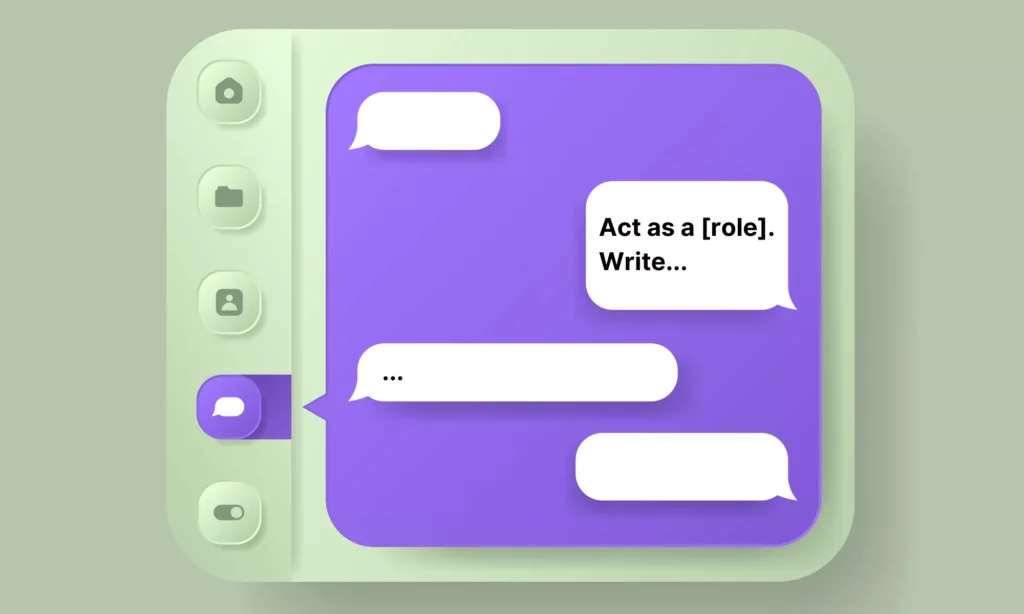
For tasks requiring expert knowledge, you should assign a role to add direction, context, and a layer of expertise. Without a defined role, the model defaults to a neutral, general-purpose voice that tries to serve everyone. But through role assignment, the AI model knows what lens to use, what assumptions to make about the audience, and what standard of depth to apply. Here’s what you need to focus on when assigning a role:
Use Persona Prompting For Better Results
Persona prompting is a prompt engineering technique that instructs LLMs to adopt a specific persona, role, or identity. It gives the model a professional frame of reference, say, for data analysis, senior-level software engineering, and more. In other words, this frame tells the model to adopt a specific vocabulary, a set of priorities, and a way to structure information, which match what someone in that role actually produces.
Example:
❌ “Explain why our app’s loading time is slow.”
✅ “Act as a senior backend engineer specializing in web performance optimization. Diagnose the most likely causes of slow loading time in a React app that fetches data from a REST API, and suggest three concrete fixes.”
Align Tone And Perspective
Beyond expertise, you should align tone and viewpoint with the role given to the AI. This matters because it controls the entire communicative posture of a response.
Example:
❌ “Write a product description.”
✅“Act as a copywriter and write a persuasive product description targeting young professionals.”
6. Show Examples When Format And Style Matter

Some tasks require consistency so that AI-generated outputs can follow a specific format or pattern. In that case, simply describing what you want may not be enough. You should show examples to give the model a clear pattern to follow without heavy editing later.
Use Few-Shot Prompting To Guide The Model
Few-shot prompting is a technique of providing sample inputs and outputs so that the model can immediately understand how you want your content to look. More particularly, this technique helps the model extract the structure, tone, level of detail, and stylistic choices from your example, then applies them to the new input. Giving a few examples is very useful when instructions alone feel too abstract.
Example:
❌ “Summarize this customer review.”
✅ “Summarize customer reviews using the format below.
Example:
Input: ‘The delivery was late and the packaging was damaged, but the product itself works perfectly.’
Output: Delivery issue, damaged packaging. Product quality: satisfactory.
Now summarize:
Input: ‘Setup was confusing and took over an hour, but once running, the software is intuitive and fast.’”
Use Examples For Repeated Workflows
When you run the same type of task repeatedly (e.g., classifying support tickets or formatting product descriptions), give examples to guide the model on how typical workflows should run. They set the format and eliminate the need to re-explain your requirements every single time. For repeated workflows, attaching two or three examples in a reusable prompt template effectively trains the model on your specific style.
Example:
❌ “Classify this support ticket.”
✅ “Classify each support ticket into: Billing Issue, Technical Problem, or General Inquiry.
Example 1:
Ticket: ‘My invoice shows a charge I didn’t authorize.’
Category: Billing Issue
Example 2:
Ticket: ‘The dashboard won’t load on Chrome after the latest update.’
Category: Technical Problem
Now classify:
Ticket: ‘I’d like to know if I can use your software on two devices simultaneously.’”
7. Break Complex Tasks Into Smaller Steps

For complex tasks, you should break them down into smaller steps instead of asking the AI model to handle them at once. Otherwise, prompts may fail.
Why? A complex task often involves many different cognitive operations (e.g., researching, reasoning, and writing), while the model’s context window and capabilities are limited. Even the most powerful may skip steps, mix ideas, or produce shallow answers when dealing with complex tasks.
Follow the tips below to break large requests effectively:
Split Big Requests Into Manageable Actions
Large requests can overwhelm the model, especially when they involve multiple objectives. And when outputs are weak, you struggle to figure out which part of the large prompt goes wrong for refinement. So, splitting the large request into smaller steps allows the model to handle it more easily and improve overall accuracy.
Use Stepwise Prompting For Better Reliability
Stepwise prompting guides the model through a logical sequence. This makes it particularly effective for tasks that require reasoning, planning, or technical precision.
When a model is asked to reason and write simultaneously, it often skips reasoning steps to reach the output faster. Separating the two forces it to think before it writes. Besides, asking the model to show its reasoning helps you identify logic errors more easily.
Example:
❌ “Analyze our Q3 sales data and write a full performance report with recommendations.”
✅ “Read our Q3 sales data, then follow these steps:
Step 1: List the three weakest performing product categories in Q3 based on the data below. Be concise.
Step 2: For each underperforming category, identify the most likely contributing factor based on the sales trends.
Step 3: Using the categories and factors above, write an executive summary with one actionable recommendation per category. Keep it under 200 words.”
8. Specify The Output Format

Even when the content is correct, poor formatting can make it hard to use. As AI models don’t automatically know how you want the answer structured, specifying the format is crucial to ensure organized and ready-to-use outputs. So, to specify the output format effectively, here’s what you need to focus on:
Ask For Structured Responses
Different tasks call for different output structures, and the model responds well to explicit format instructions. Instead of letting the AI guess what the output should look like, you should request structured responses. Some common structured outputs include:
- Tables work best for comparisons.
- Bullet points work for lists of actions or features.
- JSON is essential when the output needs to feed into another system.
- Markdown suits documentation.
- Step-by-step numbered lists fit instructional content.
The format request should appear in the prompt itself, ideally at the end, after the task and context have been established.
Example:
❌ “Compare these three project management tools.”
✅ “Compare Asana, Trello, and Monday.com in a structured table with four columns: Tool Name, Best Use Case, Key Limitation, and Pricing Tier. Keep each cell to one sentence.”
Define Length, Structure, And Audience
Besides structured responses, you should also define how detailed and formal the answer should be. Without these details, responses may be too long, too brief, or misaligned with your needs. Accordingly:
- Length cues can be approximate (“under 200 words,” “no more than three paragraphs”) or exact (“exactly five bullet points”).
- Structure cues can specify section headers, a particular order of information, or a specific hierarchy.
- Audience cues tell the model what background knowledge to assume and what vocabulary to use.
Example:
❌ “Write something about stranger danger for kids.”
✅ “Write a safety guide for children aged 6-8 about recognizing unsafe situations with strangers.
Structure: Use three short sections with subheadings: What a Safe Adult Looks Like, Situations That Feel Wrong, and What To Do If You Feel Unsafe.
Length: Keep the total response under 200 words. Use simple vocabulary a second-grader can read aloud.”
9. Test, Refine, And Improve

Prompt engineering is not a one-time task. Even well-written prompts may produce inconsistent results across different inputs. That’s why testing and refining are crucial to help you identify weaknesses and improve performance over time.
To make this iterative process of prompt engineering effective, you should:
- Compare Prompt Variations
The fastest way to improve a prompt is to run controlled comparisons. Change one variable at a time (the role, the format instruction, the level of context, the action verb) and observe how the output changes. When you change multiple variables at the same time, you can’t tell which change led to the improvement.
- Improve Prompts Using Real Results
Controlled comparisons reveal what works in practice. Instead of guessing what to fix, you can refine prompts based on actual issues, like missing details, irrelevant content, or inconsistent tone.
10. Document Prompt Attempts

This is one of the best prompt engineering practices people often miss. Most people discard prompts as long as they get the output they need. But that habit is costly, because the prompt failing on this task may succeed on another.
Documenting prompt attempts is very crucial, especially across teams or organizations, as it turns individual trial-and-error into shared, compounding institutional knowledge. In other words, it helps members (especially new ones) understand why prompts work or fail across different tasks without trying from scratch. Then, they can choose the right prompt or refine it to get the best results.
But recording prompt attempts is not copying and pasting them into a spreadsheet. Instead, it involves:
- Tracking What Works And What Fails
Recording both successful results and failures helps you identify patterns. You can see which prompts consistently perform well for what tasks and which ones need improvement. This saves time and avoids repeated experimentation.
- Building A Reusable Prompt Library
A prompt library is the natural extension of a prompt log. Once you’ve identified prompts that perform reliably across different inputs, edge cases, and users, those prompts become reusable assets. By building a reusable prompt library, you can avoid starting from scratch. This is especially valuable for teams handling repeated tasks across projects.
According to Designveloper’s experience, you should the library should be organized by task type, not by topic. In other words, you should group prompts by what they do (e.g., summarize, classify, reformat, draft, analyze), so that users can find the right starting point quickly, regardless of the specific content they’re working on.
Further, review the library regularly to update new failure cases and refine prompts. Over time, it becomes a living record of your team’s collective prompt engineering expertise.
Prompt Engineering Best Practices For ChatGPT
ChatGPT reached 900 million active users in February 2026. This scale makes it the most widely used AI tool across industries. While ChatGPT is evolving significantly, the number of people who truly know how to use it effectively is quite modest. That’s why for effective prompt engineering in ChatGPT, you need to consider the following best practices:
How To Write A ChatGPT Prompt
ChatGPT performs best if your prompts are specific enough, well-structured, and supported with relevant context. Below are the best practices for prompt engineering to help users get more accurate, useful, and consistent outputs with the model:
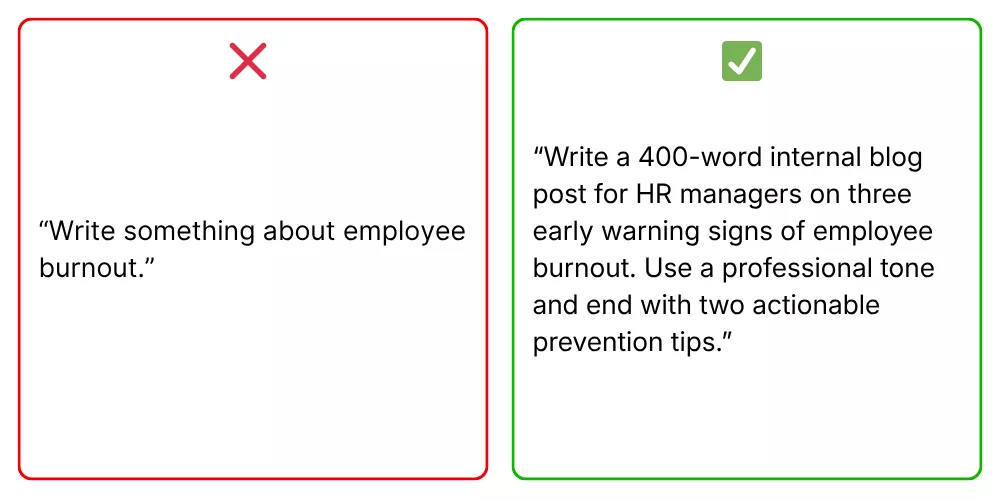
- Write clear and specific instructions. This way, the model knows exactly what you want, who it’s for, and what format to use.
- Provide reference context or grounding data. This gives the model the background it needs to create a relevant, accurate response rather a generic one.
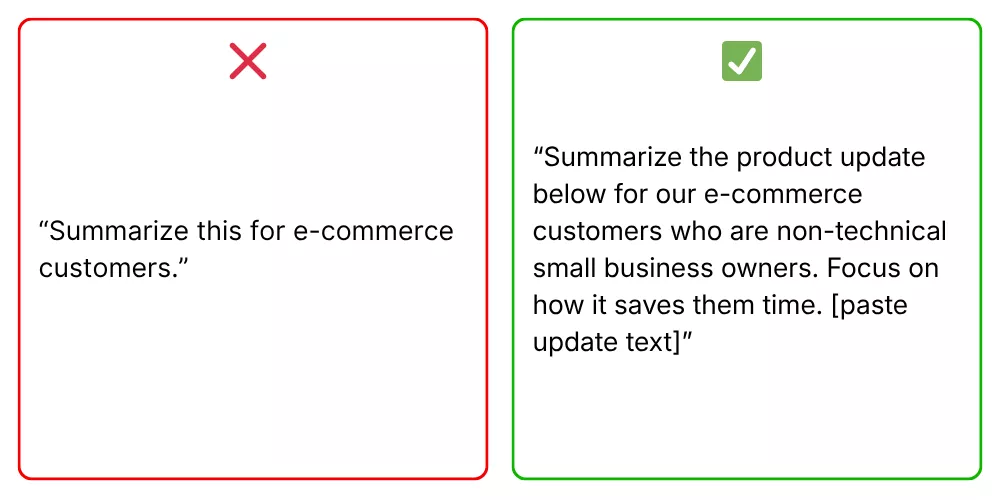
- Start your prompt with instructions and use ### or “”” to separate the instruction and context. Leading with the task orients the model immediately, while sing delimiters prevents it from confusing your instructions with the content it should act on.
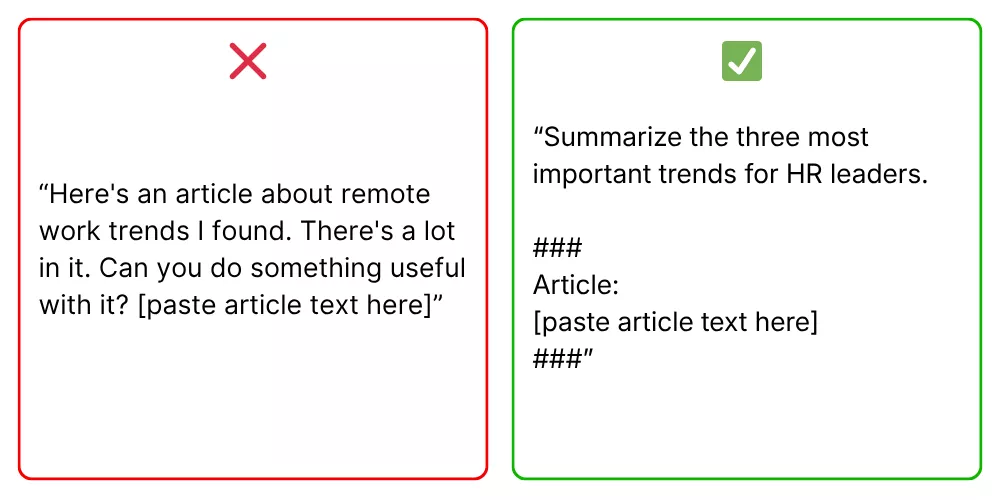
- Offer examples to define the desired output. This is very crucial when consistency or a specific format matters. It’s because the model can base its reliable responses on completed examples.
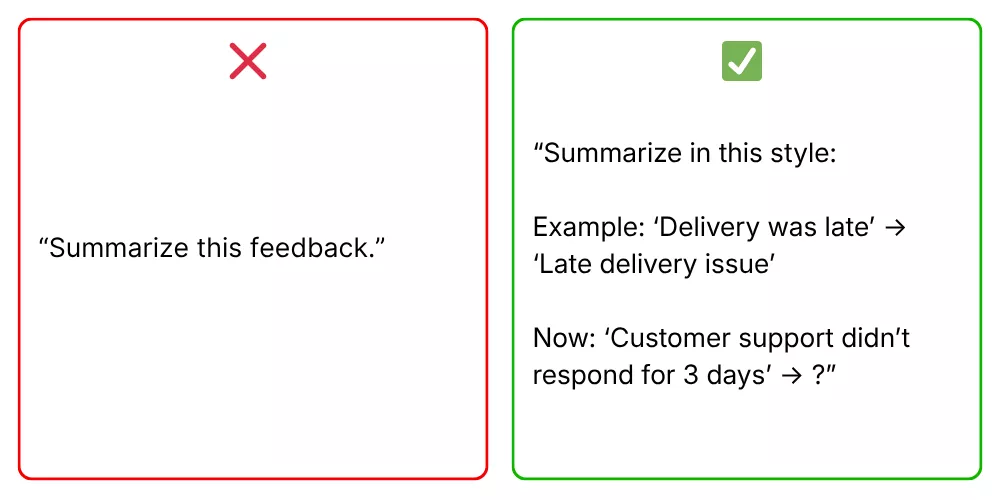
- Break complex tasks into simpler subtasks. Adding too many steps to one prompt increases the chance of errors. By handling each stage separately, you can review and correct as you go.
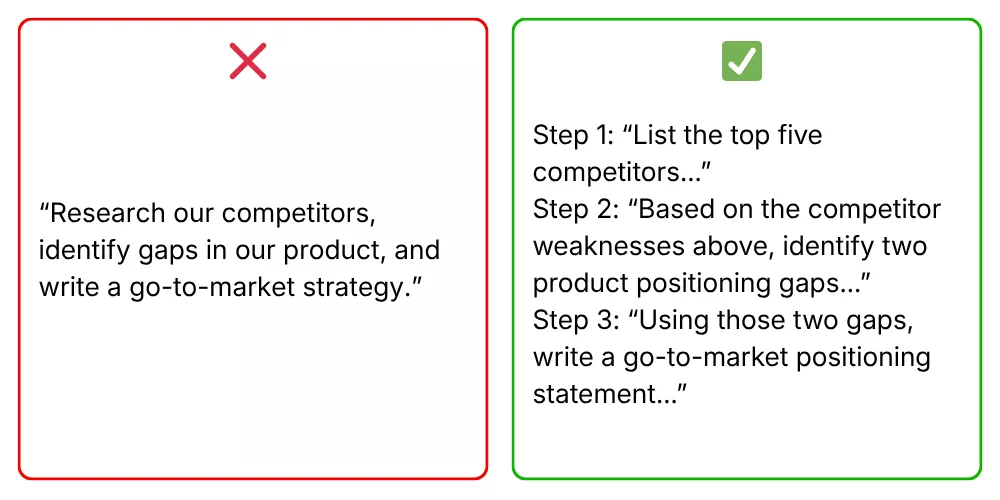
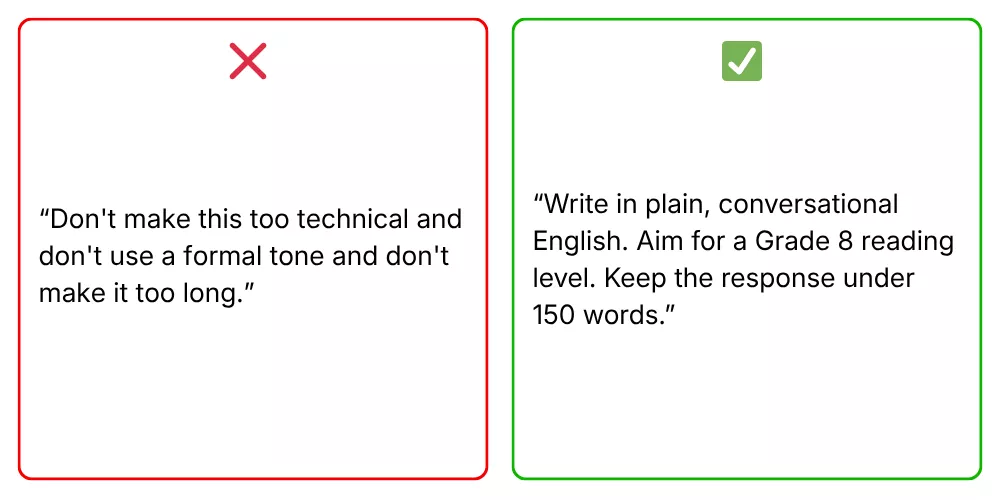
- Say what the model should do instead of what it shouldn’t do. According to the OpenAI’s official guideline, positive instructions give the model a clear direction to follow. Meanwhile, negative instructions leave it guessing about what you actually want.
Best Prompts For ChatGPT By Use Case
Effective prompting changes depending on the task. Below are some of the best prompts by use cases, plus why they work in practice.
| Use Case | Best Prompts | Why It’s Good |
| Content Writing | Act as a B2B content writer. Create 5 SEO-friendly headlines for [topic], each with keyword and search intent. | Clear role + structured output |
| Write a product description for [product] targeting [audience]. Lead with the top feature, keep it under 80 words, and end with urgency. | Combines audience, structure, and constraints well. | |
| Data Analysis & Reporting | Act as a data analyst. Summarize key sales insights in 3 bullet points for executives. Focus on trends and anomalies. Avoid jargon. | Defines audience + format, ensuring clarity and relevance. |
| Analyze [metrics] in the table below. Identify the top 2 contributing factors, explain business implications, and suggest one action per factor. [table] | Breaks output into actionable steps. | |
| Coding | Review the code below as a senior developer. Identify performance issues and suggest improvements with explanations. [code] | Clear role assignment and a structured request. |
| Generate technical documentation for the following API. Include endpoints, parameters, and example requests/responses. [API details] | Clear format makes output ready for real use. | |
| Customer Support | Act as a support agent. Write a polite response to a customer complaining about [issue]. Include an apology, explanation, and solution. Keep it under 100 words. | Ensures tone, structure, and brevity for real interactions. |
| Write a friendly email to a customer who received a defective product. Tone: empathetic. Include replacement steps and next actions. | Focuses on empathy + resolution. | |
| Business Strategy & Operations | Act as a business analyst. Create a SWOT analysis for [product/project] in [industry]. Highlight key opportunities and risks. | Clear role assignment and contextual details |
| Create 3 customer personas for [product]. Include demographics, pain points, goals, and buying objections. | Defines exact components of output. |
ChatGPT Prompt Builder Tips For Better Outputs
If you want to build effective ChatGPT prompts across use cases, don’t miss these tips. Regardless of your experience level with AI prompting, these tips work immediately to create better results:
- Give clear and specific instructions to guide ChatGPT’s behavior. Accordingly, you should use direct active verbs, provide contextual details, and any input necessary for the AI to understand without exceeding its context window.
- State the task (what you want done) before the context. This helps the model focus on the right part of the prompt.
- Name the format you want. Tell ChatGPT whether you want a table, bullet points, a numbered list, JSON, or prose. Without this, it defaults to its own format preference, which may not suit your workflow.
- Provide an example when format consistency matters. Accordingly, you can show one or two examples of completed input-output to help the model envision what your desired output looks like.
- Break multi-part tasks into separate prompts. If your request has multiple parts, splitting it up helps ChatGPT give clear, focused answers, while helping you catch errors easily.
- Use “think step by step” for reasoning tasks. By prompting the model to reason through a problem, you can consistently improve output quality on complex or multi-part requests.
- Assign roles if expertise matters. If your tasks require specific vocabulary, tone, and level of expertise, you should start the prompt with “Act as a [specific expert]”. This way aligns the model’s responses with tasks.
- Iterate deliberately. Prompt engineering requires an iterative approach. So, start with an initial prompt, review the output, and refine based on what went wrong.
- Save prompts that work and fail, with notes. When a prompt produces a high-quality output, document it to know what made it effective. The same applies to ineffective prompts.
Prompt Engineering Best Practices Across AI Models

So, do the best prompt engineering practices work the same way across different AI models? Not exactly. Different AI models have different inner workings, hence leading to small changes in generated outputs. Let’s learn how:
How Prompting Changes Across Different AI Models
The way AI models respond to prompts can vary a bit. This means the same prompt may produce clear results in one model and weaker output in another, depending on how that model processes instructions.
So, why does that happen? The answer lies in the following key differences:
- Reasoning abilities: Some models handle multi-step reasoning well, while others perform better when tasks are simplified. For example, a complex request like “analyze trends and suggest strategies” may work in advanced models, but smaller models often need step-by-step prompts.
- Instruction following: Certain models strictly follow constraints like word limits or formats, while others may ignore them unless reinforced. So, despite clear and specific instructions, different AI models can still work differently.
- Context management: Models with larger context windows can handle long documents and detailed inputs. Meanwhile, others may lose focus or overlook earlier instructions if the prompt is too long or unstructured.
To adapt across models, you can adopt a few practical adjustments as follows:
- Start by simplifying prompts when switching to less capable models. Accordingly, you can break tasks into smaller steps and avoid overloading them with instructions.
- Reinforce key constraints clearly, especially for formatting or length.
- Use structured prompts with labels or delimiters to improve clarity, particularly for models that struggle with long inputs.
More importantly, you need to understand how your chosen model works, test prompts, and refine them until you get the desired outcomes.
Prompt Structures That Work Across Tools
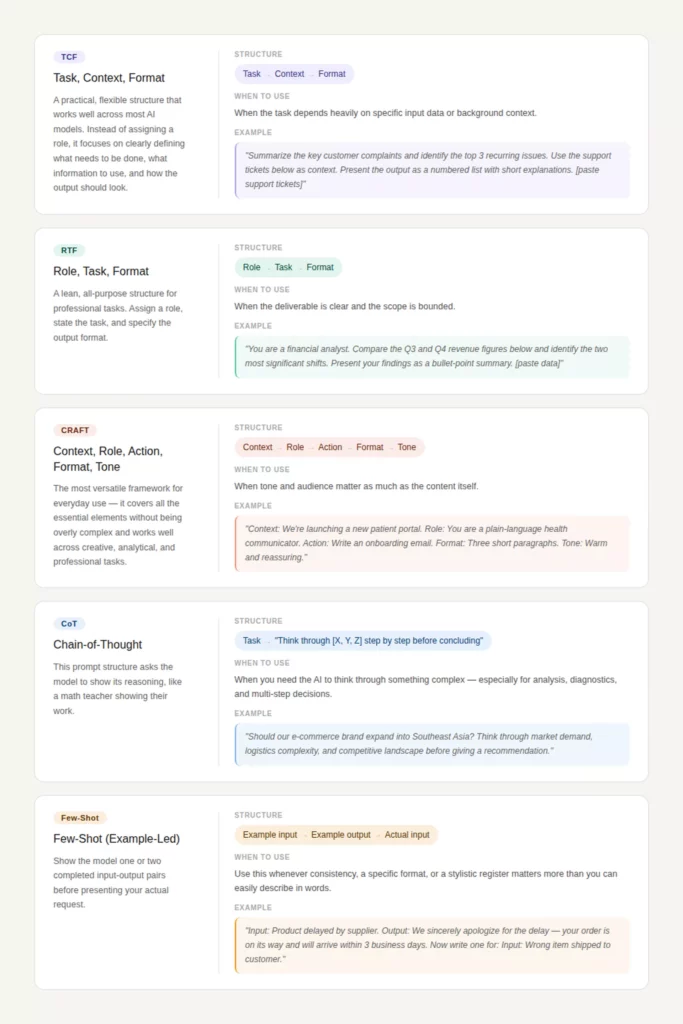
Although prompting approaches can behave differently across AI models, several core prompt structures still work consistently across most systems. This is because they align with how models parse instructions into clear, structured components to improve accuracy regardless of the underlying architecture.
Below are common prompt structures you can adopt across AI tools:
Best Practices For Prompt Engineering In Real AI Workflows
Many teams and organizations now build AI agents to automate workflows and business operations. And of course, to make those agents work effectively in their real processes, they need to adopt the best prompt engineering practices to ensure the agents work as intended. If you plan to build AI-powered workflows, here are practices to consider:
- Standardize prompt templates. This means creating reusable formats (e.g., TCF, RTF) so that teams can follow consistent structures across tasks and tools.
- Version and track prompt changes. Treat prompts like code by saving iterations, comparing results, and documenting what improves performance.
- Test prompts with real-world inputs. But don’t rely on ideal cases. Instead, use messy, edge-case data to ensure prompts perform reliably in production.
- Define clear evaluation criteria. Such criteria accordingly specify what a “good output” looks like (accuracy, format, tone) before testing or scaling prompts.
- Break workflows into modular steps. Instead of one large prompt, your team should split tasks into smaller stages (e.g., extract → analyze → generate).
- Use structured outputs for integration. Accordingly, request formats like JSON or tables so that outputs can be used in other systems or tools.
- Monitor outputs and refine prompts continuously based on failures. This way, your team ensures the output can be high-quality and error-free.
- Align prompts with business goals. Your team should ensure prompts are not just technically correct, but also useful for decision-making or user needs.
- Limit unnecessary context. You should provide only relevant data to reduce noise and improve model focus.
- Design for cross-model compatibility. Instead of using complex structures, you should adopt clear, simple structures so that prompts can work consistently across different AI tools.
- Collaborate across teams. You should share prompt libraries and best practices between developers, marketers, and analysts to improve efficiency.
Common Prompt Engineering Mistakes To Avoid

Many prompts still fail to deliver useful results, not because of the AI model itself but how those prompts are written. Only small mistakes can lead to incomplete and inconsistent outputs. So, when learning how to engineer prompts, you should avoid the common mistakes as follows:
Vague Instructions
Vague instructions are one of the most common issues in prompt engineering. When a prompt lacks clarity, the model has to guess what the user wants. This often leads to generic or irrelevant responses.
For example, asking “Explain marketing” gives the model too much freedom, so the answer may be broad and unfocused. This will become a bigger problem in professional workflows where precision matters.
Solution:
Make instructions specific and action-oriented. Use direct active verbs and define exactly what you expect. Instead of “Explain marketing,” write *“Explain three digital marketing strategies for small businesses in under 100 words.” By adding scope, format, and constraints, you can reduce ambiguity and improve output quality.
Missing Context
A prompt without context forces the model to rely on general knowledge, which may not match your specific situation. This often results in answers that are technically correct but not useful.
For instance, when you ask “Write a product description” without details about the product or audience, the model can create generic copy that lacks relevance.
Solution:
Provide only the context that matters. It may include key details such as audience, purpose, or background information. For example, “Write a product description for a fitness tracker targeting busy professionals, focusing on time-saving features.” This engineered prompt gives the model enough direction to produce a tailored response without overwhelming it.
Conflicting Requirements
Conflicting instructions confuse the model and lead to inconsistent outputs. This happens when a prompt includes requirements that don’t align, such as “Write a detailed report in under 50 words” or “Use a formal tone but make it casual and conversational.” As a result, the model may prioritize one instruction over another or produce a compromised result.
Solution:
Keep requirements aligned and realistic. Besides, consider reviewing your prompt to ensure all constraints support the same goal. If needed, prioritize one requirement over another. For example, “Write a concise 100-word summary in a professional tone.” With clear, consistent instructions, the model delivers more reliable outputs.
Asking Too Much In One Prompt
Trying to complete multiple complex tasks in a single prompt often leads to shallow or incomplete answers. The model may skip steps, merge ideas, or fail to fully address each part. This is a typical example of adding too much in one prompt: “Analyze this data, write a report, and suggest strategies.” This prompt combines many tasks that require different levels of focus.
Solution:
Break the task into smaller, manageable steps. Start with one objective, then build on the output. For example:
1. “Summarize the dataset.”
2. “Identify key trends.”
3. “Suggest strategies based on the trends.”
This step-by-step approach helps the model create more accurate, aligned, and useful outputs.
Start Your AI Development Project With Designveloper
Strong prompts can unlock powerful outputs, but they are only one piece of a much larger system. In real-world workflows, prompts must help AI agents connect with data, tools, and business logic to deliver consistent results. And if you plan to build a powerful AI system that integrates your prompts, data, and tools to streamline existing processes, you may need expert help. That’s why Designveloper is here to support you on this journey.
Over the years, we are an AI-first software and automation partner of many clients across industries. We help both technical and non-technical teams build AI systems, intelligent workflows, and web, mobile, and voice-enabled applications that actually work with their processes.
Unlike agencies that stop at prototypes or generic chatbot demos, Designveloper focuses on full delivery. We combines AI engineering, workflow design, and software development to reduce manual work and improve efficiency at scale. Our experience spans key areas such as document intelligence, AI assistants and agents, HR automation, and operational workflows. Each solution is designed to handle real business tasks, not just isolated use cases.
One of our successful projects is Lodg, a finance and accounting support platform. It integrates AI into structured back-office processes with built-in review and approval steps. Accordingly, it helps handle tasks like invoice extraction, autofill, and tax-related classification faster and with greater consistency.
If you’re looking to build AI solutions that reduce manual steps, speed up operations, and improve user experience, Designveloper can help turn those ideas into practical, working systems. Talk to our team!


