


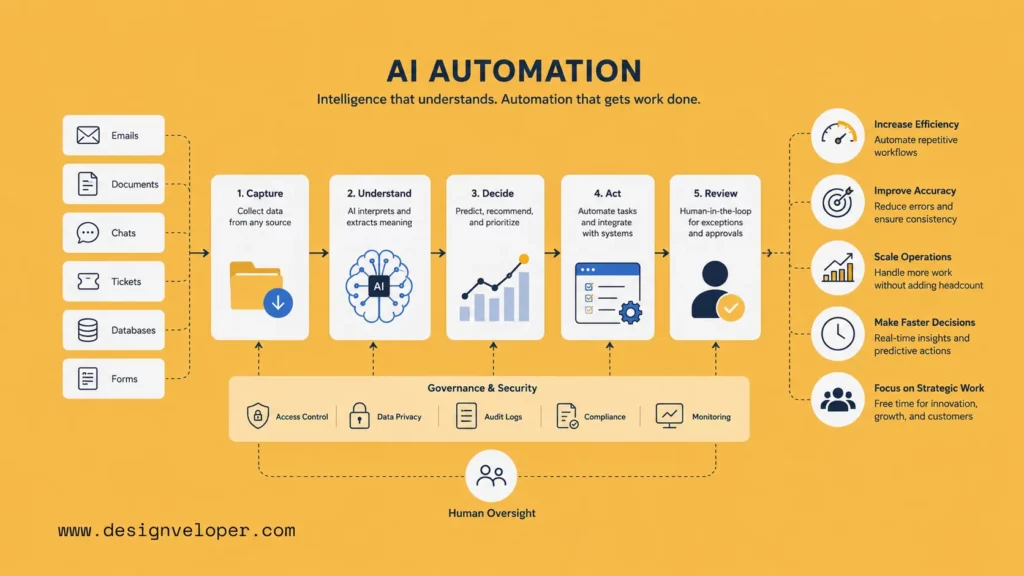
What is AI automation? AI automation is the use of artificial intelligence inside business workflows so software can understand inputs, make decisions, trigger actions, and reduce manual work. It helps teams handle tasks that are too variable for basic rule-based automation. These tasks often involve emails, documents, tickets, forms, invoices, approvals, conversations, and internal requests.
This topic matters because AI has moved from experiment to operations. McKinsey’s 2025 global survey found that 88 percent of respondents report regular AI use in at least one business function, while only about one-third say their companies have begun to scale AI programs. That gap shows the real challenge. Many companies already use AI. Far fewer have turned AI into repeatable workflows that improve speed, accuracy, and business control.
AI automation solves that problem by connecting intelligence with execution. It does not only generate text or answer questions. It can read a customer request, classify the intent, extract the right fields, recommend the next step, update a business system, and ask a human to review risky cases. So the value is not just “using AI.” The value is using AI to move real work forward.
This guide explains the definition, process, benefits, examples, and tools behind AI automation. It also shows how businesses can start with AI automation in a safe and practical way.
What Is AI Automation?
1. AI Automation Definition
AI automation is the use of artificial intelligence to automate business workflows that require interpretation, prediction, decision support, or adaptive action. It combines AI models, workflow logic, business rules, integrations, and human review.
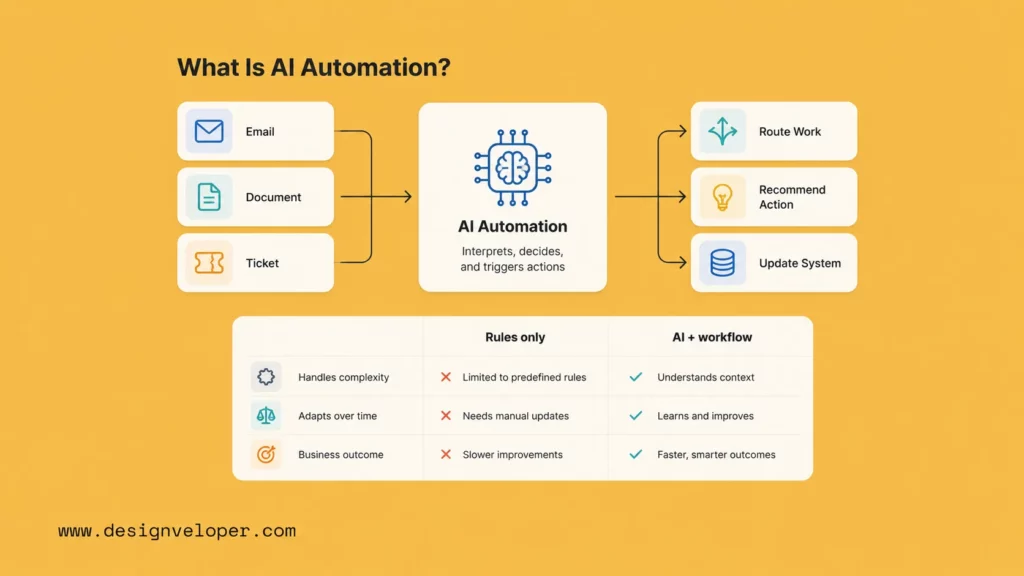
A simple automation workflow follows fixed instructions. For example, it sends a form to a manager when a field says “approval required.” AI automation can handle a less structured case. It can read a free-text request, detect the topic, estimate urgency, summarize the context, and route the task to the right person.
That difference makes AI automation useful for modern work. Many business processes do not start with clean data. They start with an email, a PDF, a chat message, a call transcript, a spreadsheet, or a support ticket. AI can help turn those messy inputs into structured actions.
IBM describes intelligent automation as the use of AI, business process management, and robotic process automation to streamline and scale decision-making across organizations. This definition helps explain the core idea. AI automation is not one tool. It is a system that connects intelligence, workflow, and action.
For example, an AI automation workflow in finance may read an invoice, extract vendor data, compare it with a purchase order, flag missing fields, and send the case for review. In customer service, it may summarize a ticket, suggest a reply, check account history, and escalate sensitive issues. In HR, it may classify employee requests, route approvals, and answer policy questions.
So, what is AI automation in practical terms? It is software that helps a business understand work faster and move that work through the right process with less manual effort.
2. Why AI Automation Matters for Modern Businesses
AI automation matters because business work has become too fast, fragmented, and data-heavy for manual handling alone. Teams now work across CRMs, help desks, ERPs, HR systems, spreadsheets, chat tools, email inboxes, and document platforms. Each system creates data. Yet people still spend hours moving that data from one place to another.
This creates operational drag. A support agent waits for context. A finance team checks invoice fields by hand. A recruiter repeats the same scheduling steps. A manager chases approvals across several tools. These tasks look small. However, they slow down the whole workflow when they happen every day.
AI automation removes part of this friction. It helps teams read, sort, summarize, classify, extract, predict, and route information faster. Then people can focus on exceptions, decisions, customer relationships, and strategy.
The market also shows why this shift is important. Gartner forecast that worldwide AI spending will total nearly $1.5 trillion in 2025. This level of investment means AI is no longer a side project for many companies. It is becoming part of enterprise software, operations, and workflow design.
Still, investment alone does not create value. A company can buy several AI tools and still keep the same slow process. AI automation becomes valuable when it changes how work moves. It should reduce manual steps, shorten cycle time, improve consistency, and help employees make better decisions.
This is why AI for business automation should start with a workflow problem. The question should not be, “How can we add AI?” A better question is, “Which workflow is slow, repetitive, measurable, and full of manual interpretation?” That question leads to stronger use cases.
3. How AI Automation Differs From Traditional Automation
Traditional automation and AI automation share the same goal. Both help businesses reduce manual work. However, they solve different types of problems.
Traditional automation works best when the process is stable and the input is predictable. It uses rules such as “if this happens, then do that.” This works well for simple workflows. For example, a system can send a welcome email after a user signs up. It can also create a task when a form reaches a certain status.
AI automation works better when the process needs interpretation. It can handle text, documents, images, voice transcripts, behavior patterns, and incomplete information. It can also improve recommendations as more data becomes available.
| Criteria | Traditional Automation | AI Automation |
|---|---|---|
| Input type | Structured data and fixed fields | Structured and unstructured inputs, including text, files, messages, and documents |
| Logic | Predefined rules | Prediction, classification, extraction, scoring, and recommendation |
| Best use case | Stable repetitive tasks | Variable workflows with high volume and many exceptions |
| Adaptability | Rules must be changed manually | Models and workflows can improve with better data and feedback |
| Human role | People handle exceptions after automation fails | People review sensitive cases, train workflows, and govern decisions |
| Main risk | Breaks when the process changes | Can create wrong outputs if governance, data quality, or review design is weak |
A simple example makes this clear. Traditional automation can move a ticket to the billing team if the customer selects “billing” from a dropdown. AI automation can read a message that says, “I think I was charged twice after upgrading my plan,” detect billing intent, identify possible urgency, summarize the problem, and route it with context.
That does not mean AI automation should replace traditional automation. The strongest systems often use both. Rules handle simple and stable steps. AI handles interpretation, prediction, and prioritization. Humans handle judgment, exceptions, and high-risk decisions.
How AI Automation Works
1. Intelligent Interpretation
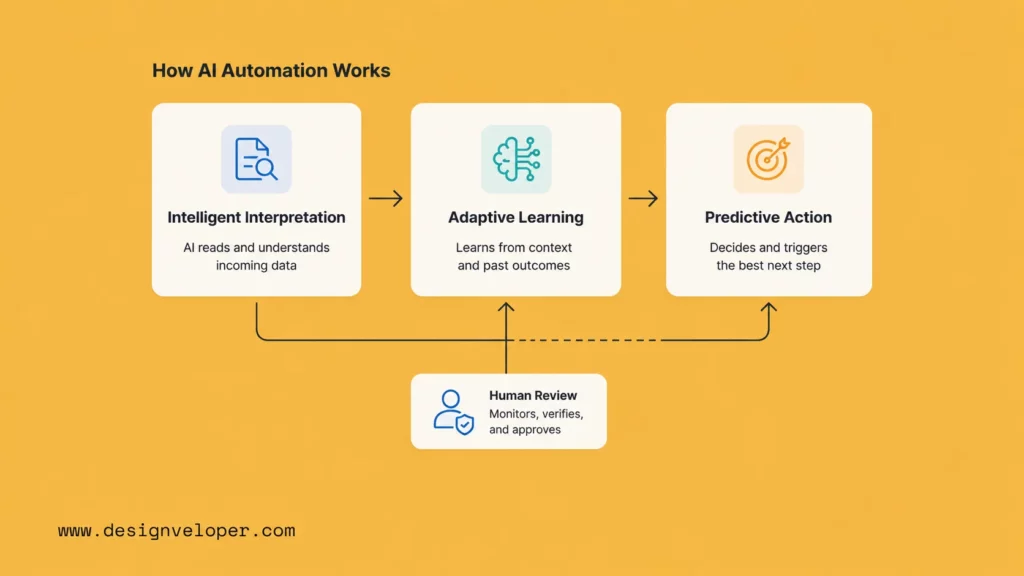
Intelligent interpretation is the first layer of AI automation. It means the system can understand information before the workflow continues.
Most business workflows start with input. The input may be an email, ticket, invoice, resume, contract, call transcript, chat message, or form. Traditional automation needs this input to follow a fixed format. AI automation can work with messier information.
For example, a customer support workflow may receive thousands of messages each week. Customers do not describe issues in the same way. One customer may write, “My order never arrived.” Another may write, “The package tracking stopped updating.” A third may write, “I paid for express delivery and still have nothing.” AI can identify that all three cases relate to delivery problems.
After that, the system can classify the topic, detect sentiment, summarize the message, extract order details, and decide whether the case needs urgent review. This creates a cleaner workflow for the support team.
The same pattern works in finance. AI can read invoices, identify vendor names, extract amounts, detect tax fields, and compare the document with purchase records. It also works in HR. AI can classify leave requests, policy questions, onboarding tasks, and hiring updates.
Intelligent interpretation turns raw input into usable workflow data. Without this layer, automation only works when the input is already clean. With this layer, automation can start earlier and handle more real-world variation.
2. Adaptive Learning
Adaptive learning helps AI automation improve over time. It does not mean the system should change without control. It means the workflow can use feedback, examples, rules, and performance data to become more useful.
For example, a document workflow may start with invoice extraction. At first, the system may miss some fields because vendors use different formats. The finance team corrects those fields during review. Then the team uses those corrections to improve prompts, validation rules, templates, or model settings.
The same idea applies to customer service. If agents keep editing AI-generated replies, the team can study those edits. They may find that the AI needs better product knowledge, clearer tone rules, or stronger escalation logic. The automation improves because people review the output and refine the system.
Adaptive learning also helps with routing. A workflow may learn that some cases need legal review, while others can go straight to support. It may learn that certain invoice patterns often create exceptions. It may learn that some HR requests need manager approval, while others only need a policy answer.
However, adaptive learning needs governance. A business should not let AI change critical workflows without review. Teams need version control, audit logs, approval rules, and clear owners. This is especially important when AI driven automation affects customers, money, compliance, or employee data.
The goal is controlled improvement. The system should learn from real work, but the business should decide how those lessons enter production.
3. Predictive Action
Predictive action is where AI automation moves from understanding to execution. The system does not only analyze information. It recommends or triggers the next step.
For example, a sales workflow may predict which lead needs follow-up first. It may draft a message, update a CRM field, and remind the account owner. A manufacturing workflow may detect an equipment signal that suggests a future failure. It may create a maintenance task before the machine stops. A finance workflow may flag an invoice as risky and send it to a reviewer.
Predictive action should match business risk. Low-risk actions can often happen automatically. For example, the system can tag a ticket, draft a reply, or create a task. Higher-risk actions need review. For example, the system should not approve a large payment, reject a candidate, or close a legal complaint without human oversight.
This is why good AI automation uses confidence levels. If the system has high confidence, it can move the workflow forward. If the case is unclear, sensitive, or unusual, it should ask a person to review it. This keeps the system useful without giving it too much autonomy.
UiPath’s 2025 Agentic AI Report supports this direction. It found that 90% of U.S. IT executives say they have business processes that would be improved by agentic AI, while 77% are prepared to invest in agentic AI this year. The reason is clear. Businesses want automation that can handle more than simple tasks. They want systems that can coordinate work across tools, people, and decisions.
Still, predictive action works only when the process is clear. AI cannot fix unclear ownership, poor data, or broken approval paths. It can only improve a workflow when the business defines the right goal, control model, and success metric.
Benefits Of AI Automation
1. Increased Efficiency
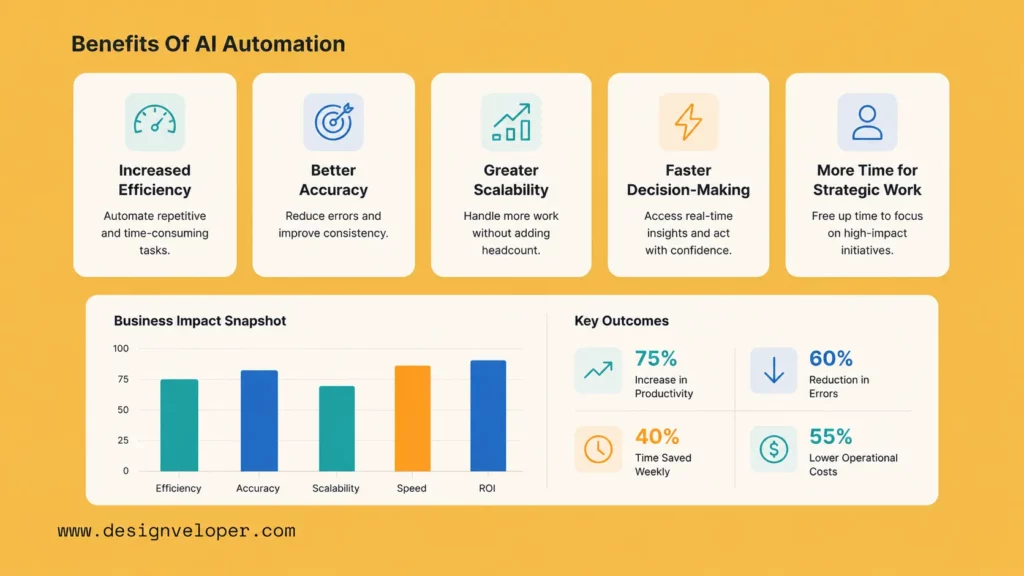
AI automation improves efficiency by reducing the manual steps that slow work down. It can read inputs, prepare context, update systems, route tasks, and draft responses before a person starts working on the case.
This matters because many employees lose time on coordination. They copy data from one tool to another. They check the same fields again and again. They sort requests by hand. They search for context across inboxes, spreadsheets, and business systems.
AI automation cuts some of that work. For example, a support team can use AI to summarize cases and recommend replies. A finance team can use AI to extract invoice fields and flag missing data. An HR team can use AI to route employee requests and prepare onboarding checklists.
The result is not just faster work. It is also smoother work. People start with better information. They spend less time preparing the task and more time solving the problem.
| Workflow | Manual Step Reduced | Efficiency KPI |
|---|---|---|
| Customer support | Reading, tagging, and routing tickets | First-response time |
| Finance | Copying invoice data into accounting systems | Invoice cycle time |
| HR | Sorting employee requests and scheduling steps | Time-to-complete request |
| Operations | Checking alerts and assigning follow-up tasks | Resolution time |
2. Better Accuracy
AI automation can improve accuracy when teams use it with clear rules and review paths. It helps reduce mistakes that come from repeated manual work, context switching, and inconsistent handling.
For example, invoice processing often creates errors when employees retype vendor names, invoice numbers, tax fields, or payment amounts. AI automation can extract those fields and compare them with existing records. It can also flag mismatches before payment approval.
Customer service teams can also improve consistency. AI can suggest answers from approved knowledge sources. It can remind agents about policy steps. It can also detect when a case needs escalation.
However, AI accuracy is not automatic. The system needs good data, strong prompts, validation rules, and human review for sensitive workflows. McKinsey’s 2025 survey notes that 51 percent of respondents from organizations using AI say their organizations have seen at least one negative consequence, with inaccuracy the most common issue. That is why governance matters.
AI automation should not hide errors. It should surface them earlier. A strong workflow shows confidence levels, missing fields, exception reasons, and review history. This helps people catch problems before they affect customers, payments, or compliance.
3. Greater Scalability
AI automation helps businesses scale operations without adding the same amount of manual labor for every increase in volume. This is useful when growth creates more tickets, invoices, documents, approvals, leads, or internal requests.
For example, a SaaS company may receive more support tickets as its customer base grows. Without automation, the company may need to hire support agents at the same pace. With AI automation, the team can classify tickets, draft replies, and route simple cases faster. Human agents can then focus on complex issues.
Finance teams face the same pattern. As transaction volume grows, invoice review can become a bottleneck. AI automation can extract fields, match purchase orders, flag exceptions, and prepare approval tasks. The team still controls payments, but it handles a larger workload with less friction.
Scalability also applies to enterprise software. Gartner predicts that 40 percent of enterprise applications will include task-specific AI agents by the end of 2026, up from less than 5 percent in 2025. This shows that AI automation will become more embedded in the tools employees already use.
Still, businesses should scale carefully. A workflow should prove value in one process before it expands. If a small workflow cannot improve measurable KPIs, a larger rollout will only spread the weakness.
4. Faster Decision-Making
AI automation supports faster decisions by preparing the right information earlier. It can summarize context, detect patterns, rank priorities, and recommend next steps.
This helps managers and frontline teams. A support lead can see which cases need urgent action. A finance manager can see which invoices have missing data. A sales leader can see which leads show strong buying signals. An operations manager can see which alerts need immediate attention.
Faster decision-making does not mean careless decision-making. It means people receive better signals before they act. AI automation can reduce the time spent searching for context. Then employees can spend more time judging the situation.
For example, a customer complaint may include order history, past tickets, sentiment, product details, and refund rules. A human can review all of that information. But AI can collect and summarize it first. This makes the decision faster and more consistent.
5. More Time For Strategic Work
AI automation gives employees more time for work that needs judgment, creativity, empathy, and planning. It removes low-value steps from daily workflows.
This benefit matters because automation should not only reduce cost. It should improve how teams use their time. Support agents can spend more time solving complex customer issues. HR teams can spend more time improving employee experience. Finance teams can spend more time analyzing cash flow and risk. Operations teams can spend more time improving systems instead of chasing updates.
This also changes the role of employees. People become reviewers, process owners, exception handlers, and workflow designers. They do not disappear from the process. They move to higher-value parts of it.
That shift fits the safest view of AI powered automation. AI handles routine interpretation and preparation. People handle accountability, trust, and judgment.
Common Use Cases Of AI Automation
1. AI Automation For Customer Service And Support
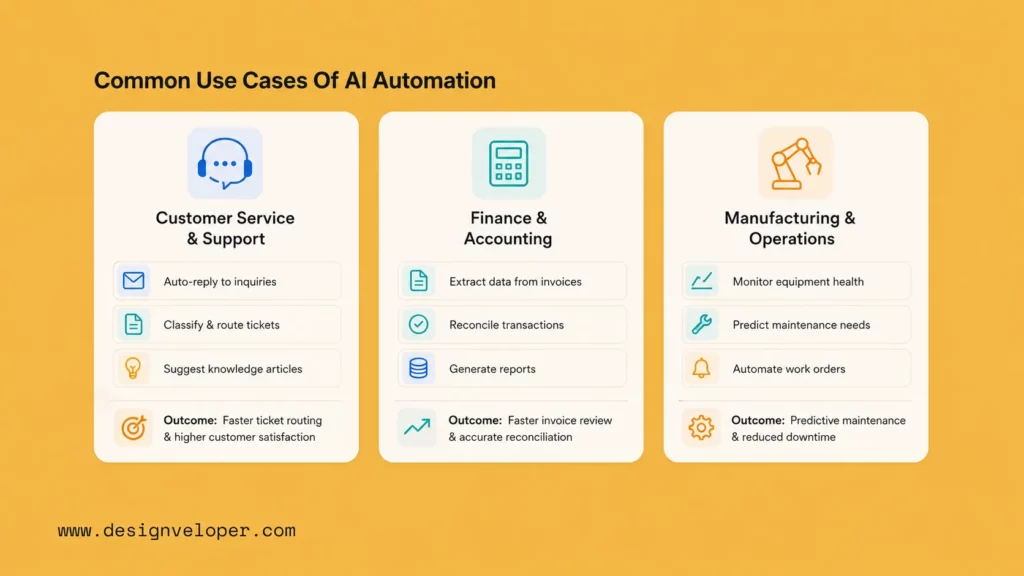
Customer service is one of the strongest use cases for AI automation. Support teams handle high volumes of repeated questions, but each case still has different details. This creates a perfect fit for AI-assisted triage, response drafting, knowledge retrieval, and escalation.
Salesforce’s 2025 State of Service research found that service teams estimate 30% of cases are currently handled by AI and expect that figure to reach 50% by 2027. This shows how quickly service operations are moving toward AI-assisted workflows.
A customer service AI automation workflow may look like this:
- The system receives a customer message.
- AI detects the topic, sentiment, language, and urgency.
- The workflow pulls account and order data from internal systems.
- AI summarizes the issue and suggests a reply.
- The system routes simple cases to self-service or an agent queue.
- It escalates sensitive cases to a human specialist.
This workflow helps the team respond faster. It also helps agents avoid repetitive reading and searching. More importantly, it keeps humans involved when the case affects refunds, contracts, legal issues, or customer trust.
Example: An e-commerce customer writes, “I paid for fast shipping, but the tracking page has not changed for three days.” AI can identify this as a delivery issue, check the order record, summarize the problem, draft an apology, and route the case to the logistics queue. If the customer is a high-value account or the delay breaks an SLA, the workflow can escalate it.
This is where AI automation becomes practical. It does not replace the whole support team. It removes the slow start of each case and helps people act with better context.
2. AI Automation For Finance And Accounting
Finance and accounting teams often handle repetitive work with high accuracy requirements. This makes them strong candidates for AI automation, especially in accounts payable, invoice review, expense management, reconciliation, and audit preparation.
AP work still contains many manual steps. Teams receive invoices in different formats. They compare vendor data, purchase orders, tax fields, amounts, dates, and approvals. Each error can delay payment or create compliance risk.
Recent AP automation research shows that the global AP automation market is estimated at USD 6.17 billion in 2025 and is expected to reach about USD 11.17 billion by 2030. This growth reflects a clear business need. Finance teams want faster processing, fewer errors, and better payment control.
A finance AI automation workflow may look like this:
- The system receives an invoice by email or portal upload.
- AI extracts vendor name, invoice number, amount, tax data, due date, and line items.
- The workflow compares the data with purchase orders and vendor records.
- AI flags missing fields, duplicate invoices, unusual amounts, or policy issues.
- The system sends clean invoices to approval.
- It routes exceptions to finance staff for review.
Example: A supplier sends an invoice with a slightly different company name. A manual workflow may miss the issue or delay the payment. AI automation can match the vendor to existing records, flag the name difference, and ask the finance team to confirm it before payment.
This use case also shows why AI automation services need governance. Finance workflows involve money, compliance, and audit trails. A business should keep review rules for high-value payments, new vendors, unusual patterns, and missing documents.
3. AI Automation For Manufacturing And Operations
Manufacturing and operations teams use AI automation to improve visibility, reduce delays, and act earlier on process signals. The strongest use cases often involve predictive maintenance, quality inspection, inventory alerts, production planning, and workflow routing.
Deloitte’s 2025 smart manufacturing research surveyed 600 executives from large manufacturing companies with headquarters or operations in the United States. The report highlights a clear direction. Manufacturers want smarter systems, but they also need to manage transformation risk, talent needs, and operational complexity.
AI automation helps because factory and operations data often changes in real time. Machines create sensor data. Teams track quality checks. Supply chains update delivery status. Maintenance teams handle alerts. Managers need to decide what matters now and what can wait.
A manufacturing AI automation workflow may look like this:
- Sensors collect machine data such as temperature, vibration, and runtime.
- AI detects patterns that may signal failure or quality issues.
- The workflow creates a maintenance ticket before downtime happens.
- The system checks spare parts, technician availability, and production schedules.
- It recommends the best maintenance window.
- A human supervisor approves the action.
Example: A production line shows rising vibration on a key machine. AI detects that this pattern often appears before a bearing failure. The system creates a maintenance task, suggests a time slot, and alerts the operations manager. The team can act before the machine stops production.
AI automation can also support back-office operations. It can route internal requests, monitor SLA delays, summarize shift reports, and detect repeated bottlenecks. This makes operations more proactive and less dependent on manual status checks.
1. Workflow Automation Platforms
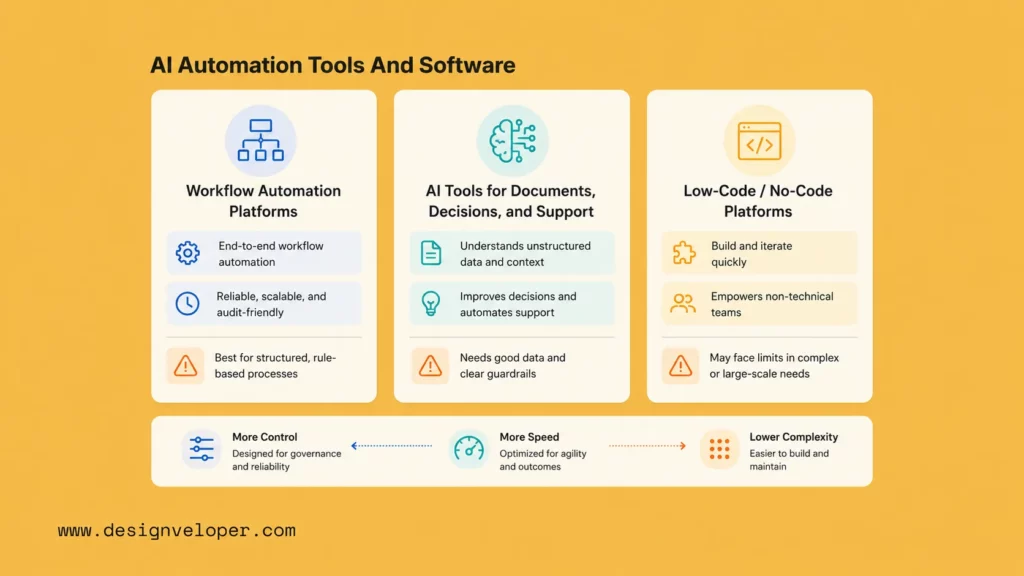
Workflow automation platforms help teams design, run, and monitor business processes. They connect apps, trigger actions, manage approvals, and move tasks between systems. When these platforms add AI, they can support smarter routing, document handling, decision support, and agentic workflows.
Common examples include Microsoft Power Automate, UiPath, ServiceNow, Zapier, Make, and Workato. These platforms are useful when a business needs to connect several tools without building every integration from scratch.
They work best for workflows such as:
- Ticket routing across help desk and CRM systems.
- Invoice intake and approval workflows.
- Employee onboarding tasks.
- Sales follow-up and CRM updates.
- Internal request management.
- Operations alerts and escalation flows.
The main benefit is speed. Teams can launch simple workflows faster. They can also test automation before investing in custom software. However, these platforms still need clean process design. A low-code workflow can become messy if the business does not define ownership, exceptions, and governance.
| Platform Type | Best For | Main Strength | Watch Out For |
|---|---|---|---|
| Enterprise automation platforms | Large workflows across departments | Governance, connectors, and scale | Implementation complexity |
| Integration automation tools | Connecting SaaS apps | Fast setup and many connectors | Limited fit for complex business logic |
| RPA platforms | Legacy systems and repetitive office tasks | Works with systems that lack modern APIs | Can break when user interfaces change |
| Agentic automation platforms | Multi-step workflows with AI decision support | Can coordinate tools, data, and tasks | Needs strong monitoring and permissions |
Businesses should choose workflow platforms when the process is clear and the main need is orchestration. If the workflow needs deep domain logic, custom interfaces, or sensitive approval rules, a custom build may be stronger.
2. AI Tools For Documents, Decisions, And Support
AI automation software also includes specialized tools for documents, decisions, and support. These tools solve narrower problems than full workflow platforms, but they can deliver value fast.
Document intelligence tools help teams extract, classify, and validate information from PDFs, scans, forms, contracts, claims, receipts, and invoices. They are useful in finance, insurance, legal operations, logistics, healthcare administration, and HR.
Decision support tools help teams rank, score, and recommend actions. For example, sales teams can prioritize leads. Finance teams can flag risky transactions. Operations teams can detect anomalies. HR teams can route requests based on policy and context.
Support AI tools help customer service teams manage tickets, generate replies, retrieve knowledge, summarize conversations, and guide agents. They work best when the business has strong help content, clear escalation rules, and clean customer data.
| Tool Category | Common Use | Example Output | Good KPI |
|---|---|---|---|
| Document intelligence | Invoice and contract processing | Extracted fields and exception flags | Processing time, error rate |
| Decision intelligence | Risk scoring and prioritization | Recommended next action | Decision speed, escalation accuracy |
| Customer support AI | Ticket triage and reply drafting | Summary, suggested answer, routing tag | First-response time, CSAT, resolution time |
| Knowledge assistants | Internal Q&A and policy lookup | Answer with source context | Self-service rate, request volume |
These tools are powerful, but they need good source material. A support AI tool cannot give reliable answers if the knowledge base is outdated. A document tool will struggle if scans are unreadable. A decision tool will fail if historical data is biased or incomplete.
That is why tool selection should include a data review. Teams should test tools against real documents, real tickets, and real exceptions before making a buying decision.
3. Low-Code And No-Code AI Automation Platforms
Low-code and no-code AI automation platforms help non-engineering teams build workflows with visual builders, templates, connectors, and AI blocks. They make automation more accessible to operations, marketing, HR, finance, and support teams.
These platforms are useful for simple and medium-complexity workflows. For example, a marketing team can use a no-code workflow to summarize form submissions and route qualified leads. An HR team can use a low-code tool to classify employee requests. A finance team can use it to send invoice reminders and approvals.
The biggest advantage is speed. Teams do not need to wait months for a full engineering project. They can test a workflow, measure value, and improve the process in small steps.
However, low-code and no-code platforms also create risks. A business can end up with too many fragile workflows. Teams may build automations without security review. Data may move across tools without enough control. AI prompts may change without version tracking.
To avoid these issues, companies should set rules early:
- Define which teams can create automations.
- Use approved tools and connectors.
- Require review for workflows that touch customer, employee, financial, or legal data.
- Document triggers, actions, owners, and fallback paths.
- Monitor errors and workflow changes after launch.
Low-code AI automation works best when citizen builders and technical teams work together. Business users understand the workflow. Engineers and IT teams understand security, architecture, and integration risk. A shared model gives the company speed without losing control.
How Can Businesses Start With AI Automation?
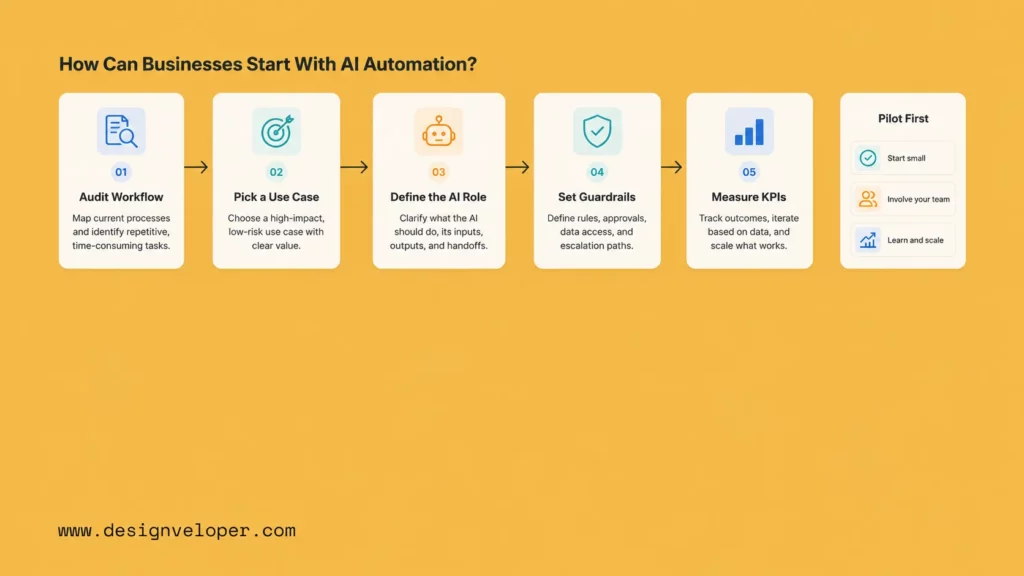
Businesses should start with one clear workflow, not a broad AI transformation plan. A focused workflow makes it easier to prove value, manage risk, and improve the system before scaling.
The first step is to identify a process with high volume, repeated manual work, messy inputs, and measurable impact. Good candidates often include customer tickets, invoices, HR requests, sales follow-ups, document review, internal support, and operations alerts.
Next, the team should map the workflow. This means listing the inputs, owners, systems, handoffs, approvals, exceptions, and pain points. The map should show where people spend time and where delays happen. It should also show which decisions need human judgment.
After that, the business should define the role of AI. The role should be specific. AI may classify requests, extract fields, summarize context, draft replies, score risk, recommend actions, or route work. A vague goal such as “use AI in operations” is too broad. A clear goal such as “use AI to classify incoming HR requests and route them to the right owner” is easier to test.
Then the team should choose the right tool or build path. A packaged AI automation tool may work when the workflow is common and integrations are standard. A custom AI workflow may work better when the process is unique, deeply integrated, or central to competitive advantage.
| Step | Question To Ask | Output |
|---|---|---|
| Find the workflow | Where does manual work slow the business down? | One target process |
| Map the process | What are the inputs, owners, decisions, and exceptions? | Workflow map |
| Define the AI role | Should AI classify, extract, summarize, score, or act? | AI task definition |
| Set controls | Which actions need review, logs, and fallback rules? | Governance model |
| Measure value | Which KPI should improve after launch? | Success metric |
| Scale carefully | What should improve before the workflow expands? | Rollout plan |
Governance should come before launch. The business should define confidence thresholds, audit logs, review paths, fallback rules, and access controls. This is important because AI automation can make mistakes. A safe workflow makes those mistakes visible and reviewable.
Measurement also matters. The team should track KPIs before and after launch. Common metrics include cycle time, first-response time, backlog size, error rate, automation rate, cost per transaction, SLA attainment, and rework rate. If the numbers do not improve, the team should check the process design before blaming the AI model.
Designveloper often approaches AI automation as a workflow and software delivery problem, not just a tool selection problem. We have worked on 100+ projects in 20+ industries across 50+ technologies, including AI-powered business software, web applications, mobile applications, UI/UX design, and VoIP solutions. That delivery background matters because real AI automation often needs integrations, review dashboards, user roles, data pipelines, and production support.
For example, a business may need an internal assistant that handles HR requests. Another may need document intelligence for invoices and contracts. Another may need an AI support workflow that summarizes tickets and updates a CRM. In each case, the best solution depends on the workflow, risk level, system landscape, and business goal.
Designveloper can support AI automation services by helping teams audit workflows, define automation opportunities, design AI-assisted processes, build custom AI software, and integrate automation into real products and internal systems. The goal is not to add AI for its own sake. The goal is to reduce manual work and make business workflows faster, clearer, and easier to scale.
Conclusion
AI automation is the use of artificial intelligence inside business workflows so software can understand information, recommend actions, and move work forward with less manual effort. It works best when a company applies it to a clear process with high volume, messy inputs, measurable impact, and human review. The right approach is simple. Start with one workflow. Define the AI role. Set controls. Measure the outcome. Then scale what works. For companies that want to move from AI ideas to production-ready workflows, Designveloper can help turn AI automation into practical business software that supports real operations.


