


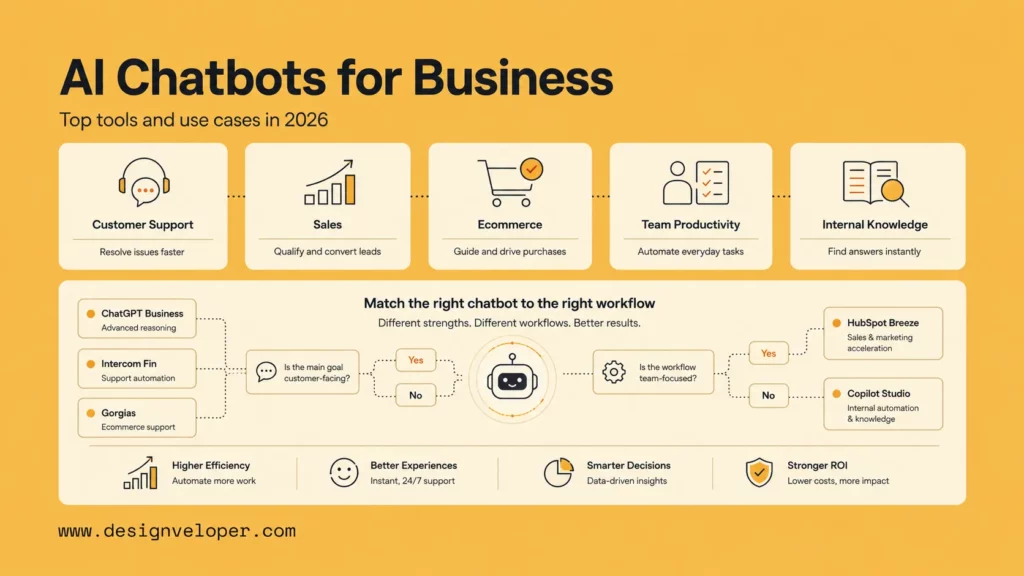
Choosing an ai chatbot for businesses is no longer a simple question of which tool sounds the most advanced. In 2026, business teams need bots that answer customers accurately, qualify leads, book meetings, connect to CRM and help desk data, and hand off safely when the conversation needs a person. The best choice depends on the workflow: customer support, ecommerce, sales, internal knowledge, or deeper automation.
This guide compares leading AI chatbots by real business fit. It focuses on channels, integrations, setup effort, pricing signals, and the operating model each tool supports. It also explains when an off-the-shelf chatbot is enough and when a company should design a custom chatbot experience around its data, approvals, and long-term operations.
Best AI Chatbots For Businesses At A Glance
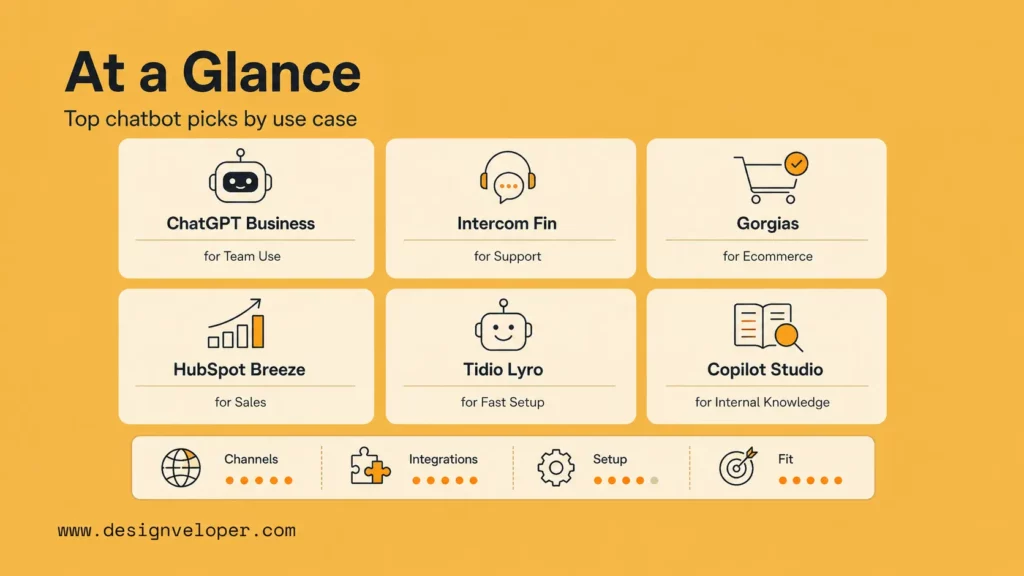
The strongest shortlist starts with use case, not brand recognition. A support team needs resolution quality and escalation controls. A sales team needs routing, CRM context, and booking. An ecommerce team needs order, product, return, and Shopify context. A knowledge-heavy company needs secure internal access and permission-aware answers.
| Tool | Best For | Channels | Core Strength | CRM Or Workflow Integrations | Pricing |
|---|---|---|---|---|---|
| ChatGPT Business | General-purpose team use | Web, mobile, workspace use, custom GPTs | Flexible research, writing, analysis, and reusable team assistants | Connectors, custom GPTs, workspace controls, API-backed custom builds | Business subscription; see OpenAI pricing |
| Intercom Fin | Customer support automation | Chat, email, SMS, WhatsApp, social, voice options | AI agent built around support resolution and customer service workflows | Intercom help desk, knowledge base, ticketing, customer data | Seat pricing plus Fin AI Agent pricing shown on Intercom plans |
| Gorgias AI Agent | Ecommerce and Shopify stores | Email, chat, social, SMS, ecommerce support surfaces | Shopify-aware shopping and support automation | Shopify, ecommerce policies, order data, help desk workflows | Plan and AI Agent subscription; see Gorgias pricing |
| HubSpot Breeze Agents | B2B lead generation and meeting booking | Website, CRM, sales and service workflows | Native CRM context for customer and prospecting workflows | HubSpot Smart CRM, Service Hub, sales workflows, customer history | Credits and task-based pricing for selected Breeze agents |
| Tidio Lyro | Small businesses that need fast setup | Website chat, live chat, ecommerce support channels | Simple AI support automation with accessible entry points | Tidio live chat, ecommerce apps, help center content | Free trial conversations, then paid Lyro AI Agent limits |
| Microsoft Copilot Studio | Internal knowledge and employee support | Microsoft 365, Teams, web, authenticated internal agents | Permission-aware internal agents for Microsoft environments | Microsoft 365, Power Platform, business data connectors | Copilot Credits and licensing rules vary by use case |
| Salesforce Agentforce | Salesforce-heavy service and sales teams | Salesforce service, sales, digital channels, contact center workflows | Agent actions inside Salesforce customer records and workflows | Salesforce CRM, Service Cloud, Data Cloud, Slack, industry clouds | Conversation, credit, and user-based pricing options |
| Lindy | Lightweight workflow automation | Email, calendar, meetings, CRM, productivity apps | No-code assistants for admin, follow-up, and sales operations | Gmail, Google Calendar, Slack, Notion, HubSpot, Salesforce, and more | Tiered plans from individual to enterprise |
How We Chose The Best AI Chatbots For Businesses
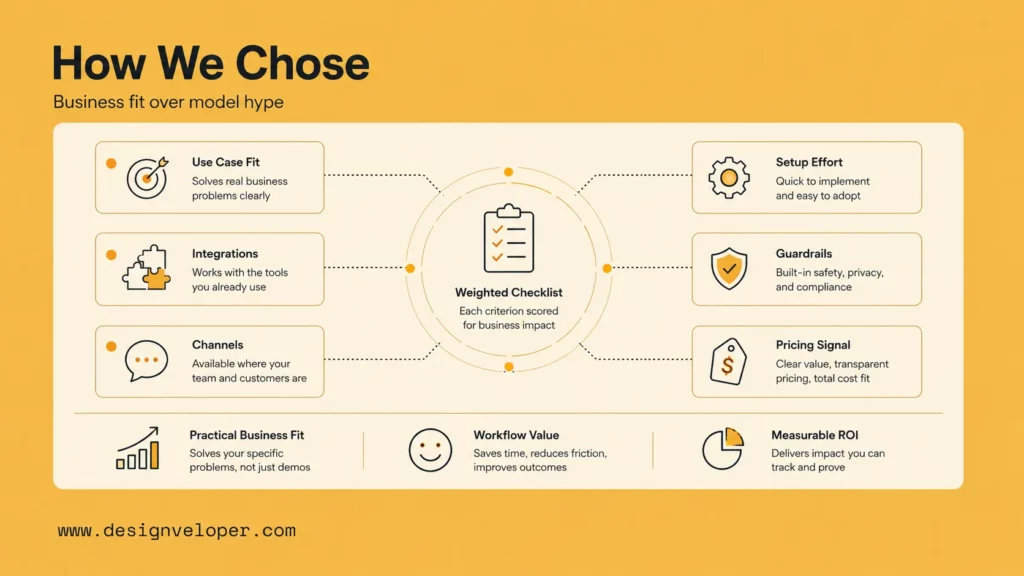
The ranking uses practical business fit instead of model quality alone. Modern language models are powerful, but a business chatbot succeeds only when it can use the right context, follow company rules, escalate risky issues, and show measurable value inside existing work.
Support depth mattered first. Customer service leaders are under pressure to implement AI, with Gartner reporting that 91% of service leaders felt pressure to adopt AI in 2026. That pressure makes governance important. A chatbot that answers quickly but creates inaccurate refunds, privacy issues, or weak handoffs can damage trust faster than it saves time.
Workflow fit came next. Salesforce research says AI is expected to handle a larger share of service cases, rising toward half of all customer service cases by 2027 according to its State of Service announcement. That makes integrations essential. The best tools do not only chat. They pull order history, understand account status, create tickets, book meetings, or route work to the right person.
Ease of rollout also matters. Small teams often need a bot that can launch from a website, help center, or Shopify store with limited engineering support. Larger teams need security controls, analytics, permissions, test environments, and workflow governance. Pricing was reviewed as a fit signal, not as the only decision factor, because AI chatbot pricing increasingly mixes seats, usage, credits, automated resolutions, or task outcomes.
The Best AI Chatbots For Businesses In 2026
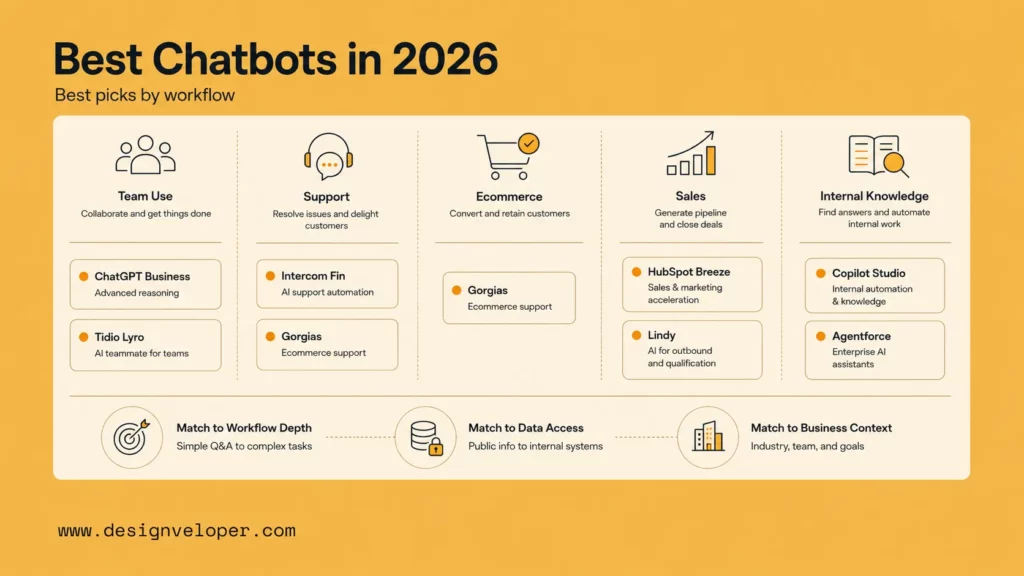
Best For General-Purpose Team Use
ChatGPT Business is the strongest general-purpose choice for teams that want one AI workspace for research, writing, analysis, brainstorming, knowledge work, and reusable internal assistants. It is not a plug-and-play customer support bot by itself, but it is useful for teams that need flexible AI across many roles before investing in a dedicated support or sales chatbot.
Its business value comes from breadth. Teams can create custom GPTs for repeated tasks, use workspace controls, and apply AI to documents, spreadsheets, proposals, research, and internal processes. For companies planning a custom AI chatbot, ChatGPT Business can also help teams prototype prompts, conversation flows, knowledge structures, and escalation rules before building a production system with APIs and integrated data.
Choose it when the main need is team productivity and reusable AI assistance. Avoid treating it as a finished public-facing support chatbot unless the company has designed a proper application layer, knowledge source, permissions model, logging, and human review process around it.
Best For Customer Support Automation
Intercom Fin is a strong fit for companies that already think of chat as part of a broader customer service operation. Intercom presents Fin as an AI agent that can answer customers across live chat, email, SMS, WhatsApp, social channels, and other service touchpoints. That makes it attractive for support teams that want AI resolution, inbox workflows, help center content, and human support in one environment.
Fin is strongest when the support knowledge base is clean and the company can define clear resolution rules. It is especially useful for SaaS, subscription, and digital product teams that need to deflect repetitive questions while preserving a path to human agents. The main buying question is cost control. Teams should model seat pricing, AI resolution pricing, expected automation rates, and fallback volume before committing.
Zendesk AI agents deserve comparison here too, especially for organizations already using Zendesk. The company has been expanding AI agent packaging and support capabilities, including a 2026 rollout of broader AI agent access. Zendesk can be a better fit when the company has mature ticketing, support operations, and reporting inside Zendesk already.
Best For E-Commerce And Shopify Stores
Gorgias AI Agent is one of the clearest ecommerce-specific options because it is built around Shopify data, product questions, order status, returns, and post-purchase support. Its documentation says the AI Agent can use Shopify store data, policies, brand guidelines, and workflows to handle customer questions, while its Shopping Assistant and Support Agent skillsets cover pre-purchase and post-purchase needs.
That specialization matters. Ecommerce chatbots fail when they answer general questions well but cannot understand product availability, order status, delivery rules, discounts, return policy, or subscription changes. Gorgias is strongest for ecommerce teams that need support and revenue assistance in one place, especially when the store already uses Shopify and wants the AI assistant to share context with human agents.
Shopify Inbox is a lighter option for merchants that want simple chat and AI-generated answers inside Shopify. It is easier to start with, but it is less suited to complex support operations. A good path for many stores is to begin with simple FAQ and order questions, then move to a more advanced AI agent when support volume, catalog complexity, or refund risk grows.
Best For B2B Lead Generation And Meeting Booking
HubSpot Breeze Agents are a strong fit for companies that already run marketing, sales, and service in HubSpot. HubSpot positions its Customer Agent and Prospecting Agent around CRM context, customer history, and outcome-based pricing updates. That makes the platform useful when the chatbot needs to qualify visitors, answer service questions, connect to known records, or support sales follow-up.
For B2B lead generation, the chatbot should do more than collect an email address. It should identify intent, ask qualifying questions, route the lead by account size or region, book meetings, and update the CRM with useful context. HubSpot has an advantage when the company already uses HubSpot forms, lists, workflows, lifecycle stages, and sales sequences.
Salesforce Agentforce is the enterprise alternative for Salesforce-heavy teams. Its pricing page describes flexible models such as conversations, Flex Credits, and user-based options. Agentforce is a better fit when the chatbot or agent must act inside Salesforce records, service processes, and sales workflows rather than sit as a separate website widget.
Best For Small Businesses That Need Fast Setup
Tidio Lyro is a practical option for small businesses that want AI chat without a long implementation project. Tidio’s pricing and help materials explain that accounts can start with a limited number of Lyro conversations, with paid plans refreshing usage. That entry point helps small teams test whether automated answers reduce repetitive questions before buying a larger service platform.
Lyro is a good fit for local services, small ecommerce stores, and early-stage teams with clear FAQs, simple customer journeys, and limited technical resources. The main requirement is disciplined knowledge setup. A small company should feed the bot accurate service descriptions, opening hours, pricing policies, refund rules, and escalation instructions. If the business has messy policies or many exceptions, a fast setup can still create avoidable customer confusion.
Lindy can also suit small teams when the need is not customer support alone. It is better for personal and team workflow automation across inboxes, calendars, meetings, CRM tasks, and follow-ups. Choose Tidio when the priority is website support chat. Choose Lindy when the priority is lightweight operational assistance behind the scenes.
Best For Internal Knowledge And Employee Support
Microsoft Copilot Studio is the strongest fit for companies already standardized on Microsoft 365, Teams, SharePoint, Power Platform, and Microsoft identity. Internal knowledge bots need permissions, authentication, and governance more than a flashy chat interface. Employees may ask about HR policies, IT access, finance workflows, onboarding, or project documents, and the assistant must respect who is allowed to see what.
Copilot Studio is useful when companies want authenticated employee-facing agents inside Microsoft environments. Microsoft documents billing through Copilot Credits and licensing rules, and the details vary by whether the agent is employee-facing, which features it invokes, and which licenses users already have. That makes planning important before rollout.
For larger service organizations, Zendesk or Salesforce can support employee service use cases too. The choice depends on where employee requests already live. If staff work inside Teams and SharePoint, Microsoft is usually natural. If IT, HR, or service desks already run in Salesforce or Zendesk, those ecosystems may reduce operational friction.
What Makes An AI Chatbot Actually Useful For Businesses
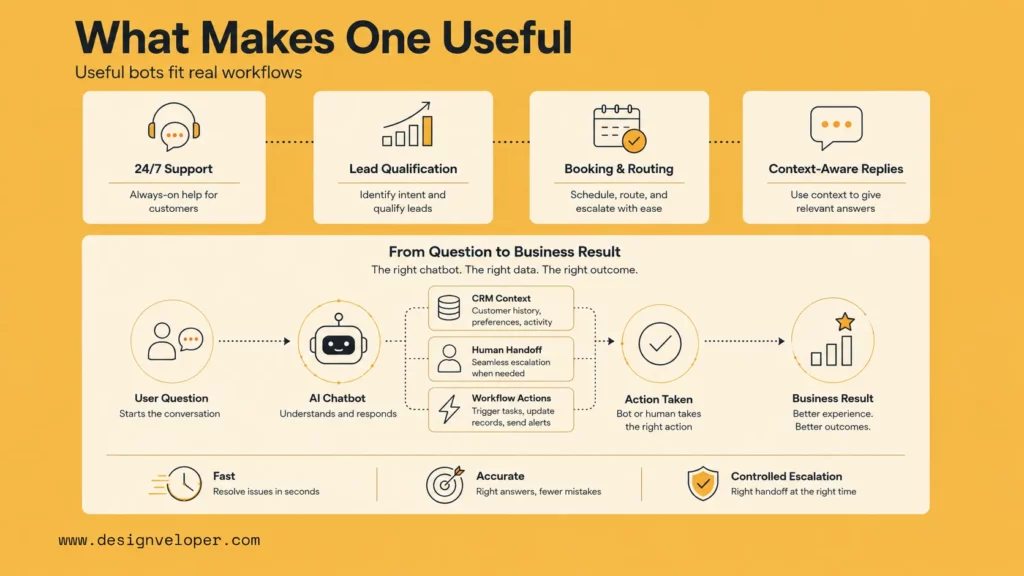
24/7 Support Without Expanding Headcount
The most visible benefit of an AI chatbot is availability. Customers can ask questions after hours, on weekends, or during traffic spikes without waiting for a human queue. Zendesk’s 2026 CX content reports that many customers find chatbots helpful for simple issues and associate AI with faster replies, according to its CX Trends 2026 coverage.
However, 24/7 availability is only valuable when the chatbot knows its boundaries. Simple order lookup, password reset guidance, appointment information, pricing clarification, and FAQ answers are good automation candidates. Complaints, billing disputes, sensitive account changes, medical or legal issues, and high-value sales conversations often need human review or a carefully designed approval step.
Lead Qualification, Sales Support, And Booking
A sales chatbot is useful when it reduces friction between curiosity and a real conversation. It should understand the visitor’s goal, ask only the questions needed to qualify the lead, and route the person to a relevant next step. A weak bot asks too many generic questions. A strong bot uses context: page viewed, company size, industry, CRM status, budget range, and urgency.
For B2B teams, this often means connecting the chatbot with CRM workflows. HubSpot, Salesforce, and similar platforms are valuable because the conversation can become a contact record, task, deal note, meeting, or service ticket. The chatbot should not just produce a transcript. It should move the process forward.
Context-Aware Conversations Across Real Workflows
The next generation of business chatbots is context-aware. The bot does not answer from a static FAQ only. It understands product catalog data, order history, account tier, contract terms, knowledge base articles, CRM records, and workflow state. IBM’s guide to AI customer service chatbots describes how modern systems combine natural language processing, generative AI, and enterprise data to support more useful conversations.
This is where many companies discover the gap between buying a chatbot and building a chatbot experience. A tool can provide the interface and model layer, but the business still needs clean content, reliable integrations, escalation logic, analytics, compliance review, and ownership. Without those pieces, the bot may answer fluently while still failing the real workflow.
What Features Matter Most Before You Choose
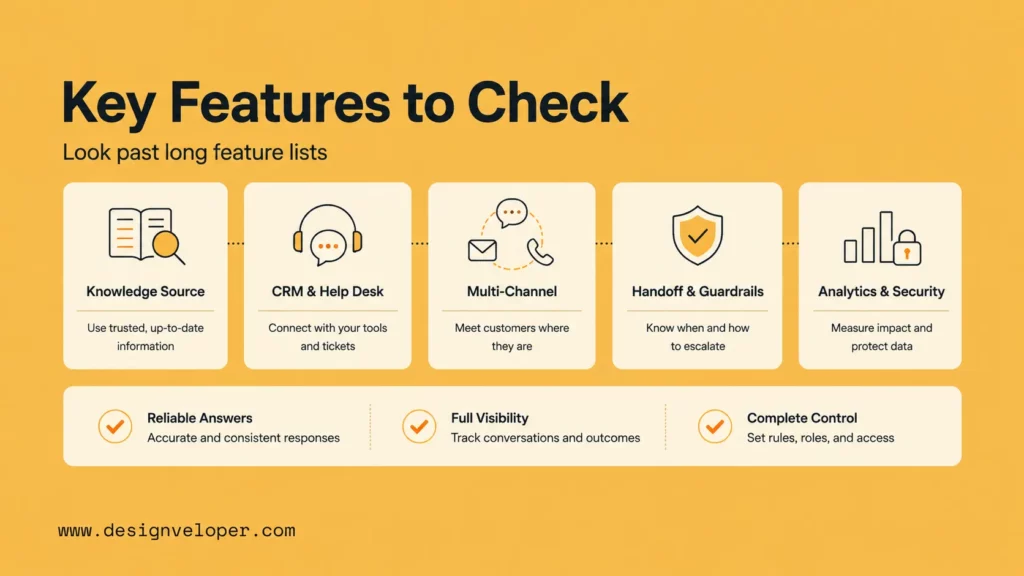
Feature lists can be noisy, so evaluate chatbot platforms around the capabilities that change day-to-day operations. The first is context awareness. The bot should know which sources it can use, when data was updated, and which information is safe to reveal. For ecommerce, that may mean Shopify order and product data. For internal support, it may mean permission-aware SharePoint or HR policy access.
The second is CRM and help desk integration. A business chatbot should create, update, route, or summarize work inside the systems the team already uses. Intercom, Zendesk, HubSpot, Salesforce, Gorgias, and Microsoft all become more valuable when the chatbot is not isolated from tickets, contacts, accounts, conversations, and reports.
The third is multi-channel deployment. Customers may reach the business through website chat, email, SMS, WhatsApp, social media, in-app chat, or voice. A chatbot does not need every channel on day one, but the company should know where customers actually ask for help and whether the platform can support those channels later.
The fourth is human handoff and guardrails. A good chatbot can say when it does not know, transfer the conversation, preserve context for the human agent, and follow rules for refunds, discounts, compliance, and sensitive data. This is especially important because recent reporting on customer communications AI shows that governance, hallucination risk, and auditability remain serious deployment concerns for many organizations.
The fifth is analytics, security, and compliance. Teams need to see resolution rate, escalation reasons, unanswered questions, customer satisfaction, cost per automated conversation, and risky responses. They also need controls for data retention, access, training data, audit logs, and privacy. A chatbot that cannot be measured cannot be safely improved.
Which AI Chatbot Fits Your Business Best?
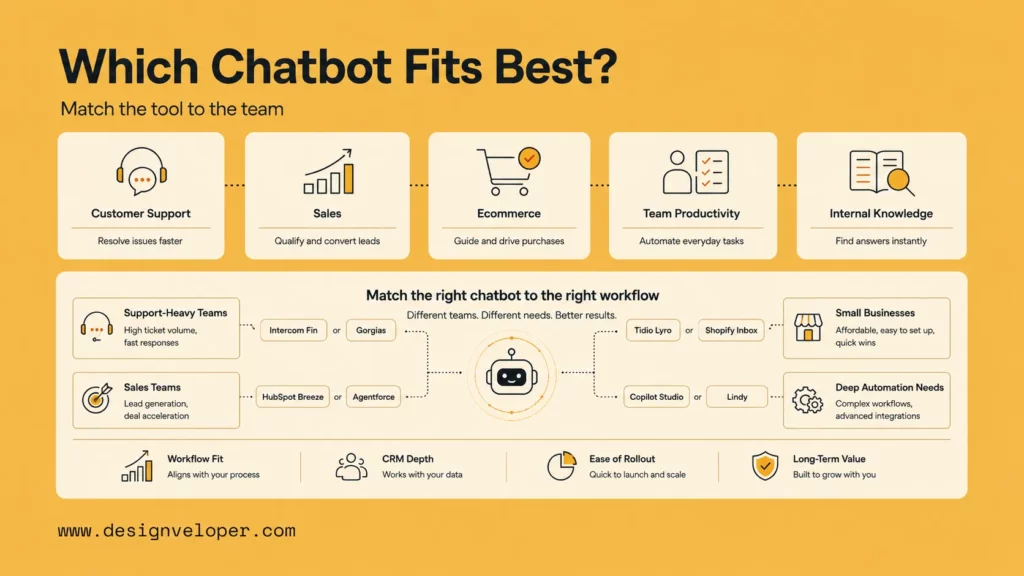
For Support-Heavy Teams
Support-heavy teams should start with Intercom Fin, Zendesk AI agents, Gorgias AI Agent, or Salesforce Agentforce depending on their existing stack. The best fit is usually the platform where tickets, knowledge, customer records, and support analytics already live. Migration cost matters. A slightly less exciting bot inside the right workflow often beats a better demo that creates a separate inbox.
Before buying, support teams should calculate expected automated resolutions, human escalation volume, cost per resolution, and the quality bar for customer-facing answers. They should also test the bot against real historical tickets, not only ideal FAQ examples.
For Sales And Lead Capture
Sales teams should prioritize HubSpot Breeze Agents, Salesforce Agentforce, or a custom chatbot connected to CRM and calendar systems. The chatbot should qualify the lead, route the account, create CRM notes, book meetings, and trigger follow-up. It should also recognize when a high-value visitor deserves a human conversation quickly.
The deciding factor is CRM depth. If the business already runs sales and marketing in HubSpot, HubSpot is efficient. If account data and sales operations live in Salesforce, Agentforce or a Salesforce-connected custom build may fit better. And if the sales process is unusual, a custom chatbot can be designed around the company’s exact qualification logic.
For Small Businesses With Limited Technical Resources
Small businesses should choose a simple platform first. Tidio, Shopify Inbox, and lightweight website chat tools can answer common questions, collect contact details, and reduce repetitive messages without a long build. The goal is to prove the use case before adding complex automation.
A practical first rollout includes a clear FAQ, service pages, pricing or booking rules, refund and return rules, opening hours, and human handoff instructions. Small businesses should review bot conversations weekly during the first month because early transcripts reveal missing content and confusing customer journeys quickly.
For Teams That Need Deeper Automation And Integrations
Teams that need deeper automation should look beyond the chatbot widget. They may need an agent that reads internal systems, writes to CRM, triggers approvals, summarizes documents, checks account status, or coordinates work across departments. Microsoft Copilot Studio, Salesforce Agentforce, Lindy, and custom AI systems can all fit this category depending on the environment.
This is also where Designveloper’s experience becomes relevant. As an AI-first software and automation partner, we help teams design AI chatbot experiences around real workflows, not only around conversation screens. That can include retrieval-augmented knowledge, CRM visibility, guided actions, approval steps, analytics, and secure integrations with existing software.
Building The Right AI Chatbot Experience For Real Business Needs
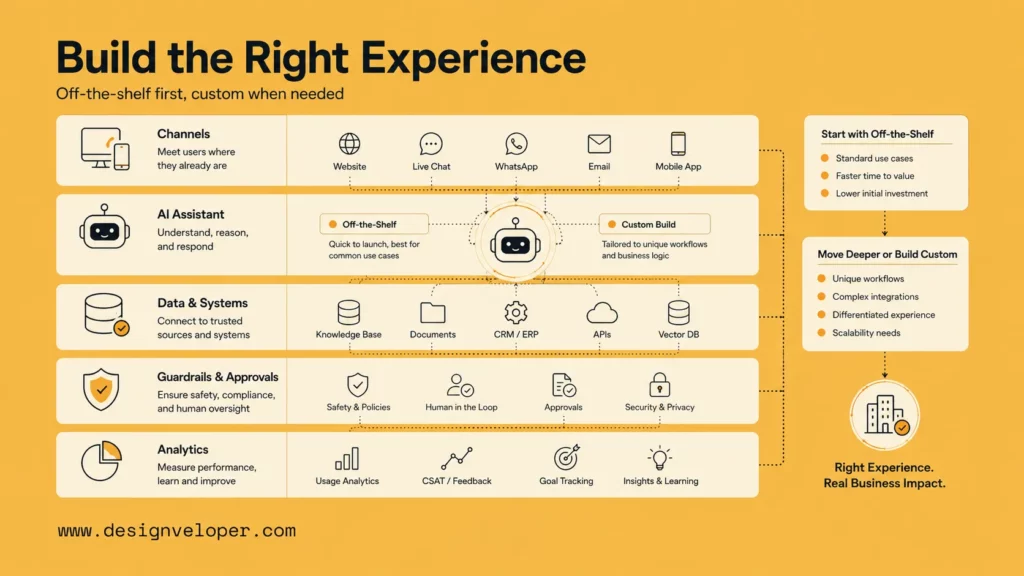
The best AI chatbot is not always the one with the longest feature list. It is the one that fits the business model, data quality, customer journey, team capacity, and operational risk. A retail store needs product and order context. A SaaS company needs account and subscription context. An internal HR assistant needs permission-aware policy retrieval. A sales chatbot needs CRM and calendar logic.
Off-the-shelf tools are often the right starting point. They reduce time to launch, include tested interfaces, and give teams a way to learn from real conversations. But companies should move toward custom design when the bot must coordinate multiple systems, respect complex permissions, support unusual workflows, or create a branded experience that directly affects revenue and customer trust.
Designveloper has built AI-oriented assistant experiences and workflow-heavy platforms that connect conversations with operational processes. For public-facing content, the important lesson is not a specific project name. It is the delivery pattern: define the workflow, connect the right data, design safe actions, test failure cases, and keep humans in control where the business risk is high.
A strong implementation plan usually starts with one high-volume use case. Examples include order status questions, lead qualification, appointment booking, internal policy lookup, or support triage. The team then measures containment, escalation quality, answer accuracy, customer satisfaction, and operational savings. After that, the chatbot can expand into additional channels and actions with less risk.
Companies comparing AI chatbot platforms should also plan ownership. Someone must maintain knowledge content, review analytics, approve new automation, audit risky conversations, and update integrations when business rules change. Without ownership, even a good chatbot becomes stale. With ownership, the chatbot becomes a living part of the operating model.
FAQs About AI Chatbots For Businesses
Which Is The Best AI Chatbot For Business?
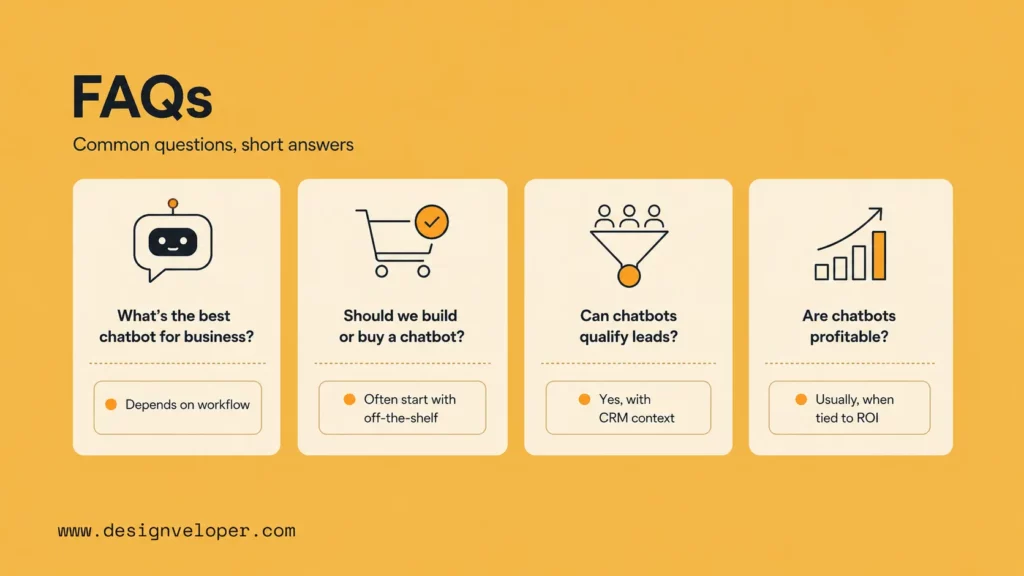
The best AI chatbot for business depends on the use case. ChatGPT Business is strong for general team productivity. Intercom Fin and Zendesk AI agents fit customer support. Gorgias fits ecommerce and Shopify-heavy stores. HubSpot Breeze Agents and Salesforce Agentforce fit CRM-led sales and service workflows. Microsoft Copilot Studio fits internal knowledge and employee support in Microsoft environments.
How To Build An AI Chatbot For Companies?
Start with the workflow, not the model. Define the chatbot’s job, target users, approved knowledge sources, required integrations, human handoff rules, and success metrics. Then build or configure the chatbot, test it against real conversations, add analytics, and launch in a narrow use case before expanding. For complex workflows, a custom build may be safer than forcing a generic tool to act like a business system.
Are AI Chatbots Profitable?
AI chatbots can be profitable when they reduce repetitive support work, increase lead conversion, improve booking rates, or help employees find answers faster. Profitability depends on automation quality, support volume, pricing model, and implementation cost. A chatbot that creates bad answers or unnecessary escalations can erase savings, so teams should measure cost per resolved conversation, customer satisfaction, and human rework.
Can An AI Chatbot Qualify Leads And Support Sales?
Yes. A sales chatbot can ask qualifying questions, identify intent, recommend next steps, book meetings, and update CRM records. The strongest sales chatbots connect to CRM, calendar, routing rules, and account data. They should also escalate high-value or complex opportunities to a human salesperson quickly.
How Much Does An AI Chatbot For Business Usually Cost?
Costs vary widely. Some tools start with free trials or low monthly plans, while enterprise platforms use seats, credits, automated resolutions, conversations, or custom contracts. For example, Salesforce lists Agentforce pricing models such as conversations and Flex Credits, Microsoft uses Copilot Credits and licensing rules for Copilot Studio, and Intercom prices Fin alongside its support platform. Businesses should estimate monthly conversation volume, expected automation, seat needs, integration cost, and maintenance effort before choosing.
For companies that need more than a standard chatbot, Designveloper can help design and build a workflow-aware AI assistant that fits existing software, support processes, sales operations, and long-term product goals. The right path is not always the most complex one. It is the one that makes customer and team conversations more useful, measurable, and safe.


