

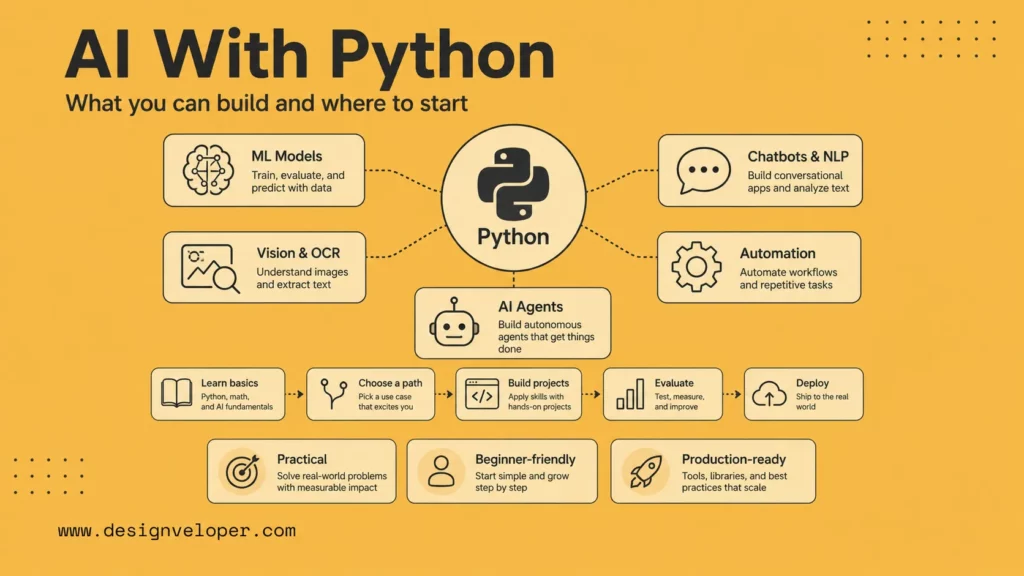
AI with Python is one of the most practical starting points for learning artificial intelligence because Python is readable, widely supported, and deeply connected to the AI ecosystem. You can use it to build machine learning models, chatbots, NLP tools, computer vision apps, automation flows, and AI agents.
The important part is choosing the right path. A beginner does not need to learn every library at once. A business team does not need to train a model when an API-based AI feature would solve the workflow faster. This guide explains what Python is used for in AI, which libraries matter, and how to move from small projects to real applications.
What Is AI With Python?
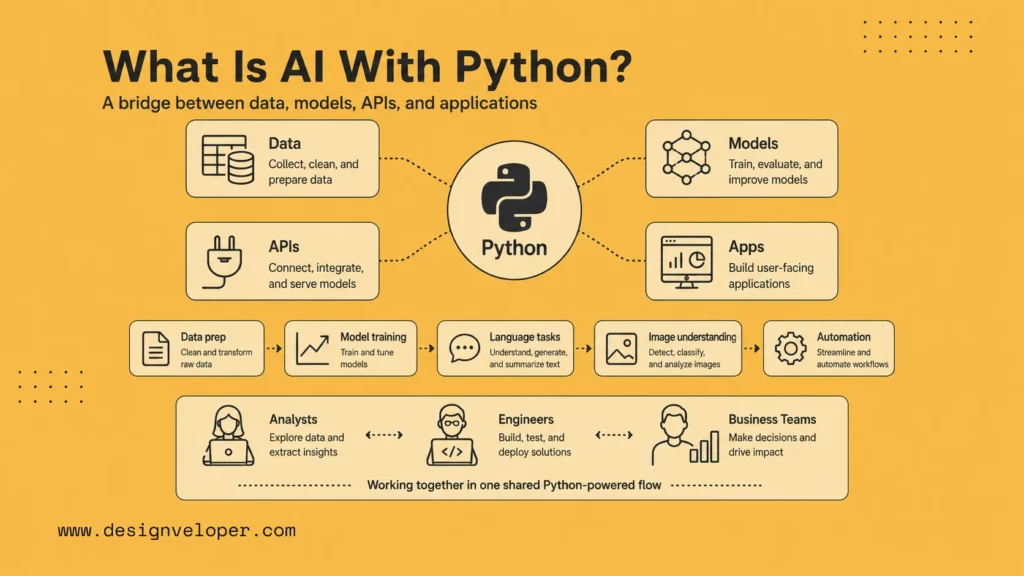
AI with Python means using Python as the practical layer between data, models, APIs, and applications. A small project may classify support tickets from a CSV file. A larger product may combine embeddings, a vector database, a language model, a FastAPI service, and a web interface so users can ask questions over approved business documents.
Python is also approachable for cross-functional teams. Data analysts, backend engineers, automation specialists, and AI engineers can often collaborate in the same language, which reduces handoff friction during early AI projects.
AI with Python means using Python to build or connect systems that can learn from data, process language, understand images, generate content, recommend actions, or automate decisions. Python may be used for data preparation, model training, evaluation, API integration, user interfaces, and deployment scripts.
Python is popular in AI because it sits close to both research and production. The official Python documentation covers the language foundation, while libraries such as NumPy, pandas, scikit-learn, PyTorch, TensorFlow, and LangChain give developers building blocks for AI work.
Why Python Is Still The Leading Language For AI
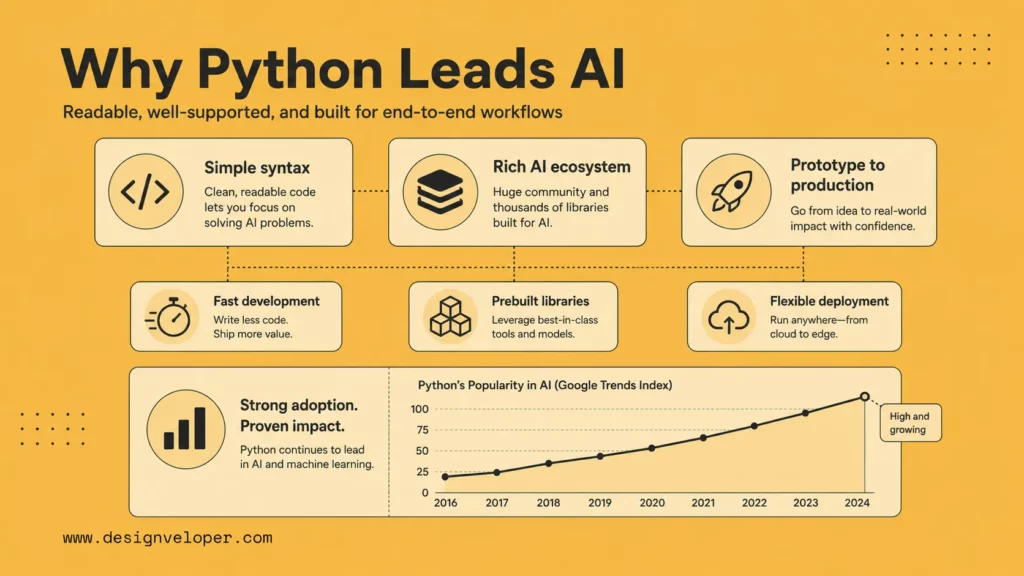
The evidence is current and specific. Stack Overflow’s 2025 Developer Survey says Python adoption grew in 2025. JetBrains’ State of Python 2025 coverage reports that 41% of Python developers use Python specifically for machine learning, while 51% are involved in data exploration and processing. These two uses explain why Python remains central to AI work.
The same trend affects business teams. Python is not only a research language. It supports data cleaning, API services, retrieval pipelines, model evaluation, workflow scripts, and deployment glue. That range makes it useful when an AI project must become part of an application.
Recent developer research continues to show why Python remains central to AI work. Stack Overflow’s 2025 Developer Survey coverage notes strong Python growth, while JetBrains and the Python Software Foundation’s State of Python 2025 highlights Python’s continued role in machine learning, data work, and AI development. The exact rankings change, but the ecosystem signal is consistent.
That ecosystem matters because AI work is rarely only model training. Teams need data loading, cleaning, visualization, APIs, background jobs, cloud deployment, monitoring, and user interfaces. Python has mature options for nearly every part of that workflow.
Simple Syntax And Faster Development
Python is easier to read than many lower-level languages, which helps beginners and product teams move quickly. It is also expressive enough for notebooks, scripts, APIs, data pipelines, and production services. That lowers the distance between idea, experiment, and usable prototype.
A Strong Ecosystem Of Prebuilt AI Libraries
The biggest reason to use Python for AI is the ecosystem. NumPy handles numerical arrays, pandas handles data tables, scikit-learn supports classical machine learning, PyTorch and TensorFlow support deep learning, and Transformers supports modern NLP and generative model workflows.
Flexibility For Learning, Prototyping, And Production
Python can be used in Jupyter notebooks for exploration, command-line scripts for data processing, FastAPI services for APIs, and workflow systems for automation. It may not be the fastest language for every runtime, but it is often the fastest way for teams to learn, test, and integrate AI features.
What You Can Build With AI In Python
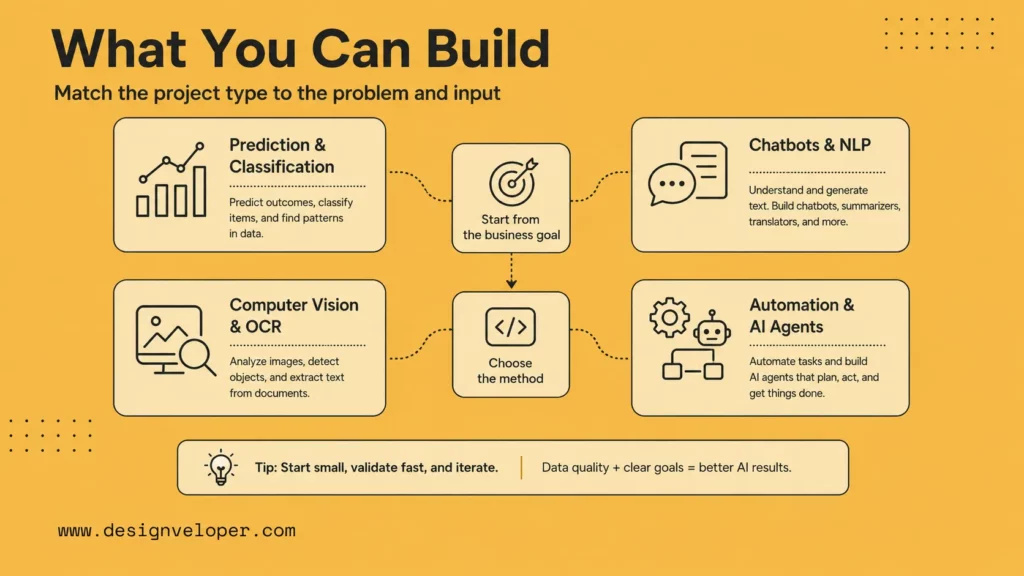
A useful way to choose a project is to match the input type to the method. Tables and transaction records often fit classical machine learning. Text and documents often fit NLP, embeddings, or LLM workflows. Images and scans may need computer vision or OCR. Multi-step operations may need agents or workflow automation.
The business goal should come before the technique. If the goal is faster invoice processing, the solution may combine OCR, field extraction, validation rules, and human approval. If the goal is customer support, the solution may combine retrieval, conversation design, and ticketing integration.
Machine Learning Models For Prediction And Classification
For these projects, define the prediction target carefully. A churn model, for example, needs a clear definition of churn, a time window, training data that does not leak future information, and a plan for how the business will act on each score. Without those details, the model may look accurate but fail operationally.
Classical machine learning remains useful. With scikit-learn, teams can build churn prediction, lead scoring, demand forecasting, fraud detection, recommendation, and classification systems. These projects usually start with structured data, clear labels, and measurable outcomes.
Chatbots, NLP Apps, And Generative AI Tools
Python is widely used for chatbots, document summarization, semantic search, text classification, RAG systems, and generative AI products. Libraries such as LangChain and model provider SDKs help connect language models to prompts, tools, memory, and retrieval.
Computer Vision, Automation, And AI Agents
Python can also support computer vision, OCR, invoice processing, quality inspection, image classification, and agent workflows. Agent frameworks and workflow tools let Python connect models with APIs, databases, files, and approval flows.
The Main Python Libraries Used In AI
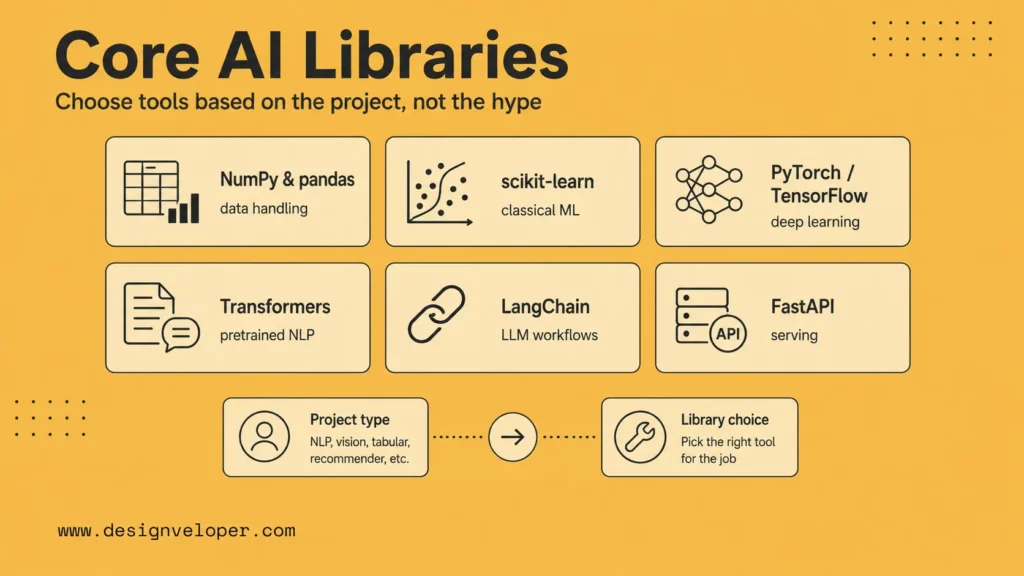
| Library | Best use | Specific example |
|---|---|---|
| pandas | Data cleaning and tabular analysis | Clean support tickets before training an intent classifier. |
| scikit-learn | Classical machine learning | Predict churn risk from usage and billing features. |
| PyTorch or TensorFlow | Deep learning | Train or fine-tune a vision model for document images. |
| Transformers | Pretrained language models | Classify messages or embed text for semantic search. |
| LangChain | LLM app orchestration | Build a RAG assistant that answers from product docs. |
| FastAPI | Serving models and AI workflows | Expose an internal prediction API for a dashboard. |
Library choice should also reflect the team’s deployment plan. A notebook experiment can use many packages freely. A production service should minimize unnecessary dependencies, pin versions, and document why each library is included. This makes security review, deployment, and maintenance easier.
For companies, the winning stack is often boring in a good way: pandas for data preparation, scikit-learn for simple models, a model API for language tasks, a vector database for retrieval, and a web framework for delivery. Use deep learning frameworks when the problem truly needs custom training or specialized inference.
- NumPy And Pandas For Data Handling: Use NumPy for numerical work and pandas for tabular data cleaning, joining, grouping, and analysis.
- Scikit-Learn For Classical Machine Learning: Use it for regression, classification, clustering, feature pipelines, and model evaluation.
- TensorFlow, PyTorch, And Keras For Deep Learning: Use these for neural networks, deep learning research, and production model workflows.
- NLTK And SpaCy For NLP: NLTK is useful for learning NLP concepts, while spaCy is practical for production-oriented text processing.
- Transformers, LangChain, And Agent Libraries For Modern AI Apps: Use Transformers for pretrained models, LangChain for LLM app composition, and agent frameworks for tool-connected workflows.
Do not start by memorizing every library. Start with the project type. A forecasting project needs pandas and scikit-learn. A chatbot may need a model API, LangChain, and a vector store. A computer vision project may need PyTorch, TensorFlow, or OpenCV.
How To Start AI Programming With Python
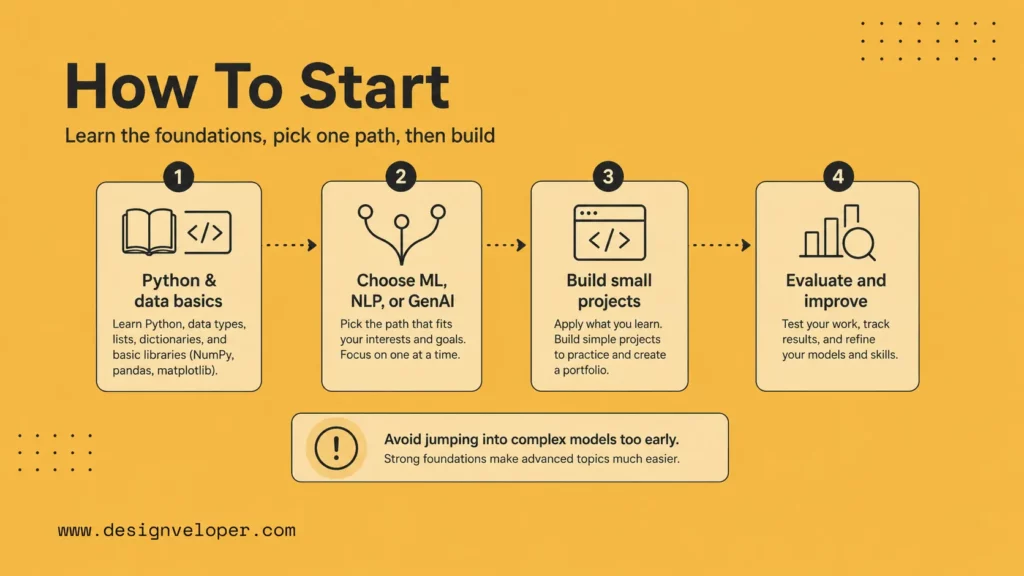
1. Learn Basic Python And Data Handling First
The first step is not a neural network. The first step is clean Python. Most AI work starts with data, so learners need to read files, clean rows, handle missing values, and turn raw inputs into useful features.
This is why Python for AI usually begins with core syntax and data handling. A learner should know variables, functions, lists, dictionaries, loops, and basic error handling. After that, they should move to NumPy and pandas. For example, pandas can load a CSV file into a DataFrame through read_csv, which is often the first line of a data based AI project.
The market also supports this learning path. Stack Overflow’s 2025 Developer Survey says Python saw a 7 percentage point increase from 2024 to 2025, helped by its use in AI, data science, and back end development. GitHub also reports that Python powered 582,196 new AI repositories in 2025. So, learning data handling is not a side skill. It is the base of ai programming with python.
| Skill | Why It Matters For AI | Simple Practice Task |
|---|---|---|
| Python syntax | It helps learners write readable AI scripts. | Write a function that scores customer feedback. |
| pandas | It helps clean and inspect structured data. | Load a sales CSV and remove empty rows. |
| NumPy | It helps handle arrays and numerical data. | Calculate averages for product ratings. |
| Data visualization | It helps spot patterns before model training. | Create a chart of user churn by month. |
2. Choose One Path Such As ML, NLP, Or Generative AI
AI in Python has many paths. Beginners often fail when they try to learn all of them at once. A better method is to choose one path, build a small base, and then expand later.
Machine learning is a strong first path. It teaches how models learn from data. A beginner can start with scikit learn and build a spam classifier, churn predictor, or house price model. This path explains feature selection, model training, and evaluation.
NLP is useful for text heavy work. It helps teams classify support tickets, extract keywords, summarize documents, and route messages. A simple NLP project can read customer reviews and sort them into positive, neutral, or negative groups.
Generative AI is now the most popular entry point for many product teams. Stanford’s 2026 AI Index says generative AI reached nearly 53% population level adoption within three years. This makes it a practical path for learners who want to build AI assistants, RAG search tools, and content automation flows.
- Choose machine learning when the project needs prediction from structured data.
- Choose NLP when the project needs to understand or process text.
- Choose generative AI when the project needs to create, summarize, answer, or reason with language.
3. Build Small Projects Before Moving To Complex Systems
Small projects teach the real workflow faster than long theory. They also expose common problems early. For example, a model may look good during training but fail on new data. A chatbot may answer well in simple tests but break when users ask vague questions.
A beginner should start with projects that have clear inputs and outputs. This keeps the scope small and makes learning easier. It also builds the habit of testing each result before adding more features.
| Beginner Project | AI Path | What It Teaches |
|---|---|---|
| Email spam detector | Machine learning | Text features, classification, accuracy checks |
| Review sentiment tool | NLP | Text cleaning, labels, prediction quality |
| PDF question answer bot | Generative AI | Chunking, retrieval, prompts, answer review |
| Invoice data extractor | Document AI | OCR, fields, validation, human review |
This is also how real teams reduce risk. They do not start with a full AI platform. They test one workflow first. Then they improve the data, model, interface, and deployment step by step.
A Simple AI Workflow In Python
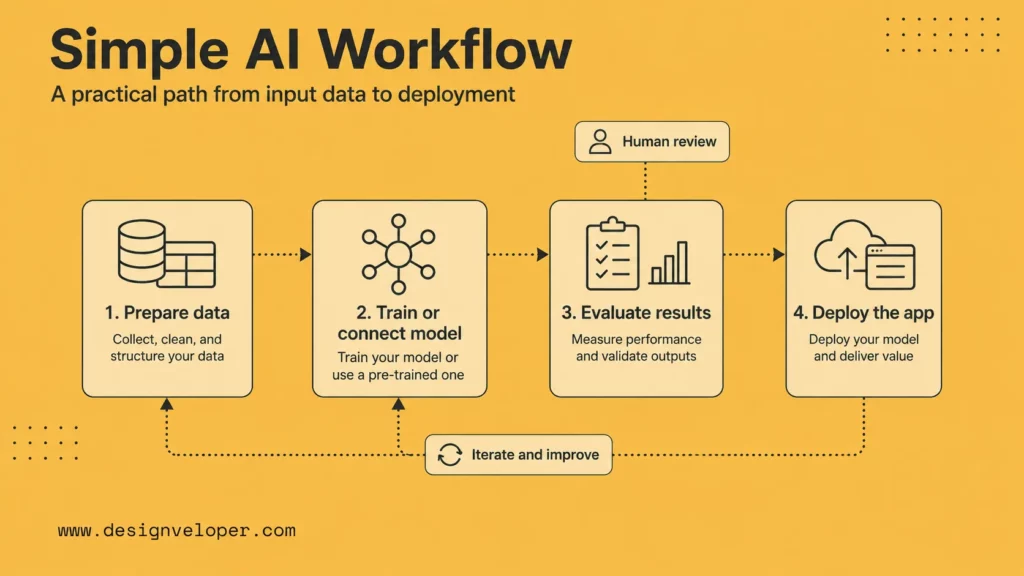
1. Prepare The Data
Every AI workflow starts with data. The model can only learn from what the data shows. So, data preparation often decides whether the final system works or fails.
For structured data, the workflow can start with a CSV file. A developer can use pandas to load the file, inspect column names, remove duplicates, fill missing values, and convert text labels into numbers. For images, audio, or documents, the same idea still applies. The system must turn raw inputs into a format the model can read.
A simple data preparation flow looks like this:
- Collect the data from files, forms, logs, or APIs.
- Check the data shape, column names, and empty values.
- Clean errors, duplicates, and inconsistent labels.
- Create features that match the prediction task.
- Split the data into training and testing sets.
For example, scikit learn provides train_test_split to split arrays or matrices into random train and test subsets. This helps developers test the model on data it did not learn from during training.
2. Train Or Connect The Model
The next step depends on the project type. For classic machine learning, the developer trains a model. For generative AI, the developer may connect an existing model through an API or use an open model through a local setup.
For a churn prediction tool, the Python script may train a logistic regression model or a random forest model. The input can include user activity, plan type, support tickets, and payment history. The output can be a churn risk label.
For a support chatbot, the Python app may connect to a large language model. It can send a user question, retrieve related internal documents, and ask the model to answer based on those documents. This setup often works better than a plain chatbot because it grounds the answer in company knowledge.
| Project Type | Model Choice | Python Tools |
|---|---|---|
| Prediction from tables | Train a machine learning model | pandas, scikit learn |
| Text classification | Train or fine tune a text model | scikit learn, Hugging Face, spaCy |
| Document Q and A | Connect an LLM with retrieval | LangChain, LlamaIndex, vector databases |
| AI automation flow | Connect an LLM with business rules | FastAPI, Celery, workflow tools |
3. Evaluate Results And Improve The System
AI with Python should not stop after the first result. A model needs checks. A developer must compare predictions with real labels, review wrong answers, and decide what to improve.
For classification tasks, scikit learn supports common model evaluation tools such as precision, recall, F score, and ROC AUC through its model evaluation module. These metrics help teams see more than simple accuracy. This matters when the data is uneven. For example, a fraud model may look accurate because most transactions are normal, but it may still miss risky cases.
For generative AI, evaluation needs a different method. The team should check answer accuracy, source quality, format, tone, latency, and safety. A practical test set can include real user questions, edge cases, and expected answers. Human review also matters, especially for legal, finance, medical, or HR workflows.
- Use accuracy when classes are balanced.
- Use precision when false positives create cost.
- Use recall when missing a true case creates risk.
- Use human review when the output affects users or business decisions.
After evaluation, the developer can improve the system. They can clean more data, add better features, change the model, adjust prompts, improve retrieval, or add guardrails. This loop turns a demo into a useful AI system.
4. Deploy The AI App Or Automation Flow
The final step is deployment. A model has value only when people or systems can use it. Python supports several deployment paths, from a simple script to a web API or a scheduled automation flow.
FastAPI is a common option for serving AI in Python because it can turn a Python function into an API endpoint. Its official guide also explains how to build a Docker image from the official Python image, which helps teams run the app in cloud or container based environments.
A simple deployment flow can look like this:
- Save the trained model or connect the model API.
- Create a Python function that receives input and returns output.
- Wrap the function in a FastAPI endpoint.
- Add validation, logging, and error handling.
- Deploy the app to a server, cloud service, or container platform.
- Monitor usage, failures, latency, and output quality.
For example, a small invoice AI app can receive a PDF, extract vendor names and totals, check missing fields, and send uncertain cases to a human reviewer. This kind of workflow shows the real value of ai in python. It connects the model to a business task, not just a notebook result.
Where Python For AI Creates Real Value
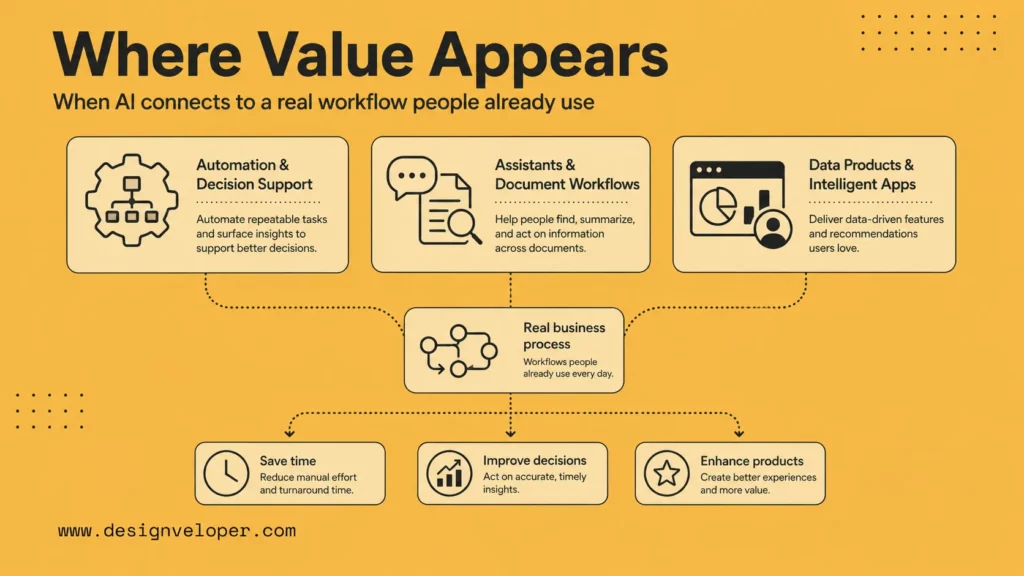
The strongest value appears when Python AI is connected to a process people already perform. A report generator saves time only if the report reaches the right stakeholder. A prediction model matters only if someone uses it to prioritize action. A chatbot helps only if it answers from trusted content and routes unresolved cases.
For this reason, Python AI projects should include workflow mapping. Identify the trigger, input, AI step, human review point, output system, and feedback loop. This turns the project from an isolated model into a usable system.
Business Automation And Decision Support
Python can help automate reporting, route tickets, extract invoice fields, score leads, summarize calls, and detect anomalies. These workflows are valuable because they reduce repetitive work and help people make decisions faster.
AI Assistants, Chatbots, And Document Workflows
Python is a good fit for assistants that search documents, summarize policies, answer product questions, or prepare drafts. RAG and agent patterns are especially useful when the system must use business content instead of generic web knowledge.
Data Products And Intelligent Applications
AI in Python can power recommendation systems, analytics dashboards, personalization, search, forecasting, and intelligent SaaS features. The most valuable products connect model output to a workflow people already care about.
Common Challenges In AI Programming With Python
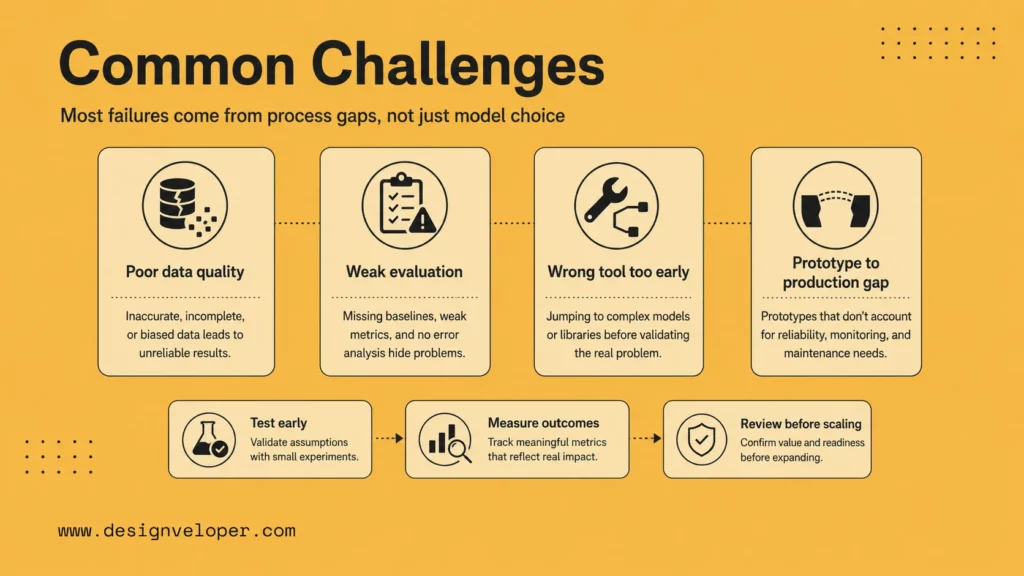
AI productivity also needs measurement. Google Cloud’s 2025 DORA report treats AI-assisted development as a change in software delivery practice, while METR’s early-2025 controlled trial found a 19% slowdown for experienced open-source developers in one realistic setting. Together, these sources support a practical rule: use AI with Python, but measure the whole workflow after review.
For example, a Python AI assistant may generate a data pipeline quickly. However, the team still needs to check data leakage, test edge cases, review security, and monitor runtime cost. The project succeeds only when the reviewed system saves time or improves quality.
Poor Data Quality And Weak Evaluation
Bad data and weak evaluation cause many AI failures. A model can look impressive in a demo and still fail on edge cases. Build test sets early and review errors before expanding scope.
Choosing The Wrong Library Or Model Too Early
Beginners often choose a library before understanding the problem. Start with the task, data, constraints, and success metric. Then choose the simplest tool that can solve the problem reliably.
Moving From Prototype To Production
A production move should be gradual. Start with internal users or a limited workflow, compare outputs with human decisions, and monitor errors before expanding. This protects users while giving the team real evidence about where the Python AI system needs refinement.
Production requires more than a working notebook. Teams need APIs, authentication, monitoring, retries, cost control, security review, data pipelines, and maintenance ownership. This is where many AI projects need experienced software engineering support.
What Changes When AI In Python Meets Real Applications
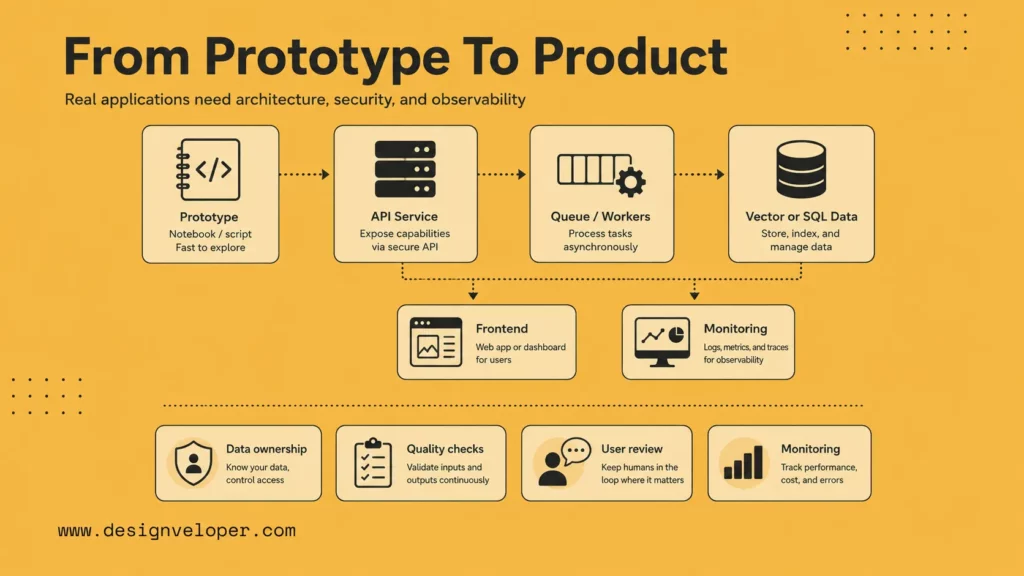
Real applications change the goal from making a notebook work to making a system reliable. The team must decide how data is refreshed, how model outputs are reviewed, how users report bad answers, and how code changes move through testing and deployment. Python remains central, but it becomes one piece of a broader software architecture.
Finally, teams should plan for observability. Track errors, latency, cost, data freshness, model versions, and human corrections. These signals show whether the Python AI system is improving, drifting, or creating hidden operational work.
Security becomes part of the Python AI workflow too. API keys should live in environment variables or secret managers, user inputs should be validated, logs should avoid sensitive data, and model outputs should be reviewed before triggering risky actions. These practices are normal software engineering, but AI projects sometimes skip them during fast prototyping.
Maintenance is also a long-term concern. Data changes, model behavior changes, dependencies age, and business rules move. A production Python AI system needs owners, tests, monitoring, and a release process so improvement does not depend on one notebook or one developer’s memory.
Real applications need architecture choices. A prototype may live in a notebook, but a product may need a Python API, worker queue, vector database, SQL database, object storage, frontend, authentication system, and monitoring dashboard. Choosing the right architecture early can prevent expensive rewrites.
Teams should also decide where Python ends and other technologies begin. Python may power the AI service, while TypeScript powers the web app, PostgreSQL stores business data, and cloud infrastructure handles deployment. Strong AI products combine the right tools instead of forcing Python to do every job.
Using Python for AI is not just about training a model. The bigger challenge is connecting data, models, workflows, and operational controls into something useful, maintainable, and production-ready.
Designveloper helps teams turn AI prototypes into software products and workflow systems. For businesses, that may mean connecting Python AI services to web apps, mobile apps, dashboards, CRMs, document systems, human review queues, and monitoring. The engineering layer is what turns a model into a product.
A practical Python AI roadmap should answer who owns the data, how the model is evaluated, where outputs are reviewed, what happens when the system fails, and how the application improves after release. Those questions matter as much as the first library choice.
| Production question | Why it matters | Practical control |
|---|---|---|
| Who owns the data? | AI output quality follows source quality. | Assign owners, refresh dates, and approval status to datasets or documents. |
| How is quality measured? | Demo answers can hide edge-case failures. | Maintain evaluation cases, human review notes, and regression checks. |
| How are outputs used? | Generated text or predictions can affect real users. | Add confidence thresholds, review queues, and rollback paths. |
| How is the system monitored? | Model behavior, data, and usage patterns change over time. | Track latency, cost, errors, drift, feedback, and manual corrections. |
FAQs About AI With Python
Before publishing or deploying a Python AI project, review the result from a user’s point of view. The system should explain what it does, accept realistic input, fail clearly, and avoid hiding uncertainty. Good AI engineering is partly model work and partly careful product design.
Is Python Good For AI?
Yes. Python is one of the best languages for AI because it is readable, widely used, and supported by strong libraries for data, machine learning, deep learning, NLP, and generative AI.
What Python Libraries Are Best For AI?
Common choices include NumPy, pandas, scikit-learn, TensorFlow, PyTorch, Keras, NLTK, spaCy, Transformers, LangChain, and specialized libraries for vector databases, computer vision, and agents.
Can Beginners Learn AI With Python?
Yes. Beginners should learn Python basics, data handling, and one project path first. A small classifier, chatbot, or document summarizer is better than trying to learn every AI topic at once.
What Can You Build With AI In Python?
You can build prediction models, chatbots, RAG apps, document processing systems, image classifiers, automation scripts, AI agents, dashboards, and intelligent business applications.
Is Python Enough For Modern AI Development?
Python is enough for many AI workflows, but production systems often also need web frameworks, databases, cloud infrastructure, frontend interfaces, security controls, and DevOps practices.