


MCP vs AI agent is not a choice between competing technologies. An AI agent is the reasoning and action-oriented system that interprets goals, plans steps, uses tools, and decides what to do next. The Model Context Protocol (MCP) is a connection layer that lets AI applications expose tools, resources, and prompts through standardized servers. Agents need MCP when they need reusable, governed access to external systems instead of one-off tool integrations.
The simplest way to frame the relationship is this: an AI agent decides; MCP connects. The agent handles goal interpretation, planning, tool choice, response generation, and workflow state. MCP defines how the application discovers and calls external capabilities such as files, APIs, databases, repositories, support systems, calendars, or business workflows.
This guide explains where AI agents and MCP overlap, what an MCP server does for agents, how agents use MCP in practice, when teams should choose an agent, MCP, or both, and what this means for modern AI product design.
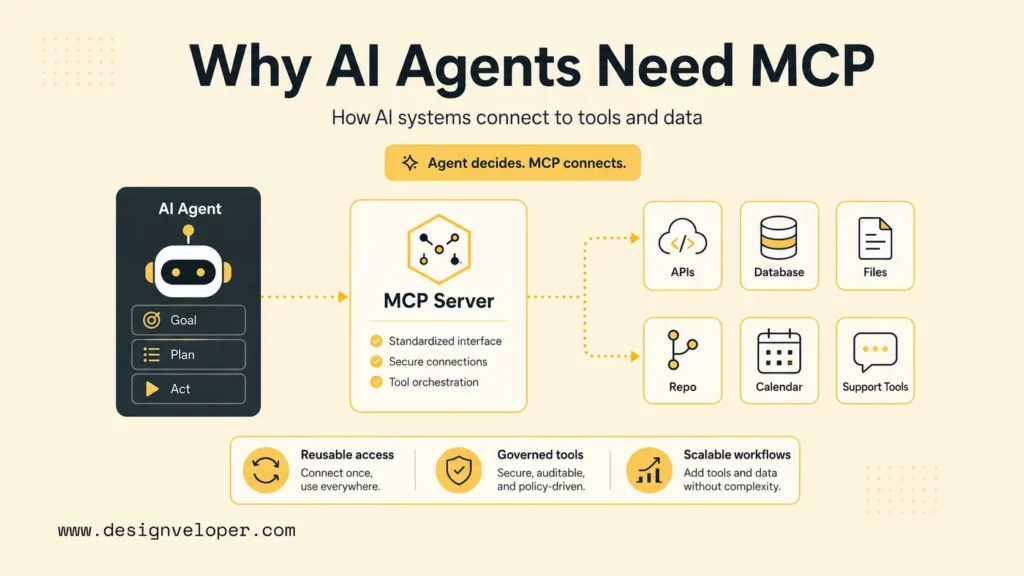
What Are AI Agents And MCP?
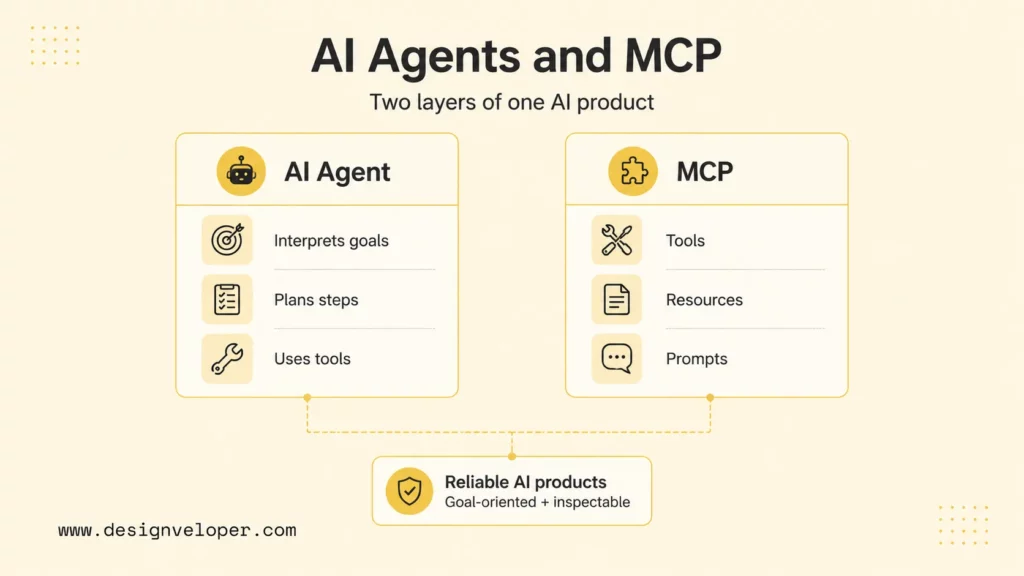
AI agents and MCP solve different layers of the same product problem. Agents make AI systems goal-oriented. MCP makes external tool and data access more reusable and inspectable.
What Is An AI Agent?
An AI agent is a software system that can interpret a goal, reason about next steps, use tools or data, observe results, and continue until the task is complete or escalated. An agent may be simple, such as a support assistant that retrieves context and drafts a response, or complex, such as a coding agent that inspects a repository, runs tests, edits files, and prepares a pull request.
OpenAI’s Agents SDK guide describes agentic applications as systems where a model can use additional context and tools, hand off to specialized agents, stream partial results, and keep traces of what happened. That framing is useful because an agent is more than a chat completion. The agent includes instructions, tool access, orchestration, memory or state, guardrails, and observability.
What Is MCP?
MCP is an open protocol for connecting AI applications to external tools, resources, and prompts through a client-host-server architecture. The official MCP specification says each host can run multiple client instances, and each client connects to a server that exposes capabilities such as resources, tools, and prompt templates.
MCP does not decide what the agent should do. MCP defines how a server makes an approved capability available. For example, an MCP server may expose a GitHub search tool, a Slack notification tool, a database query resource, or a company policy prompt.
Why AI Agents Need MCP
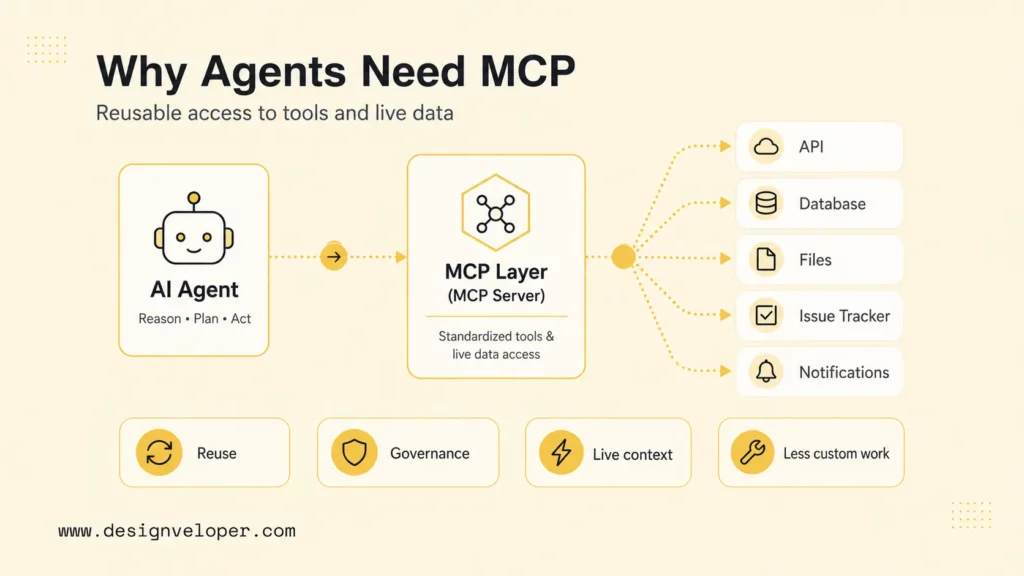
AI agents need MCP when they must work with tools, APIs, databases, and live context in a way that can be reused across clients and models. Without a standard connection layer, each new data source or tool usually needs custom integration work for each AI application.
MCP matters because agents become more useful when they can act inside real workflows. A coding agent needs access to repository files, issue trackers, tests, logs, and team notifications. A support agent needs account history, order status, policy documents, and escalation tools. MCP servers provide a structured way to expose those capabilities while keeping tool ownership outside the model.
The practical overlap is easiest to see in an architecture review. The product team may describe the desired assistant as an agent because the assistant should understand a goal and choose steps. The engineering team may describe the required integrations as MCP servers because those integrations expose approved actions. Both descriptions can be correct. A reliable design separates the reasoning contract from the integration contract.
That separation also helps teams assign ownership. Product and AI engineers usually own agent prompts, task flows, evaluation cases, and escalation rules. Platform or application engineers often own MCP servers because those servers touch business systems, credentials, databases, and APIs. Security teams can then review server permissions without needing to inspect every agent prompt.
MCP Vs AI Agent: How They Differ And Where They Overlap
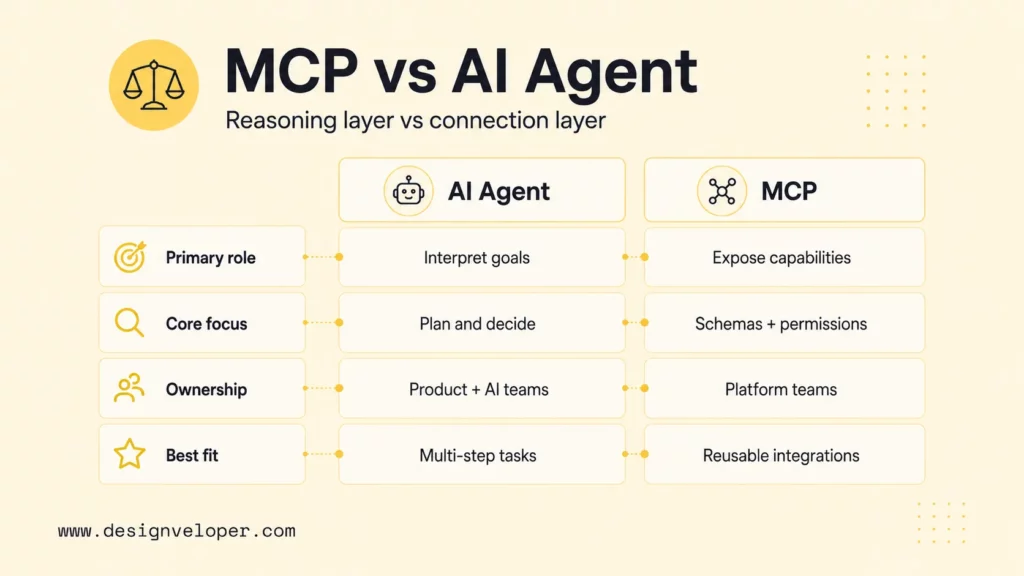
MCP and AI agents differ by role. While MCP is the integration protocol, the AI agent is the reasoning and orchestration layer. The overlap happens when an agent uses MCP servers as part of its tool layer.
| Category | AI Agent | MCP |
|---|---|---|
| Type | Goal-oriented AI system or workflow actor | Protocol and server interface for external capabilities |
| Primary Role | Interprets goals, plans steps, chooses tools, and decides when to continue or stop | Exposes resources, tools, and prompts through a standardized client-server model |
| Core Focus | Reasoning, orchestration, state, tool selection, and task completion | Reusable access to external systems, data, and actions |
| How It Operates | Uses model calls, instructions, memory, tools, guardrails, and observations | Lets a host/client discover server capabilities and call approved tools or resources |
| Independence | Can use native function calling, APIs, RAG, MCP servers, or other tools | Does not act autonomously; a host or agent uses the server |
| Best Fit | Tasks requiring goal interpretation, multi-step execution, planning, and adaptation | Standardized, reusable tool and data access across AI clients and workflows |
The two layers are complementary. An agent can use tools without MCP, but MCP helps the team avoid building a brittle integration for every tool-client pair. An MCP server can exist without a sophisticated agent, but its value grows when an assistant can reason about when to use the server.
What An MCP Server Does For AI Agents?
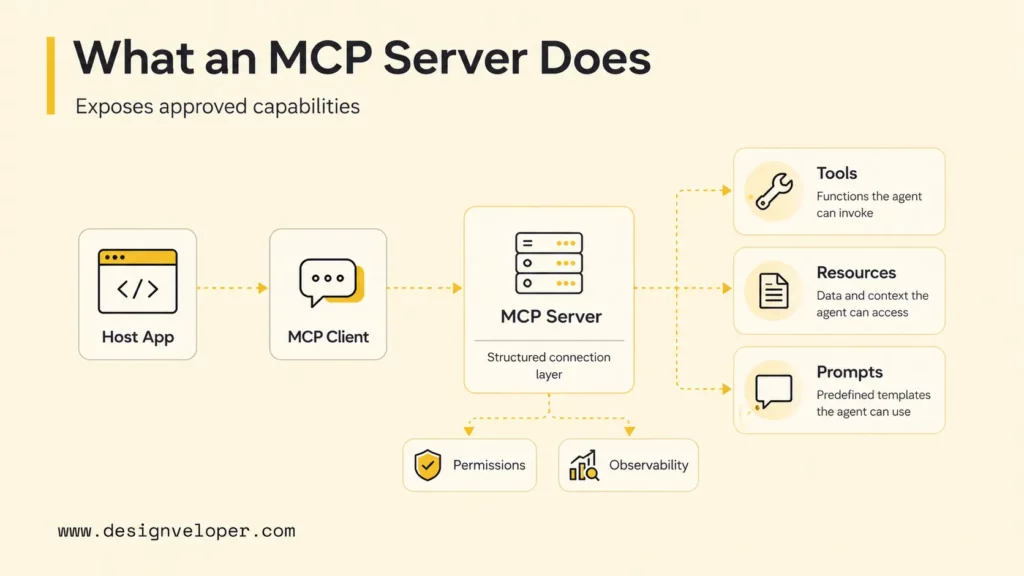
An MCP server gives AI agents a controlled interface to external capabilities. The server can expose read-only resources, callable tools, and reusable prompts. The agent or host can inspect those capabilities, call them with structured inputs, and receive structured outputs.
A useful MCP server does four things for an agent:
- Capability discovery: the agent-facing client can see which tools, resources, or prompts exist.
- Input structure: tools define expected parameters so model calls are less ambiguous.
- System boundary: the external system remains behind server code rather than being directly exposed to the model.
- Operational ownership: the team that owns the server can maintain permissions, schemas, logs, errors, and versioning.
The MCP server is not a safety guarantee by itself. A write-capable server still needs authentication, authorization, input validation, audit logs, rate limits, and human approval where the action is sensitive. OpenAI’s Agents SDK guardrails documentation makes a similar point at the agent layer: guardrails are explicit checks around inputs, outputs, and tool use, and tool guardrails apply to tool invocations rather than magically covering every workflow risk.
A production MCP server for agents should be designed like a small product API. The server needs a clear owner, a versioned contract, a test suite, useful errors, and a rollback plan. If the server exposes write actions, the server should also expose dry-run behavior or preview output where possible so an agent can show the user what will happen before the action is committed.
Tool descriptions are especially important. An agent may select a tool based on the name, schema, and docstring exposed by the server. A vague tool such as update_item can create ambiguity. A specific tool such as create_support_escalation_ticket gives the agent and the human reviewer a clearer mental model of the action.
How AI Agents Use MCP In Practice
AI agents use MCP in practice by interpreting a goal, selecting the right external capability, calling an MCP server through the host/client layer, reading the result, and continuing the loop. The agent decides the task strategy; the MCP server provides controlled access to systems.
The Agent Interprets The Goal
Start with a practical example: a developer asks an AI agent to investigate a failing test, propose a fix, and notify the team. The agent first interprets the goal. It needs to inspect the repository, understand recent changes, run or read test output, decide whether a code change is needed, and communicate the result.
This reasoning layer belongs to the agent. Microsoft Azure’s AI agent orchestration patterns describe situations where agents plan, coordinate, and use tools to make changes in external systems, especially when one prompt or one tool is not enough.
MCP Exposes The Right Tools And Systems
MCP servers can expose the systems the agent needs. A repository MCP server may expose file search and read-only code inspection. A CI server may expose test logs. A GitHub server may expose issue or pull-request data. A Slack server may expose a notification tool.
The agent does not need to know every API detail. The agent needs accurate tool descriptions and structured results. The MCP server owner handles the API calls, permission checks, response formatting, and error handling.
The Agent Repeats The Loop Until The Task Is Done
After receiving tool results, the agent evaluates what happened and chooses the next step. The agent may inspect a file, run another query, draft a patch, ask for approval, create a pull request, or notify a Slack channel. Each step should be observable and bounded.
The loop should not run forever. Azure Databricks’ agent system design guidance warns that agentic systems add latency, debugging complexity, routing requirements, and possible bouncing between agents when constraints are weak. A production agent needs stopping rules, timeouts, retries, and escalation paths.
In a real repository workflow, the agent might first call a read-only file search tool, then call a CI log resource, then ask for permission before using a write-capable patch tool. The same task may also use a messaging server to notify a team after the user approves the final summary. Each server should expose only the minimum capability required for its part of the workflow.
This separation makes failure recovery easier. If the repository server fails, the agent can explain that code context is unavailable. If the messaging server fails, the agent can still provide the investigation result and ask the user to send the notification manually. A well-designed agent does not hide tool failure; it turns tool failure into a clear next step.
When To Choose Between An AI Agent, MCP, Or Both
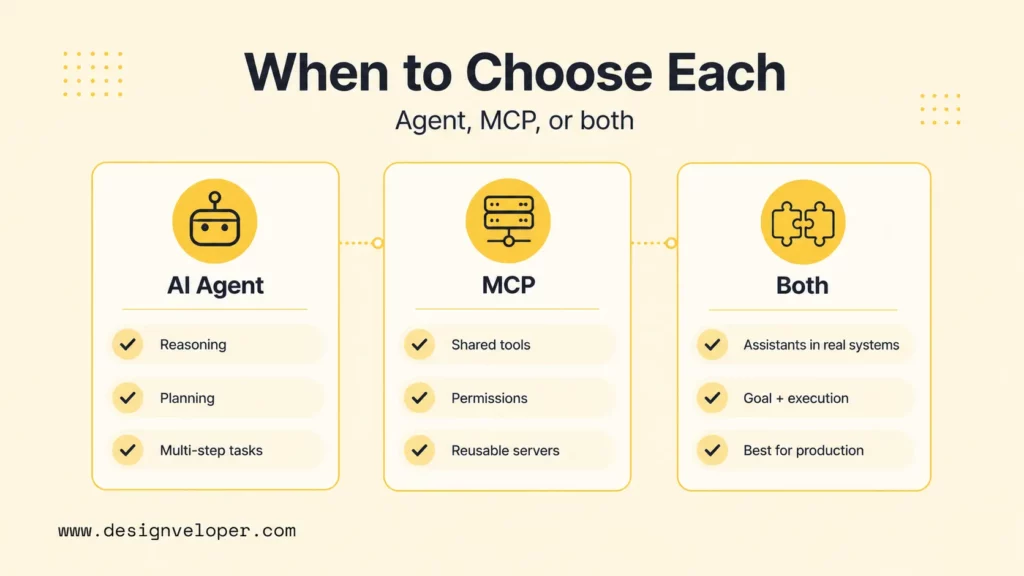
Choose an AI agent, MCP, or both based on the problem layer. If the product needs goal-oriented behavior, use an agent. If the product needs reusable access to tools or data, use MCP. And if the product needs goal-oriented behavior plus reliable external execution, use both.
When An AI Agent Makes More Sense
An AI agent makes more sense when the system needs reasoning, planning, and multi-step execution. Use an agent when the system needs to decide what to do next, ask clarifying questions, choose tools, evaluate intermediate results, or adapt to changing task state.
- The workflow requires goal interpretation rather than a single fixed API call.
- The system must plan multiple steps or recover from partial failure.
- The user expects an assistant, copilot, or autonomous workflow actor.
A simple example is bug investigation. The agent must inspect evidence, form a hypothesis, choose files to inspect, read logs, and decide whether a fix is safe. That is agent behavior, even if the tools underneath are traditional APIs.
When MCP Makes More Sense
MCP makes more sense when the main problem is standardized access to tools and data. Use MCP when several AI clients, agents, or workflows need the same capability, or when the team wants cleaner boundaries around external systems and permissions.
- The same data source should be available to multiple AI clients.
- The integration should be owned and versioned separately from one chatbot.
- The tool boundary needs clear schemas, descriptions, and server-side controls.
A simple example is a read-only company policy server. The server can expose approved policy resources and search tools. Different assistants can use the same server without each assistant reimplementing the policy integration.
When Teams Usually Need Both
Teams usually need both when the product needs goal-oriented behavior plus reliable external execution. A support copilot may need an agent to interpret customer intent and an MCP server to fetch account status. A coding assistant may need an agent to plan investigation and MCP servers to inspect files, issues, logs, and messaging tools.
Both layers should be designed together. The agent needs enough tool descriptions to choose well. MCP servers need narrow enough permissions to avoid unsafe action. The product needs guardrails, observability, and human review at the workflow level.
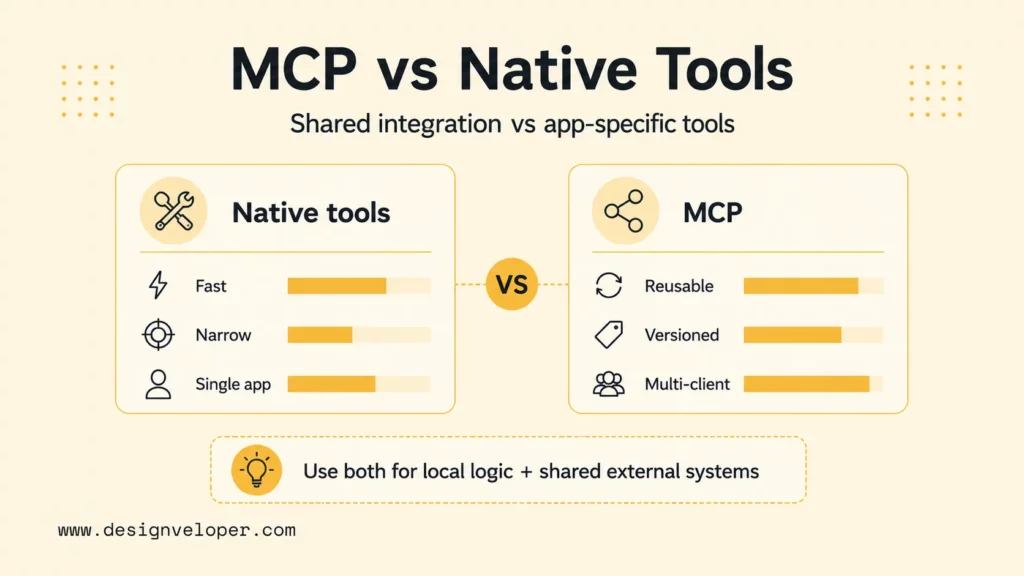
MCP vs native tool use is a comparison between a standardized integration protocol and an application-specific tool interface. Tool use is the broader behavior. MCP is one standardized way to support that behavior.
Native tool use can be faster for a single application. A developer writes a function, registers it with the model provider or agent framework, and ships the workflow. That is often the right first step for a prototype, internal demo, or single-purpose assistant.
MCP becomes stronger when integrations need reuse. A GitHub, Slack, Postgres, support-ticket, or document-search server can serve many clients if it is exposed through MCP. The tradeoff is operational: MCP servers become their own maintained components, with versioning, permissions, logs, tests, and deployment requirements.
Use this decision rule:
- Use native tools when the workflow is narrow, one client owns the integration, and speed of implementation matters most.
- Use MCP when multiple AI clients need the same tools, permissions need a reusable boundary, or the integration should outlive one agent.
- Use both when the agent framework has native tools for local logic and MCP servers for shared external systems.
For a product team, the decision should start with user value. If the user only needs a deterministic form workflow, an agent may be unnecessary. If the user needs a flexible assistant that can interpret messy requests, retrieve context, and choose an action path, an agent is useful. And if that assistant must touch several systems, MCP becomes useful as the integration boundary.
For an engineering team, the decision should start with maintenance cost. Native tools may be cheaper for one narrow assistant. MCP may be cheaper over time when the same capability needs to be shared with Claude Desktop, Claude Code, an internal web assistant, a customer-support copilot, or another agent framework. The more clients need the same capability, the stronger the case for MCP.
What This Means For Modern AI Product Design
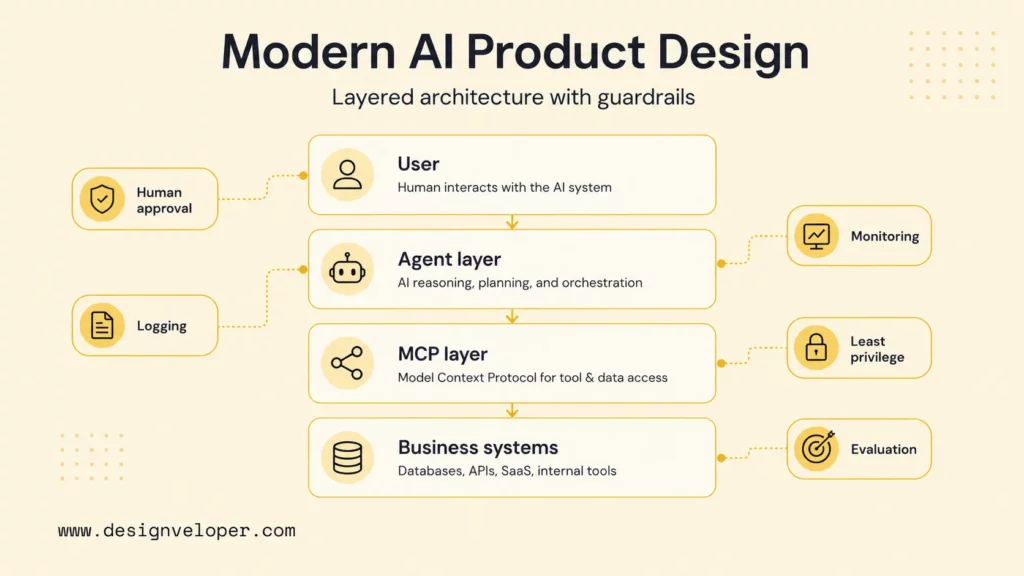
Modern AI product design should treat agents and MCP as separate design layers. The agent layer defines how the product reasons, plans, asks for clarification, uses tools, and decides when work is done. The MCP layer defines which external capabilities are available, how they are described, and what boundaries protect the underlying systems.
Designveloper’s Song Nhi virtual assistant project is a useful supporting proof point for assistant-style product thinking because the product centers on conversational request handling, context-aware responses, and user-friendly task flows. The public page does not claim MCP usage. The relevant lesson is broader: a useful assistant needs goal-oriented behavior, contextual understanding, and safe workflow design.
Designveloper’s AI development services show the production context around this decision. AI products need discovery, workflow mapping, architecture review, tool and data integration, security review, CI/CD, testing, monitoring, and maintenance. MCP can improve the connection layer, but product engineering still determines whether the assistant is useful and safe.
A production-ready design should include:
- Clear agent responsibilities and stopping rules.
- Separate read-only resources from write-capable tools.
- Human approval for sensitive actions such as payments, account changes, production deployments, and customer-facing messages.
- Tool-call logging, tracing, latency monitoring, and error review.
- Server-side permissions, secrets management, and dependency review for MCP servers.
- Evaluation cases that test real tasks, invalid requests, missing data, prompt injection, and tool failure.
The strongest AI products will not ask whether MCP replaces agents or agents replace MCP. The better question is how the agent, protocol layer, tools, human review, and production monitoring fit into one reliable system.
Teams should also plan how A2A and MCP may coexist. A2A can help one agent communicate with another agent, delegate work, or discover another agent’s capabilities. MCP can help those agents use external tools and data. A customer-success agent might use A2A to ask a billing agent for help, while the billing agent uses MCP servers to read invoices, check payment status, and prepare an approved response.
The guardrail model should follow the same layered design. Agent-level guardrails can check user intent, output quality, and escalation decisions. MCP server-level guardrails can enforce permissions, validate parameters, and block unauthorized actions. Human review can sit above both layers when the action affects customers, money, production systems, legal commitments, or sensitive data.
FAQs About AI Agents And MCP
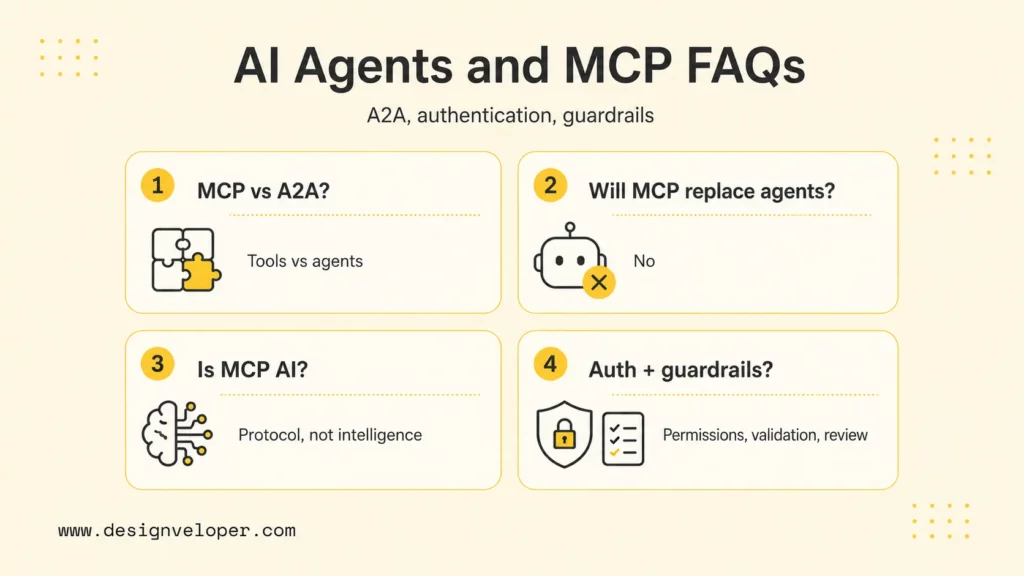
What Is The Difference Between MCP And Agent2Agent?
MCP connects AI applications or agents to tools, resources, and data sources. Agent2Agent (A2A) connects agents to other agents for interoperability and task collaboration. Google’s A2A specification says an A2A server agent might use MCP to interact with underlying tools, APIs, or data sources while fulfilling an A2A task (Google A2A specification). In short, MCP is usually tool-facing, while A2A is agent-facing.
Will MCP Replace AI Agents?
MCP will not replace AI agents because MCP does not reason, plan, or decide what to do next. MCP gives AI applications a standardized way to use external capabilities. Agents can use MCP servers, but agents still need instructions, orchestration, state, evaluation, and guardrails.
Is MCP Considered AI?
MCP is not AI by itself. MCP is a protocol that helps AI applications connect to tools and data. The intelligence usually comes from the model and the agent workflow. MCP supplies the structured connection layer around that intelligence.
How Is Authentication Usually Handled With MCP?
Authentication is usually handled by the MCP server, the hosting environment, or the transport and deployment layer. A local demo may rely on local process permissions, while an internal or remote server should use stronger authentication, authorization, secret management, and audit logging. The server should expose only the capabilities each user or client is allowed to use.
What Guardrails Matter When Agents Use MCP Tools?
The most important guardrails for agents using MCP tools are input validation, least-privilege tool scopes, read/write separation, human approval for sensitive actions, prompt-injection testing, output validation, logging, tracing, rate limits, and rollback paths. Guardrails should exist at both layers: the agent should decide safely, and the MCP server should enforce safe capability boundaries.


