


AI driven decision making uses machine learning, analytics, automation, and human review to turn business data into better choices. It helps teams forecast demand, rank leads, detect fraud, route support tickets, plan resources, and spot risks faster than manual reporting alone. The goal is not to replace every manager with an algorithm. The goal is to make decisions more timely, evidence-based, and repeatable.
Quick decision guide: start with one high-value decision that already has reliable data, a clear owner, and a measurable outcome. Use AI to recommend, rank, forecast, or alert first. Automate only after the team can explain the output, track accuracy, and decide which cases still need human approval.
| Decision area | Best AI role | Human role | Main KPI |
|---|---|---|---|
| Sales and revenue | Forecast pipeline, score leads, and surface account risk. | Review strategic accounts and adjust assumptions. | Forecast accuracy, conversion rate, and sales cycle time. |
| Customer support | Classify tickets, suggest replies, and route urgent cases. | Approve sensitive responses and resolve exceptions. | First response time, CSAT, escalation rate, and reopens. |
| Operations and supply chain | Predict demand, detect stock risk, and suggest replenishment. | Balance cost, service level, and supplier constraints. | Stockout rate, inventory turnover, and fulfillment delay. |
| Finance and risk | Score transactions, flag anomalies, and prioritize reviews. | Investigate uncertain cases and approve risk actions. | False positive rate, loss reduction, and review time. |
| Product and delivery | Analyze usage, predict churn, and plan resources. | Choose roadmap priorities and staffing tradeoffs. | Retention, feature adoption, delivery variance, and utilization. |
AI-driven decisions work best when the system recommends the next move and the business still owns the judgment behind that move.
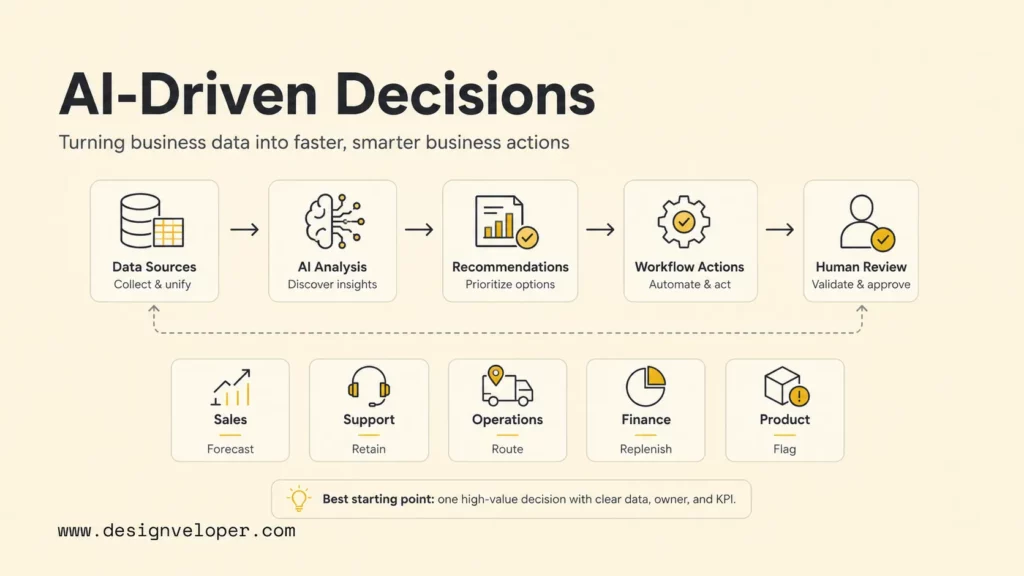
What Is AI-Driven Decision Making?
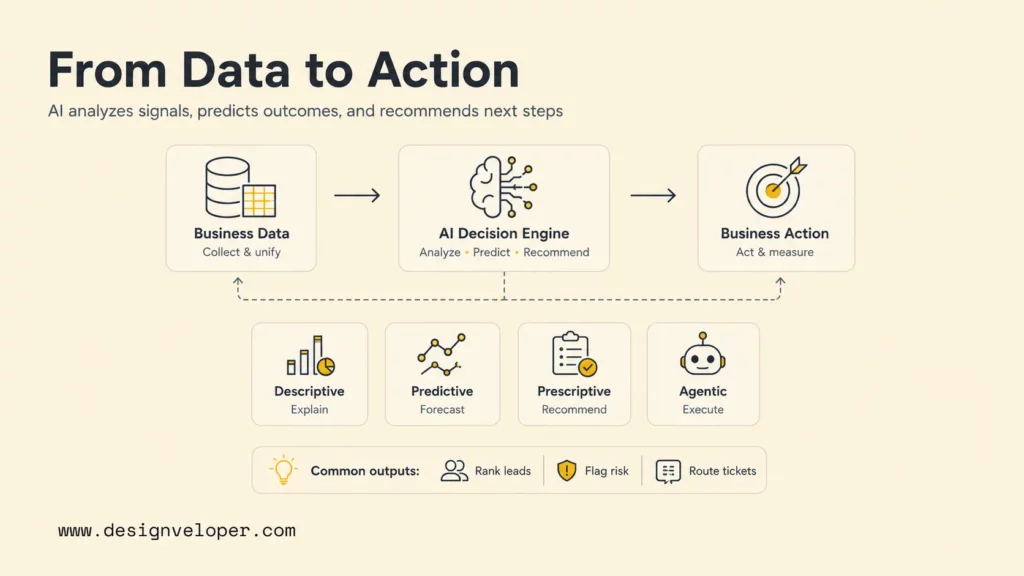
AI-driven decision making is the use of artificial intelligence to analyze data, identify patterns, predict outcomes, and recommend actions. It combines data engineering, machine learning, business rules, dashboards, alerts, and workflow automation so teams can make decisions with more context and less manual analysis.
A basic example is sales lead scoring. A model can review historical conversion data, firmographic signals, engagement patterns, and pipeline activity, then rank leads by likelihood to convert. A more advanced example is fraud risk scoring, where AI analyzes transaction behavior, device signals, geography, and account history to recommend which payments should be approved, blocked, or reviewed.
AI-driven decisions can be descriptive, predictive, prescriptive, or agentic. Descriptive systems explain what happened. Predictive systems estimate what may happen next. Prescriptive systems recommend what to do. Agentic systems can plan steps, call tools, and trigger workflows under defined permissions. The right level depends on decision risk. A product analytics dashboard can be mostly descriptive and predictive. A payment-risk system needs stricter controls because a wrong action can block a real customer or allow fraud.
The business case is stronger now because AI adoption has moved from experimentation into regular business use. McKinsey’s 2025 State of AI survey found that 88 percent of respondents reported regular AI use in at least one business function, up from 78 percent a year earlier. Yet the same research notes that many organizations have not scaled AI across the enterprise, which means the gap is no longer awareness. The gap is operational execution.
Why Business Data Needs AI
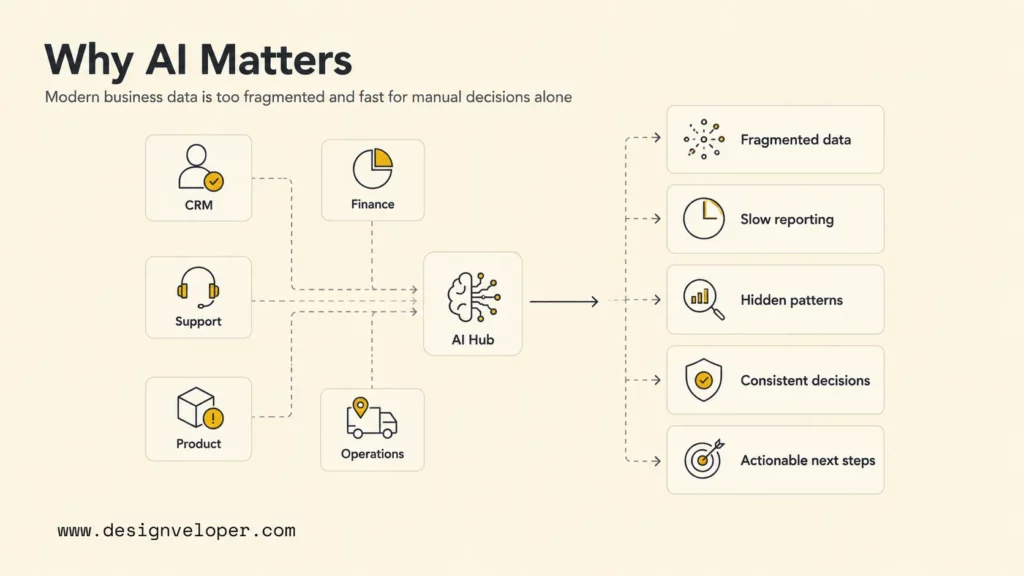
Business data needs AI because most companies now produce more information than teams can inspect manually. Customer interactions, CRM updates, support tickets, product events, invoices, website behavior, project activity, supply-chain records, and financial transactions all arrive continuously. Spreadsheets and static dashboards still matter, but they often show the issue after the decision window has already passed.
AI helps business data become useful in three ways. First, AI can find patterns across large datasets that humans may not notice. Second, AI can forecast likely outcomes, such as churn risk, demand changes, or delivery delays. Third, AI can recommend or trigger the next action, such as assigning a support ticket, flagging a transaction, or notifying a manager that a resource plan is drifting.
- Data is fragmented: key signals often live across CRM, ERP, finance, product analytics, support, HR, and project systems.
- Manual reporting is slow: teams may wait days for a report when the decision needed to happen in hours.
- Patterns are too complex: a manager can review a handful of records, but AI can compare thousands of variables and histories.
- Decisions need consistency: AI can apply the same scoring logic across cases, while human judgment can focus on exceptions and context.
- Operations need action, not only insight: a dashboard explains what is happening, but AI can recommend a next step or trigger a workflow.
The Stanford 2026 AI Index shows how quickly AI adoption and investment are moving. That speed raises expectations inside businesses: leaders now want data systems that do more than display charts. They want systems that warn, explain, prioritize, and support action. AI decision systems answer that need when they are built on reliable data and governed workflows.
How AI Turns Data Into Decisions
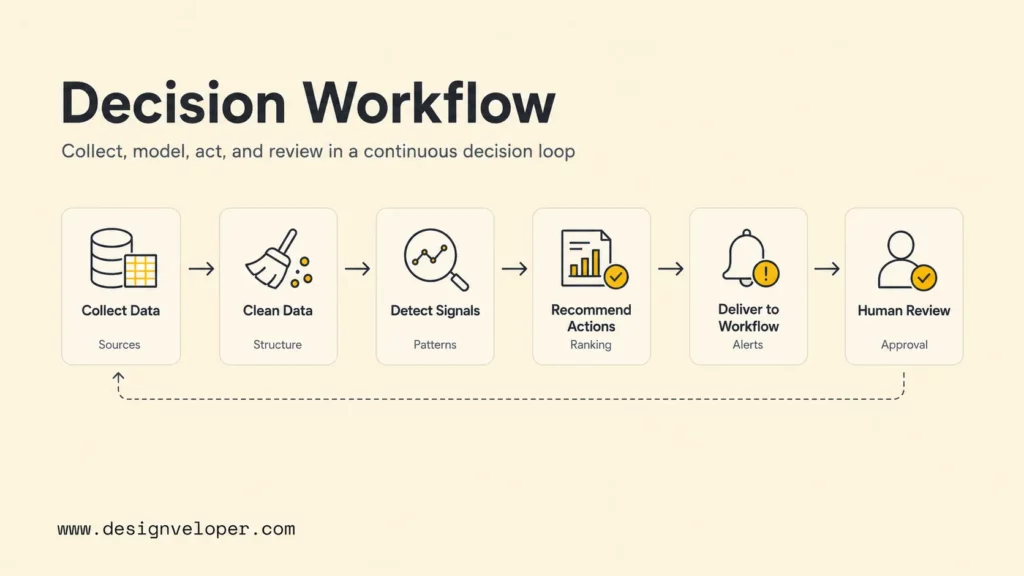
AI turns data into decisions through a pipeline. The exact architecture changes by industry, but the core flow is stable: collect data, clean it, detect signals, recommend an action, deliver the result to a workflow, and keep humans involved where impact is high.
Collect Data From Business Systems
The first step is collecting data from the systems that already run the business. Sales data may come from a CRM. Support data may come from Zendesk, Intercom, or a ticketing platform. Product data may come from event tracking. Finance data may come from accounting software, payment systems, and bank feeds. Operations data may come from inventory, ERP, logistics, or workforce tools.
Collection should be intentional. Teams should decide which decision they want to improve before connecting every possible database. For example, improving lead prioritization may require CRM activity, website engagement, email response data, and historical win-loss records. It may not require payroll records or unrelated product logs. Narrow scope makes the first system easier to govern.
Clean And Structure The Data
AI decisions are only as reliable as the data underneath them. Cleaning includes deduplicating records, normalizing names and categories, handling missing values, aligning time periods, removing obsolete fields, and making sure the same metric means the same thing across teams. A “qualified lead” should not mean one thing in marketing and another thing in sales operations.
Structured data also makes explanations easier. When a model recommends a customer for retention outreach, the team should be able to see the signals behind the score: declining usage, unresolved tickets, renewal date, plan type, or failed payments. That transparency helps users trust the system and challenge it when the context is wrong.
Detect Patterns, Risks, And Opportunities
Once data is usable, AI can detect patterns. Predictive models can find correlations between behavior and outcomes. Anomaly detection can identify transactions, devices, login behavior, or operational metrics that deviate from the norm. Clustering can group customers by behavior or needs. Natural language processing can classify open-text tickets, survey comments, sales notes, or product feedback.
Pattern detection is where AI creates speed. A support manager may not see a product issue until complaint volume rises. An AI system can detect a cluster of similar tickets earlier. A finance team may not notice a payment risk until after review queues grow. A risk model can rank suspicious transactions immediately so reviewers focus on the highest-value cases first.
Recommend Actions Or Rank Options
AI decision systems become valuable when they translate patterns into options. A model might recommend “contact this account,” “review this invoice,” “increase stock for this SKU,” or “assign this ticket to the billing team.” Ranking is often safer than full automation because it lets humans start with the most likely or highest-impact cases while still retaining judgment.
The recommendation should include enough context to review. A sales lead score should show the strongest signals behind the ranking. A fraud alert should show the behavior that made the transaction unusual. A resource planning recommendation should show which project, skill, deadline, or capacity constraint drove the warning. Otherwise the system becomes a black box that users may ignore or over-trust.
Trigger Dashboards, Alerts, Or Workflows
The output must reach the place where work happens. Some decisions belong in a dashboard. Others need an alert in Slack, email, Teams, Mattermost, or an internal app. Some need a workflow ticket, CRM update, approval queue, or scheduled job. Tools such as Copilot in Power BI, Google Looker documentation, n8n workflow automation docs, and Apache Airflow DAG documentation show different layers of this decision stack: analytics, semantic models, automation, and orchestration.
Workflow delivery is where many AI projects fail. A model may be accurate in a notebook, but the business still sees no value if the result does not reach the right person at the right time. Teams should design the last mile early: who receives the recommendation, what action they can take, what happens after approval, and how the outcome is recorded for future learning.
Keep Human Review For High-Impact Decisions
Human review is essential when AI affects money, health, employment, safety, access, legal obligations, or customer trust. The NIST AI Risk Management Framework encourages organizations to manage AI risk across design, development, use, and evaluation. For decision systems, that means defining who owns the decision, how users appeal or override outputs, and how performance is monitored over time.
A practical rule is to automate low-risk, reversible actions first. AI can safely draft a recommendation, rank a queue, summarize a ticket, or alert a manager. It should not silently deny a loan, terminate an account, change a medical path, or reassign critical resources without controls. Human-in-the-loop design is not a weakness. It is how organizations use AI speed without giving up accountability.
AI decision workflow map
1. Data
CRM, ERP, support, product, finance, and operations inputs.
2. Quality
Clean fields, shared definitions, permissions, and audit trail.
3. Model
Forecast, classify, score, summarize, or detect anomalies.
4. Action
Dashboard, alert, recommendation, workflow, or approval queue.
5. Review
Human approval, outcome tracking, drift checks, and improvement.
Practical Applications Of AI-Driven Decision Making
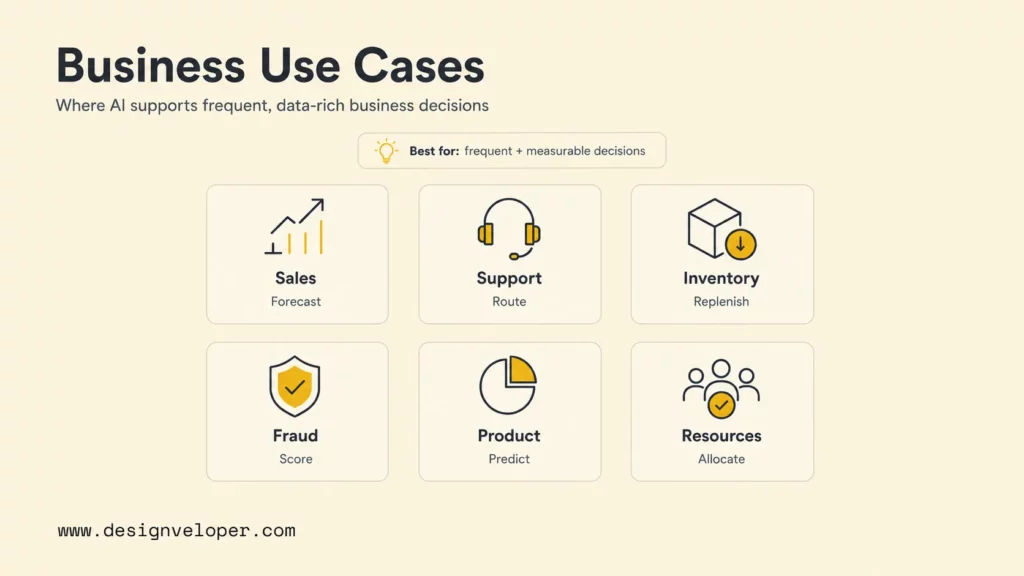
AI-driven decision making is most useful when the decision is frequent, data-rich, measurable, and expensive to delay. The following business areas are strong starting points because they already generate structured data and recurring decisions.
Sales Forecasting And Lead Prioritization
AI can help sales teams forecast revenue, score leads, identify stalled deals, and prioritize account outreach. A model can combine CRM activity, website behavior, deal stage, company size, contact engagement, and previous win patterns. The output can rank opportunities by conversion likelihood or highlight accounts that need attention before the quarter ends.
Sales managers should not treat AI scores as absolute truth. Market changes, relationship context, procurement timing, and competitive pressure may not be fully captured in the data. The best workflow gives sales teams a ranked list, explains the signals, and lets managers update the pipeline based on context.
Customer Support Routing
AI can classify support tickets by issue type, urgency, sentiment, product area, language, and customer tier. That helps support teams route tickets to the right queue faster and identify recurring product issues earlier. AI can also summarize long conversations so agents do not need to reread every message before responding.
Support routing should keep sensitive responses under human control. AI can draft a reply or recommend a macro, but agents should approve refund decisions, legal-sensitive messages, enterprise escalations, and angry customer responses. The decision system should measure response time, reopen rate, escalation rate, and customer satisfaction so the team can see whether AI improves the actual support outcome.
Inventory And Demand Planning
AI can forecast demand by analyzing seasonality, promotions, sales history, geography, supplier lead times, and external signals. Retailers and manufacturers can use these forecasts to reduce stockouts, overstock, and emergency replenishment costs. Demand planning is a strong AI use case because the decision repeats often and historical data can be measured against future outcomes.
The risk is over-trusting a model during unusual events. Weather, economic shifts, supplier disruptions, viral demand, and policy changes can break historical patterns. Human planners should review exceptions, override forecasts when needed, and feed those outcomes back into the system.
Fraud And Payment Risk Scoring
Fraud detection is one of the clearest examples of AI decision support. AI can analyze transaction amount, device behavior, location, account history, velocity, and merchant patterns to score payment risk. PayPal has long described the use of machine learning and risk systems in payments, while IBM’s 2025 Cost of a Data Breach Report shows why governance matters when AI and security intersect: ungoverned AI systems can expand breach risk even as security AI can speed detection and containment.
Fraud systems need careful threshold design. If the threshold is too strict, real customers are blocked. If the threshold is too loose, losses rise. A good AI decision workflow ranks cases, explains signals, routes uncertain transactions to review, and tracks false positives as closely as fraud capture.
Product Analytics And User Behavior Insights
AI can help product teams detect usage patterns, identify churn risk, group feedback themes, and prioritize roadmap opportunities. Instead of manually reading thousands of events, reviews, survey answers, and support tickets, product managers can see which problems repeat and which user segments are affected.
This workflow is valuable only when the AI output connects to product decisions. A churn model should help the team decide which onboarding issue to fix, which feature to improve, or which segment needs outreach. A feedback summary should include source links, sample comments, and confidence levels so product teams can inspect the evidence.
Project Management And Resource Planning
AI can support project management by spotting delivery risk, estimating resource pressure, summarizing blockers, and forecasting whether a team is likely to miss a milestone. For software and operations teams, the input may include task status, time logs, sprint velocity, skill availability, dependency changes, and historical delivery patterns.
Resource planning is especially sensitive because recommendations can affect people. AI can highlight risk, but managers should make final staffing decisions with context about skill growth, morale, client expectations, and strategic priorities. Designveloper’s HRM project shows how workflow digitization can centralize employee, time-off, work log, and resource information; that type of structured system is the foundation for better decision support.
Technologies Behind AI-Driven Decisions
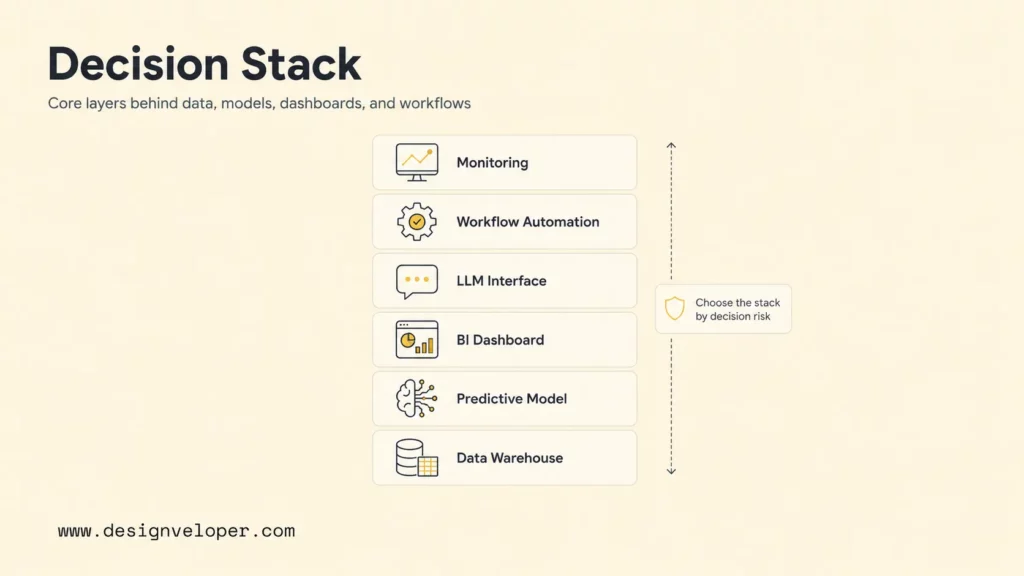
AI-driven decision systems usually combine several technologies rather than one model. Predictive analytics estimates future outcomes. Machine learning models classify, score, rank, and detect anomalies. Large language models help users ask questions, summarize records, generate explanations, and work with unstructured text. Business intelligence tools turn outputs into dashboards. Automation tools move recommendations into workflows.
| Technology layer | What it does | Decision example | Implementation check |
|---|---|---|---|
| Data warehouse or lakehouse | Stores and organizes business data from multiple systems. | Unifies sales, support, product, and finance data for customer health scoring. | Metric definitions, permissions, refresh frequency, and data lineage. |
| Predictive model | Forecasts outcomes or scores probability. | Predicts churn risk, demand, fraud probability, or delivery delay. | Training data quality, validation, explainability, drift monitoring, and bias checks. |
| LLM or chatbot interface | Lets users query, summarize, and explain business data in natural language. | A manager asks why sales forecast changed this month. | RAG design, source citations, access control, and hallucination testing. |
| BI dashboard | Displays trends, alerts, and decision metrics. | Shows high-risk accounts, supply delays, or support volume spikes. | Semantic model, report ownership, filter design, and actionability. |
| Workflow automation | Moves recommendations into tasks, approvals, alerts, or system updates. | Creates a review ticket when invoice confidence is low. | Error handling, retry logic, approval gates, and audit logs. |
| Monitoring layer | Tracks model quality, cost, latency, fairness, and business outcomes. | Flags a drop in fraud-model precision after a product change. | Owner, thresholds, incident process, and retraining rules. |
The safest architecture depends on the decision. A simple dashboard may be enough for low-risk operational visibility. A high-impact decision system may require model governance, role-based access, encrypted data, human approvals, audit trails, and incident response. The OWASP Top 10 for LLM Applications 2025 is a useful technical risk reference when LLMs can access tools, private data, or autonomous workflows.
Benefits And Risks To Manage
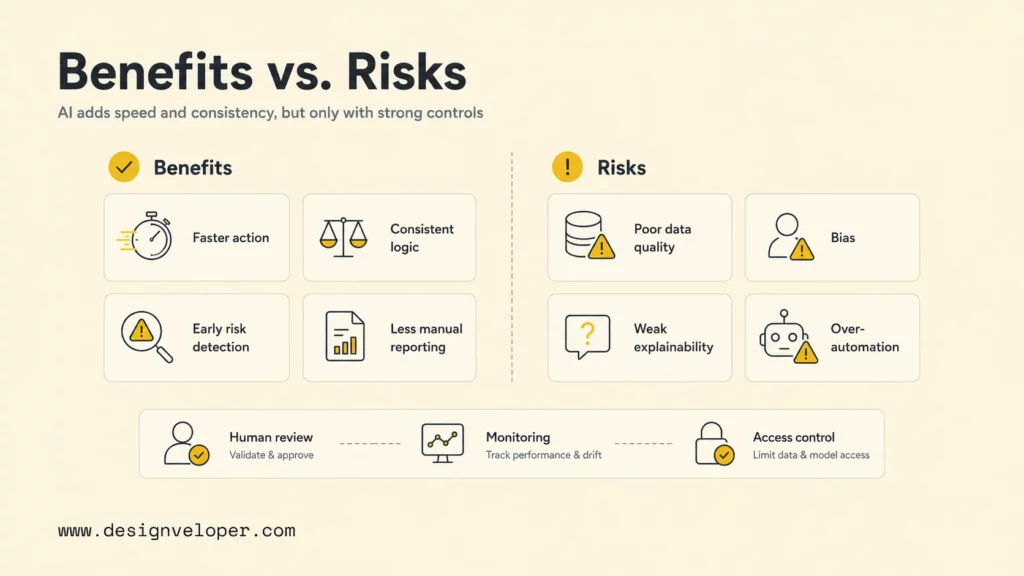
The benefits of AI-driven decisions are speed, consistency, earlier risk detection, better personalization, and less manual reporting. Teams can respond faster because AI reduces the time between data creation and action. Decisions can become more consistent because the same scoring logic applies across similar cases. Leaders can also focus human attention on judgment-heavy exceptions instead of asking people to inspect every record.
The risks are just as real. Poor data quality can produce misleading recommendations. Biased historical data can create unfair outcomes. Weak explainability can make users accept or reject AI outputs for the wrong reasons. Over-automation can remove human judgment from decisions that require context. Privacy gaps can expose customer, employee, or partner data. Model drift can reduce accuracy as behavior changes.
| Risk | What can go wrong | Control to add |
|---|---|---|
| Poor data quality | The model learns from duplicates, missing values, or inconsistent definitions. | Data quality checks, shared metric definitions, lineage, and owner review. |
| Bias and unfair impact | Historical patterns disadvantage certain groups or customer segments. | Fairness testing, representative data, human review, and impact monitoring. |
| Weak explainability | Users cannot see why the system recommended an action. | Reason codes, source links, confidence scores, and review notes. |
| Over-automation | AI takes action where human judgment is required. | Approval thresholds, reversible actions, escalation paths, and manual override. |
| Security and privacy exposure | Sensitive data enters the wrong tool or workflow. | Role-based access, retention rules, encryption, vendor review, and audit logs. |
| Model drift | Accuracy declines when customer behavior, products, or markets change. | Monitoring, retraining triggers, outcome tracking, and periodic validation. |
The faster a decision system can act, the more important it becomes to define who can override it, when it escalates, and how the business learns from the outcome.
McKinsey’s 2026 AI trust research reports that inaccuracy and cybersecurity remain highly relevant AI risks as adoption expands. That matters for decision systems because a wrong recommendation can move from a harmless answer to an operational action. Trust is not a slogan. It is a set of design, monitoring, and review practices.
How Businesses Can Apply AI Decision-Making Responsibly
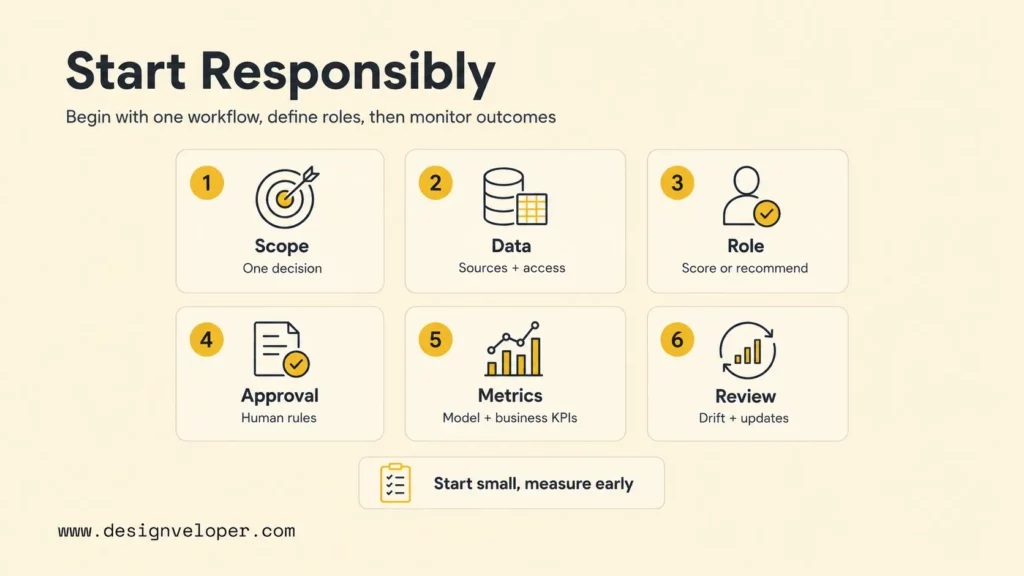
Responsible AI decision-making starts small and measurable. The best first project is a decision workflow with high business value, enough historical data, clear human ownership, and a measurable result. Examples include lead prioritization, support routing, invoice review, stockout risk alerts, project delay prediction, or churn prevention. Avoid starting with a vague goal such as “use AI for strategy.”
- Choose one decision workflow: define the exact decision, owner, data sources, users, and desired outcome.
- Map data and permissions: identify which systems are needed, who can access the data, and what must be excluded.
- Set the AI role: decide whether AI will summarize, score, rank, recommend, alert, or automate.
- Define human approval rules: specify which thresholds require review, who can override outputs, and how exceptions are handled.
- Measure both model and business performance: track accuracy, false positives, latency, cost, fairness, adoption, and business KPIs.
- Review regularly: test for drift, update assumptions, review incidents, and retire workflows that no longer add value.
Teams should document decisions before they automate them. A decision policy should explain the input data, AI method, confidence thresholds, human review rules, escalation path, monitoring metrics, and rollback plan. NIST’s AI RMF 1.0 publication is useful because it frames AI risk management as a lifecycle activity, not a one-time checklist.
AI decision readiness scorecard
| Question | Ready signal | Fix before launch |
|---|---|---|
| Is the decision specific? | One owner, one workflow, one measurable outcome. | Scope is still a broad analytics wish list. |
| Is data reliable? | Fields are clean, current, permissioned, and understood. | Metrics conflict across teams or sources are missing. |
| Can users review outputs? | Recommendation includes reason codes and supporting evidence. | Users only see a black-box score or action. |
| Can the system be monitored? | Accuracy, cost, drift, false positives, and business KPIs are tracked. | No owner exists for incidents or model degradation. |
Building AI Decision Systems Around Real Business Data
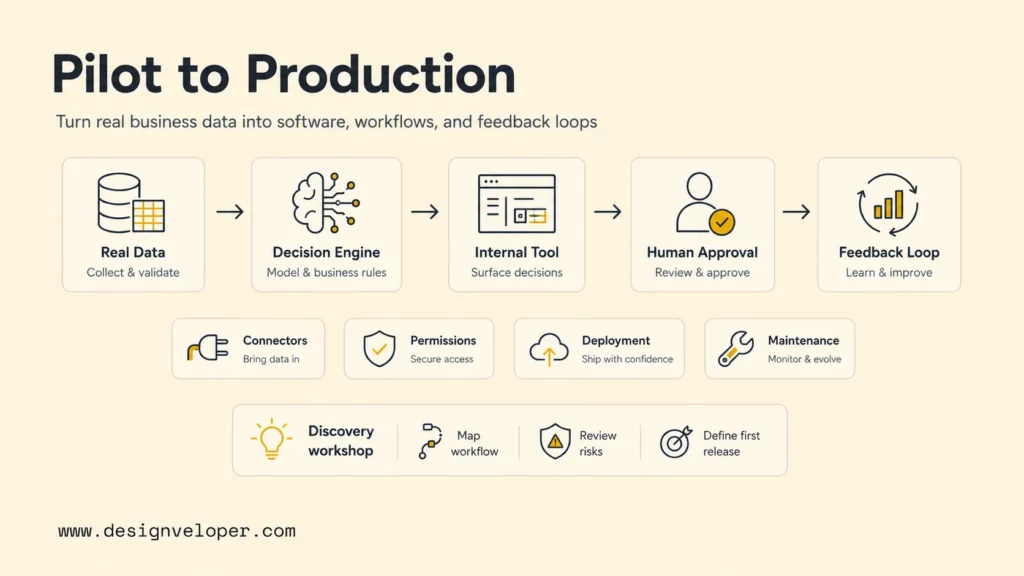
AI-driven decision making works best when the system is designed around real business data, not a demo dataset. A production system needs data connectors, permission rules, model selection, UI design, approval workflows, observability, testing, deployment, and maintenance. It also needs a team that understands the business process well enough to know when AI should recommend, when AI should automate, and when AI should step aside.
Designveloper builds custom software, AI systems, dashboards, and workflow automation around operational needs. Our AI development services can help teams scope AI decision-support systems, connect them to reliable data sources, design review flows, and ship production-ready software. Our AI business process automation guide also explains why automation should be tied to real workflows instead of isolated AI prompts.
For teams that need dashboards, internal tools, or data-driven web applications, Designveloper’s software development services and project portfolio show experience across web applications, internal platforms, HR workflows, document platforms, construction management tools, and business systems. That matters because AI decision systems are rarely only AI. They are software products with data, UX, permissions, integrations, and long-term support.
A practical engagement usually starts with a discovery workshop. The team maps one decision workflow, identifies data sources, reviews risks, defines acceptance criteria, and chooses a first release. The first release may be a dashboard with recommendations, a model-assisted review queue, an internal chatbot over trusted business data, or a workflow that routes cases to the right person. After launch, the system should keep learning from approvals, overrides, outcomes, and user feedback.
FAQs About AI-Driven Decision Making
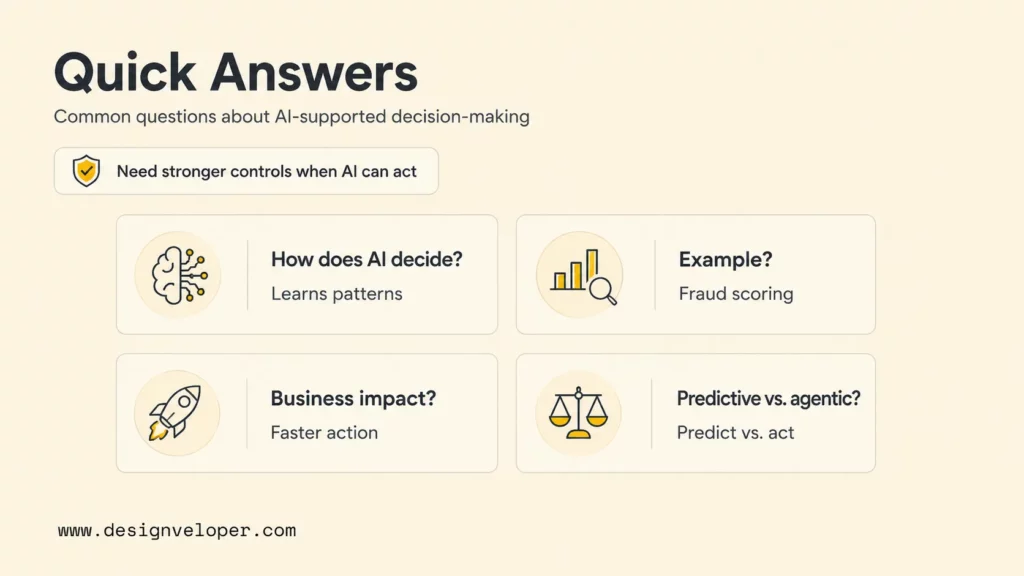
How Is AI Able To Make Decisions?
AI is able to make or support decisions by learning patterns from data and applying those patterns to new cases. A model may classify a support ticket, predict churn risk, rank sales leads, detect fraud anomalies, or recommend inventory actions. The decision is strongest when the model has clean data, a clear objective, feedback from outcomes, and human review for high-impact cases.
What Is An Example Of AI Decision-Making?
A common example is fraud scoring. AI reviews transaction amount, device behavior, location, account history, and previous fraud patterns. It then ranks the transaction as low, medium, or high risk. Low-risk transactions can proceed, high-risk transactions can be blocked or reviewed, and uncertain cases can go to a human analyst with reason codes.
How Does AI Change Business Decision-Making?
AI changes business decision-making by reducing the time between data and action. Instead of waiting for a manual report, teams can receive forecasts, alerts, summaries, rankings, and recommendations inside the workflow. AI also makes some decisions more consistent because the same scoring logic can be applied across many cases, while humans focus on judgment, exceptions, and strategy.
What Is Agentic Decision-Making?
Agentic decision-making uses AI agents that can plan steps, call tools, use memory, retrieve data, and trigger workflows under defined permissions. An agentic system might review a support queue, identify urgent tickets, draft responses, update a CRM, and ask a human to approve sensitive cases. Agentic systems need stronger controls because they can move beyond advice into action.
What Is The Difference Between Predictive AI And Agentic Decision-Making?
Predictive AI estimates what may happen, such as churn risk, demand, fraud probability, or delivery delay. Agentic decision-making can use predictions as one input, then plan and execute steps through tools or workflows. Predictive AI answers “what is likely?” Agentic AI moves closer to “what should happen next, and which approved steps can the system take?” Businesses should usually master predictive and recommendation workflows before giving AI agents wider autonomy.
AI driven decision making is most valuable when it turns scattered business data into practical action: a forecast, a ranked queue, an alert, a recommendation, or a workflow with human review. Companies that start with one clear decision, reliable data, measurable KPIs, and responsible controls can use AI to move faster without losing accountability.


