


If you’ve been around software development long enough, you’ve probably heard people discuss the term “DevOps pipelines.” Faster releases, fewer bugs, and smoother collaboration are what people often mention to describe those pipelines.
But when you actually sit down to figure out what a DevOps pipeline really is and how to build one that actually works for your projects, things become more complicated. That time, you may need this guide to build a truly effective pipeline for your team.
Here, we’ll provide you with the fundamentals to get started with DevOps pipelines efficiently. Keep reading!
What Is A DevOps Pipeline?
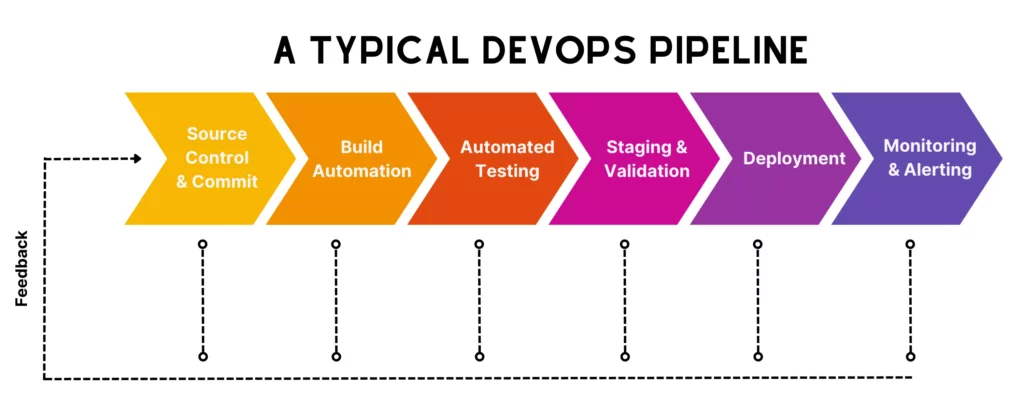
A DevOps pipeline is a structured workflow that combines automated processes and tools to move code from a commit all the way to production. Instead of relying on manual handoffs (which can slow things down or introduce small but costly mistakes), DevOps pipelines bring together development, testing, and deployment into one continuous flow.
For example, when a developer commits code in reality, the pipeline triggers the following activities: building the application, running tests, checking for issues, and eventually deploying it if everything looks good. Each step happens consistently in sequence. And with the help of tools, this pipeline can take place automatically, allowing small yet frequent updates.
Of course, what really makes DevOps pipelines stand out is the combination of continuous flow and tight feedback loops. Code doesn’t just move forward automatically; it’s constantly being validated along the way. If something breaks (e.g., a test fails or a build doesn’t pass), the pipeline stops right there and sends immediate feedback. That way, teams can detect issues early, instead of waiting for weeks when they’re much harder to fix.
Benefits Of A DevOps Pipeline

The DevOps market has been growing at an annual rate of around 20.7%, and it’s expected to reach roughly $17.26 billion by 2026. Those numbers indicate that more and more organizations are leaning into DevOps because they start seeing very real improvements in how they build and deliver software.
So, what benefits can organizations reap from DevOps pipelines? Let’s see:
- Faster delivery cycles: DevOps pipelines allow code to move from commit to production faster through automated processes and continuous feedback. According to Harness, DevOps helps 35% of developers push code multiple times a day.
- Improved software quality: Automated testing at almost every stage helps detect bugs early. So instead of struggling to fix issues in production, teams deal with them while they’re still small.
- Consistent and repeatable processes: In DevOps pipelines, every build, test, and deployment follows the same steps, every time.
- Better collaboration between teams: Dev and Ops aren’t working separately anymore. Instead, the pipeline creates a shared system everyone relies on, which naturally improves communication.
- Early and continuous feedback: If something breaks, teams know right away. That immediate feedback loop helps teams fix issues more easily before they grow into bigger problems.
- Reduced risk in deployments: DevOps encourages smaller, incremental changes. Combined with automated checks, releases become more predictable and stable.
DevOps Pipeline Vs CI/CD Pipeline
These two pipelines are closely related, but they’re not the same thing. A CI/CD (Continuous Integration and Continuous Delivery/Deployment) pipeline is one of the core technical pieces inside a DevOps setup.
Meanwhile, DevOps pipelines cover more than that in reality. They wrap that automation into a broader workflow that includes collaboration, monitoring, feedback, and ongoing operations. That said, in many posts, whenever talking about a DevOps pipeline, people often talk about its “technical” aspect (aka “a CI/CD pipeline”) rather than mentioning its broader concept.
Below is a clearer comparison between DevOps and CI/CD pipelines:
| Aspect | DevOps Pipeline | CI/CD Pipeline |
| Definition | A complete workflow combining culture, collaboration, processes, tools, and practices to deliver software continuously | An automated process plus automation tools for integrating, testing, and deploying code changes |
| Goals | Improve collaboration, speed, reliability, and continuous improvement across the lifecycle | Deliver code changes quickly and safely through automation, reduce manual errors, and make the codebase always ready for deployments |
| Scope | Broad. Covers the entire software development process, from planning and coding to deployment and monitoring. | Narrower. Focuses mainly on automatically integrating, testing, and deploying code changes. |
| How to implement | Involves cultural and organizational changes, process adjustments, and soft skills in addition to tool adoption. | Primarily tool-driven automation (e.g., build servers, test runners) and involves building specific automated workflows. |
So, how do DevOps and CI/CD pipeline actually work together?
In a well-functioning setup, the CI/CD pipeline acts as the technical backbone of a DevOps pipeline. DevOps accordingly breaks down silos between teams, making it possible to implement CI/CD effectively in the first place. Without that shared responsibility, automation alone tends to fall short.
How A DevOps Pipeline Works
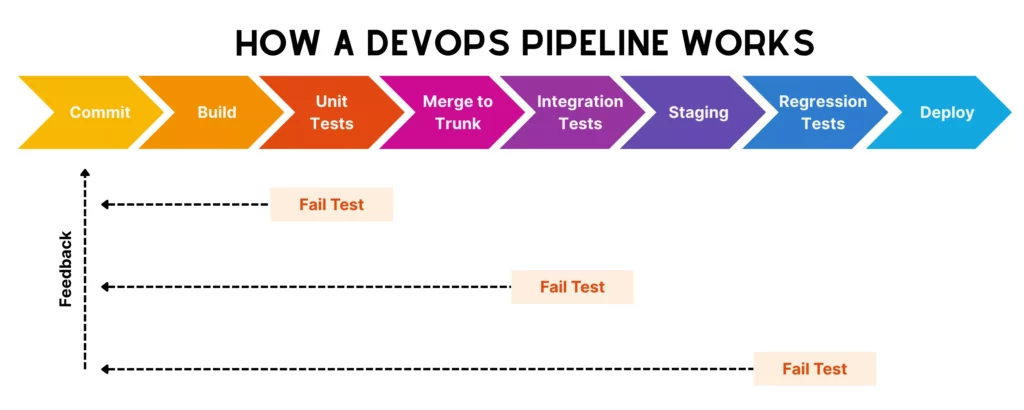
On paper, a DevOps pipeline looks clean and linear. But in reality, it’s more complicated and can vary across different teams. However, the core technical workflow behind a DevOps pipeline still follows the following steps:
Commit Starts The Workflow
A DevOps pipeline begins with a simple commit. It’s when a developer writes code (e.g., for a new feature or a small bug fix) and pushes it to a shared repository. That action triggers the automated CI/CD pipeline that your team set up before.
Without the need to ping QA or manually start a build, the pipeline detects the change and kicks off the next steps almost immediately.
Build And Unit Tests Validate The Change
Once the pipeline is triggered, the system attempts to build the feature. This step ensures the code actually compiles and integrates properly with the existing codebase.
Right after that, unit tests run. These are quick, focused tests that check whether individual components behave as expected. If something breaks here, the pipeline stops to prevent unstable code from moving forward.
Merge To Trunk And Run Integration Tests
If the feature passes unit tests, the code is then merged into the main branch (often called the trunk). Here, in this step, integration tests come into play to check how different parts of the system work together instead of testing isolated pieces. This way, these tests can catch hidden issues that unit tests didn’t explore.
Staging, Regression Testing, And Deployment
Once the code passes integration tests, it keeps moving to a staging environment. This environment is designed to closely mimic production, so teams can validate how the application behaves in real conditions.
Here, teams adopt regression testing to make sure new changes haven’t unintentionally broken existing functionality. If everything checks out, the pipeline proceeds to deployment either automatically or with a manual approval step, depending on how the team has set things up.
Feedback Stops The Pipeline When A Stage Fails
At any stage (build, test, staging), if something fails, the pipeline stops immediately and sends feedback to the team.
This feedback loop helps developers quickly identify what went wrong, so they can fix it and push a new commit to restart the pipeline. This keeps teams truly informed about where issues come from or whether their pipeline works as intended, hence fixing issues faster, adjusting the pipeline, and making the entire process reliable. Following this continuous feedback loop, the code can seamlessly flow through build, test, fail (sometimes), fix, and deployment.
DevOps Pipeline Example

To better understand how a DevOps pipeline works in reality, let’s take this example:
Imagine a team working on an eCommerce app.
A developer adds a new feature (like a discount code function) and pushes the code to the main repository. That commit automatically triggers the pipeline.
First, the pipeline runs a build process, compiling the application and packaging it into a deployable artifact (often a Docker image). Right after that, unit tests run to make sure the new logic behaves correctly. If something breaks here, the pipeline stops. But if everything passes, the code moves forward to integration testing, where the new feature is tested alongside other parts of the system, like payment processing or user accounts.
Next, the application is deployed to a staging environment. Here, the team might run regression tests, perform security checks, and even involve a quick manual check to confirm the feature works as expected in a production-like setup.
Once validated, the pipeline proceeds to deployment. After release, monitoring tools track performance and error rates. If something unusual happens (like a spike in failed transactions), the team gets alerted and can quickly investigate or roll back.
Components Of A DevOps Pipeline
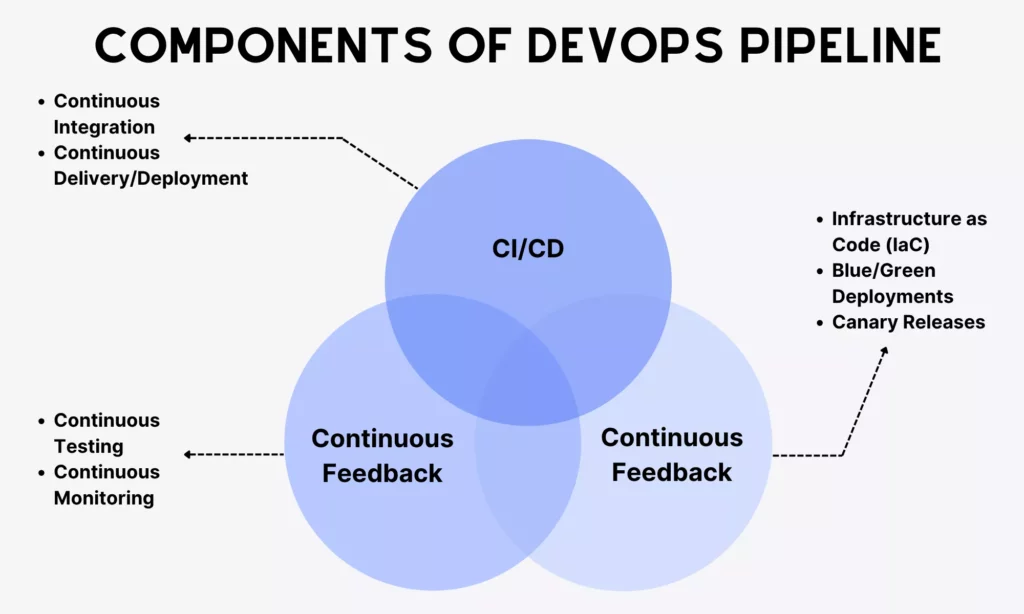
DevOps is built around the idea of “continuous everything.” A pipeline isn’t just a sequence of steps; it’s powered by ongoing processes that keep things moving, adapting, and improving over time. Accordingly, the DevOps pipeline revolves around a few core components that keep it stable and responsive.
Continuous Integration, Delivery, And Deployment
These components shape how code moves forward automatically.
- Continuous Integration (CI)
CI means developers frequently merge small code changes into a shared repository. Each commit triggers automated builds and tests to identify issues early.
Teams often adopt different strategies to make the CI process effective. One standard, commonly used approach is trunk-based development. This strategy allows developers to commit code directly to a single main branch (often called trunk or main) or use very short-lived branches that get merged back quickly to the trunk. This way, teams can make small, frequent changes and avoid merge conflicts.
For this reason, trunk-based development is a preferred strategy for those aiming for fast CI/CD pipelines, continuous deployment, and close collaboration.
- Continuous Delivery/Deployment (CD)
Continuous delivery ensures that code is always in a deployable state. In other words, every successful build passes through automated testing and validation, so teams can release it at any time.
Sometimes, continuous delivery and continuous deployment are used interchangeably. But some still set them apart. Accordingly, the latter is considered to take releases further. If the code passes all checks, it’s automatically deployed to production.
CD isn’t completely automated. Deployment itself may still require manual approval, depending on business needs.
Continuous Feedback
If CI/CD is how code moves forward, continuous feedback is how the pipeline learns and reacts.
In other words, it means collecting insights at every stage (during builds, tests, deployments, and even after release) and feeding that information back to the team as quickly as possible. Accordingly, teams can catch errors fast and improve the system over time.
When learning about continuous feedback, you may encounter these two ideas:
A DevOps pipeline doesn’t treat testing later, but early. Different tests are implemented throughout the pipeline, covering unit tests, integration tests, regression tests, and even performance checks. This way, teams can identify issues early, making issue fixes cheaper, faster, and less disruptive. Instead of a big testing phase at the end, validation becomes part of the flow.
Once the application is live, monitoring tools track metrics like performance, errors, and user behavior. This gives teams real-world feedback on how the system is actually behaving, not just how it should behave. Such valuable insights are fed back to development and testing to learn from mistakes and improve the system over time.
Continuous Operations
Continuous operations is technically about automating operational tasks to manage and maintain apps in production environments, even when new updates are continuously being deployed. This involves automatically monitoring app health, handling incidents, scaling resources, managing infrastructure, and supporting frequent releases. Its goal is to keep apps and systems working stably and prevent new updates from disrupting user experiences.
To make this work without constant manual effort, teams rely on automation techniques such as:
- Infrastructure as Code (IaC)
Teams define and manage infrastructure through code to make environments consistent and repeatable.
Teams maintain two identical environments: Blue and Green. One environment is live (Blue), while the other is updated (Green). When the new version runs stably in Green, traffic is switched from Blue to Green. But if something goes wrong, traffic can quickly revert to Blue. This approach helps reduce downtime and deployment risks.
Changes are gradually rolled out to a small group of users first, then expanded to everyone when everything is stable. This limits risk and allows teams to observe real-world impact before a full release.
Key Stages Of A DevOps Pipeline
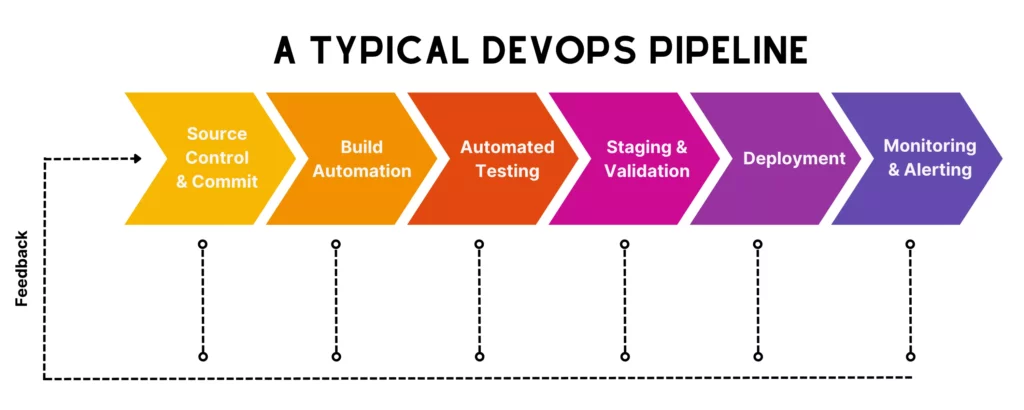
You’ve learned what a DevOps pipeline mainly revolves around. So, now, let’s learn the key stages of the typical pipeline. These phases give you a clearer picture of what needs to happen, in what order, and why each step matters, hence supporting you in setting your own or improving your existing pipeline.
Source Control And Commit
Like what we said earlier, a DevOps pipeline technically starts with code commits. More particularly, developers write and push code to a source control system.
Some common source control tools include Git, GitHub, GitLab, and Bitbucket. Of which, Git is an open-source, distributed version control tool that developers can install and use locally on their personal computers. Meanwhile, systems like GitHub and GitLab are mainly cloud-based and create a shared platform for developers to work in isolated feature branches, merge their changes back to the trunk branch, track changes, and collaborate on committed code.
In a healthy pipeline, commits are small and frequent. That allows teams to efficiently review changes, identify issues, and integrate work without major conflicts.
Build Automation
Once code is committed, the pipeline is triggered to move into the build stage. Here, the system compiles the code, resolves dependencies, and packages the application into a runnable artifact.
The goal of this stage is to make sure the application can actually be built in a clean, consistent environment. Because if the build fails, nothing else really matters.
Of course, this build phase doesn’t rely on developers building locally. But teams often set up an automated pipeline using CI/CD tools like GitHub Actions, GitLab, or Azure Pipelines. This pipeline ensures every build follows the same steps. This reduces manual intervention, reduces humen errors, and speeds up small, frequent builds while ensuring high-quality software.
Automated Testing
After a successful build, the code needs to go through unit testing to check individual components. Normally, unit tests often run early in the build stage, after being triggered by every code commit.
If it passes unit tests, the code continues moving to integration testing for validation. More particularly, the pipeline will verify interactions between modules or services. A failed test stops the process before faulty code moves further down the line.
This phase is very important and non-negotiable, because it ensures what’s built meets project and security requirements. Through continuous deliveries, the pipeline also automatically implements different tests on code to continuously validate quality, accelerate feedback loops, and enable more reliable releases.
Staging And Pre-Production Validation
Once code passes those previous tests (unit, integration), it’s deployed to a staging environment. Here, teams can validate how the application behaves under more realistic conditions in a production-like environment before it goes live. This stage acts as a final safety net to discover hidden issues that the above tests may miss.
In this phase, teams need to:
- Set up a staging environment that is nearly identical to the production environment in terms of infrastructure, configurations, network settings, and data models.
- Validate the code through a mix of manual and automated testing:
- Functional/End-to-end (E2E) tests to validate complete user journeys scenarios in nearly-real conditions.
- Regression tests to ensure existing features still work
- User acceptance tests (UAT) to allow product owners, QA engineers, and stakeholders to interact with the app and give final sign-off.
- Performance tests to evaluate system speed and scalability under load.
- Security checks to spot vulnerabilities early through static (SAST) and dynamic (DAST) analysis.
- Verify configurations, integrations, or the deployment process itself
- Set up quality gates or conditions (e.g., performance thresholds) to prevent unsuccessful code from being moving forward to production
- Integrate human judgment to manually approve all the validations before the application is actually pushed to production.
Deployment
If everything checks out in staging, the application is ready for deployment. Depending on the pipeline setup, deployment can require manual approvals or be automatically triggered after validations.
Teams may also use strategies like blue/green deployments or canary releases to reduce risk. Instead of pushing changes all at once, they roll them out gradually or switch traffic between environments.
Monitoring And Alerting
Once the application is live, the pipeline moves to the observation mode. Integrated with monitoring tools, the pipeline can continuously track system performance, uptime, error rates, and user activity. This way, teams understand how the application behaves in the real world, not just in simulated environments.
These tools also come with notifications to alert teams when something goes wrong. Insights gathered here feed back into development to help teams fix issues, improve performance, and plan future updates more effectively.
What To Consider Before Building A DevOps Pipeline

There’s no perfect formula to set up a “one-size-fits-all” DevOps pipeline for all team needs and use cases. What works for one team might feel completely wrong for another. That’s why you need to consider the following factors to design a pipeline that actually fits your context.
Technology Stack And Application Architecture
Your technology stack and architecture shape almost every decision in the pipeline. Some stacks may require longer build times, or your legacy systems may not support full automation right away. Besides, a simple web app with a monolithic structure will need a very different pipeline compared to, say, a microservices-based system running across containers.
So, before building a DevOps pipeline, your team needs to map how your application is structured (we mean, what components exist, how they interact, and how they’re deployed). Then design pipeline stages that reflect that reality, not an idealized version of it.
Team Skills And Delivery Maturity
Tools alone don’t make a pipeline work, but require human involvement.
If your team is new to DevOps practices, jumping straight into advanced automation (like full continuous deployment) may be overwhelming. It’s because skill gaps can lead to misconfigured pipelines or fragile setups. Meanwhile, experienced teams may find overly manual pipelines frustrating and slow.
That’s why you need to assess where your team currently stands by looking deeply at their technical skills and how the team can deliver software reliably from idea to production. That evaluation helps you define a suitable level of automation that is manageable for your team, then evolves over time.
Budget, Toolchain Complexity, And Maintenance Effort
There are a lot of DevOps tools out there to support your DevOps pipeline. Some specialize in specific DevOps functions (e.g., Octopus Deploy for CD), while others are more versatile (e.g., GitHub for version control and CI/CD pipelines). More or fewer tools don’t always mean a better pipeline. Choosing a few can make your team encounter failures, while building a complex toolchain can increase costs and create long-term maintenance headaches.
So, consider your company’s budget constraints, toolchain complexity, and maintenance effort when building a DevOps pipeline.
Our advice is to choose tools that integrate well with each other and fit your actual needs (e.g., automation, budget, and maintenance).
Artifact Management And Environment Strategy
Once your application is built, you need a reliable way to store and promote artifacts across environments. In other words, artifacts (like compiled binaries or container images) should remain consistent as they move from testing to staging to production.
Without properly configured and managed, each environment may have different conditions that make artifacts “work well in testing but fail in staging and production.” Meanwhile, if you don’t clearly version your artifacts, it’s hard to trace what was deployed, when it went live, and which version causes issues.
Therefore, your team needs to devise a good strategy to manage artifacts and environments effectively. More particularly, you should define how artifacts move between environments, and keep configurations separate from the code itself (e.g., using environment variables or config files). Besides, use a centralized artifact repository and version everything clearly.
Build-Once Versus Rebuild-Per-Stage Decisions
The final consideration is whether your DevOps pipeline should build once or rebuild per stage.
“Build once” here means creating a single artifact and promoting it through all stages. Meanwhile, the “Rebuild-per-stage” approach involves generating a new build at each step.
Understanding these two approaches is crucial as they partially decide on how your pipeline works. Normally, many modern pipelines lean toward the build-once approach for reliability because it ensures consistency across environments. Meanwhile, rebuilding can introduce slight differences (and unexpected issues). But it’s still useful in certain cases (e.g., environment-specific dependencies).
Consider the benefits and trade-offs of these approaches to identify what aligns best with your system and deployment model.

DevOps pipelines can’t run seamlessly without tools. These tools support automation, integration, and visibility across stages. And they come into different categories as follows:
Source Control Tools
Source control or version control tools help teams manage code, track changes, and collaborate without stepping on each other’s work. Beyond versioning, they also support branching strategies, code reviews, and access control.
What they typically do:
- Track code changes over time
- Support branching and merging workflows
- Enable pull requests and code reviews
- Integrate with CI/CD pipelines
Common tools include:
- Git (the foundation behind most modern workflows)
- GitHub
- GitLab
- Bitbucket
CI/CD Automation Tools
These tools automate the process of building, testing, and deploying code whenever changes are made. Instead of manually running scripts or coordinating releases, CI/CD tools handle it all, from triggering workflows and executing jobs to managing pipeline stages.
What they typically do:
- Automatically build applications after commits
- Run test suites and validations
- Orchestrate multi-stage pipelines
- Deploy applications to different environments
Common tools include:
- Jenkins
- GitLab CI/CD
- GitHub Actions
- Bitbucket Pipelines
Testing Tools
Testing tools ensure that code changes don’t introduce new bugs or break existing functionality. They’re accordingly integrated directly into the pipeline, running automatically at different stages to validate code quality and behavior.
What they typically do:
- Run unit, integration, and regression tests
- Automate API and UI testing
- Measure code coverage and quality
- Detect performance or security issues (in some setups)
Common tools include:
- JUnit, TestNG (for unit testing)
- Selenium, Cypress (for UI testing)
- Postman, REST Assured (for API testing)
- Aikido Security, Checkmarx, Snyk (for security and DevSecOps).
Deployment And Container Tools
Once code passes testing, it needs to be packaged and deployed. That’s when teams need tools to handle this. Accordingly, they help standardize how applications are built, shipped, and run across environments. This ensures consistency from development to production.
What they typically do:
- Package applications into deployable units (like containers)
- Manage container orchestration and scaling
- Automate deployments across environments
- Support rollback and release strategies
Common tools include:
- Docker
- Kubernetes
- Helm
- Ansible, Terraform (for deployment and infrastructure automation)
Monitoring And Alerting Tools
After deployment, teams need monitoring and alerting tools to track how applications perform in real-world conditions and respond quickly when something goes wrong. Insights from these tools are fed back into development to help teams improve features and the pipeline itself.
What they typically do:
- Track system metrics (CPU, memory, latency, etc.)
- Monitor application performance and errors
- Generate alerts when thresholds are exceeded
- Provide dashboards and logs for analysis
Common tools include:
- Prometheus
- Grafana
- Elastic Stack (Elasticsearch, Logstash, Kibana)
- Datadog, New Relic
Conclusion
Through this guide, we expect you to have a clearer picture of what a DevOps pipeline is and how it works step by step in practice. We also broke down its core components (like continuous integration, feedback, and operations) along with the key stages, tools, and decisions that shape an effective pipeline. Together, these basics act as a good starting point to design an effective pipeline to deliver software with more confidence.
Of course, building a DevOps pipeline that actually fits your team isn’t always easy. It depends on your tech stack, your team’s maturity, and how you balance speed with stability. That’s why many companies choose to work with experienced partners who’ve already gone through this process.
If you’re in that case, why don’t you work with Designveloper? We’re a leading software and app development company in Vietnam. Our teams build and refine our own DevOps pipelines by combining Agile practices with modern tools like Git, GitHub Actions, Argo CD, Kubernetes, and Terraform to automate workflows, improve collaboration, and support continuous delivery across web and mobile projects.
If you’re planning to build software or modernize legacy systems using DevOps, reach out to us!


