


YouTube is expanding access to its live-stream jewels, while it’s also adding some more precise editing tools to give you more creative control over your content.
First off, on Jewels, YouTube’s live-stream donation option, which it first launched back in 2024 with U.S. creators in its YouTube Partner Program (YPP). Jewels are essentially an in-app currency that enables live-stream viewers to purchase digital stickers that they can then apply during a live stream. A percentage of the sticker purchase price then allocated to the streamer, providing a fun way to donate to your favorite creators in-stream.
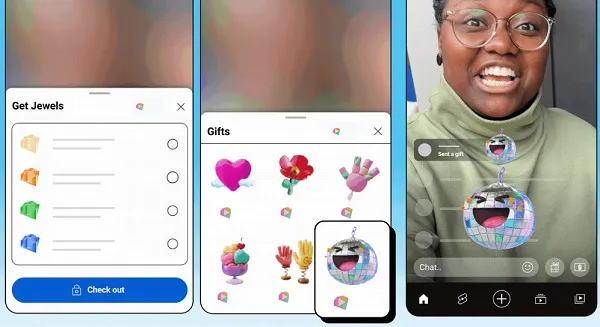
And now, YouTube is expanding both to YPP creators in Canada as well.
As per YouTube: “Gifts are a fun and interactive way for viewers to express appreciation for creators during vertical live streams. Jewels are digital items that viewers can purchase to send gifts, and creators earn Rubies based on the Jewels that viewers redeem for gifts.”
Yeah, it can be slightly confusing with the varying naming conventions here, but essentially, Jewels are a digital currency that viewers can buy to then exchange for in-app stickers, while Rubies are what creators gain from Jewels donations, and they can then be exchanged for real money.
Not sure why YouTube felt the need to use different precious stones as titles, but that’s the basic breakdown.
So now, live-stream creators in Canada will have more ways to make money, while viewers will have an additional way to donate to streamers during a broadcast.
On another front, YouTube is improving its editing tools for Shorts, which make it easier to make precise changes to your video clips.
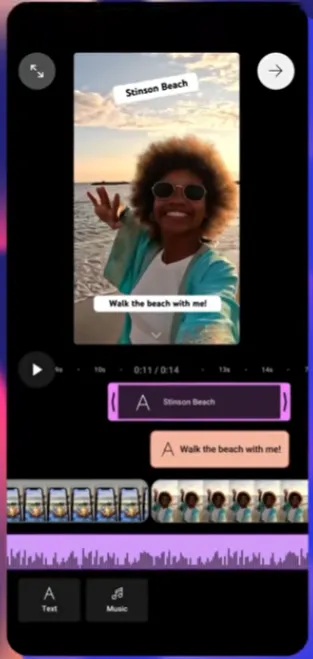
With this new editing process, creators will be able to make adjustments and edits to the timing of each element within the video composer screen. You’ll be able to zoom in on each track, re-arrange them, and more, making it easier to get your Shorts clips exactly the way you want them.
YouTube says the new editing options are being rolled out on Android, and will be coming to iOS soon.
YouTube’s also testing out its conversational AI tool on smart TVs, gaming consoles and streaming devices, which will enable connected TV (CTV) viewers to use voice queries to get answers.
YouTube’s conversational AI chatbot enables viewers to ask questions about what they’re viewing, and get responses in-stream.
And now, selected CTV viewers will also be able to use this.
“While watching a video, select the ‘Ask’ button to open the AI tool. Select from suggested prompts, or use the microphone button to ask questions using your voice. If your TV remote has a microphone button, you can also use that button to trigger the conversational AI tool and ask questions.”
So you’ll be able to engage direct with YouTube’s AI chatbot while viewing on your TV, so you can ask more questions about the content that you’re viewing.
YouTube says that it will begin testing this with a small group of users ahead of future expansion.
Finally, YouTube is also updating the way Shorts are displayed in the YouTube Studio mobile app.
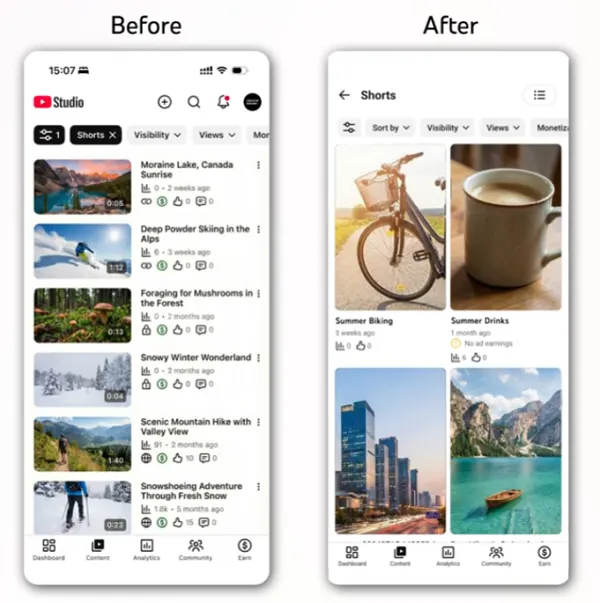
Up till now, Shorts have been displayed in a list format, in the same style as long-form videos, but now, Shorts will be displayed in a grid format, in the same way that they appear on the YouTube main app.
Creators will have the option to switch their view back to list format if they prefer, but the update provides an alternative, more familiar display for Shorts content.


