


Testing is a non-negotiable process in Agile software development. Without proper and careful testing, software fails for sure because you don’t know whether the software works as intended. So, what is Agile methodology testing mainly about? This article has everything fundamental you need to know about it.
What is Agile Methodology Testing?
As the name states, Agile methodology testing is a way of testing software continuously instead of considering it as an afterthought. In other words, teams don’t need to wait until the end of development to conduct testing, but perform different tests alongside coding. Accordingly, testers collaborate closely with developers and even product owners to spot issues earlier before they grow into uncontrollable problems.
Agile testing evolves when requirements change. Through quick feedback loops, teams flexibly and iteratively implement test updates and make constant adjustments.
Why is Agile Testing Important?
The global Agile testing market is expected to grow around 18.5% annually, reaching $12.44 billion in 2033. This growth is accordingly driven by the increasing adoption of CI/CD pipelines to bring the following benefits:
- Spot issues early: Agile testing happens during development, not after. This allows teams to identify bugs when they’re still small and manageable, instead of handling expensive fixes later on.
- Supports faster releases without chaos: Because testing is continuous, teams can release updates more frequently without rushing untested code to production environments.
- Improve collaboration across teams: In Agile, testers don’t work alone, but collaboratively with developers and stakeholders throughout the process to perform testing. This helps everyone understand what issues are happening and reduce miscommunication.
- Adapt easily to changing requirements: Following the core Agile philosophy, teams can adapt testing to changing project requirements instead of sticking to outdated plans.
- Enhance product quality and user satisfaction: With constant feedback and validation, teams can keep the final product more aligned with what users actually need (not just what was initially planned).
- Reduces long-term costs: Fixing bugs early is cheaper and simpler than doing it later on. Through continuous testing, teams can avoid major rework and delays.
Agile Testing Lifecycle Explained
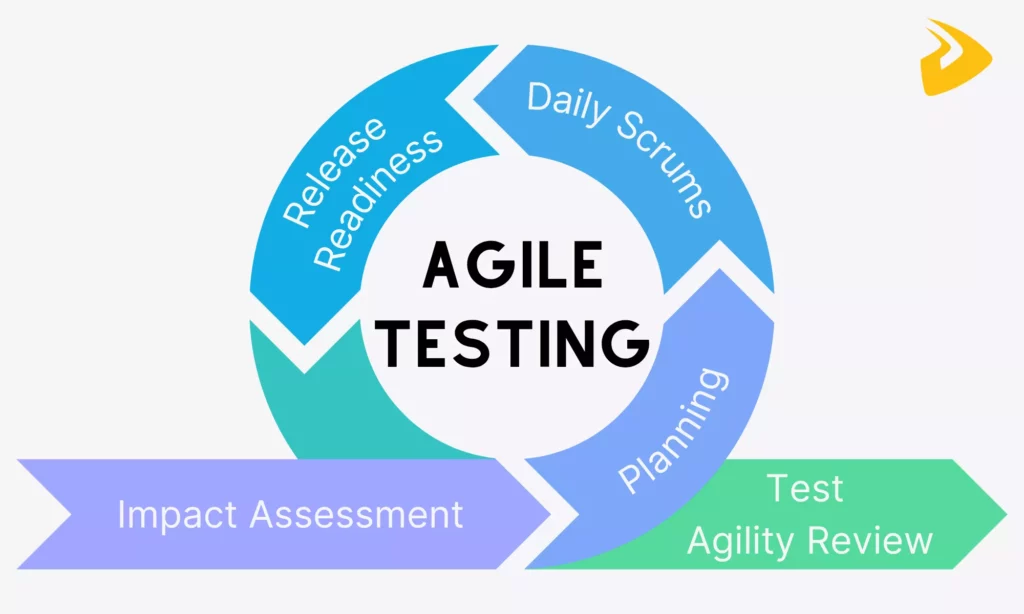
So, how can your team conduct testing following the Agile methodology? Well, it’s a loop that your team keeps repeating and improving a little each time. The Agile testing lifecycle brings together developers, testers, product owners, and even stakeholders to short cycles to keep quality in check. Now, let’s break this process down step by step.
1. Impact Assessment
Evaluating the impact of changes during each sprint is important, as even a small feature update can ruin the product. Miss this step, and you’re testing blind.
So in this phase, your team needs to ask, “Which components does this change actually affect?” In other words, testers and developers will collaboratively review new requirements, user stories, or changes introduced in the sprint backlog. The goal is to identify which areas of the software might be impacted, directly or indirectly. Then, your team can provide the feedback to stakeholders to fine-tune testing strategies in the next step.
Besides, your team can conduct the TIA (Test Impact Analysis) to identify which components are most affected by changes and how extensive the testing should be. This helps your team reduce testing duration and focus their energy on what actually matters, hence maintaining quality.
2. Agile Testing Planning
Once the impact is clear enough, your team moves into planning. In this phase, you don’t write a massive, fixed test plan like in traditional models, but focus on flexible plans that can evolve alongside requirement changes.
During this step, your team prioritizes testing efforts based on insights from impact and risk assessment. This might involve defining testing strategies, deciding on the types of tests needed (manual, automated, exploratory), and allocating tasks.
Then, testers begin writing test cases or scenarios based on user stories, while developers prepare for unit and integration testing. Also in this phase, your team considers tools, environments, and data required for testing.
3. Daily Scrums
Daily scrums, or called stand-ups, often happen at the start or mid-morning of the workday. They’re short (usually around 15 minutes), but they play an important role in keeping testing aligned with development.
Accordingly, during daily meetings, each team member quickly shares what they worked on yesterday, what they’re tackling today, and if anything’s blocking them. For testers particularly, this might include updating the status of executed test cases, bugs found, or challenges with test environments. Meanwhile, developers might flag changes that could impact ongoing testing.
Daily scrums are crucial because of the visibility they create. If a feature isn’t ready for testing yet, or if a critical bug is slowing things down, the team knows immediately through daily Scrums, not days later. This encourages quick problem-solving.
4. Release Readiness
As the sprint nears its end, the focus shifts toward release readiness. In this phase, testers execute final rounds of testing. This could include regression testing, system testing, and sometimes user acceptance testing (UAT). Those tests ensure that new features or changes work as expected and that existing functionality hasn’t been accidentally broken along the way.
Your team also reviews test results, bug reports, and overall system stability. This helps you see whether all severe defects are already fixed and less important ones are documented for future sprints.
5. Test Agility Review
After the release, your team moves into the test agility review. This phase is where team members can review the effectiveness of the testing process and strategy.
Similar to daily scrums, your team will reflect on what worked, what didn’t, and what could be done better next time. More particularly, they discuss testing effectiveness, bug trends, missed issues, and any bottlenecks they experienced. For example, maybe test automation was slower than expected, or communication gaps caused delays.
Based on reviews and feedback, the team decides whether to adjust testing strategies, improve collaboration, or adopt new tools or practices. Over time, these small changes will make your testing process smoother and more efficient.
Agile Testing Strategies
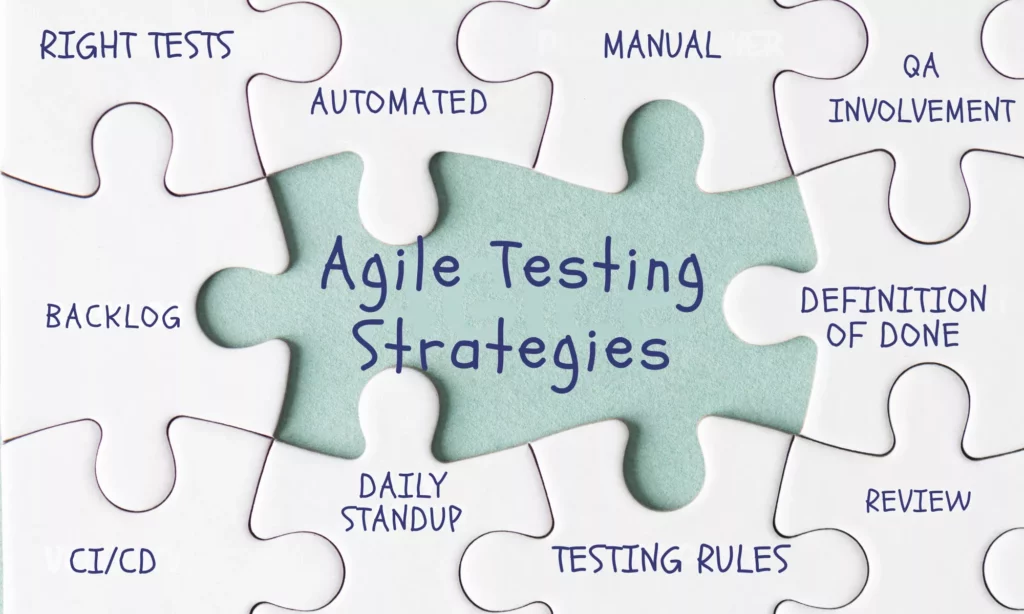
If you’re seeing testing as a separate phase that happens after development, Agile may not work the way it should. So, in a true Agile setup, testing should come into the process early and stay there the whole time alongside development.
To make testing work in practice, your team should rely on some practical strategies like these:
- Determine the right testing levels early on, like unit tests (often handled by developers), integration tests, functionality tests, regression tests, or exploratory tests.
- Integrate testing into the Definition of Done (DoD) to ensure every software increment is functional, shipable, and stable.
- Set up CI/CD pipelines to run automated tests as soon as new code is committed. This helps identify issues early.
- Balance automated and manual testing instead of depending entirely on automation. Without manual testing, you can miss edge cases.
- Keep QA fully involved. Testing shouldn’t sit in a corner. Instead, QA needs to be part of planning and daily work from the start.
- Define clear testing rules per user story. Each story should include test cases and must pass them before closure. More advanced teams even use risk-based test matrices to automate core features while exploring newer, less predictable ones.
If your Agile team keeps spotting bugs late, adopting those Agile testing strategies helps improve process quality and respond faster. It’s because they help the team more proactively observe the process to catch bugs sooner and promptly respond to customer feedback before something serious truly happens.
Agile Testing Quadrants
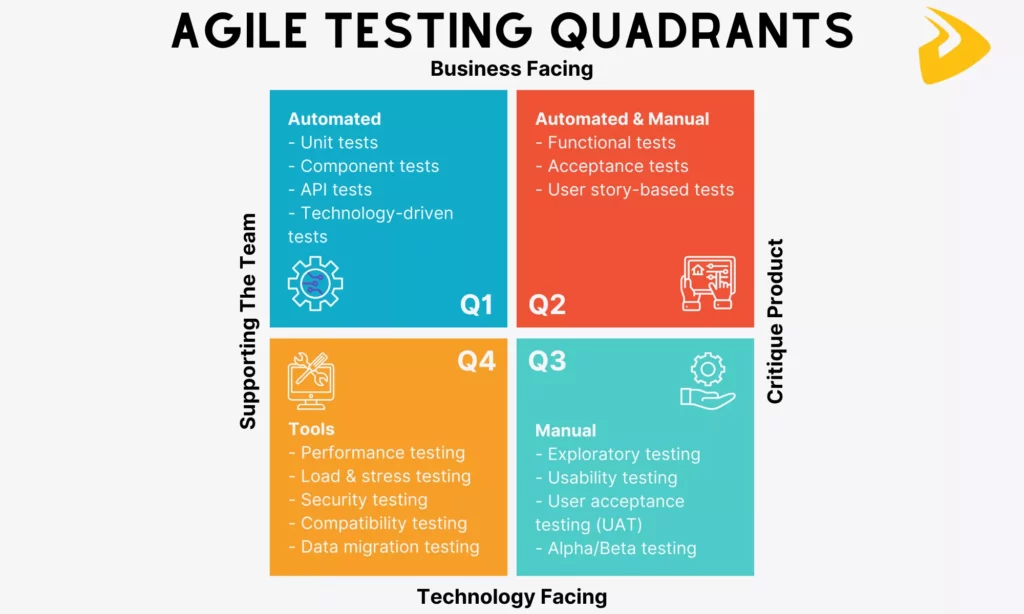
You’ve learned about the strategies to embed Agile testing effectively into your workflow. So, the question here is, how do you organize all those testing activities without missing something important? The answer lies in Agile testing quadrants.
Those quadrants were introduced by Brian Marick and later popularized by Lisa Crispin and Janet Gregory. They offer a simple, visual way to perform all the tests that cover both technical and business needs. Accordingly, they encourage Agile teams to think about different types of tests based on what they focus on, when to use them, and who’s usually responsible.
Now, let’s find out about those quadrants:
Quadrant 1 (Automated)
Quadrant 1 focuses on the technical foundation of the software. It covers all the tests that support the development team by ensuring the code works as expected at a low level. They’re mostly automated, fast to run, and executed frequently.
Purpose: Ensure code quality and technical correctness.
Common types of tests:
- Unit tests
- Component tests
- API tests
- Technology-driven tests
How it works in practice: For example, a developer builds a login function. So they write unit tests to verify correct password validation and API tests to ensure the login endpoint returns the right response. Those tests often run automatically as long as new code is committed.
Quadrant 2 (Manual and Automated)
Quadrant 2 shifts focus from technical correctness to business functionality. Tests in this quadrant can be both manual and automated. Accordingly, Agile teams often start with manual acceptance tests to explore behavior, then automate stable scenarios over time.
Purpose: Validate that the software behaves according to functional requirements and that the correct functionality is developed.
Common types of tests:
- Functional tests
- Acceptance tests
- User story-based tests
How it works in practice: For example, when a user story is created to define a checkout process, testers create acceptance criteria with the product owner. Then, they initially adopt manual tests to validate the flow, and then automated tests to ensure the checkout works consistently across updates.
Quadrant 3 (Manual)
Quadrant 3 is all about exploratory and usability testing that testers manually perform to review the software. Particularly, they interact with the software like real users would to test the user experience and see whether the software meets end-user needs.
Purpose: To uncover user experience issues that structured tests might miss.
Common types of tests:
- Exploratory testing
- Usability testing
- User acceptance testing (UAT)
- Alpha/Beta testing
- Scenario-based testing
How it works in practice: For example, a tester navigates a new mobile app feature without predefined steps. He then notices confusing navigation and unclear error messages. After that, he shares this experience and feedback with the team for improvements.
Quadrant 4 (Tools)
Quadrant 4 focuses on system-level qualities, like performance, security, and reliability. These qualities aren’t always visible during normal use, but they can make or break a product in real-world conditions. Testing in this quadrant is typically tool-driven and may require specialized environments.
Purpose: Assess non-functional, system-level requirements to ensure performance, security, and stability.
Common types of tests:
- Performance testing
- Load and stress testing
- Security testing
- Compatibility testing
- Data migration testing
How it works in practice: For example, an Agile team simulates thousands of users accessing the system simultaneously. In this case, they adopt specialized tools to measure response time and system stability. They then identify bottlenecks and optimize the performance before release.
Agile Testing Methodologies & Techniques

The Agile testing quadrants above help you organize what to test. Now, let’s learn about some common techniques to implement Agile methodology testing effectively:
- Test-Driven Development (TDD)
This technique flips the usual process: developers write tests before writing the actual code. They start with a failing test, then build just enough code to make it pass, and finally refactor. This technique is commonly used when your team plans to build core features that require high reliability, especially in backend or logic-heavy systems.
- Behavior-Driven Development (BDD)
BDD focuses on defining system behavior in a way that both technical and non-technical stakeholders can understand. Accordingly, Agile teams write scenarios in plain language (often using formats like “Given–When–Then”), then automate them. This Agile testing methodology proves particularly useful when collaboration between developers, testers, and business stakeholders is important.
- Acceptance Test-Driven Development (ATDD)
ATDD is somewhat similar to BDD, but starts with identifying acceptance criteria before development begins. Accordingly, the whole team collaborates to create acceptance tests that reflect user expectations. This testing technique is often adopted if you want to ensure software increments meet business requirements.
This is a more flexible, unscripted approach that enables testers to actively explore the software to find unexpected issues. Instead of following predefined test cases, they depend on experience and intuition. It’s often used when project requirements are evolving or when complex features come with edge cases.
Session-based testing is a more structured version of exploratory testing. This Agile testing methodology accordingly enables testers to break testing into time-boxed sessions with specific goals. They then document what they test, what they find, and how they approach it. This technique works well when you want to explore the software but still need some time for tracking its performance.
Agile Testing Examples in Real Projects

So far, we’ve talked about strategies, quadrants, and techniques. But how does all of this actually play out in real projects? The examples below show how Agile teams apply testing in practical situations. They’re not perfect templates, but they reflect common patterns that show how Agile teams work in real-world environments.
Example 1: Scrum Testing Within Sprints
In Scrum, testing doesn’t happen at the end of a sprint and waits for its turn after development. It happens continuously within short iterations (often 2-4 weeks) where development and testing move side by side. As soon as a team picks up a user story, testers begin preparing scenarios, sometimes even before the feature is fully built.
Through backlog refinement sessions, esters help clarify acceptance criteria early, reducing confusion later. Besides, testers also join daily standups to share what they’ve validated, what’s blocked, and what’s coming next, while developers highlight new changes that might affect testing.
For example, an Agile team working on a payment feature might:
- Break it into smaller user stories within the sprint
- Test each story based on acceptance criteria when it’s developed
- Report bugs or issues immediately instead of waiting until the end
When more Scrum sprints add up, more testing is already done and helps the team improve the product.
Example 2: Continuous Integration Testing
In many Agile teams, code doesn’t just wait to be tested manually. Instead, it flows through a Continuous Integration (CI) pipeline where automated tests run almost instantly after each code commit. This creates a fast feedback loop, helping developers and testers know within minutes whether something breaks.
Teams can set up pipelines using tools like Jenkins, GitLab CI, or CircleCI. These tools activate a set of tests automatically when new code is pushed.
So, in practice, a typical workflow of CI testing might happen like that:
- A developer commits code to the repository
- The CI tool triggers automated tests
- Failures are reported immediately, often with logs
This approach helps Agile teams identify issues early rather than days later when the issues may become more severe.
Example 3: User Story-Based Testing
User story-based testing centers around testing what the user actually cares about. Each user story comes with acceptance criteria, and those criteria guide testers on what needs to be tested.
Normally, teams collaborate during backlog refinement to define these criteria clearly. Then, testers turn them into test cases, albeit manual or automated, to ensure software increments behave as expected. Tools like Jira or TestRail are often used to track stories and associated test cases.
For instance, your team defines a user story like “As a user, I can reset my password so that I can regain access to my account,” plus corresponding acceptance criteria that outline expected behaviors. Once the feature is built, the team then performs test cases to validate each condition (e.g., email sent, link works, error handling).
Following this type of testing, the team can keep testing closely aligned with business requirements. Further, it reduces the risk of building something that technically works but doesn’t meet user expectations.
Example 4: Automated Regression Testing
When Agile teams release updates frequently, they may encounter the risk that new changes can break existing features. That’s where they adopt automated regression testing to ensure that what worked before still works now.
Accordingly, teams build a set of regression tests covering critical functionalities. These tests are automated using tools like Selenium, Cypress, or JUnit, and are often integrated into CI/CD pipelines.
So, a common setup for automated regression testing might include:
- Running regression tests after every major code change
- Prioritizing critical user flows (login, checkout, etc.)
- Updating tests as features evolve
This doesn’t eliminate all risks, of course, but it creates a safety net. Without it, teams would spend a lot more time manually rechecking old features.
Example 5: Exploratory Bug Testing
Not every bug follows a script. That’s why structured testing is not always suitable, and exploratory testing still matters. In this approach, testers actively explore the software without predefined steps, with the goal of trying to discover hidden or unexpected issues.
After new features are implemented or when something feels “off,” Agile teams often run exploratory testing sessions. Below is what a typical session might include:
- Testing edge cases that weren’t covered in formal test cases
- Navigating the software like a real user would
- Logging unexpected behavior or usability issues
Agile Testing vs Traditional Testing: Key Differences
When learning all the essentials of Agile testing, you may now wonder, “Is that different from traditional testing?” The answer is, of course, yes. And below is a comparison table that explain their key differences:
| Aspect | Agile Testing | Traditional Testing |
| Timing of Testing | Continuous and integrated throughout the development lifecycle. Testing happens alongside coding in each sprint to catch issues early and frequently. | Phase-based, typically occurring after development is complete. Testing is often seen as a separate stage, which can delay defect detection. |
| Flexibility & Adaptability | Highly flexible. Test plans and cases evolve as requirements change. | More rigid. Testing follows predefined plans, and adapting to changes can be slow and sometimes costly. |
| Documentation Approach | Lightweight and focused. Documentation exists, but it’s often just enough to support collaboration and testing needs rather than being overly detailed. | Heavy documentation. Detailed test plans, scripts, and reports are created upfront and maintained throughout the project. |
| Speed of Delivery & Releases | Faster, with frequent releases or iterations. Continuous testing supports rapid feedback and shorter delivery cycles. | Slower, with longer release cycles. Since testing happens later, it can extend timelines before deployment. |
Looking at those differences, Agile testing isn’t necessarily “better” in every situation. But it’s clearly designed for situations where speed, change, and continuous feedback are priorities.
Challenges in Agile Testing

Despite the visible benefits, Agile testing isn’t without limitations. In fact, the flexibility that makes Agile powerful can also introduce instability sometimes, especially if team members aren’t fully aligned with the Agile philosophy. Below are some common challenges you may encounter when adopting Agile testing:
- Frequently changing requirements
One strength of Agile is allowing teams to respond to changes. But constant changes can make testing a moving target.
Accordingly, test cases may need to be updated repeatedly, sometimes even mid-sprint, which can create confusion or gaps in coverage. Further, if communication isn’t tight, testers might validate outdated requirements without realizing it. Over time, this can lead to inconsistencies between what’s built, what’s tested, and what users actually expect.
Agile tends to favor “working software over comprehensive documentation.”
This may be a benefit in highly collaborative teams. But in situations where teams require clarity for complex features or edge cases or where knowledge isn’t shared consistently, light documentation means lacking detailed references.
This can slow down onboarding for new team members or create dependency on verbal communication instead of technical documentation.
Short iterations mean testing has to happen quickly. This results in pressure to complete testing within the same sprint as development, which can lead to rushed validation or missed scenarios. In some cases, regression testing gets squeezed or partially skipped just to meet deadlines.
- Need for skilled and adaptable testers
Agile testing isn’t just about executing test cases, but it also requires critical thinking, collaboration, and adaptability.
So, having technical skills isn’t enough. Testers need to understand business logic, communicate with developers, and sometimes even contribute to automation.
Unfortunately, not every team has that level of skill right away. This can slow down Agile testing adoption.
Best Practices for Effective Agile Testing

In reality, just “doing Agile” doesn’t automatically guarantee better quality. Teams can still run into delays, missed bugs, or unclear requirements if they don’t approach testing carefully.
So how do you implement Agile testing effectively in practice? Here are some key practices your team may consider:
- Start testing early (shift-left)
Don’t wait until features are fully built. Begin testing as soon as requirements are defined. This helps you spot issues early, before they turn into actual defects.
- Integrate automation wherever possible
Automating repetitive tests, like regression or unit tests, saves time and reduces manual effort. However, automation should be applied strategically, not blindly, by focusing on stable and high-impact areas.
- Maintain strong team collaboration
Agile testing works best when testers, developers, and product owners stay closely connected. Through open communication and shared responsibilities, your team can stay aligned and accelerate problem-solving toward the shared goals.
- Use continuous feedback loops
Don’t wait until the end of a sprint to deliver feedback. By implementing frequent testing and quick validation, your team can adjust testing strategies early, whether fixing bugs or refining features based on stakeholder input.
- Focus on critical and high-risk areas
Not everything needs the same level of testing. Prioritize features that are complex, business-critical, or prone to failure instead. This ensures testing efforts are used where they matter most.
FAQs About Agile Methodology Testing
What are Agile Testing Quadrants?
Agile testing quadrants are a simple framework used to organize different types of testing based on their purpose and who they support. They divide testing into four areas. Some focus on validating the product from a business perspective, while others support the technical side of development.
In reality, those quadrants help teams balance their testing efforts. Instead of over-focusing on, say, automation or only user-facing tests, the quadrants act like a checklist to ensure nothing important is overlooked.
What is The Quad 3 of Agile Testing?
Quadrant 3 is the area focused on exploratory, usability, and user experience testing. In other words, this quadrant requires human judgment. It relies on testers interacting with the software like a real user would instead of adopting automated tests.
By adopting tests in this quadrant, teams can explore issues that structured test cases might miss, such as confusing navigation or unexpected behavior.
What are The 5 Levels of Testing?
The five common levels of testing refer to different stages where testing is applied throughout development. They include:
- Unit Testing: Verifies individual components or functions (usually by developers)
- Integration Testing: Ensures different modules work together correctly
- System Testing: Validates the complete software as a whole
- Acceptance Testing: Confirms the software meets business requirements and user needs
- Regression Testing: Checks that new changes haven’t broken existing features
Not every project follows these levels strictly, but they provide a useful structure for thinking about coverage. Together, they help teams ensure both small components and the overall system are working as expected.
Is Agile Testing Manual or Automated?
Agile testing is implemented manually and automatically, depending on the situation. Normally, teams often adopt automated testing for repetitive, high-volume tasks like regression or unit tests, where speed and consistency matter.
Meanwhile, manual testing mainly revolves around exploratory testing, usability checks, and scenarios that require human insight. In practice, most development teams aim for a balance by automating what makes sense while keeping manual testing where it adds real value.
Conclusion
We’ve covered all the essentials of Agile methodology testing, from what it is and why it matters to real-world examples, common techniques, and even pitfalls. Testing in Agile, sometimes, isn’t as easy as said in reality. And is your team looking for reliable partners to speed up the testing process without compromising quality? Working with Designveloper can make a big difference.
Founded in 2013 and based in Ho Chi Minh City, our company has built a strong reputation for delivering high-quality web, mobile, and custom software solutions for global clients. Our Agile-driven approaches, typically Scrum and Kanban, combine development and testing seamlessly. We cover everything from manual and automated testing to CI/CD integration and performance optimization to make sure the software actually works well in real-world conditions.
Over the years, Designveloper has successfully delivered a range of impactful projects, including Lumin (a cloud-based PDF platform), ODC (a healthcare solution for doctors and patients), Swell & Switchboard (a solar business management platform), and Walrus Education (an education platform connecting students and teachers). These projects highlight our ability to handle complex systems while maintaining consistent quality through Agile testing practices.
So, if you’re planning to build or scale a software product, it’s worth reaching out to us!


