


What is harness engineering? Harness engineering is the practice of designing the operating layer around an AI agent so the agent can use tools, preserve state, verify work, follow policies, recover from errors, and escalate risky actions instead of only generating text. A model may decide what to do next, but the harness decides how the agent sees context, calls tools, stores memory, handles failures, and proves that work is complete.
That distinction matters because reliable AI agents are not just prompts attached to large language models. Production agents need orchestration, sandboxing, approvals, logs, test loops, cost controls, and governance. LangChain’s recent article on the anatomy of an agent harness describes harness engineering as an active area for improving long-running agents through tools, hooks, middleware, memory, and execution control.
This guide explains how harness engineering fits with prompt engineering and context engineering, what an agent harness contains, where the approach creates business value, and how teams should evaluate harnesses before scaling autonomy.
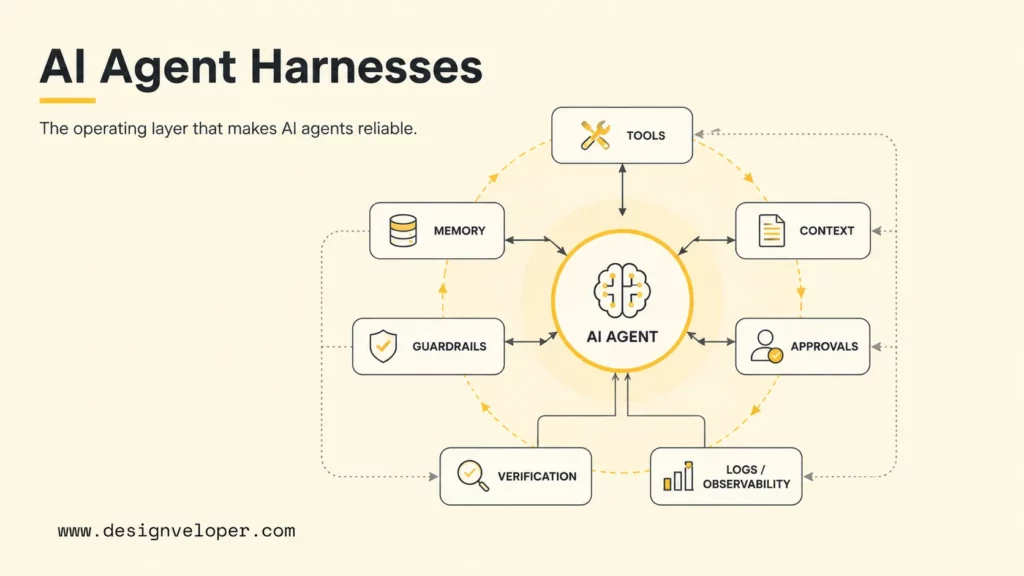
What Is Harness Engineering?
Harness engineering is the design of the control system that surrounds an AI agent during real work. The harness gives the agent a runtime loop, tool access, context loading, state management, verification steps, guardrails, approvals, observability, and recovery paths. The model remains important, but the harness turns model output into a managed workflow.
A simple chatbot can answer in one turn. An agent may need to inspect files, search a knowledge base, call an API, run tests, update a ticket, retry after an error, or ask a human for approval. The harness coordinates those steps. OpenAI’s practical guide to building AI agents defines agents around models, tools, instructions, guardrails, and orchestration, which is close to the operational meaning of a harness.
The word “harness” is useful because it shifts attention from model cleverness to system behavior. A stronger model can still fail inside a weak harness. A weaker model can sometimes perform better inside a well-instrumented harness that gives it the right tools, context, checks, and limits.
Harness Engineering In The Agent Stack
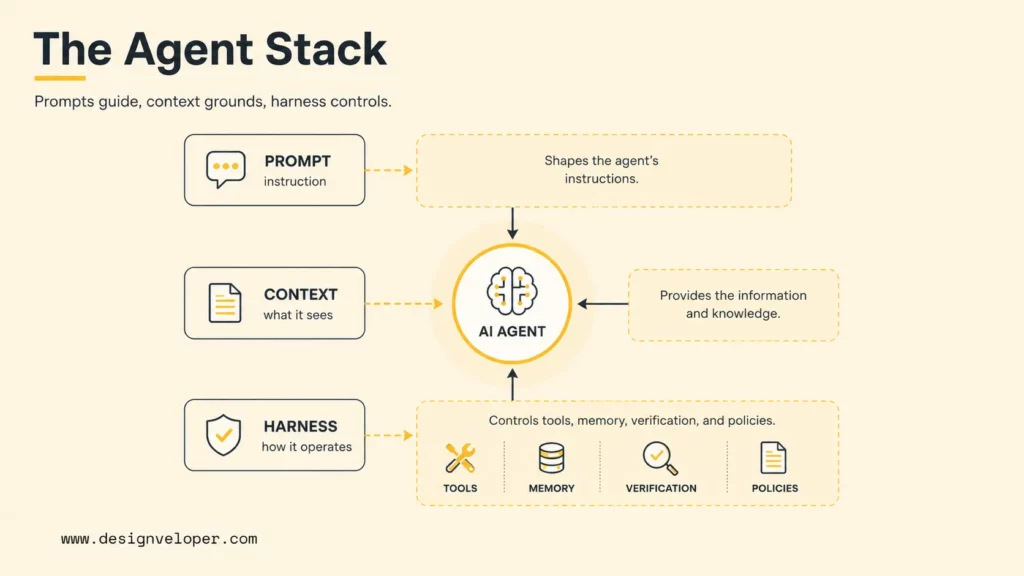
Harness engineering sits above the raw model and around the agent loop. Prompt engineering shapes instructions, context engineering shapes what the model sees, and harness engineering shapes how the agent operates across tools, memory, verification, and policy.
Prompt Engineering Shapes The Instruction
In short, prompt engineering defines the task, role, tone, output format, refusal behavior, and constraints. A prompt can tell a coding agent to follow repository conventions, a support agent to cite policy documents, or a research agent to summarize sources before answering. Prompt engineering is still useful, but prompts alone cannot guarantee safe tool calls, persistent state, or reliable completion.
Good prompt rules are necessary but not sufficient. A prompt can say “run tests before finishing,” yet the harness must actually provide the test command, execute the command, capture logs, and decide whether a failing test blocks completion.
Context Engineering Shapes What The Model Sees
Context engineering decides which instructions, files, documents, memory, examples, tool outputs, user history, and policies enter the model’s context window. The quality of contexts strongly affects agent behavior because an agent cannot follow a policy it never sees or use a code pattern it cannot inspect.
LangChain’s Deep Agents harness documentation connects harness capabilities with context engineering, memory files, and long-running agent behavior. That connection is important: a harness often becomes the delivery mechanism for better context.
Harness Engineering Shapes How The Agent Operates
Harness engineering controls runtime behavior. The harness decides when the agent can call tools, what tools are allowed, whether a tool runs in a sandbox, how state is stored, how outputs are checked, when the agent retries, and when a human must approve. OpenAI’s Agents guide and Anthropic’s tool use overview both treat tool use and controlled execution as central to agent design.
For example, a customer support agent may retrieve policy documents, check account status, draft a response, and then stop before issuing a refund. The harness can require human approval for refunds, log the evidence used, and block unsupported actions.
A coding example is similar. A model may propose a patch, but the harness can require the agent to inspect the relevant files, edit only the intended module, run the project test command, capture failing output, retry once with the error context, and open a pull request instead of merging directly. The model contributes reasoning and code; the harness supplies the delivery discipline.
Reliable Agents Usually Need All Three
Reliable agents usually need prompt engineering, context engineering, and harness engineering together. Prompt engineering says what the agent should do. Context engineering gives the agent the right information. Harness engineering makes the agent operate inside rules, tools, verification loops, and recovery paths.
A useful mental model is simple: prompts guide behavior, context grounds decisions, and harnesses control execution. Removing any one layer makes the agent weaker.
The Core Components Of Agent Harness Engineering
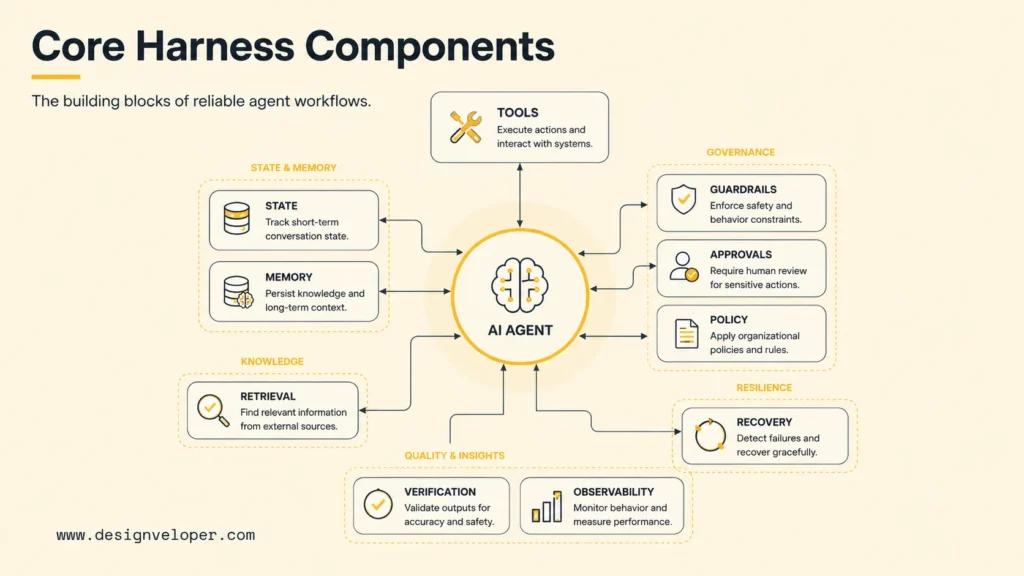
The core components of agent harness engineering are tool access, sandboxing, state, memory, retrieval, verification, guardrails, approvals, recovery, observability, logs, and policy enforcement. Each component reduces a different failure mode.
Tool access and sandboxing define what the agent can do. A coding agent may read files, edit a branch, run tests, or open a pull request. A DevOps agent may inspect pipelines, query deployment logs, or create infrastructure changes. Least-privilege tool access prevents a helpful assistant from becoming an unsafe automation.
State, memory, and retrieval help the agent continue multi-step work. The agent needs to remember goals, decisions, previous tool results, known constraints, and unresolved errors. Retrieval helps the agent find policies, documentation, code examples, or tickets without stuffing everything into the prompt.
Feedback and verification loops let the agent check work before finishing. Coding agents can run unit tests, linters, type checks, and integration tests. Support agents can validate answers against source documents. Research agents can compare claims against cited sources.
Guardrails, approvals, and recovery paths decide what happens when an action is risky, ambiguous, or destructive. NIST’s AI Risk Management Framework and Generative AI Profile emphasize governance, monitoring, escalation, and incident management for AI systems. Those ideas map naturally to agent harness design.
Observability, logs, and policy enforcement make agent behavior auditable. A team should know which prompt, model, tool call, retrieved document, approval, and error produced an outcome. LangChain’s harness engineering observability article describes using traces to understand agent failure modes and improve harness behavior.
How An Agent Harness Works In Practice
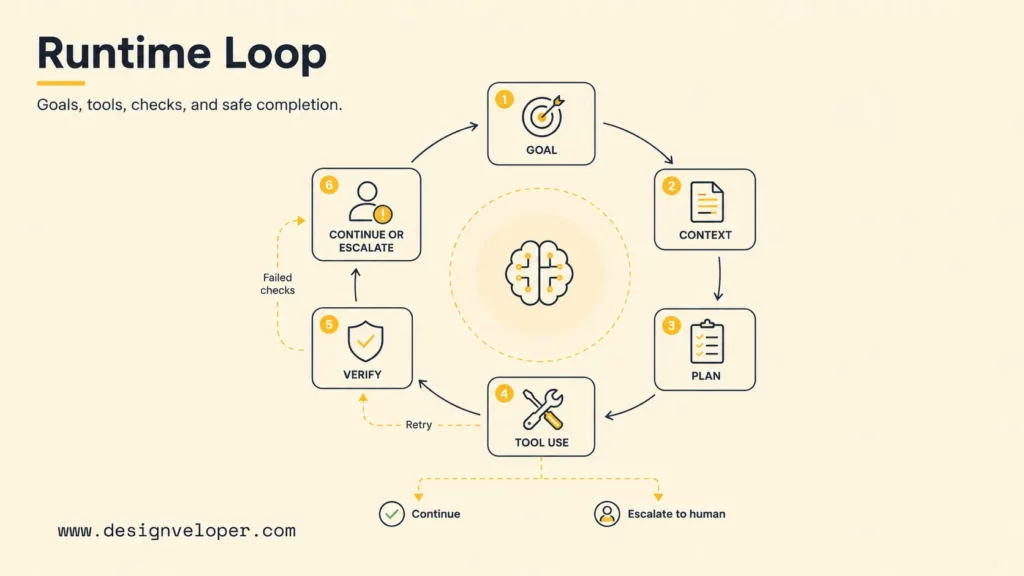
An agent harness works by running a loop: receive a goal, load context, let the model plan or choose a tool, execute the tool safely, feed results back, verify progress, and either continue, finish, recover, or escalate. The harness is the system that keeps this loop controlled.
Agents Use Tools Instead Of Only Generating Text
Agents become useful when they can act through tools. A tool can search a database, read files, create a ticket, run a test suite, update a CRM, query logs, or call a deployment API. The harness defines available tools, parameter schemas, permissions, and execution environments.
Tool design should be narrow and explicit. A tool called refund_customer should require customer ID, order ID, amount, policy reason, and approval status. A tool called execute_shell should probably run inside a restricted workspace with time limits and blocked destructive commands.
Agents Run Checks, Read Logs, And Self-Correct
Reliable agents need verification loops. A coding agent can edit code, run tests, inspect a failing stack trace, and revise the patch. A DevOps agent can analyze a failed pipeline, check logs, and recommend or apply a remediation. A support agent can compare a draft answer with approved policy text before sending.
Self-correction works best when the harness returns structured feedback. Instead of only saying “failed,” the harness should return the failing command, error output, relevant logs, confidence level, and allowed next actions.
Agents Preserve State Across Multi-Step Work
State preservation keeps an agent from starting over each turn. A harness can store goals, decisions, subtasks, files touched, tool outputs, user approvals, and unresolved blockers. Persistent memory is useful for long-running coding tasks, research projects, incident analysis, and internal workflow automation.
State also needs governance. A harness should decide which memory is temporary, which memory is durable, which memory contains sensitive data, and which memory must be deleted. Memory without ownership can become a source of stale context or privacy risk.
Good state design also prevents loop fatigue. If an agent repeats the same failed command three times, the harness can mark the subtask blocked, summarize the failure, and ask for human guidance. That behavior is more reliable than letting the model consume more tokens while making the same mistake.
Agents Pause, Escalate, Or Ask For Approval When Needed
Good agents know when to stop. The harness should pause or escalate when an action affects money, production data, permissions, legal commitments, customer records, security posture, or irreversible infrastructure. OpenAI’s Agents SDK handoffs guide shows how an agent workflow can hand off tasks between agents or control points.
Human approval is not a weakness. Approval is a design choice that keeps the agent useful without pretending that every business decision should be autonomous.
Where Harness Engineering Creates The Most Value
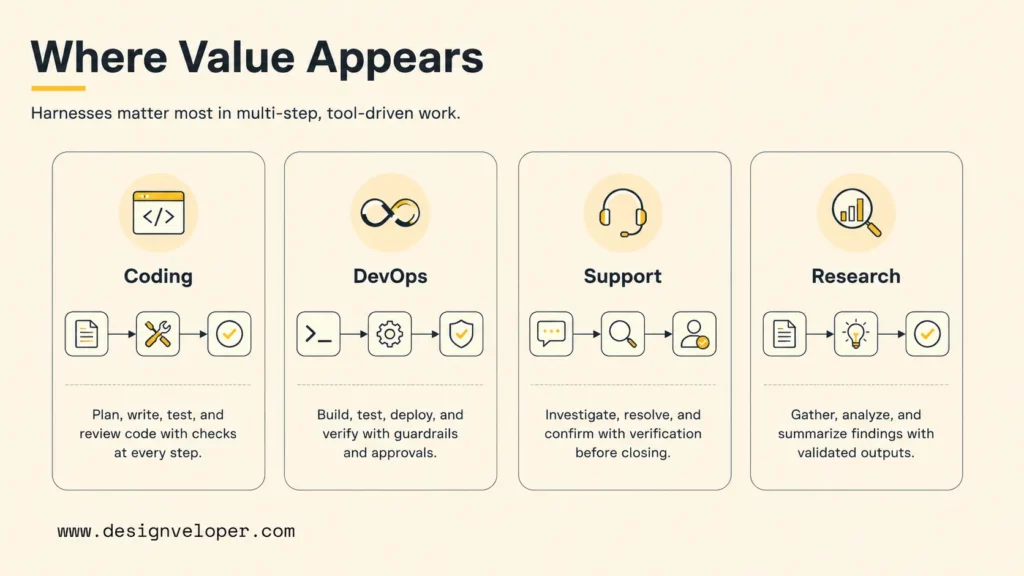
Harness engineering creates the most value when AI agents move beyond simple conversation into software, DevOps, customer support, internal knowledge, research, and multi-step automation. The more tools and consequences an agent has, the more the harness matters.
Coding Agents And Software Workflows
Coding agents need harnesses because code changes require context, tests, review, and rollback. A coding harness can provide repository instructions, branch isolation, file permissions, test commands, linter output, diff review, and pull request creation. The agent should work like a fast contributor inside a controlled development process, not like an unrestricted script.
Harnesses also help coding agents avoid context drift. The harness can load architecture notes, preserve decisions, summarize long sessions, and prevent the agent from modifying unrelated files.
Harness AI DevOps Agent Use Cases
Harness AI DevOps Agent use cases show how agent harness ideas appear in delivery platforms. The Harness AI DevOps Agent documentation describes natural-language operational control over Harness GitOps environments and infrastructure pipeline creation. The broader Harness Agents documentation describes AI-powered autonomous workers inside Harness pipelines.
DevOps agents need strong harnesses because pipeline changes, infrastructure changes, and deployment actions can affect uptime, security, cost, and compliance. A good DevOps harness should restrict permissions, log tool calls, require approval for risky changes, and measure whether remediation actually worked.
Customer Support And Internal Knowledge Agents
Customer support and internal knowledge agents need harnesses because answers must be grounded in approved sources. A support agent may retrieve help articles, check order state, draft responses, classify tickets, and hand off complex cases. An internal agent may answer HR, IT, security, or product questions from company knowledge.
The harness should enforce source boundaries, role-based access, sensitive-data rules, escalation, and feedback collection. A policy answer should cite the source. A private data request should require authentication and permission. A high-risk answer should route to a human owner.
Research, Analysis, And Multi-Step Automation
Research and analysis agents need harnesses because multi-step work can drift. The agent may search sources, extract claims, compare evidence, write a summary, and update a report. The harness should track sources, preserve intermediate findings, verify claims, and separate sourced facts from model guesses.
Multi-step business automation needs the same discipline. An agent that reads invoices, updates a spreadsheet, and sends approvals should run with audit logs, data validation, exception handling, and recovery paths.
Harness Engineering Best Practices
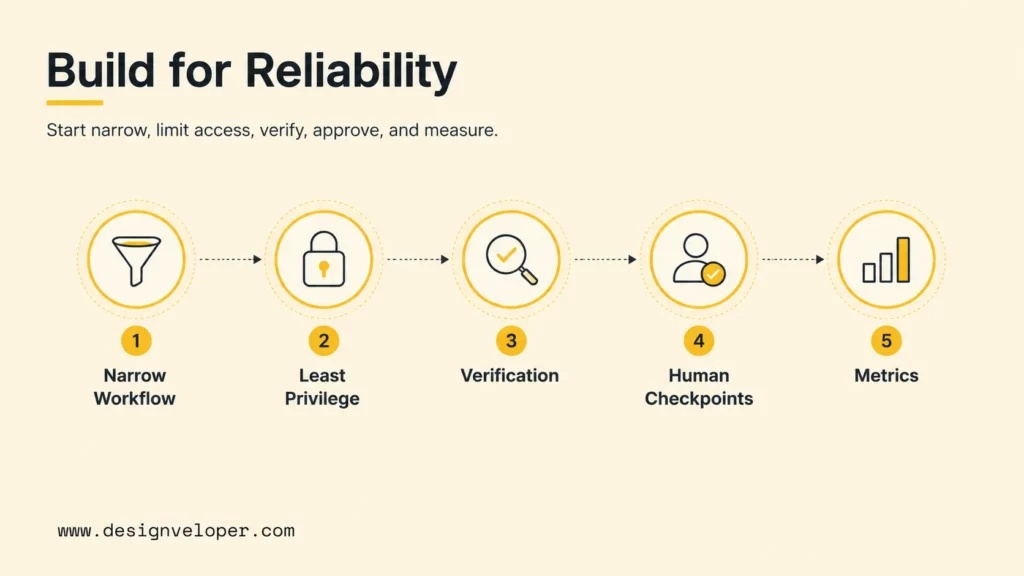
Harness engineering best practices start with narrow workflows, least-privilege tools, verification loops, human checkpoints, and measurement. Teams should avoid giving broad autonomy to an agent before the harness proves that the workflow is observable, recoverable, and valuable.
- Start with one narrow workflow before scaling autonomy: choose a repeatable task such as triaging support tickets, repairing failed tests, or summarizing deployment errors.
- Restrict tools with least-privilege access and sandboxing: give the agent only the tools and data required for the task.
- Add verification loops before adding more agent freedom: require tests, source checks, policy checks, or human review before completion.
- Keep human checkpoints for destructive or high-risk actions: approvals should protect users, data, infrastructure, and business commitments.
- Measure reliability, recovery, and operating cost over time: track success rate, escalation rate, retries, tool failures, latency, and cost per resolved task.
What Teams Should Evaluate Before Building An Agent Harness
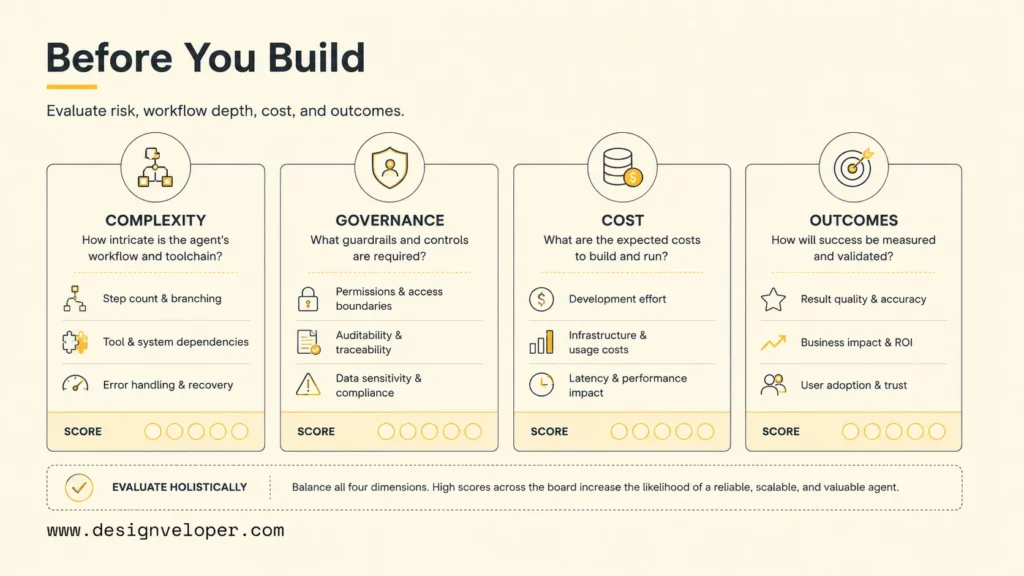
Teams should evaluate whether an agent harness is worth the complexity before building one. A harness is powerful, but it adds engineering work, integration work, monitoring, security review, and ongoing ownership.
Workflow Complexity And Tool Depth
Workflow complexity determines how much harness the team needs. A one-turn FAQ assistant may not need deep orchestration. A coding agent, DevOps agent, or operations agent probably needs tools, state, verification, and approvals. The team should map the workflow, systems touched, permissions required, and failure modes before choosing architecture.
Tool depth matters too. Reading public documentation is low risk. Changing infrastructure, issuing refunds, editing production data, or merging code is high risk. High-risk tools need stronger gates.
Reliability, Governance, And Auditability
Reliability means the agent completes the right task, knows when it is blocked, and recovers from common failures. Governance means the agent follows policies, permissions, and risk controls. Auditability means the team can inspect what happened after the fact.
A mature harness should answer these questions: What context did the model see? Which tools did it call? Which data did it access? And which checks passed? Who approved the action? Why did the agent stop?
Cost, Latency, And Operational Overhead
Agent harnesses can add cost and latency through repeated model calls, retrieval, tool execution, logging, verification, and retries. A workflow that saves ten minutes of human work may not be worth an expensive multi-agent loop if volume is low or accuracy is poor.
Teams should measure cost per successful outcome, not only token cost. A cheaper harness that escalates every hard case may be worse than a more expensive harness that resolves high-value tasks reliably.
Whether The Harness Improves Real Outcomes
The final evaluation is outcome quality. A harness should improve resolution speed, correctness, compliance, developer productivity, customer satisfaction, incident response, or operational throughput. If the harness only creates impressive demos, the team should narrow the use case or redesign the workflow.
Outcome measurement should include human review. The best metric is not “the agent completed more tasks.” The best metric is “the agent completed the right tasks safely, with fewer escalations and recoverable failures.”
What Teams Should Optimize As Harness Engineering Matures
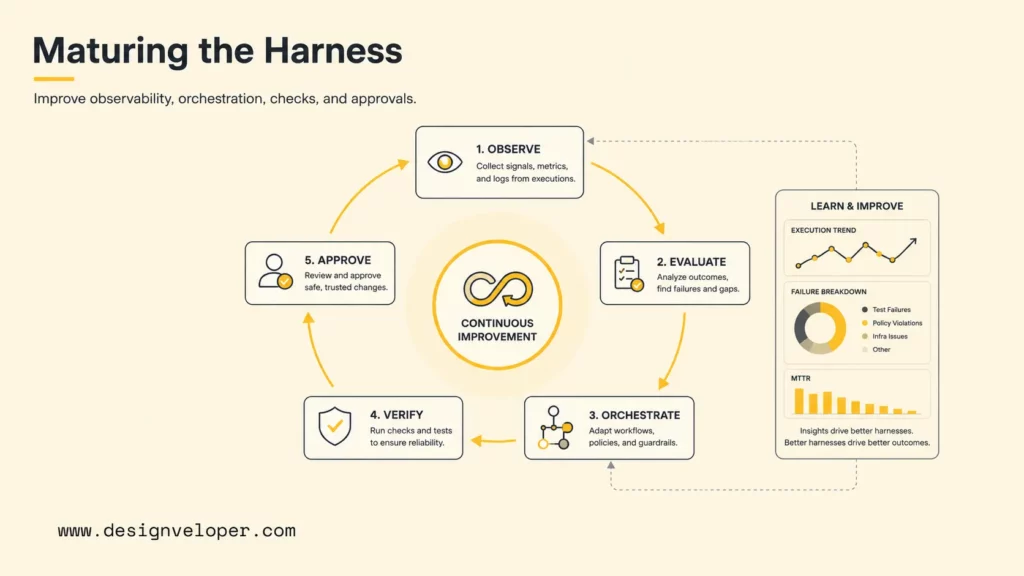
Teams should optimize evaluation, observability, orchestration, verification, and approval design as harness engineering matures. The first working agent is rarely the final architecture. The harness should improve as real failures reveal where the agent needs better tools, context, checks, or human control.
Strengthen evaluation and observability before scaling more agents. Add trace review, failure classification, golden task sets, and dashboards for success rate, retries, blocked tasks, tool errors, latency, and cost. Replace brittle prompt-only workflows with better orchestration and verification when failures repeat.
Approval checkpoints should become clearer over time. A support agent may draft refunds but require human approval over a threshold. A DevOps agent may modify a test environment but require approval for production. A coding agent may open a pull request but not merge it.
Teams should also bring in experienced IT or development partners when integration, orchestration, or production hardening becomes too complex for an internal team alone. Agent harnesses touch software architecture, security, operations, data access, and user workflows; those concerns need engineering ownership.
Better Agents Usually Come From Better Harnesses
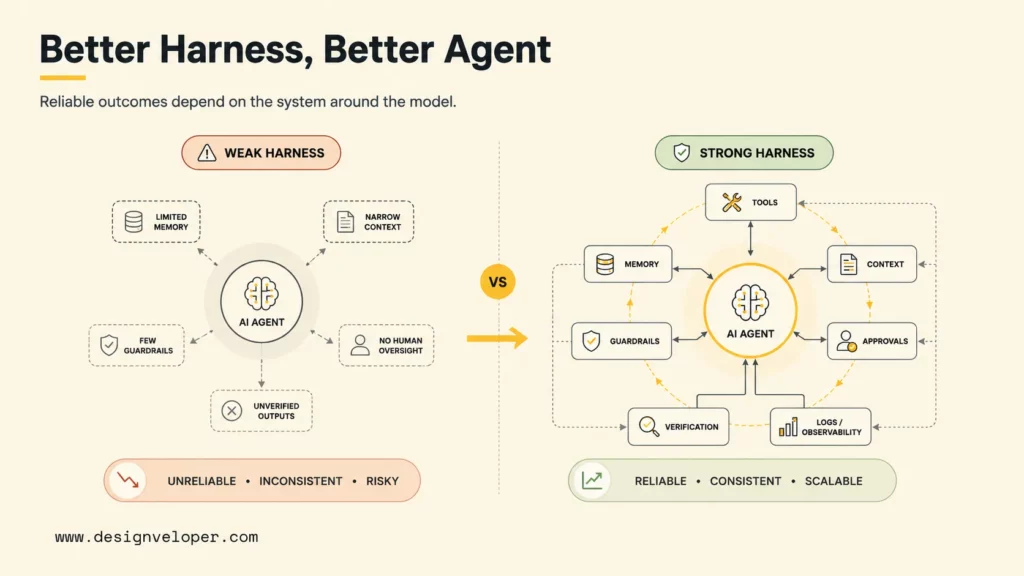
Better agents usually come from better harnesses because reliable agents depend as much on the surrounding system as on the model itself. A model can reason, but the harness gives that reasoning tools, context, verification, policy boundaries, logs, approvals, and recovery paths.
Teams get the most value when they improve tools, context, verification, policies, and control together. A better prompt may help for one task. A better harness can improve every run of a workflow because the agent operates inside a safer and more observable system.
Designveloper approaches agent harness work as production software engineering. As an AI-first software and automation partner, we help teams map agent workflows, design tool permissions, integrate LLMs with product systems, build RAG and memory layers, add review gates, test failures, monitor behavior, and maintain the system after launch. Our software development services and Agile delivery process support the full path from discovery to deployment and iteration.
The practical takeaway is simple: do not judge an agent only by the model behind it. Judge the harness that controls the agent’s work.
FAQs About Harness Engineering
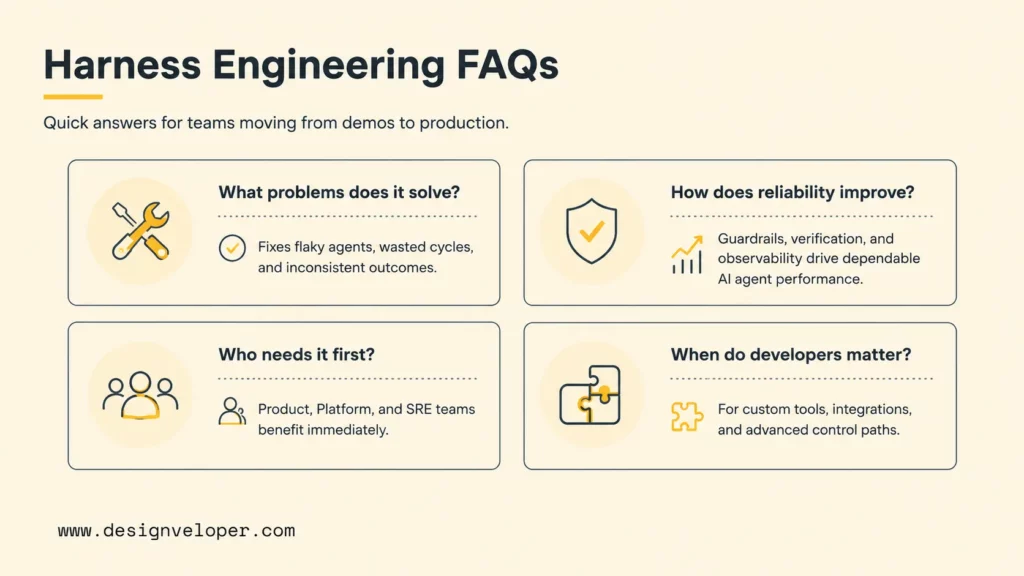
The questions below summarize how teams should think about agent harnesses before they move from demos to production workflows.
What Problems Does Harness Engineering Solve For AI Agents?
Harness engineering solves problems around tool access, state, memory, verification, safety, approvals, observability, retries, and policy enforcement. The harness helps an agent act reliably across multi-step workflows instead of only producing one text answer.
What Makes An Agent Harness More Reliable Over Time?
An agent harness becomes more reliable through better task scoping, cleaner context, stricter tool permissions, stronger evaluation sets, better logs, human feedback, and repeated failure analysis. Reliability improves when the team fixes the system around the agent, not only the prompt.
Which Teams Need Harness Engineering First?
Teams building coding agents, DevOps agents, customer support agents, internal knowledge agents, research agents, or workflow automation agents need harness engineering first. The need is highest when the agent uses tools, touches private data, changes systems, or affects business outcomes.
How Does Harness Engineering Show Up In AI DevOps Workflows?
Harness engineering shows up in AI DevOps workflows through pipeline tools, infrastructure permissions, log analysis, deployment checks, incident triage, rollback planning, and approval gates. A DevOps agent should not only suggest actions; the harness should control how actions are validated and executed.
When Should A Business Bring In Developers To Build An Agent Harness?
A business should bring in developers when an agent needs custom integrations, sensitive data access, tool permissions, workflow orchestration, security review, observability, or production support. Those requirements turn the agent from a prompt experiment into a software system.


