


LangGraph vs MCP is not a simple framework-versus-framework choice. LangGraph helps developers design stateful agent workflows, while the Model Context Protocol (MCP) helps AI applications connect to external tools, data, and prompts through a standard interface. Advanced AI systems often need both: LangGraph for control flow, memory, retries, human checkpoints, and multi-agent coordination; MCP for standardized access to business systems, developer tools, files, databases, and APIs.
The distinction matters because teams often mix two problems together. One problem is orchestration: deciding what an agent should do next, how state moves between steps, when a human should approve an action, and how failures should recover. The other problem is integration: exposing tools, resources, and prompts so an AI client can use external systems without every team writing one-off connectors. LangGraph documentation describes LangGraph as infrastructure for long-running, stateful agent workflows, while the official Model Context Protocol introduction describes MCP as an open-source standard for connecting AI applications to external systems such as data sources, tools, and workflows.
This guide explains the practical difference, where each layer belongs, and how teams can combine LangGraph and MCP when building production AI systems. The goal is not to crown one winner. The goal is to help engineering, product, and operations teams decide whether they need access, orchestration, or both.
Fast decision guide: choose MCP when the main problem is giving AI systems standardized access to tools, resources, prompts, databases, files, or business APIs. Choose LangGraph when the main problem is controlling a stateful agent workflow with branches, retries, memory, approvals, and multi-agent coordination. Use both when an advanced AI system needs reusable access and reliable orchestration at the same time.
| Project situation | Best default | Why | First validation step |
|---|---|---|---|
| Several AI clients need the same approved business tools | MCP first | MCP creates a reusable access contract for tools, resources, and prompts. | Design one read-only MCP server and test tool schemas, permissions, and logs. |
| One agent needs branching, retries, human review, and durable state | LangGraph first | LangGraph makes workflow control explicit instead of hiding it in a prompt loop. | Map nodes, state, edges, failure paths, and approval points before adding tools. |
| Enterprise agent must read systems, act through tools, and follow policy | LangGraph plus MCP | MCP handles standardized access while LangGraph controls execution and recovery. | Separate platform-owned MCP servers from product-owned graph workflows. |
| Early prototype with unclear workflow | Manual workflow before either layer | Neither protocol nor orchestration fixes a poorly understood process. | Run five real tasks manually and record inputs, decisions, tools, and failure modes. |
The Core Difference Between LangGraph And MCP
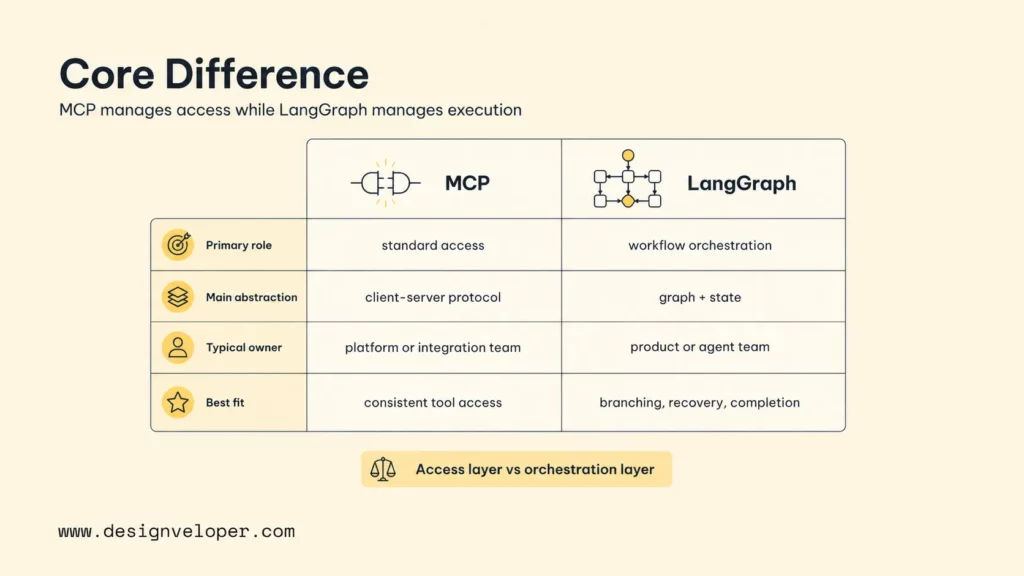
The core difference is responsibility. MCP standardizes how an AI application discovers and calls external capabilities. LangGraph structures how an agent or multi-agent workflow decides, branches, persists state, coordinates tools, and reaches a final outcome.
MCP is best understood as an access layer. An MCP server can expose tools such as database queries, ticket updates, file search, calendar actions, deployment commands, or internal knowledge retrieval. The MCP client connects to one or more servers and makes those capabilities available to the AI application. The MCP tools specification explains that tools let models interact with external systems such as APIs, databases, and computations through named capabilities with schemas.
LangGraph is best understood as an orchestration layer. A LangGraph application can model agent behavior as a graph of nodes, edges, state, and conditional paths. The workflow may retrieve context, call a model, inspect a result, route to another agent, call a tool, ask for approval, retry after failure, or stop. The LangGraph workflows and agents guide separates predictable workflows from dynamic agents and highlights patterns such as routing, evaluator-optimizer loops, and tool use.
A useful mental model is simple: MCP tells an AI system what doors it can open, while LangGraph decides which door to open, in what order, under what conditions, and what to do if the result is unsafe or incomplete.
| Question | MCP | LangGraph |
|---|---|---|
| Primary role | Standard access to tools, resources, and prompts | Stateful workflow and agent orchestration |
| Main abstraction | Client-server protocol | Graph of nodes, edges, and state |
| Typical owner | Platform, integration, or tool team | AI product, agent, or application team |
| Best question | How does the agent access this system consistently | How should the agent reason, branch, recover, and finish |
MCP As The Standard Access Layer For AI
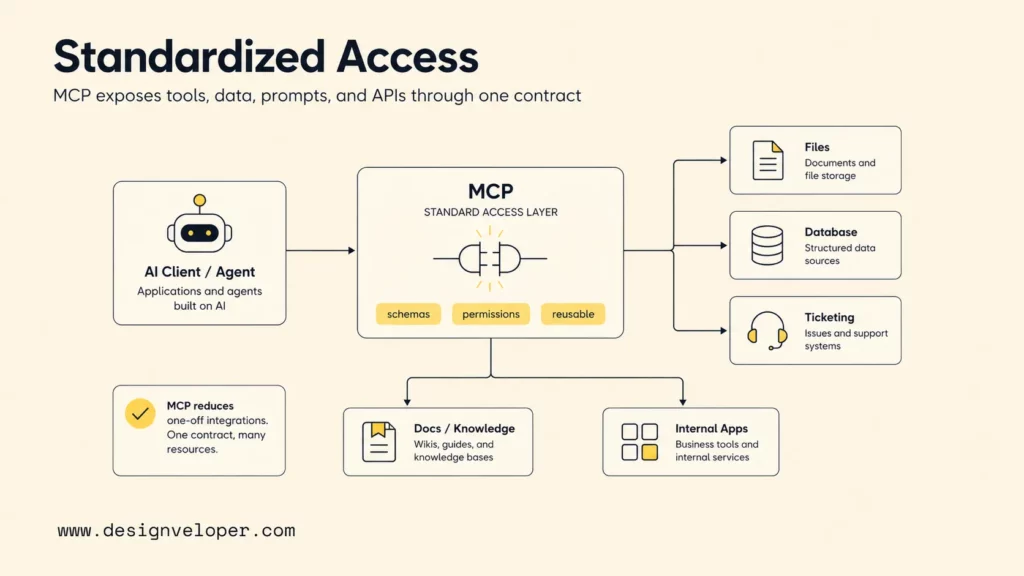
MCP gives AI applications a shared way to connect with external systems. Instead of hard-coding separate connectors for each model host, agent framework, and business tool, teams can expose capabilities through MCP servers and let compatible clients consume them.
The protocol is useful because agent systems become valuable only when they can read and act on real context. A coding agent needs repository files, issue trackers, documentation, CI logs, and code search. A customer-support agent needs tickets, knowledge bases, entitlement data, and escalation workflows. A finance assistant needs invoices, receipts, budgets, policies, and approval systems. MCP is designed to reduce the integration burden around that access problem.
MCP also separates access contracts from orchestration decisions. A server can expose a tool named create_support_ticket, a resource for a policy document, or a prompt template for a support handoff. The agent does not need to know how the ticketing platform works internally. The agent only needs the schema, permission boundary, and result format.
That standardization becomes more important as organizations adopt multiple AI clients. Anthropic’s original MCP announcement described servers for systems such as Google Drive, Slack, GitHub, Git, Postgres, and Puppeteer. The point is not that those examples are the only useful integrations. The point is that a standard protocol can make integrations reusable across different agent surfaces.
MCP should not be treated as a complete agent architecture. MCP can expose an external action, but MCP does not decide whether a request should be routed to a research agent, reviewed by a human, retried after a tool error, or blocked by a policy. The access layer still needs application logic around safety, context selection, state, and recovery.
LangGraph As The Orchestration Layer For Agents
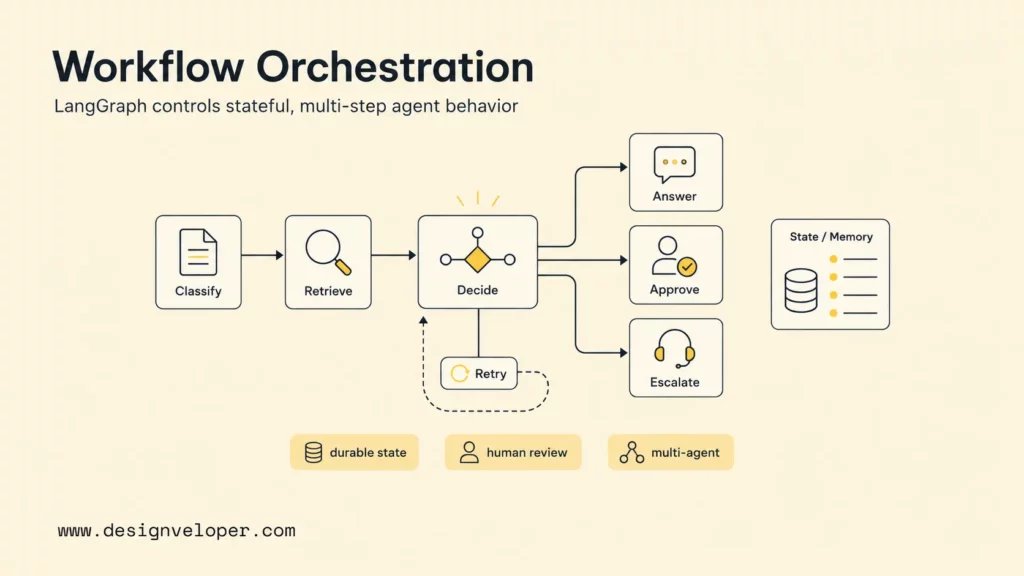
LangGraph is useful when an AI application needs durable control over multi-step behavior. The framework helps teams express agent logic as a graph instead of hiding workflow decisions inside one long prompt or one unstructured loop.
That structure matters in production. A useful agent often needs to remember intermediate results, branch based on tool output, ask a different model to evaluate an answer, pause for approval, resume later, or handle a failed tool call without losing context. LangGraph gives developers a place to model those paths explicitly.
For example, a support triage agent might start by classifying an incoming ticket, then retrieve account history, then decide whether to answer directly, ask a human for approval, escalate to engineering, or create a follow-up task. A workflow like that should not be only a prompt. The logic belongs in application code where it can be tested, reviewed, monitored, and changed.
LangGraph also helps with multi-agent coordination. One node can gather context, another can propose a plan, another can validate against policy, and another can prepare the final response. The graph decides how outputs move between roles. That gives teams stronger control than letting a single model improvise the entire process.
LangGraph can still use tools, including tools exposed through MCP. The important point is that tool access and workflow control are different layers. A LangGraph workflow can call MCP-connected tools as part of a larger execution path, while MCP servers can stay focused on exposing reliable capabilities.
The Real Difference In Architecture And Responsibility
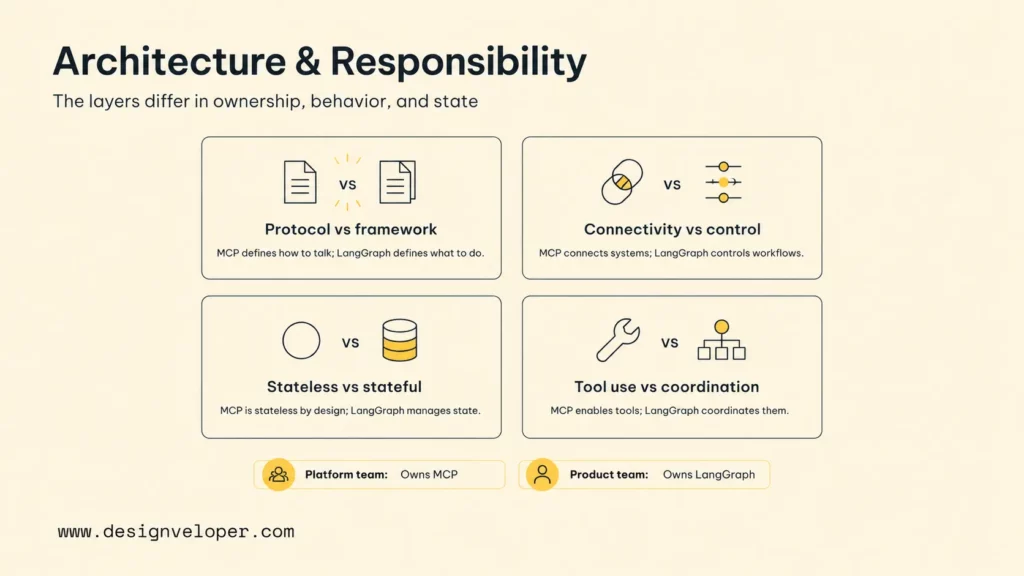
The real architecture difference is that MCP standardizes boundaries between systems, while LangGraph standardizes behavior inside the agent application. The layers can overlap in conversation, but they should not overlap in ownership.
Protocol Vs Framework
MCP is a protocol. A protocol defines how different components communicate. MCP clients and servers use shared concepts so an AI host can discover and use external capabilities in a predictable way. The protocol does not prescribe a full product workflow, user experience, or agent strategy.
LangGraph is a framework. A framework gives developers building blocks for implementing a system. LangGraph helps application teams create workflow graphs, manage state, route steps, and coordinate agents. The framework does not replace the need for integration contracts, identity rules, or tool schemas.
This distinction helps teams assign responsibility. Platform teams can own MCP servers for shared systems such as CRM, knowledge base, repository search, data warehouses, and internal APIs. Product teams can own LangGraph workflows that use those capabilities for specific business outcomes.
External Connectivity Vs Workflow Control
MCP solves external connectivity. An MCP server can expose a controlled way to search documents, read customer records, update tickets, or run a diagnostic command. The server defines the schema and returns structured results.
LangGraph solves workflow control. A graph decides whether the agent should search documents before calling the CRM, whether ticket updates require approval, whether a failed diagnostic should trigger a fallback, or whether the user should receive a partial answer.
Teams that confuse the two layers often build brittle systems. If every integration carries its own workflow assumptions, tool servers become hard to reuse. If every workflow hard-codes every system connection, agent teams duplicate integration work and create inconsistent security boundaries.
Stateless Access Vs Stateful Execution
MCP access is usually designed around discrete capabilities. A client asks a server for a resource, prompt, or tool call, and the server returns a result. Some MCP deployments can maintain connection-level context, but the central value is the standardized access contract.
LangGraph is designed for stateful execution. A graph can keep track of what the agent has already tried, what evidence has been collected, what branch is active, what human approval is pending, and what output needs validation. That state can be essential for long-running workflows.
Stateful execution is especially important when the agent must recover from partial failure. If a payment-reconciliation agent has already checked an invoice, searched a policy, and found a mismatch, the workflow should not restart from nothing after a transient API error. LangGraph gives teams a structure for preserving and resuming context.
Tool Integration Vs Multi-Agent Coordination
MCP helps a system integrate tools. The LangChain MCP adapters project describes a lightweight wrapper that makes MCP tools compatible with LangChain and LangGraph. That adapter pattern is a practical example of MCP tools becoming usable inside an orchestration framework.
LangGraph helps coordinate agents. A multi-agent workflow may include a planner, researcher, policy reviewer, executor, and summarizer. MCP can supply the external tools those agents use, but LangGraph decides when each role runs and how responsibilities connect.
The difference becomes clear in a software engineering assistant. MCP can expose GitHub, Jira, docs, CI logs, and database read tools. LangGraph can coordinate a debugging workflow that reads the issue, searches logs, inspects code, proposes a fix, asks for approval, creates a branch, and prepares a pull request summary.
When Teams Should Use LangGraph And MCP Together
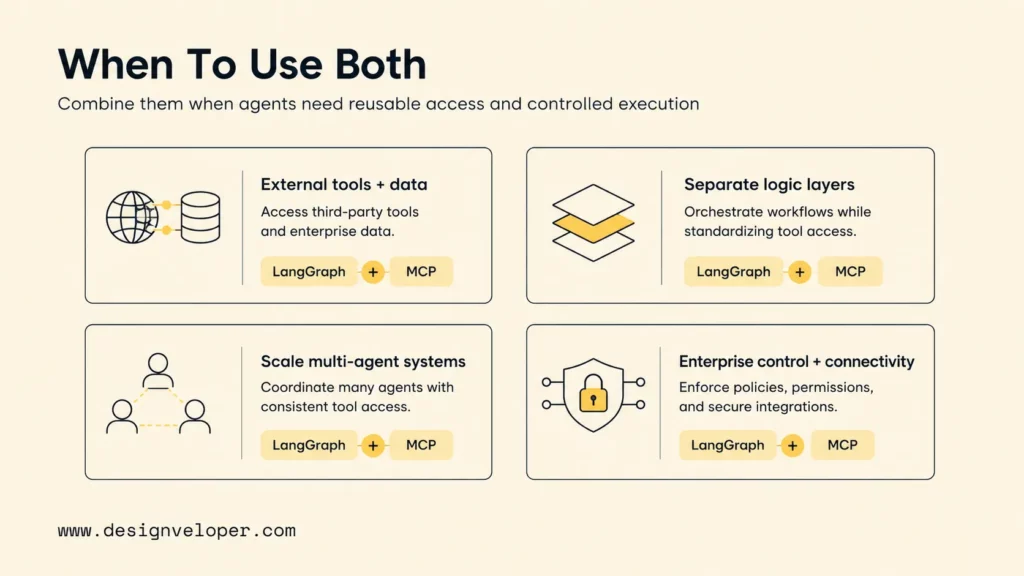
Teams should use LangGraph and MCP together when an AI system needs both reusable external access and controlled multi-step behavior. That pattern is common in enterprise agents, internal copilots, product automation, customer operations, IT service management, and software delivery assistants.
Agents Need External Tools And Data
Most useful agents eventually need external context. A model that cannot read business data, call approved tools, or update workflow systems is limited to advice. MCP helps teams expose those capabilities in a reusable way.
For example, an internal operations agent might need to read a policy document, check an employee record, open a workflow request, and notify a manager. MCP servers can expose those systems as tools and resources. LangGraph can then decide the sequence, approval path, and failure handling.
Workflow Logic Should Stay Separate From Integration Logic
Workflow logic should stay separate from integration logic because the two layers change for different reasons. A CRM integration may serve sales, support, onboarding, and renewal agents. A single support workflow may change its escalation rules without changing the CRM connector.
Separating the layers also improves testing. Tool contracts can be tested as integration units. Agent graphs can be tested as workflow units. Security reviews can inspect tool permissions and workflow approval points separately. This is much cleaner than hiding every behavior inside one prompt chain.
Standardized Access Helps Multi-Agent Systems Scale
Standardized access helps multi-agent systems scale because every new agent role does not need a new private connector. A research agent, policy agent, and execution agent can all call the same MCP server with different permissions or scopes.
That reuse becomes important when teams maintain many agents. Without standard access, every agent team may create its own partial GitHub connector, ticket connector, document connector, or database connector. MCP gives platform teams a way to build one controlled access surface and improve it over time.
Enterprise AI Systems Need Both Control And Connectivity
Enterprise AI systems need connectivity, but connectivity without control can create risk. The OWASP Top 10 for LLM Applications includes risks such as prompt injection, supply chain vulnerabilities, sensitive information disclosure, and excessive agency. Those risks become sharper when agents can call tools and touch real business systems.
LangGraph can help teams put control around MCP-connected tools. A workflow can restrict destructive actions to approval paths, require validation before external updates, separate read-only and write-capable agents, and record intermediate decisions for audit. MCP provides the access surface; LangGraph provides the control surface around that access.
How LangGraph And MCP Work Together In Practice
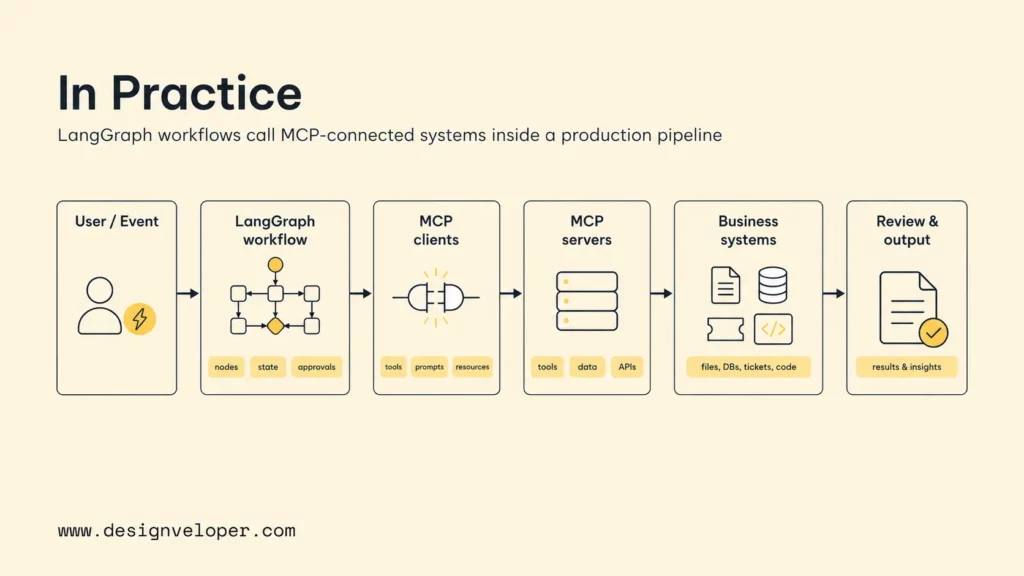
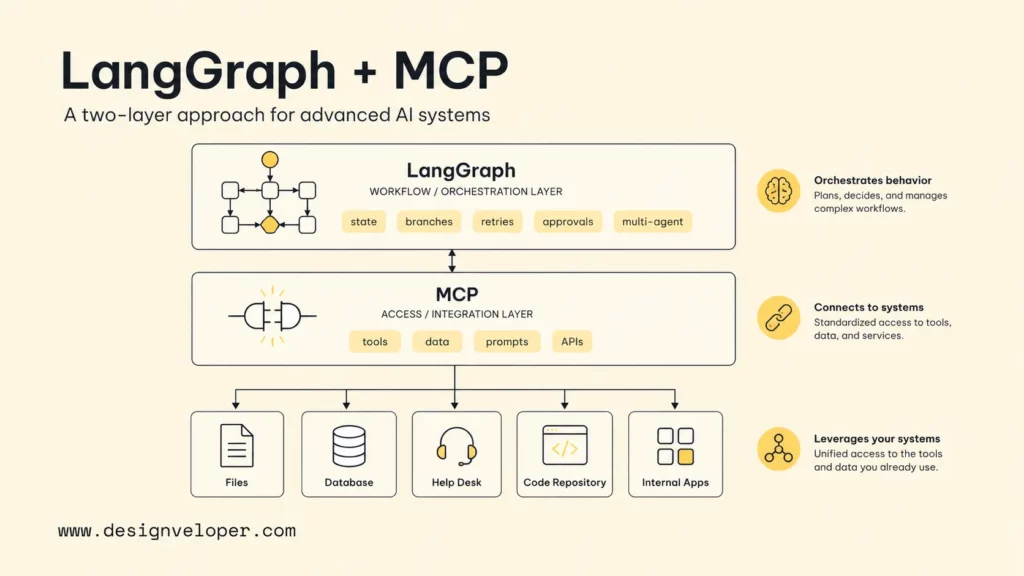
In practice, MCP servers expose tools, resources, and prompts in a standard format. LangGraph agents call those MCP-connected systems as part of a larger workflow. Production teams can then build capable agents without hard-coding every integration separately.
A practical architecture often looks like this:
LangGraph and MCP architecture map
User or event
A request, ticket, workflow trigger, or application event starts the process.
LangGraph workflow
Nodes, edges, state, memory, routing, retries, and approvals control execution.
MCP clients
The agent calls standardized tool, resource, or prompt interfaces.
MCP servers
Business systems expose approved capabilities with schemas and boundaries.
Review and output
Validation, human approval, logs, and final actions close the loop.
The architecture map shows why LangGraph and MCP are complementary. LangGraph controls the path through the AI workflow, while MCP standardizes the external capabilities that the workflow can call.
- The platform team creates MCP servers for approved systems such as GitHub, Jira, Slack, a knowledge base, a database, or a business API.
- The AI product team builds a LangGraph workflow that models the agent process as nodes, state, branches, and review points.
- The LangGraph application loads MCP tools through an adapter such as LangChain MCP integration
- The workflow calls MCP tools only at defined steps and stores the results in graph state.
- The workflow validates output, routes errors, asks for human approval when needed, and writes a final answer or action log.
Consider an AI software maintenance agent. The LangGraph workflow could start with an issue summary, retrieve relevant code and documentation through MCP servers, ask a model to hypothesize root causes, run a test or diagnostic command through a controlled tool, route the result to a reviewer node, and prepare a pull request plan. MCP handles access to the external systems. LangGraph handles the process.
For a customer-service agent, MCP could expose ticket search, knowledge base retrieval, customer profile lookup, order status, and escalation creation. LangGraph could classify the request, decide whether the response is low-risk or high-risk, call the right tools, check policy, request human approval for refunds, and send the final message only after validation.
Designveloper approaches these systems as production software, not only AI demos. Our AI development services focus on turning AI into systems with data access, workflow control, testing, monitoring, and human review. Our software delivery process also emphasizes structured discovery, design, development, testing, deployment, and support. Those disciplines matter when LangGraph and MCP move from prototype to operations.
What Teams Should Evaluate Before Choosing LangGraph, MCP, Or Both
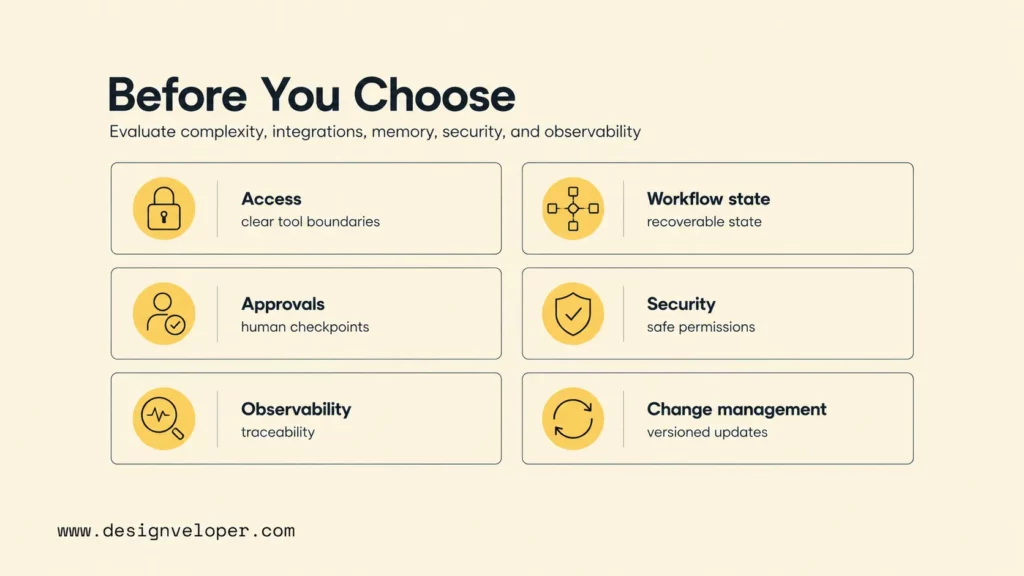
Teams should evaluate workflow complexity, the number of external systems involved, state and memory requirements, security, observability, and long-term maintenance before choosing LangGraph, MCP, or both. The decision should start from the job the AI system must perform, not from tool popularity.
Use MCP first when the main bottleneck is integration reuse. If multiple AI clients need access to the same tools, resources, or prompts, MCP can create a cleaner boundary. Use LangGraph first when the main bottleneck is workflow control. If the agent must branch, loop, remember, coordinate roles, or handle approvals, LangGraph can make that behavior explicit.
Before a team commits to LangGraph, MCP, or both, the production readiness checklist below keeps the decision grounded in operational reality.
| Production check | What to verify | Why it matters |
|---|---|---|
| Access boundary | Each MCP server has clear tools, resources, prompts, schemas, authentication, and ownership. | Reusable access should not become uncontrolled access. |
| Workflow state | The LangGraph state records enough context to resume, audit, and recover from failures. | Advanced agents fail in the middle, not only at the start or end. |
| Approval model | Risky reads, writes, external messages, deletes, and financial actions have review gates. | Tool-using agents need human control around high-impact actions. |
| Observability | Tool calls, state transitions, model outputs, errors, latency, cost, and final decisions are logged. | Teams need traceability to debug and govern agent behavior. |
| Change management | Tool schemas, graph nodes, prompts, eval cases, and permissions are versioned and tested. | LangGraph and MCP systems evolve; untested changes can break workflows silently. |
The following checklist helps teams choose the right layer:
| Evaluation area | Choose MCP when… | Choose LangGraph when… | Use both when… |
|---|---|---|---|
| Workflow complexity | The task mainly needs access to an external capability. | The task has branches, retries, review points, or multi-step reasoning. | The workflow needs both external tools and controlled execution. |
| External systems | Several clients need the same systems. | The agent uses tools but tool contracts already exist. | Many agents need standardized access to many systems. |
| State and memory | Calls are mostly independent. | The workflow needs durable state or resumability. | Tool results must be stored and routed across long-running steps. |
| Security | The priority is defining tool schemas and permissions. | The priority is approval, validation, and safe execution paths. | Read/write tools need policy-aware orchestration. |
| Maintenance | Integration contracts should be reused. | Workflow behavior changes frequently. | Both connectors and workflow logic need separate owners. |
Security and observability deserve special attention. The NIST AI Risk Management Framework encourages teams to incorporate trustworthiness considerations into AI design, development, use, and evaluation. In an agent system, that means tool permissions, state traces, input/output validation, human escalation, logging, and rollback plans should be designed before the agent touches critical operations.
Maintenance is the hidden cost. A quick prototype may connect an agent directly to five systems and let the model decide what happens. A production system needs versioned tool schemas, test data, deterministic workflow paths where possible, monitoring for tool failures, review queues, and clear ownership when the agent changes a business record.
The Best Architecture Depends On Whether You Need Access, Orchestration, Or Both
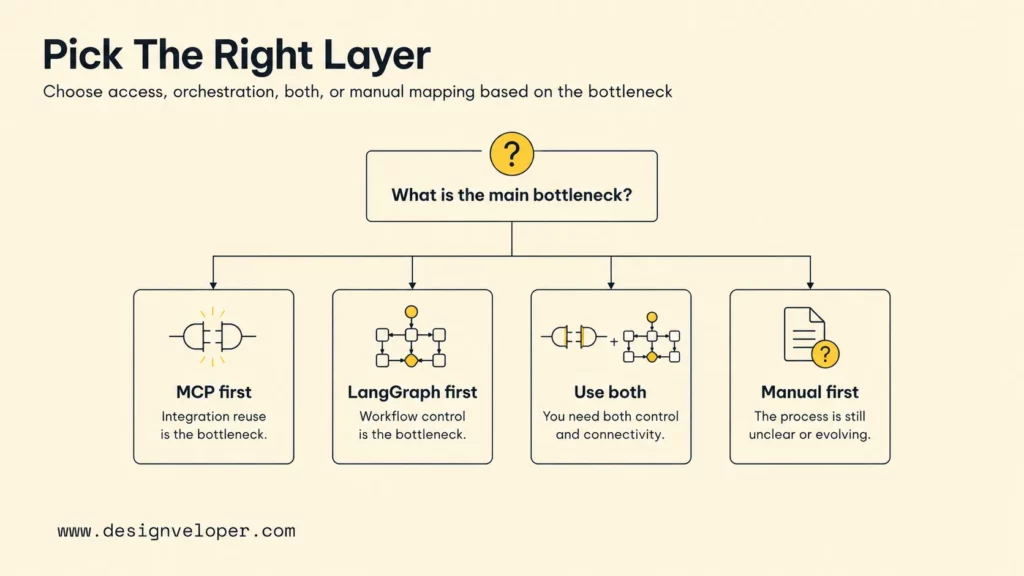
The best architecture depends on whether the team needs access, orchestration, or both. Teams rarely choose LangGraph instead of MCP as direct substitutes because MCP solves the connection problem, while LangGraph solves the orchestration problem.
If the team only needs to expose a database query, file search, or business API to AI clients, MCP may be enough for the access layer. If the team only needs a controlled agent workflow using existing tools, LangGraph may be enough for the orchestration layer. Additionally, if the team is building a real enterprise agent that reads external context, calls tools, routes work, handles state, and requires approval, the strongest pattern is often LangGraph for control and MCP for standardized access.
A good production design keeps the layers clean. MCP servers should not become a dumping ground for product-specific reasoning. LangGraph workflows should not contain every low-level integration detail. The access layer should expose reliable capabilities. The orchestration layer should decide when and how to use those capabilities safely.
For advanced AI systems, this separation gives teams room to grow. New tools can be added through MCP without rewriting the whole agent graph. New workflow paths can be added in LangGraph without rebuilding every integration. Security reviews can inspect tool permissions and workflow approvals separately. Product teams can improve agent behavior while platform teams improve the shared access surface.
That separation is also where Designveloper can help. As an AI-first software and automation partner, we help teams map the workflow first, define the data and tool boundaries, build the application layer, and add the safeguards needed for production. LangGraph and MCP are useful building blocks, but the real value comes from matching them to the business process, security model, and long-term maintenance plan.
FAQs About LangGraph Vs MCP
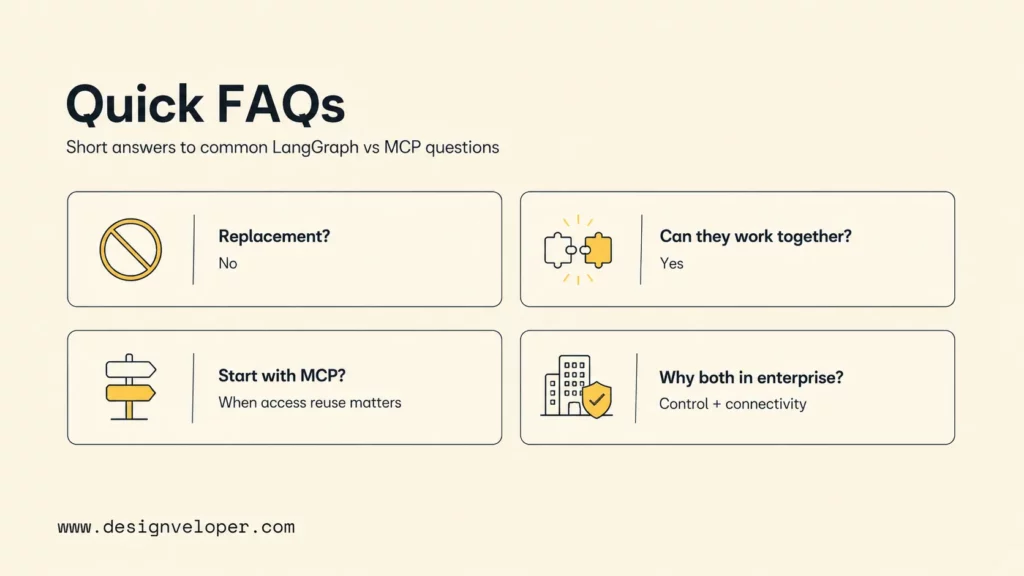
The following questions summarize how teams usually decide between LangGraph, MCP, and a combined architecture.
Is MCP A Replacement For LangGraph
No. MCP is not a replacement for LangGraph because MCP is a protocol for connecting AI applications to external tools, resources, and prompts. LangGraph is a framework for orchestrating stateful agent workflows. MCP can provide capabilities that a LangGraph workflow uses, but MCP does not replace graph-based workflow control.
Can LangGraph Use MCP Servers And Tools
Yes. LangGraph can use MCP servers and tools through adapters that convert MCP capabilities into tools compatible with LangChain and LangGraph. The LangChain MCP adapters announcement describes support for converting MCP tools and interacting with multiple MCP servers from LangChain and LangGraph applications.
When Should Teams Start With MCP First
Teams should start with MCP first when the main need is reusable access to external systems. MCP is a strong starting point when several agents, copilots, or AI clients need the same approved integrations, such as repository search, ticket management, knowledge retrieval, analytics, or internal business APIs.
When Is LangGraph The Better Starting Point
LangGraph is the better starting point when the main need is workflow control. Teams should start with LangGraph when an agent must manage state, branch between paths, coordinate multiple roles, retry failed steps, pause for human review, or run a long process that cannot be safely handled by one prompt and one tool call.
Why Do Enterprise AI Systems Often Use Both Together
Enterprise AI systems often use both together because they need standardized access and controlled execution at the same time. MCP can expose the organization’s systems in a consistent way. LangGraph can turn those capabilities into a reliable workflow with state, approvals, validation, observability, and recovery paths.
LangGraph vs MCP should therefore be framed as an architecture question, not a winner-takes-all comparison. MCP helps agents reach the right systems. LangGraph helps agents act through the right process. Advanced AI systems usually need both disciplines before they are safe, useful, and maintainable.


