


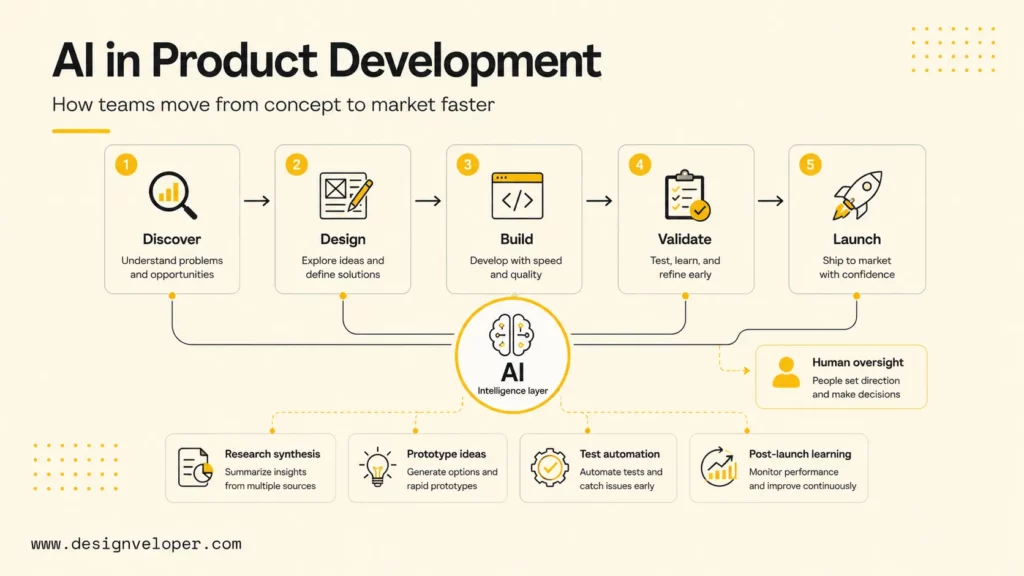
AI in product development helps product teams move from concept to market faster by improving discovery, design exploration, delivery support, testing, launch analysis, and post-launch learning. The strongest use of AI is not a single tool or chatbot. It is a connected workflow where product managers, designers, engineers, QA teams, and business stakeholders use AI to make better decisions earlier while humans still own product strategy, user judgment, and release accountability.
AI matters in product development because modern teams work with more signals than manual workflows can handle: customer interviews, support tickets, usage analytics, competitive moves, design variants, technical constraints, code changes, QA feedback, and launch metrics. IBM’s AI in product development overview describes AI as a way to streamline workflows, automate repetitive tasks, and support data-driven development decisions. McKinsey’s AI-enabled product-development lifecycle article makes the same point from a software angle: AI can reshape the full lifecycle, not only coding.
This guide explains what AI means in product development, how AI accelerates each lifecycle stage, how different product roles use AI, which benefits and challenges matter most, and how teams can adopt AI without losing human oversight, product quality, or workflow clarity.
What Is AI In Product Development?
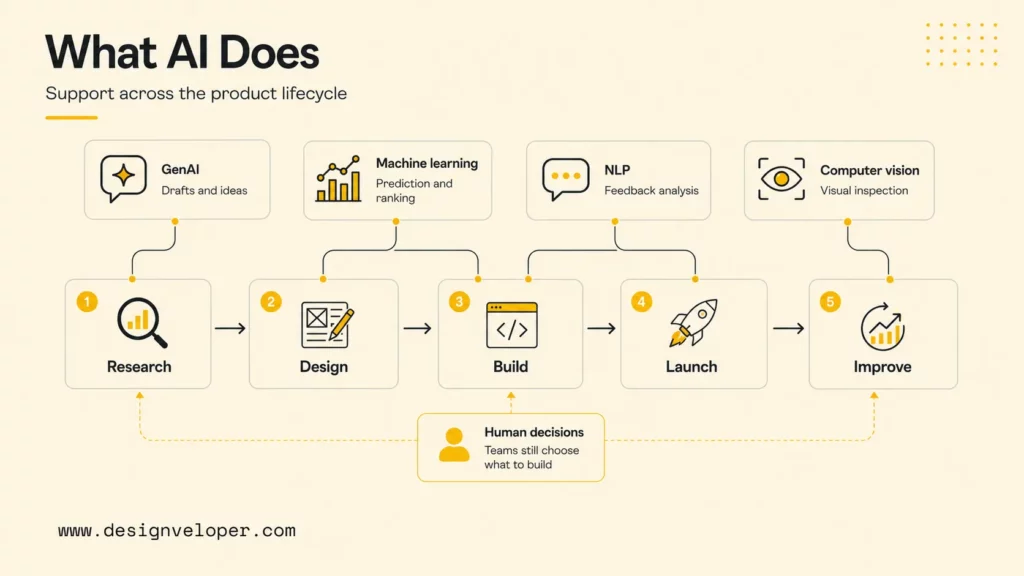
AI in product development is the use of artificial intelligence to support the full product lifecycle, from market research and ideation to design, engineering, validation, launch, and continuous improvement. AI can summarize research, analyze customer feedback, generate concepts, support UX design, draft requirements, assist coding, improve testing, monitor product behavior, and identify optimization opportunities after launch.
The phrase covers several types of AI. Generative AI can draft product requirement documents, prototype copy, UX flows, code, tests, and release notes. Machine learning can detect patterns in customer behavior, predict churn, recommend features, or rank experiments. Natural language processing can cluster feedback from tickets, reviews, calls, and surveys. Computer vision can support image-heavy product workflows, quality inspection, or visual search.
AI should not be treated as a shortcut around product thinking. A product team still needs a clear problem, real user evidence, measurable outcomes, technical feasibility, usability testing, and a launch plan. AI becomes valuable when it reduces repetitive work, surfaces patterns earlier, creates faster drafts, and helps teams compare options with more evidence.
A useful mental model is simple: AI can accelerate exploration and execution, but humans still make product commitments. Product managers decide which opportunity matters. Designers decide whether an experience solves the user problem. Engineers decide whether the implementation is reliable. Leaders decide whether the product is ready for market.
Teams should also separate AI used inside the product from AI used by the product team. Internal AI workflows may help teams write tickets or summarize research. Customer-facing AI features need stronger evaluation, privacy review, monitoring, fallback behavior, and support planning because model output becomes part of the user experience.
How AI Accelerates The Product Development Lifecycle
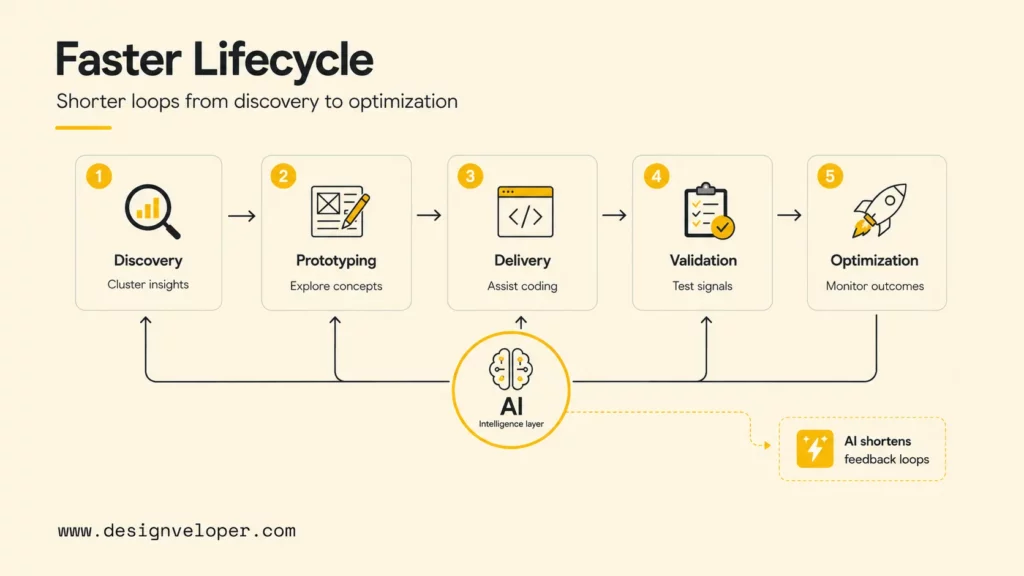
AI accelerates the product development lifecycle by shortening feedback loops between research, design, engineering, testing, and launch learning. The best lifecycle use cases are practical and specific, not vague promises that AI will innovate by itself.
Discovery And Ideation
AI can help product teams analyze customer feedback, market signals, sales calls, support tickets, app reviews, interview transcripts, and competitor pages faster. Instead of reading hundreds of raw notes manually, product managers can ask AI to cluster themes, extract pain points, identify repeated objections, and compare patterns across customer segments.
The output still needs validation. AI can find patterns, but product teams must confirm whether those patterns represent real customer value, high-frequency pain, willingness to pay, or strategic fit. A strong discovery workflow keeps source links, quotes, segments, and confidence levels attached to every AI-generated insight.
A practical discovery prompt might ask AI to group 200 support tickets by user pain, severity, affected persona, current workaround, and potential product opportunity. The team can then review the clusters, interview representative users, and decide which opportunity deserves product investment.
Prototyping And Design
AI can support prototyping and design by generating concept variants, UX copy, user-flow options, information architecture ideas, and design critique checklists. Designers can use AI to explore more options early, then narrow the work through user needs, brand standards, accessibility, and technical constraints.
Using AI for product design works best when the team provides context. A prompt should include the target user, scenario, platform, product constraints, tone, accessibility needs, and success metric. Without context, AI-generated UX ideas often become generic screens that look plausible but do not solve the real problem.
AI can also speed up design-to-engineering communication. A designer can ask AI to convert a flow into acceptance criteria, edge cases, empty states, and error states. Engineers can then review the list and identify missing states before implementation starts.
Delivery And Build
AI supports delivery and build work by assisting coding, debugging, test generation, QA planning, documentation, and model integration. Tools such as coding assistants, code-review agents, and test generators can reduce repetitive engineering work when the team keeps changes small and reviewable.
The DORA 2025 State of AI-assisted Software Development report is useful here because it frames AI as an amplifier of existing software delivery systems. Product teams with good CI/CD, code review, testing, and platform practices can turn AI speed into better throughput. Teams with unclear requirements or brittle quality gates may simply generate more work to review.
Delivery teams should use AI for focused tasks: generate a first test suite, explain a legacy module, summarize a pull request, draft a migration plan, or propose a small implementation. Broad prompts that ask AI to build large features end-to-end can create hidden assumptions and review overload.
Market Testing And Validation
AI can support market testing and validation by helping teams design experiments, summarize user research, analyze survey responses, generate landing-page variants, cluster behavioral analytics, and compare adoption signals across cohorts. AI can also help teams test pricing, positioning, and feature messaging before scaling investment.
Predictive analytics can support prioritization, but teams should avoid treating forecasts as certainty. Market validation still needs real user behavior: signups, trial conversion, activation, retention, paid usage, qualitative feedback, and sales-cycle evidence. AI can organize and interpret signals, but the market still decides whether the product matters.
A useful validation workflow connects AI analysis to experiment design. For example, AI can summarize interview objections, propose three positioning hypotheses, draft test copy, and list the metrics that would prove or disprove each hypothesis. The team then runs the experiment and reviews actual results.
Launch And Post-Launch Optimization
AI can help teams monitor live performance, detect issues, summarize support trends, analyze usage behavior, and recommend improvements after launch. Post-launch AI workflows can turn noisy data into product learning faster.
Useful post-launch signals include feature adoption, funnel drop-off, retention, crash reports, latency, support volume, sentiment, NPS comments, and sales feedback. AI can cluster those signals and highlight what changed after release. Product managers and engineers can then decide whether to fix bugs, refine onboarding, change copy, expand the feature, or roll back risky behavior.
Post-launch AI also needs guardrails. Teams should avoid optimizing only for easily measured metrics if those metrics conflict with long-term user trust, accessibility, data privacy, or product quality. Human judgment remains essential when AI suggests tradeoffs.
A mature post-launch loop should include weekly signal review, owner assignment, experiment decisions, and a visible changelog. AI can prepare the analysis, but the product team should decide which insight becomes a bug fix, UX improvement, roadmap item, or no-action note.
AI For Product Managers, Designers, And Engineering Teams
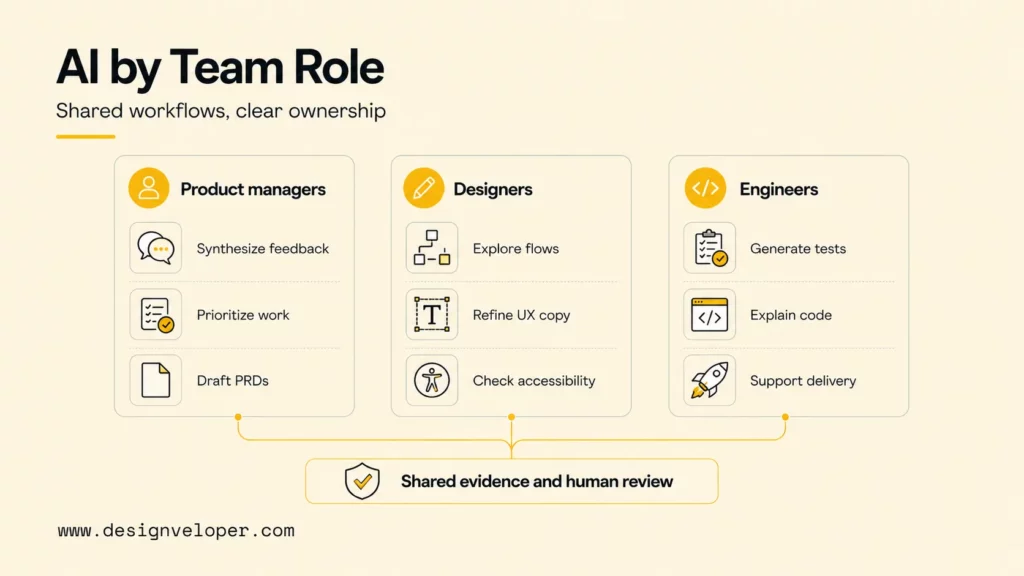
For product teams, AI works best when each role uses AI for the work it actually owns. Product managers use AI to synthesize and prioritize. Designers use AI to explore and validate experiences. Engineering teams use AI to build, test, and integrate more efficiently. Shared AI workflows reduce handoff friction when the team agrees on source evidence and decision rights.
AI For Product Managers
AI for product managers can speed up research synthesis, prioritization, PRD support, roadmap analysis, stakeholder updates, and experiment planning. A product manager can ask AI to summarize interviews, compare feature requests, draft acceptance criteria, or turn customer pain points into problem statements.
The strongest PM workflow keeps AI connected to evidence. A PRD generated from vague prompts is weak. A PRD generated from user interviews, analytics snapshots, support themes, competitor notes, and engineering constraints is more useful. Product managers should require traceable assumptions, not only polished output.
AI can also help product managers prepare better tradeoff discussions. For example, AI can compare two roadmap options by user value, technical effort, risk, dependencies, and measurable outcome. The PM can then use that analysis as a starting point for discussion with design and engineering.
Using AI For Product Design
Using AI for product design can shorten concept exploration, UX writing, prototype iteration, and validation preparation. Designers can ask AI to generate onboarding flows, empty-state copy, accessibility checks, usability-test questions, or alternative layouts for a specific user scenario.
Designers still need to protect user context. AI-generated screens may look complete while missing emotional nuance, domain constraints, accessibility needs, or real user behavior. The design team should use AI to widen exploration, then use research, critique, prototyping, and testing to narrow the work.
A useful design workflow asks AI for edge cases and failure states. For example, a payment screen needs insufficient funds, expired card, slow network, duplicate submission, refund state, and fraud review. AI can help list those states early so design and engineering do not discover them late.
AI For Product And Engineering Teams
For product and engineering teams, AI helps connect requirements, design, implementation, testing, QA, and release work. Additionally, AI can convert product decisions into acceptance criteria, generate test ideas, summarize technical risks, draft release notes, and explain implementation tradeoffs for nontechnical stakeholders.
AI is most valuable when it reduces handoff loss. A product manager may define a requirement, a designer may define states, and an engineer may define constraints. AI can help keep those artifacts aligned by summarizing changes and surfacing contradictions, but the team must still resolve decisions together.
Product and engineering teams should also define how AI output enters the workflow. For example, AI can draft tickets, but a human PM approves scope. AI can draft tests, but engineers verify behavior. AI can summarize launch risks, but the delivery lead owns release readiness.
The Biggest Benefits And Challenges Of AI In Product Development
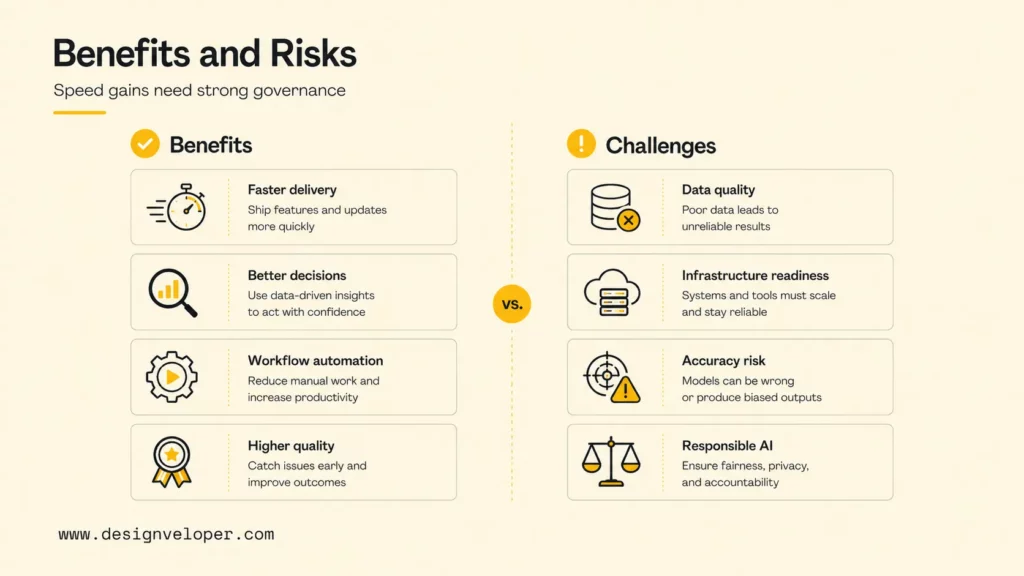
The biggest benefits of AI in product development are faster time to market, better product decisions, stronger workflow automation, and higher quality. The biggest challenges are data quality, infrastructure readiness, model accuracy, evaluation risk, monitoring, maintenance, and responsible AI use.
McKinsey’s 2025 State of AI survey reports that many organizations see AI benefits at the use-case level, but scaling impact requires operating-model changes. That lesson fits product development: a single AI tool may improve one task, while durable product impact requires workflow redesign.
- Faster time to market: AI can reduce time spent on synthesis, drafting, prototyping, testing, and documentation.
- Better product decisions: AI can organize more customer, market, and usage signals for human review.
- Stronger workflow automation: AI can connect product, design, engineering, QA, and launch tasks through reusable workflows.
- Higher product quality: AI can help identify edge cases, test gaps, support trends, and post-launch improvement opportunities.
- Data quality constraints: Poor, biased, stale, or fragmented data can produce weak recommendations.
- Infrastructure constraints: AI workflows need secure integrations, access control, evaluation, observability, and maintenance.
- Model accuracy risk: AI can hallucinate insights, invent user needs, or overstate certainty without source grounding.
- Responsible AI requirements: Teams need privacy, consent, fairness, security, and human-review rules for sensitive workflows.
Product teams should avoid a common mistake: measuring AI success only by hours saved. Speed matters, but product development also needs better decisions, fewer defects, clearer collaboration, and stronger customer outcomes. The metric set should include quality and impact, not only velocity.
A simple benefit-and-risk review can ask four questions before scaling any AI workflow: Does the workflow use trusted data? Does the output change a decision or only prepare a draft? Who approves the output? Which metric proves the workflow improved the product rather than creating more review work?
How To Use AI In Product Development Successfully
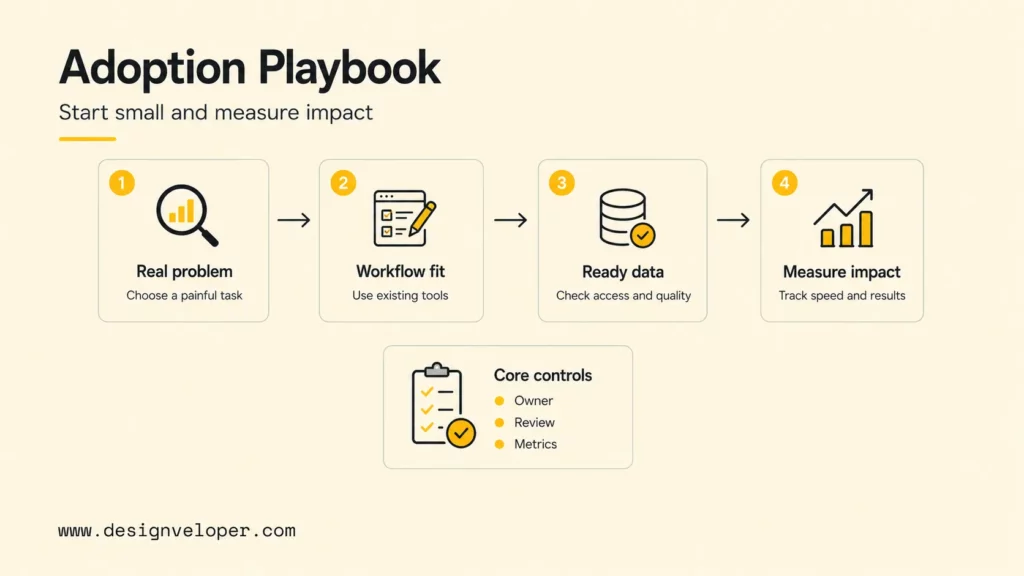
Teams use AI in product development successfully when they start with a real product problem, fit AI into existing workflows, validate data and tool readiness, and measure speed, quality, and product impact. The best adoption plan is narrow enough to manage and valuable enough to matter.
Start With A Real Product Problem
Start with a painful product workflow instead of a tool. Good first problems include slow research synthesis, scattered feedback, repeated QA planning, unclear release notes, slow prototype copy, or engineering handoff gaps. A weak first problem is use AI somewhere in the roadmap.
The problem should have an owner, a baseline, and a measurable outcome. For example, a PM team may want to reduce weekly feedback synthesis from six hours to two hours while improving traceability from insight to source quote. That goal is clearer than a broad productivity claim.
Fit AI Into Existing Team Workflows
AI should fit into the tools and rituals the team already uses: Jira, Linear, GitHub, Figma, Slack, Notion, analytics dashboards, CI/CD, support systems, and customer-research repositories. AI workflows that live outside daily work often become experiments that no one maintains.
A good workflow defines input, output, review, and storage. If AI summarizes interviews, where do transcripts come from? Who checks the summary? Where do approved insights live? How does the roadmap link back to those insights? Clear answers make AI usable beyond a demo.
Validate Data And Tool Readiness
Product teams should validate data and tool readiness before relying on AI outputs. Useful AI depends on clean sources, permission-aware access, current documents, consistent analytics definitions, and secure integrations. Fragmented data produces fragmented recommendations.
Tool readiness also includes security and governance. Teams should know what data enters a model, whether prompts are retained, how access is controlled, which vendors process data, and how outputs are logged. Sensitive research, customer data, pricing, health, finance, and HR workflows need stronger review.
Measure Speed, Quality, And Product Impact
Measure AI adoption with a balanced scorecard. Speed metrics include cycle time, synthesis time, prototype time, and QA preparation time. Quality metrics include defect rate, rework, test coverage, research traceability, and stakeholder clarity. Product impact metrics include activation, retention, conversion, support volume, and customer satisfaction.
A pilot should compare before and after results. If AI makes the team faster but increases rework, the workflow is not ready. If AI improves synthesis but weakens source traceability, the workflow needs better evidence links. The goal is not to use AI more. The goal is to build better products with less waste.
A practical readiness checklist should include: approved source systems, owner for each AI workflow, documented review rules, privacy boundaries, success metrics, failure handling, and a monthly improvement review. Without those basics, AI adoption can spread faster than the team’s ability to govern it.
How AI Is Reshaping The Way Product Teams Work
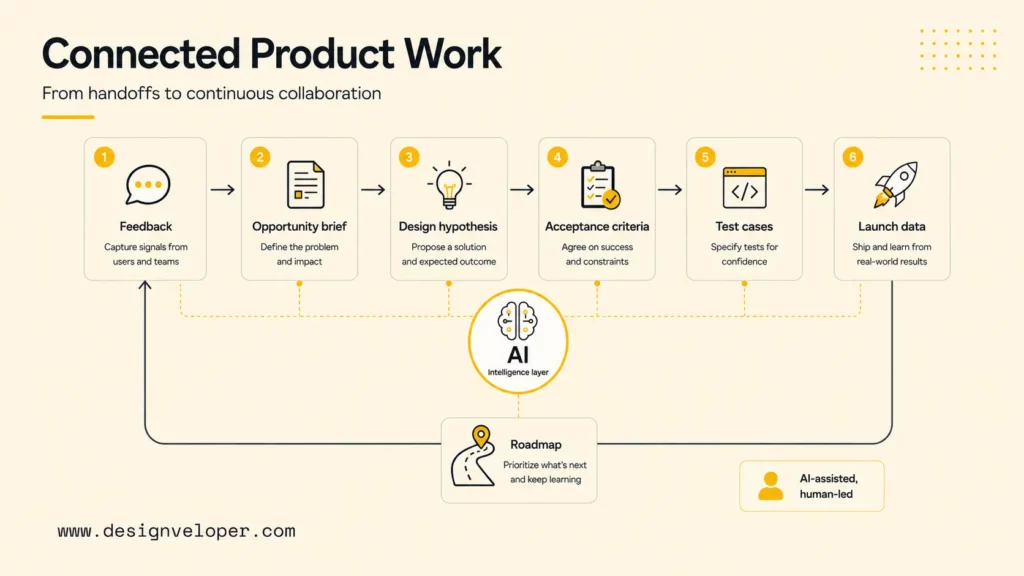
AI is reshaping product work by moving teams from isolated handoffs toward faster, more continuous collaboration. Product managers, designers, and engineers can work through shared AI-assisted workflows instead of passing static documents from one function to another.
The practical shift is that product artifacts become more connected. Customer feedback can inform opportunity briefs. Opportunity briefs can generate design hypotheses. Design hypotheses can become acceptance criteria. Acceptance criteria can become test cases. Launch data can update the next roadmap discussion. AI can help maintain those connections when the team gives it approved context and human review.
Designveloper sees this shift as an implementation reality, not only a strategy trend. As an AI-first software and automation partner, we help teams connect product discovery, workflow mapping, UX/UI design, AI/RAG/agent integration, software engineering, CI/CD, testing, monitoring, and post-launch iteration. Designveloper’s public AI development services show the kind of delivery foundation teams need when AI moves from idea to working product.
For teams building AI-enabled products, the main question is no longer whether AI can accelerate one task. The stronger question is how the whole product system changes when research, design, engineering, QA, launch, and support all move faster. Teams need clearer ownership, stronger evidence, better evaluation, and more disciplined collaboration.
A useful product-team operating model treats AI as a workflow assistant. AI can draft, summarize, cluster, compare, and suggest. Humans define the product problem, validate user value, approve design direction, review technical risk, protect customer data, and decide what reaches the market.
FAQs About AI In Product Development
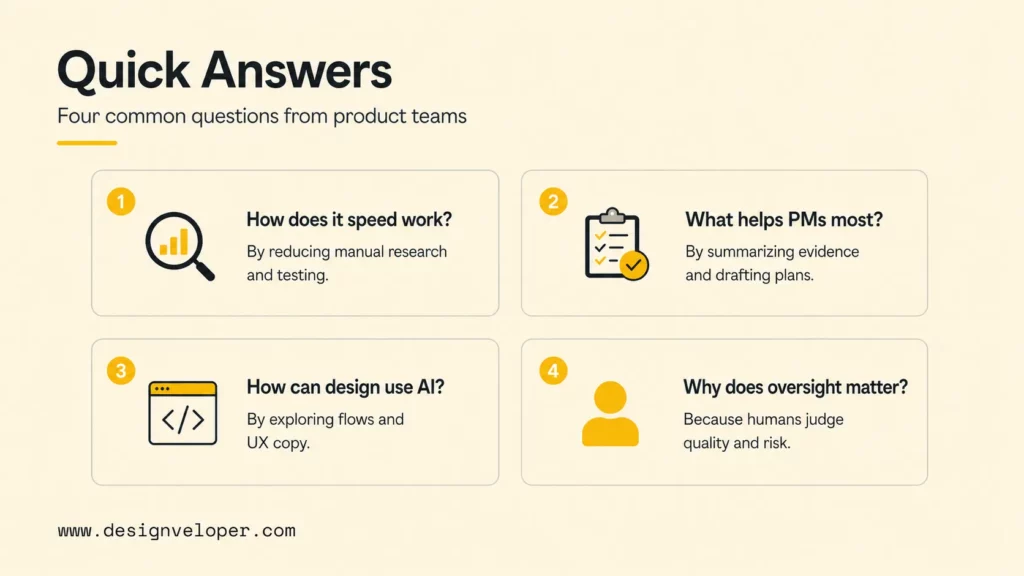
These answers clarify common questions product teams ask before adopting AI across the lifecycle.
How Does AI Speed Up Product Development?
AI speeds up product development by reducing manual work in research synthesis, concept generation, requirement drafting, UX copy, coding support, test planning, release notes, analytics review, and post-launch feedback analysis. The speed gain is strongest when teams keep AI outputs tied to source evidence and human approval.
What Does AI Help Product Managers Do?
AI helps product managers summarize customer feedback, identify patterns, draft PRDs, compare roadmap options, prepare stakeholder updates, generate acceptance criteria, and plan experiments. Product managers still need to validate insights, prioritize opportunities, and make final product decisions.
How Can Teams Use AI For Product Design?
Teams can use AI for product design by generating concept options, UX copy, flows, edge cases, accessibility checklists, usability-test questions, and design critique prompts. Designers should use AI to expand exploration, then rely on research, prototyping, and testing to decide what works for users.
Why Is Human Oversight Still Important In AI Product Development?
Human oversight is important because AI can misread customer intent, invent evidence, miss constraints, create generic UX, or recommend changes that conflict with business strategy. Product teams need humans to validate user value, review data, protect privacy, judge tradeoffs, and approve release decisions.
Where Should Product Teams Start With AI?
Product teams should start with one high-friction workflow that has clear inputs, measurable outcomes, and manageable risk. Good starting points include feedback synthesis, PRD drafting, UX copy exploration, QA scenario generation, release-note drafting, or post-launch support trend analysis.


