


Chatbots for customer service help support teams answer repetitive questions, route urgent issues, and keep service available across chat, email, social, and self-service channels without forcing every request into a human queue. The strongest customer service chatbots connect to a knowledge base, CRM, ticketing system, order data, and clear escalation rules, so customers get fast answers while human agents stay focused on complex, emotional, or high-value conversations.
The business case is getting sharper in 2026. A Gartner February 2026 survey reported that 91% of customer service leaders feel pressure to implement AI, while Salesforce’s 2025 State of Service research surveyed 6,500 service professionals and decision makers and found AI changing frontline service work. The practical question is no longer whether chatbots can answer FAQs. The practical question is where automation improves response time, resolution quality, customer trust, and support cost without weakening the human service experience.
Quick summary: customer service chatbots work best for high-volume, low-complexity requests, order updates, product guidance, appointment workflows, internal service desk questions, and guided triage. Customer service chatbots fail when they cannot access current data, cannot hand off cleanly, or are treated as a full replacement for human judgment. The sections below explain where chatbots create value, how to evaluate tools, which platforms to compare in 2026, and how to roll out chatbot automation safely.
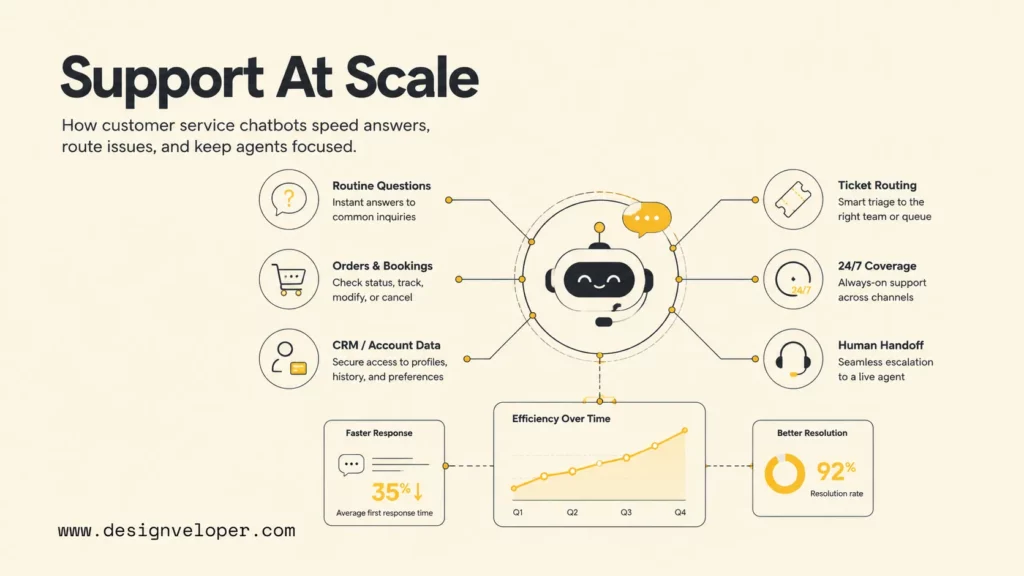
What Customer Service Chatbots Actually Help Teams Do
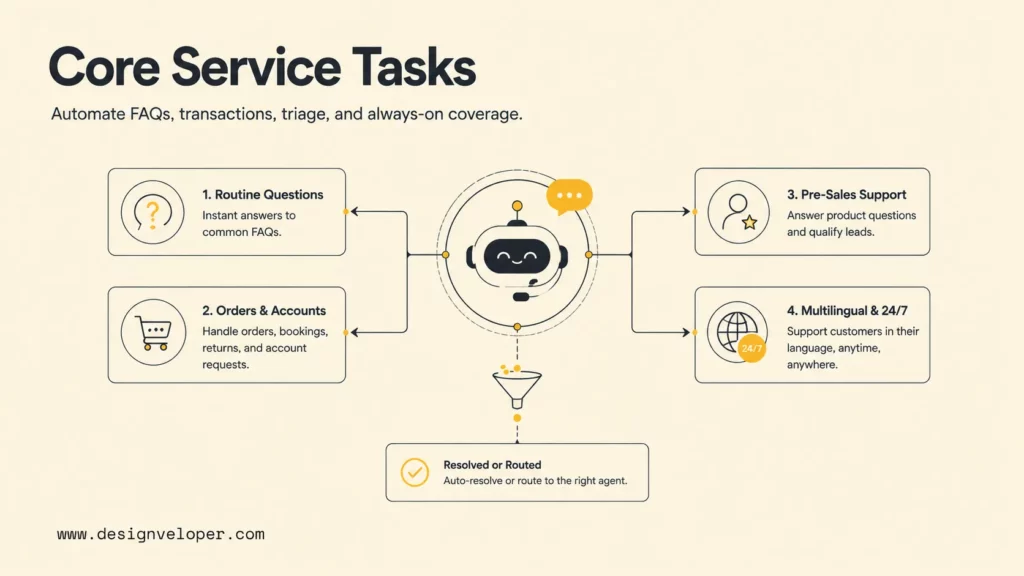
Customer service chatbots help teams remove avoidable queue pressure before agents touch a ticket. A useful chatbot is not only a website pop-up. A useful chatbot is a workflow layer that reads customer intent, retrieves approved answers, captures context, completes safe actions, and routes the conversation when a human should take over.
Answer Routine Questions
Routine questions are the best starting point because the answer is usually stable, policy-based, and easy to verify. A chatbot can answer questions about shipping timelines, password resets, plan features, warranty rules, return windows, business hours, and onboarding steps by drawing from approved help-center content. Zendesk’s CX Trends 2026 report hub frames the shift from basic bots to digital agents as part of a broader move toward intelligent CX, where AI, automation, and data analytics work together.
The operational value is consistency. Human agents can phrase the same refund policy in slightly different ways, especially during peak volume. A chatbot can serve the approved version every time, then ask a clarifying question when the customer intent is ambiguous.
Handle Orders, Bookings, And Account Requests
Order, booking, and account requests become powerful chatbot use cases when the chatbot has permissioned access to backend systems. A retail chatbot can retrieve order status from Shopify, Magento, or a custom order system. A healthcare chatbot can help patients find appointment availability without exposing protected information. A SaaS chatbot can guide account users through billing, seat management, or access requests.
Teams should keep the action boundary narrow at first. A safe first release may let the chatbot look up order status, collect cancellation details, or create a ticket with structured fields. A later release can add refunds, subscription changes, or booking updates after the team has tested authentication, audit logs, exception handling, and human approval rules.
Support Pre-Sales And Lead Qualification
Customer service chatbots often sit near the line between support and sales. A visitor may ask whether a product integrates with HubSpot, whether a plan supports SSO, or whether an ecommerce item ships to a specific country. A chatbot can answer the product question, collect the lead’s role and use case, then route the conversation to sales only when the request signals buying intent.
This pre-sales function matters because support teams often receive questions from prospects who do not want to fill out a form. A chatbot can qualify those conversations without making every visitor wait for a sales development representative. The handoff should still be transparent: the customer should know whether the next response comes from automation, sales, or support.
Provide Multilingual And 24/7 Coverage
Multilingual and 24/7 coverage are strong chatbot benefits when a company serves customers across time zones. Tidio says its Lyro AI support chatbot helps solve a large share of customer problems, while SparrowDesk lists multilingual AI agent support as part of its AI resolution offering. The deeper value is not only translation. The deeper value is giving customers a useful next step when no human agent is online.
Round-the-clock automation should avoid pretending that every problem is instantly solvable. A good chatbot says when it has created a ticket, when a specialist will respond, what details are already captured, and what the customer can do next.
Where Customer Service Chatbots Create The Most Value
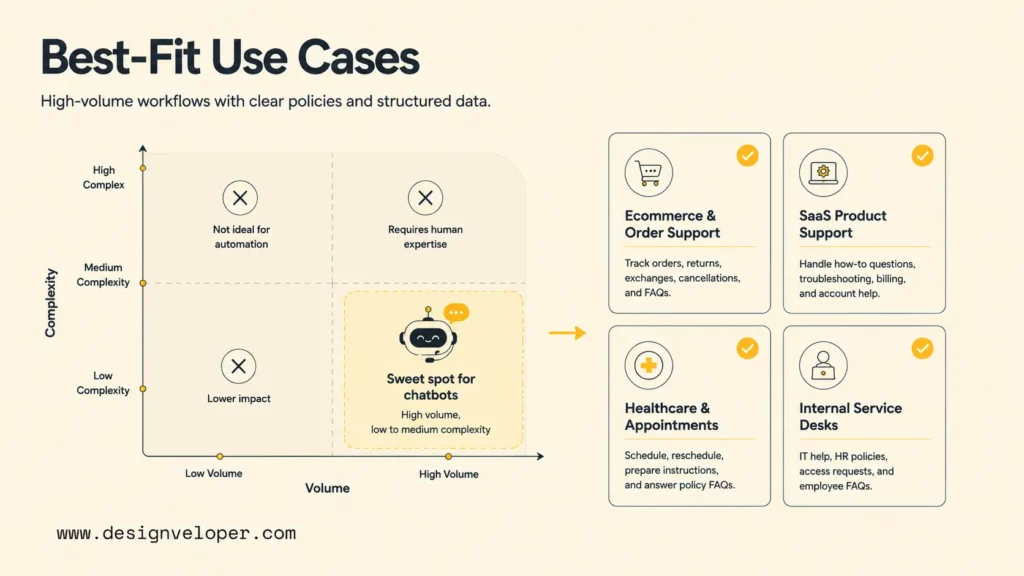
Customer service chatbots create the most value where request volume is high, data access is structured, and the difference between a good and bad answer is measurable. The best use cases have repeatable intents, clear policies, reliable knowledge, and a visible metric such as first response time, deflection rate, handle time, CSAT, or escalation quality.
Ecommerce And Order Support
Ecommerce support is a natural chatbot environment because customers ask repetitive questions about order status, returns, exchanges, delivery delays, product availability, and marketplace policies. eDesk positions its platform for ecommerce teams and lists AI Agent automated resolutions as included in every plan with usage-based pricing. The key requirement is order context. A chatbot that cannot see order status will only repeat generic shipping policy text.
A practical ecommerce rollout can start with a five-intent map:
- Where is my order?
- How do I return or exchange an item?
- Can I change my delivery address?
- Is this product available in a different size or region?
- What happens if a marketplace delivery is late?
Each intent needs approved copy, system data, exception rules, and a human escalation path. The chatbot should also capture order number, customer email, marketplace name, and preferred contact channel before creating a ticket.
SaaS Product Support
SaaS product support benefits from chatbots because many questions are documentation-heavy: login issues, plan limits, integrations, workspace roles, API keys, feature behavior, and troubleshooting steps. Help Scout’s AI customer service features focus on AI Answers, drafts, summaries, and help-center assistance, which fits teams that want automation without losing a human tone.
The risk is stale documentation. A SaaS chatbot trained on outdated release notes can answer confidently but incorrectly. Product teams should include release notes, docs ownership, and answer-review workflows in the chatbot operating model. The chatbot should also cite or link to the help article that supports an answer when possible.
Healthcare And Appointment Workflows
Healthcare and appointment workflows need stricter boundaries because customers may share sensitive information. A chatbot can help with office hours, appointment availability, preparation instructions, prescription refill routing, and document collection, but medical advice and protected health information need policy, compliance, and human oversight.
Designveloper has worked on healthcare and appointment-oriented product flows through public projects such as ODC healthcare platform work. For healthcare chatbot projects, we usually recommend a conservative first release: collect structured intake data, route requests to the correct role, show approved instructions, and avoid autonomous diagnosis or treatment recommendations.
Internal Service Desks And Employee Support
Internal service desks can use chatbots for HR, IT, finance, facilities, and operations support. The chatbot can answer policy questions, collect access-request details, summarize employee requests, and route approvals through systems such as Slack, Microsoft Teams, Jira Service Management, ServiceNow, or a custom HRM platform.
Internal support is often easier to govern than public customer support because the user base is known. However, internal chatbots still need permission checks. A chatbot that helps with payroll, leave, procurement, or system access should verify identity, log actions, and escalate sensitive cases to the right owner.
How To Evaluate A Customer Service Chatbot
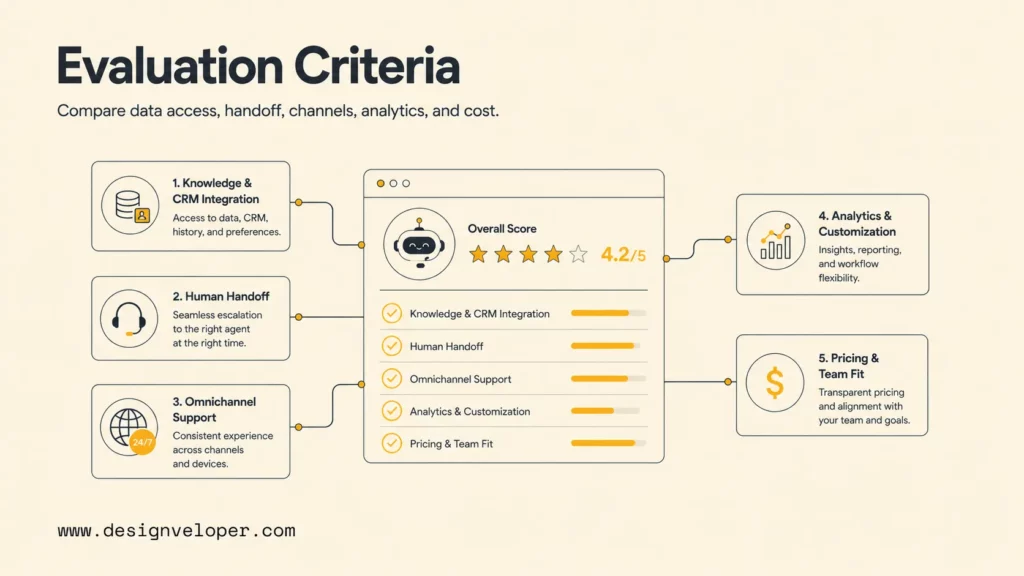
Teams should evaluate a customer service chatbot by workflow fit, integration depth, escalation quality, channel coverage, analytics, pricing model, and maintainability. Feature lists matter, but the real test is whether the chatbot can resolve the team’s top support intents with trustworthy answers and clean handoff.
Knowledge Base And CRM Integration
Knowledge base and CRM integration determine whether the chatbot can move beyond generic answers. The chatbot should retrieve approved help content, account attributes, subscription level, purchase history, ticket history, and recent conversation context when those data points are permitted. Zendesk announced expanded AI agent packaging in 2026, including a new AI agent model described in its AI agent access update, which shows how major support platforms are making AI agents part of the service architecture rather than a small add-on.
A simple evaluation question works well: can the chatbot answer the top 20 support questions using approved sources and customer context without exposing data it should not access? If the answer is no, the team should fix knowledge and integration gaps before measuring automation rate.
Human Handoff And Ticket Routing
Human handoff is the difference between useful automation and customer frustration. A customer should never need to repeat the whole story after escalation. The chatbot should pass transcript, detected intent, customer identity, account status, prior steps, sentiment, urgency, and suggested next action into the ticket or live-chat workspace.
Strong handoff rules include clear escalation triggers:
- The customer asks for a human twice.
- The chatbot detects anger, legal risk, refund dispute, safety issue, or account security concern.
- The customer provides information that conflicts with system data.
- The chatbot cannot find a high-confidence answer from approved sources.
- The requested action requires payment, cancellation, medical, legal, or policy judgment.
Omnichannel Support
Omnichannel support matters because customers do not stay in one channel. A customer may begin with website chat, reply by email, send a WhatsApp message, and later call support. Comm100 markets an AI-powered omnichannel customer service platform, while Front positions its product as an AI-powered customer service platform built around team collaboration.
The evaluation question is whether the chatbot keeps context across channels. Channel coverage without shared context only spreads the same problem across more places. A good omnichannel setup preserves customer identity, conversation history, ticket state, and escalation ownership.
Analytics, Automation, And Customization
Analytics should show more than chatbot volume. Useful dashboards track containment rate, verified resolution rate, escalation rate, fallback topics, answer confidence, customer satisfaction after chatbot interactions, repeat contact rate, and agent time saved. Salesforce expects AI to resolve a growing share of service cases, according to its State of Service analysis, but teams still need quality metrics to know whether automation is genuinely improving support.
Customization also matters. A customer service chatbot should reflect brand tone, policy limits, customer segments, product catalog, and escalation rules. The chatbot should let administrators revise answers, block unsafe actions, test workflows, and review failed conversations.
Pricing And Team Fit
Pricing and team fit are easy to underestimate. Some vendors charge per agent seat, some charge per automated resolution, some charge per conversation, and some combine base plans with AI add-ons. Zendesk’s 2026 move toward outcome-based AI agent pricing, described in its Relate 2026 announcement, shows how customer service AI pricing is shifting toward measurable resolutions.
Teams should model cost per resolved issue, not only monthly subscription price. A chatbot that costs more per resolution may still be cheaper if it reduces repeat contact and escalates cleaner tickets. A low-cost chatbot may be expensive if it creates rework, refunds, churn, or agent cleanup.
The 10 Best Customer Service Chatbots In 2026
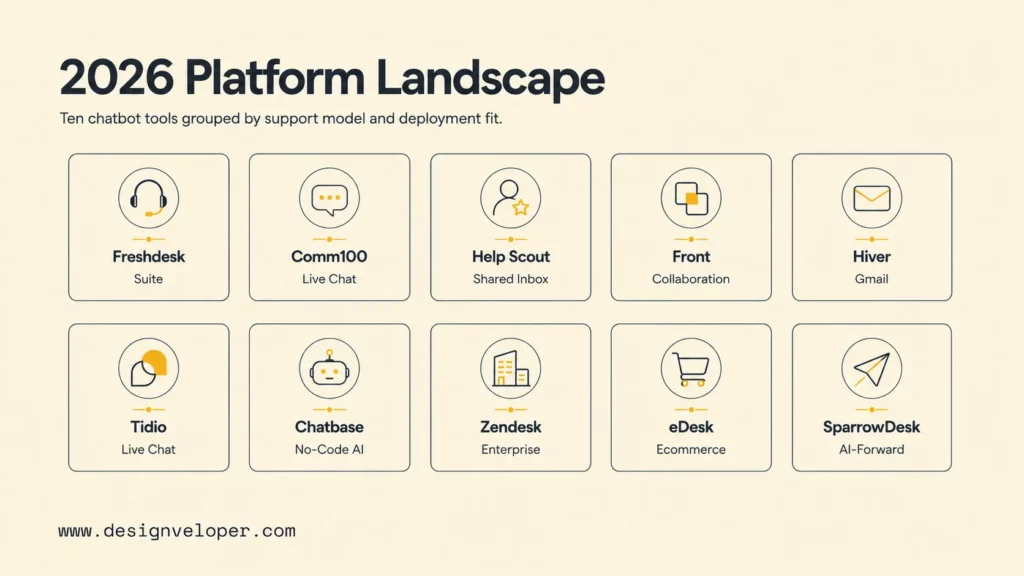
The best customer service chatbot depends on the support model. The table below compares the ten platforms from the audit outline by practical fit, not by a universal ranking. Pricing and packaging can change, so buyers should verify each vendor’s current pricing page before procurement.
| Platform | Best fit | Pricing signal to check |
|---|---|---|
| Freshdesk | Teams that want help desk, omnichannel support, and Freddy AI in the Freshworks ecosystem. | Freshdesk plans plus Freddy AI or AI agent session packs. |
| Comm100 | Organizations that need live chat, chatbot automation, and omnichannel customer engagement. | Plan tier, AI agent package, live chat needs, and security requirements. |
| Help Scout | Email-first teams that want shared inbox simplicity with AI assistance and self-service. | Contact-based plans, AI features, and inbox or knowledge base limits. |
| Front | Collaborative customer-facing teams that manage complex conversations across departments. | Seat plans, AI add-ons, chat, routing, and collaboration features. |
| Hiver | Google Workspace teams that want customer service workflows inside Gmail. | Hiver plan tier, Hiver AI features, and Gmail-based team workflow needs. |
| Tidio | Small and mid-sized ecommerce or website support teams that want live chat plus Lyro AI. | Lyro usage, seat needs, conversation limits, and ecommerce integrations. |
| Chatbase | Teams that want a no-code AI agent trained on documents, websites, and custom knowledge. | Message credits, agents, data sources, custom domains, and integrations. |
| Zendesk | Mid-market and enterprise service teams that need AI agents inside a mature service suite. | Suite seats, automated resolutions, Advanced AI, QA, workforce, and data add-ons. |
| eDesk | Ecommerce teams managing marketplace, store, live chat, and social support channels. | Agent seats, automated-resolution cost, AI Assist, translate, and marketplace count. |
| SparrowDesk | Teams looking for a newer AI-powered help desk with resolution-based AI agent pricing. | Seat plan, AI Agent per-resolution pricing, AI Copilot, and startup discounts. |
1. Freshdesk
Freshdesk is a strong fit for teams that want ticketing, knowledge base, automation, and AI inside a broad customer service suite. Freshworks documents Freddy AI add-on management for Freshdesk, including AI Copilot and AI Agent capabilities. Freshdesk is worth shortlisting when the support team already uses Freshworks or wants an established alternative to Zendesk.
2. Comm100
Comm100 fits teams that need live chat, bot automation, secure customer engagement, and omnichannel support. Comm100’s public site emphasizes AI-powered service across live chat and digital channels, which makes the platform relevant for education, government, financial services, and other teams that need controlled customer conversations.
3. Help Scout
Help Scout is best for teams that want customer support to feel personal and email-like while still adding AI assistance. The platform is especially attractive for SaaS and service businesses that value shared inbox workflows, help-center content, and human support culture over heavy enterprise customization.
4. Front
Front is best for collaborative customer-facing teams where support, success, sales, operations, and account management all touch the customer relationship. Its AI focuses on keeping customer work moving across systems and teammates, so it fits complex B2B service models where a single ticket often needs several internal owners.
5. Hiver
Hiver is best for teams that run support from Gmail and want less context switching. Hiver’s pricing page presents the product as AI-powered customer service, which makes the platform useful for operations, finance, logistics, and service teams already standardized on Google Workspace.
6. Tidio
Tidio is a good fit for ecommerce and website support teams that want live chat, ticketing, and Lyro AI without buying a heavy enterprise suite. Tidio’s pricing page highlights Lyro as an AI-powered support chatbot, making it relevant for small teams that want quick deployment and clear website coverage.
7. Chatbase
Chatbase is best for teams that want to build an AI agent from documents, website pages, and custom Q&A without replacing the whole help desk. It can be useful when the team needs a lightweight public-facing assistant, product documentation bot, or internal knowledge assistant, but buyers should test hallucination controls and source coverage carefully.
8. Zendesk
Zendesk is strongest for mature service organizations that need AI agents, ticketing, knowledge, workforce management, quality assurance, reporting, and complex routing in one ecosystem. Zendesk’s May 2026 Relate announcement introduced Agent Builder, omnichannel AI agents, Copilots, and outcome-based pricing, which makes Zendesk a serious option for enterprise automation programs.
9. eDesk
eDesk is best for ecommerce businesses with marketplace complexity. Its pricing page lists AI Agent and Chatbot at a per-automated-resolution rate and includes ecommerce-focused support features. eDesk is worth comparing when support teams handle Amazon, eBay, Shopify, social messaging, live chat, and returns from one workspace.
10. SparrowDesk
SparrowDesk is best for teams that want an AI-forward help desk with transparent seat plans and per-resolution AI Agent pricing. SparrowDesk’s pricing page lists Starter, Professional, Enterprise, AI Agent, and AI Copilot pricing, which makes early cost modeling easier than platforms that require a sales call for every AI feature.
Why Customer Service Chatbots Succeed Or Fail
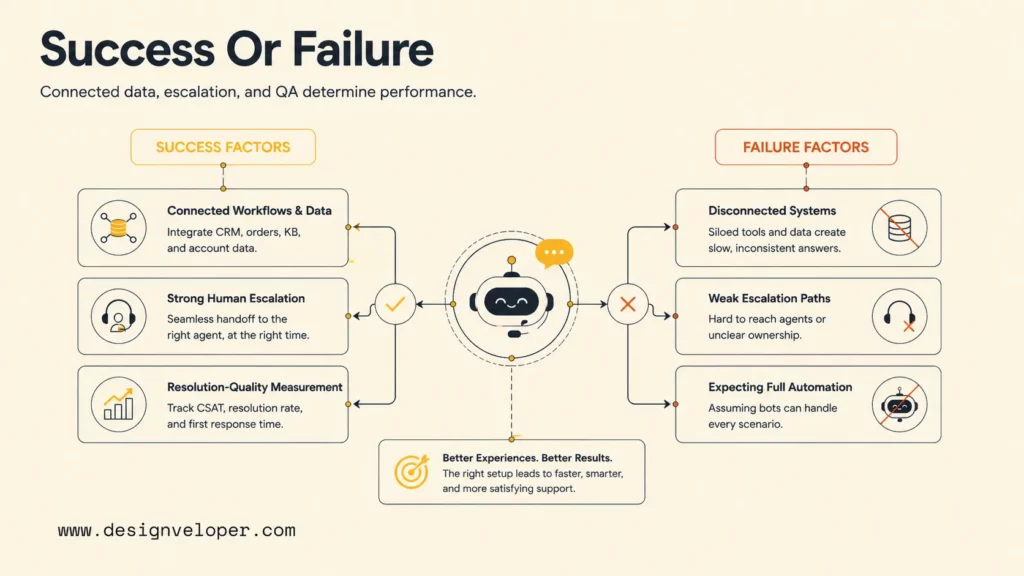
Customer service chatbots succeed when they are designed as support operations systems, not as standalone widgets. Customer service chatbots fail when teams measure only deflection, ignore customer experience, or give automation more responsibility than the data and workflow can support.
They Succeed When Workflows And Data Are Connected
A chatbot succeeds when it can access the right knowledge and systems at the right moment. Knowledge articles answer policy questions. CRM data identifies customer tier and account status. Order systems answer delivery questions. Ticketing systems preserve history and route unresolved issues. Without those connections, the chatbot can only guess from static text.
Designveloper often approaches chatbot projects as integration projects first. For teams building custom AI service automation, we map data sources, permissions, approval steps, exception paths, and support metrics before choosing the conversational interface. That approach reduces the risk of a polished chatbot sitting on top of disconnected operations.
They Fail When Escalation Paths Are Weak
Weak escalation makes customers feel trapped. The chatbot may answer the first question, but frustration grows if the customer cannot reach a human, if the agent lacks transcript context, or if the ticket lands in the wrong queue. The failure is not always the model. The failure is often routing, ownership, and queue design.
Teams should test escalation before launch with real scenarios: angry refund request, missing package, account lockout, billing dispute, sensitive data question, and ambiguous product bug. Each scenario should produce the right queue, priority, transcript, and next action.
They Underperform When Teams Expect Full Replacement
Customer service chatbots underperform when leadership expects full replacement of human agents. The better pattern is task redesign. Chatbots handle repetitive information gathering, self-service answers, and safe actions. Human agents handle judgment, empathy, negotiation, exceptions, and high-value relationships.
Intercom’s 2026 Customer Service Transformation Report says senior leaders continue investing heavily in AI for customer service. That investment should come with workforce planning, agent enablement, and quality controls rather than a simple headcount-replacement assumption.
They Improve Faster When Teams Measure Resolution Quality
Resolution quality matters more than raw containment. A chatbot that closes many conversations but causes repeat contacts is not successful. Teams should measure customer satisfaction after chatbot interactions, reopened tickets, refund exceptions, handoff quality, answer accuracy, and the percentage of conversations that need human correction.
A practical QA sample can review 50 chatbot conversations per week. The reviewer should label each answer as correct, incomplete, unsafe, outdated, unnecessary escalation, or successful handoff. Those labels can guide knowledge updates, prompt revisions, workflow fixes, and integration changes.
How To Roll Out Customer Service Chatbots In Real Support Operations
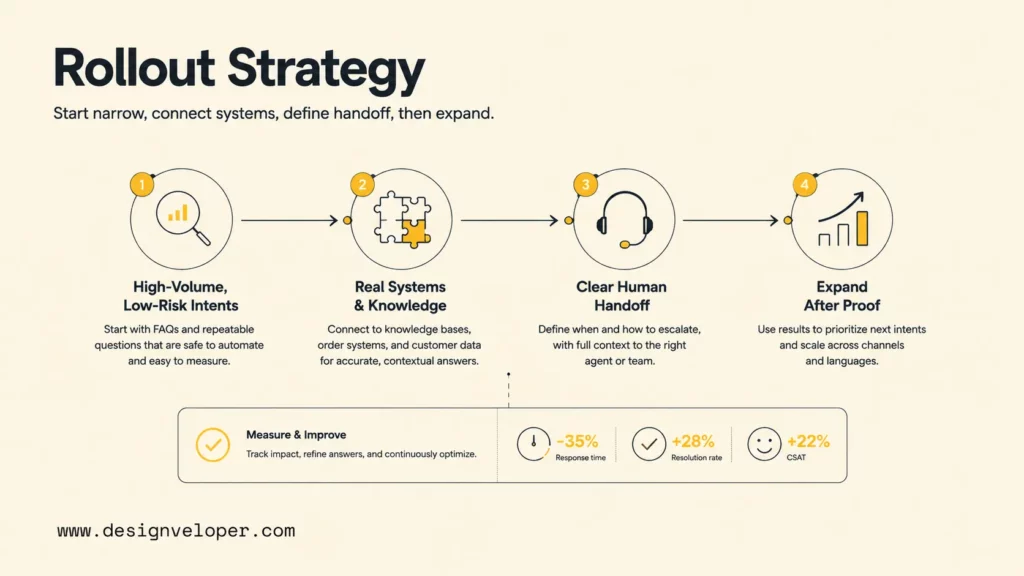
Customer service chatbot rollout should start small, prove quality, then expand. A team can move faster by choosing a narrow first use case, connecting real systems, defining human handoff, and adding new intents only after the first workflow improves measurable support outcomes.
Start With High-Volume, Low-Complexity Requests
The first release should focus on support intents that are frequent, low-risk, and easy to verify. Examples include order status, password reset guidance, warranty policy, appointment preparation, plan comparison, delivery region, and help-center navigation. The team should avoid first releases that involve refunds, medical advice, legal claims, account closure, or high-value contract disputes.
A useful first-release scorecard includes:
- Top five intents by monthly volume.
- Approved answer source for each intent.
- Required customer fields for each workflow.
- Systems the chatbot must read or update.
- Escalation trigger and target queue.
- Success metric for the first 30 days.
Connect The Chatbot To Real Systems And Knowledge Sources
A chatbot should not be trained once and forgotten. The team should connect the chatbot to maintained knowledge sources, CRM data, ticket history, product documentation, and approved workflow tools. The system should also record which source supported each answer when traceability matters.
For custom builds, Designveloper helps teams decide whether to use a vendor platform, a custom RAG system, an AI agent workflow, or a hybrid architecture. The right architecture depends on data sensitivity, integration depth, support volume, and how much control the business needs over prompts, retrieval, audit logs, and human approvals.
Keep Human Handoff Clear And Fast
Human handoff should be visible, fast, and context-rich. A chatbot should explain that a human is taking over, show the expected response time, and avoid making the customer repeat details. The ticket should include the transcript, customer profile, detected intent, attempted answer, confidence signal, and required next step.
Support leaders should also decide which agents receive escalated chatbot conversations. Some teams route escalations to a tier-2 queue. Others create a rotating AI review role that monitors failed conversations and updates the knowledge base daily.
Expand Only After The First Use Case Works
Expansion should depend on evidence, not enthusiasm. A chatbot that performs well on order status may not be ready for refunds. A chatbot that answers product FAQs may not be ready for technical troubleshooting. Each new intent should go through design, source approval, test conversations, escalation review, and post-launch QA.
The safest expansion path is intent-by-intent. Add one new workflow, observe quality, fix failures, then add the next workflow. That cadence helps teams avoid a large automation launch that creates hundreds of weak answers at once.
What Successful Customer Service Chatbot Adoption Looks Like
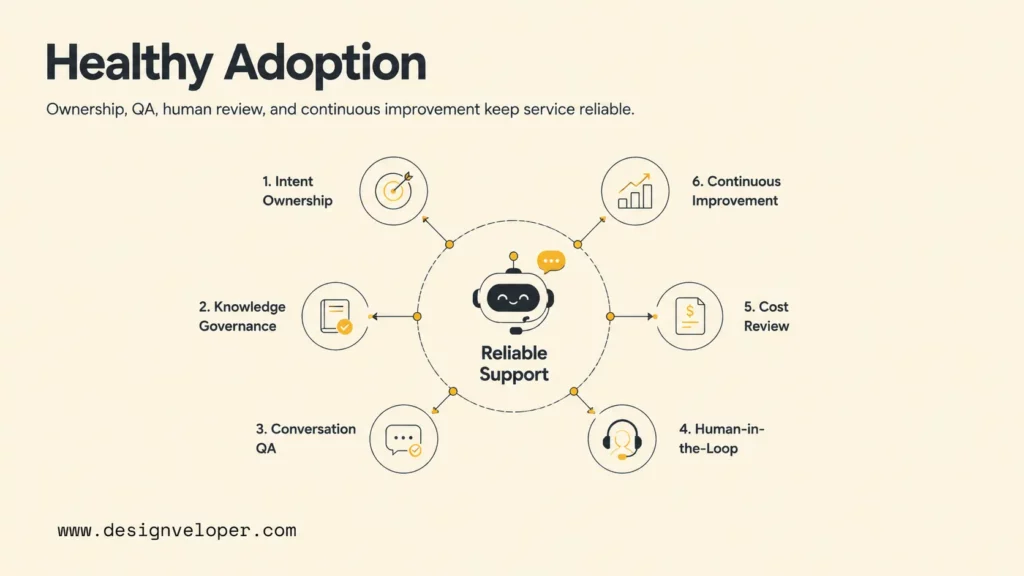
Successful customer service chatbot adoption looks like a calmer support queue, faster first response, cleaner tickets, happier agents, and customers who can solve simple issues without feeling abandoned. The chatbot does not need to handle every conversation. The chatbot needs to handle the right conversations reliably.
A mature operating model usually includes the following practices:
- Intent ownership: each supported intent has a business owner who approves answers and rules.
- Knowledge governance: help articles, product docs, and policy pages have update owners and review dates.
- Conversation QA: support leaders review chatbot conversations, failed answers, and escalations every week.
- Human-in-the-loop rules: refunds, exceptions, sensitive requests, and low-confidence answers go to humans.
- Cost review: leaders compare subscription cost, automated-resolution cost, handle-time savings, repeat-contact rate, and customer satisfaction.
- Continuous improvement: product, support, engineering, and operations teams update workflows as customer issues change.
Designveloper is an AI-first software and automation partner for teams that need chatbot automation connected to real business systems. We help companies move from a narrow support idea to a production-ready workflow by reviewing knowledge quality, system integrations, AI architecture, permissions, escalation paths, testing, monitoring, and post-launch improvement. A support chatbot becomes valuable when the surrounding software and operations are ready for automation.
FAQs About Customer Service Chatbots
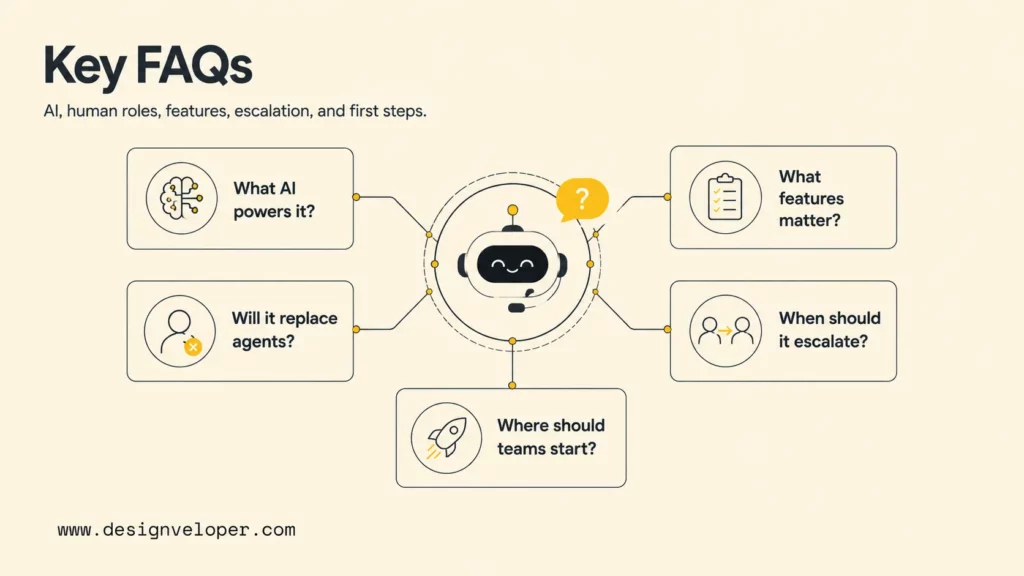
The most common questions about customer service chatbots focus on AI models, human replacement, must-have features, escalation timing, and where to start. The short answers below can help teams set realistic expectations before choosing a vendor or building a custom chatbot.
What Kind Of AI Powers Customer Service Chatbots?
Modern customer service chatbots often use large language models, retrieval-augmented generation, intent detection, workflow automation, and integrations with ticketing, CRM, order, and knowledge systems. Some chatbots rely mostly on rules and decision trees. More advanced AI agents can retrieve knowledge, ask clarifying questions, call tools, summarize conversations, and create structured tickets.
Can Chatbots Replace Human Customer Service Agents?
Chatbots can replace some repetitive support tasks, but chatbots should not replace all human customer service agents. Human agents remain essential for empathy, complex judgment, negotiation, sensitive cases, and exceptions. The better goal is a blended model where chatbots handle routine work and humans handle higher-value conversations.
What Features Matter Most In A Customer Service Chatbot?
The most important features are accurate knowledge retrieval, CRM and ticketing integration, clean human handoff, omnichannel support, analytics, conversation QA, permissions, answer controls, and flexible workflow automation. A chatbot with fewer channels but stronger data access may outperform a broader chatbot that cannot see customer context.
When Should A Chatbot Escalate To A Human Agent?
A chatbot should escalate when the customer asks for a person, the answer confidence is low, the request involves anger or legal risk, the action affects payment or account access, the customer data conflicts with system records, or the workflow requires policy judgment. Escalation should include transcript context and a clear next step.
How Should Teams Start Using Chatbots In Customer Service?
Teams should start with one or two high-volume, low-risk intents, connect the chatbot to approved knowledge, define handoff rules, test with real conversations, and measure quality for 30 days. After the first workflow is stable, teams can expand chatbots for customer service into additional support intents, channels, and backend actions.
Conclusion
Customer service chatbots improve support at scale when they answer routine questions, connect to real systems, escalate cleanly, and help human agents focus on the work that needs judgment. The best chatbots for customer service are not isolated AI demos. The best chatbots are carefully governed support workflows with current knowledge, measurable quality, and human oversight.
Teams evaluating customer service chatbot platforms in 2026 should compare integration depth, handoff quality, omnichannel coverage, analytics, pricing model, and long-term maintainability. Teams that need deeper customization can work with Designveloper to design an AI support workflow that fits real service operations, from discovery and architecture to implementation, testing, monitoring, and continuous improvement.


